Rendering a PDF page onto a Windows device context for print preview puts three coordinate systems in the same line of code, and they rarely agree. The PDF page is measured in points with the origin at the bottom-left. The screen DC is measured in pixels with the origin at the top-left and a zoom factor you choose. The printer DC, the one the preview is supposed to predict, measures pixels at the device resolution but places its origin at the corner of the printable area, not the corner of the sheet. Get any one of those wrong and the preview looks fine while the printed page comes out shifted, scaled, or clipped along an edge. The usual symptom is a bordered form that previews centered and prints with the top and left rules sliced off, because the laser printer cannot put ink in the outer few millimeters and nobody told the preview. losLab PDF Library (PDF Library for Delphi) covers the whole path with device-context rendering calls, a virtual-printer configuration layer, and preview bitmaps generated from the printer's own metrics, which is the part that makes the preview honest about that margin
Paper geometry is not printable geometry
Two rectangles describe any print target, and the offset between them is where most preview bugs live. The paper rectangle is the physical sheet. The printable rectangle is the smaller region the print engine can actually reach, inset by a hardware margin that differs per printer model and sometimes per tray. The library's printing layer measures both. The underlying TPLPrinter class exposes PageWidth and PageHeight for the printable area, FullPageWidth and FullPageHeight for the full sheet, and PrintOffsetX with PrintOffsetY for the gap between their origins, all in device pixels at the resolution GetDPI reports. An honest preview scales those same numbers down to screen resolution instead of painting the page into whatever rectangle the control happens to have. Skip that step and the preview silently assumes a zero margin, which is the one value no real printer uses
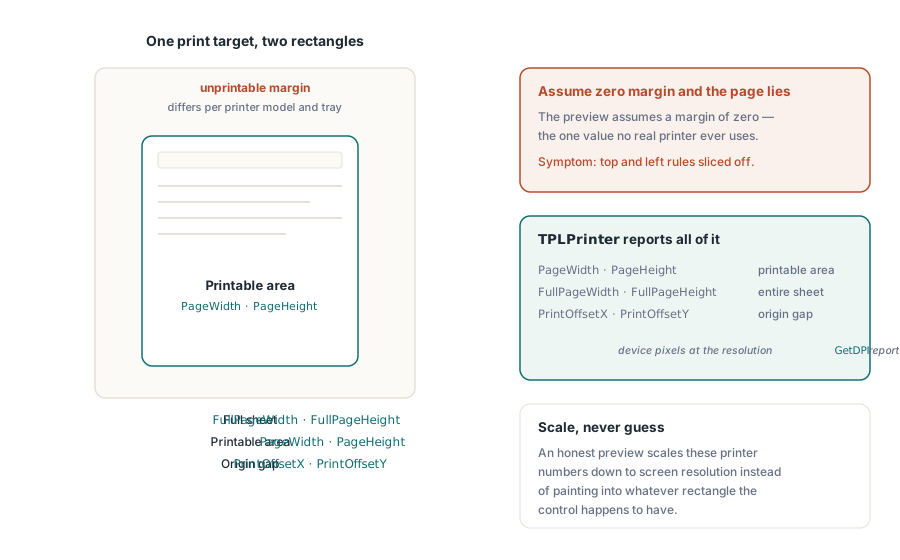
Screen preview through RenderPageToDC
For an on-screen preview control, RenderPageToDC(DPI, Page, DC) draws a page of the loaded document straight onto any GDI device context, whether that is a TPaintBox canvas, an off-screen bitmap, or a metafile DC. The DPI argument sets the zoom. 96 approximates a 100% view on a classic display, and doubling it doubles the rendered size
procedure TPreviewForm.PreviewBoxPaint(Sender: TObject);
begin
  // these three are sticky library state, not per-call parameters:
  FPdf.SetRenderDCOffset(FOffsetX, FOffsetY);
  FPdf.SetRenderDCErasePage(1);
  FPdf.SetRenderCropType(0);
  FPdf.RenderPageToDC(FPreviewDpi, FCurrentPage, PreviewBox.Canvas.Handle);
end;
The trap is that the DC render path is steered by sticky library state, not by per-call parameters. SetRenderDCOffset, SetRenderDCErasePage, and SetRenderCropType each persist until something changes them, so a thumbnail loop that runs after the user adjusted the zoomed view inherits whatever offset or crop the previous code path left behind. The symptom is a preview that drifts only in specific navigation sequences, which is about as miserable to reproduce as a bug gets. Setting all the relevant state at the top of the paint handler, as above, costs nothing and removes the whole class. A second multiplier hides nearby. The effective output resolution is the render scale times the DPI argument, and while SetRenderScale defaults to 1.0, it also persists once changed, so an export feature that bumped it quietly rescales every later preview until something sets it back
Scrolling viewers and partial repaints have a dedicated variant. RenderPageToDCClip takes a clip specification along with the device context, so invalidating one band of the window repaints only that band instead of re-rasterizing the full page. At high zoom on large-format pages that is the difference between a viewer that tracks the scrollbar and one that smears behind it
A print job that matches the preview
The printing side works through a virtual printer. NewCustomPrinter clones a system printer into a library-private configuration, and SetupPrinter adjusts that clone without touching the machine-wide DevMode: paper goes in as setting 1 (a DMPAPER_* constant) and orientation as setting 11. The payoff is isolation. A service can print A4 labels while the host's default printer stays on Letter, and nothing needs restoring afterward

var
  Pdf: TPDFlib;
  Virt: WideString;
  Opt: Integer;
begin
  Pdf := TPDFlib.Create;
  try
    if Pdf.LoadFromFile('report.pdf', '') <> 1 then
      raise Exception.Create('load failed');
    Virt := Pdf.NewCustomPrinter(Pdf.GetDefaultPrinterName);
    Pdf.SetupPrinter(Virt, 1, 9);        // setting 1 = paper, DMPAPER_A4
    Pdf.SetupPrinter(Virt, 11, 1);       // setting 11 = orientation, 1 = portrait
    Opt := Pdf.PrintOptions(1, 1, 'Monthly Report');  // fit to paper, auto-rotate + center
    Pdf.PrintDocument(Virt, 1, Pdf.PageCount, Opt);
  finally
    Pdf.Free;
  end;
end;
PrintOptions deserves a careful read. It returns an options handle that you must pass to PrintDocument or PrintPages; it is not ambient state. Building the options and then forgetting to pass the handle fails silently. The job prints with defaults, and nobody notices until a fit-to-paper policy was expected and an oversized page came out cropped instead. The page-scaling argument is where that policy lives. No scaling preserves dimensional accuracy, which matters for forms that get measured against a ruler. Fit-to-paper rescales everything to the sheet. Shrink-large-pages leaves normal pages alone and steps in only when a page exceeds the printable area, which is usually the right default for a mixed document set. The auto-rotate-and-center flag handles landscape pages without a second code path
Applications that already manage a TPrinter through the VCL dialog flow can hand it over directly. PrintDocumentToPrinterObject and PrintPagesToPrinterObject accept the configured TPrinter instance, which keeps the standard print dialog as the user-facing configuration surface while the library handles page rendering. Mixing the two approaches in one code path tends to reintroduce the geometry drift the rest of this work was meant to kill, so pick one. The virtual-printer route suits unattended services; the TPrinter route suits interactive applications
Selective output works the same way. PrintPages takes a range string, so passing the virtual printer name, '2-5,12', and the options handle prints pages 2 through 5 and 12 with the geometry contract intact, and the same syntax drives the print-to-file variants. Those file variants are the practical answer for an unattended environment with no physical device attached: regression-testing print geometry on a build server that has no driver queue at all. Render the same document through the same options into a file artifact on every build, and a geometry regression turns into a diff instead of a customer report three weeks later
Preview bitmaps with the printer's own metrics
A preview rendered at 96 DPI against an assumed page size answers the wrong question. It shows what the page looks like, not what this printer will put on this paper. GetPrintPreviewBitmapToString closes that gap by building the preview from the same custom printer and the same options handle as the eventual job, so paper size, orientation, scaling policy, rotation, and the hardware offset all feed into the bitmap. What comes back is what the sheet will show
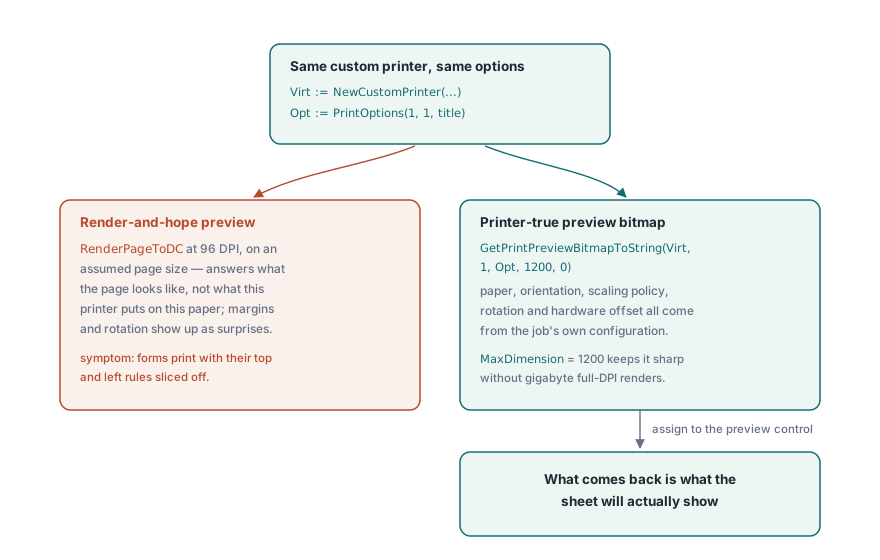
procedure ShowPrinterTruePreview(Pdf: TPDFlib; const Virt: WideString; Opt: Integer);
var
  Data: AnsiString;
  Strm: TMemoryStream;
  Bmp: TBitmap;
begin
  Data := Pdf.GetPrintPreviewBitmapToString(Virt, 1, Opt, 1200, 0);
  Strm := TMemoryStream.Create;
  try
    Strm.WriteBuffer(PAnsiChar(Data)^, Length(Data));
    Strm.Position := 0;
    Bmp := TBitmap.Create;
    try
      Bmp.LoadFromStream(Strm);
      PreviewImage.Picture.Assign(Bmp);
    finally
      Bmp.Free;
    end;
  finally
    Strm.Free;
  end;
end;
The MaxDimension argument caps the bitmap's long edge. 1200 pixels stays sharp for a preview dialog and keeps memory modest even for E-size engineering drawings, where a full-resolution render at the printer's 600 DPI would run to gigabytes
Remembering the user's printer choices
Print dialogs that forget their settings between sessions generate support tickets of their own. The DevMode pair, GetPrinterDevModeToString and SetPrinterDevModeFromString, serializes a printer's full driver configuration to an opaque string you can stash in user preferences and restore next session, including the driver-specific options no generic API bothers to model. Persist the printer by name from GetPrinterNames, never by list index. Index order changes every time a printer is added or removed, so a saved index quietly points at the wrong device the next time the list shifts. GetDefaultPrinterName covers the fallback when the remembered device has vanished entirely
Tray selection rounds out the persistence story. GetPrinterBins reports the paper sources a driver exposes, which matters for letterhead workflows where page one pulls from the letterhead tray and the rest from plain stock. That is a policy users expect the application to remember along with everything else, and a print job that lands on the wrong stock reads as a bug even when every byte of the PDF was correct
Keep one engine across preview and print
One last decision quietly governs fidelity. The rendering engine selection applies to both screen and printer destinations, so the temptation is to preview with a fast engine and print with a precise one. Resist it. Driving the preview and the job through different engines reintroduces the exact fidelity drift that a printer-true preview was built to remove, and it does so in a way that only shows up on paper. The trade-offs between the built-in, Cairo, and PDFium engines are weighed in multi-engine PDF rendering in Delphi; pick one and use it on both sides
Documents too large to load comfortably before printing can be opened through the direct-access path described in large PDF merge, split, and direct access, which renders pages to a device context from a file handle without building the document tree. The complete printing API reference is on the losLab PDF Library for Delphi product page