PDF Library for Delphi can merge images inside a PDF that look the same but are not byte-identical, through DeduplicateSimilarImages. Exact deduplication only merges images whose dictionaries and encoded payloads match; this one compares what the images actually look like, using a perceptual hash plus two pixel-error thresholds, and redirects every reference to a single canonical object
The files where this pays off are the ones that grew by accident. A scanned batch where each page carries the same logo re-encoded by a different scanner. A report assembled from sources that each embedded the same chart at a slightly different JPEG quality. A catalog whose thumbnails were regenerated by two tools. In each case the file contains many copies of one picture, and exact deduplication cannot touch any of them
What "similar enough" has to mean
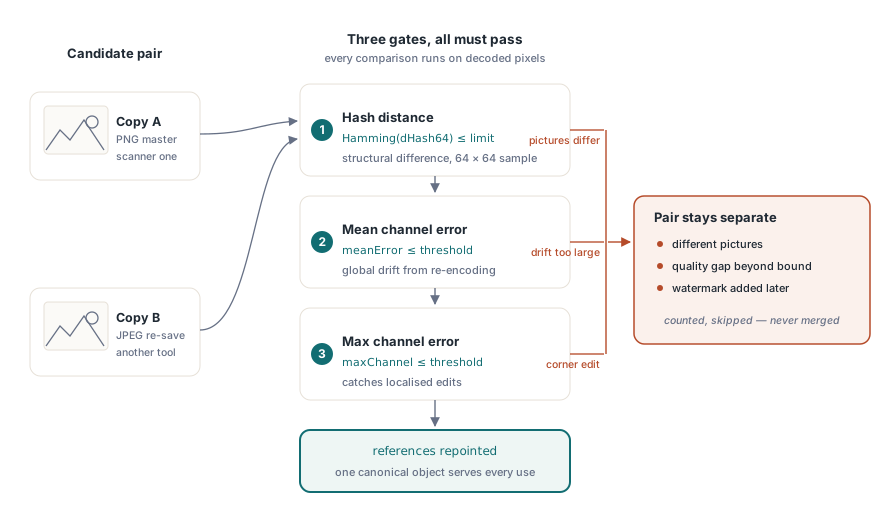
Three thresholds must all be satisfied before two images are merged, and each catches a different kind of difference. The perceptual hash distance bounds structural difference: a 64-bit difference hash is computed from a 64 by 64 sample of the decoded image, and the permitted Hamming distance runs from 0 to 7. The mean channel error bounds overall drift, which is what re-encoding produces. The maximum single-channel error bounds localized difference, which is what a small edit produces
Requiring all three is what makes the merge defensible. An image that differs by a watermark in one corner has a low mean error and a high maximum error, so the maximum-error gate rejects it. An image that has been recompressed has a small error everywhere, so it passes. That is exactly the distinction a size optimizer needs to draw
uses
  PDFlibrary;

var
  Lib: TPDFlib;
  Stats: TPDFlibImageSimilarityDedupStats;
  Merged: Integer;
begin
  Lib := TPDFlib.Create;
  try
    Lib.LoadFromFile('scanned-batch.pdf', '');

    // Hash distance 2, mean error 2, single-channel error 4.
    // Options can request a dry run so nothing is modified
    Merged := Lib.DeduplicateSimilarImages(2, 2, 4, 0, Stats);
    if Merged < 0 then
      raise Exception.Create('deduplication failed');

    Log(Format('%d scanned, %d merged, %d refs repointed, %d bytes duplicated',
      [Stats.ImagesScanned, Stats.ImagesDeduplicated,
       Stats.ReferencesRepointed, Stats.DuplicatePayloadBytes]));
    Log(Format('worst accepted: hash %d, mean %.2f, channel %d',
      [Stats.MaxAcceptedHashDistance, Stats.MaxAcceptedMeanError,
       Stats.MaxAcceptedChannelError]));
    Lib.SaveToFile('scanned-batch-optimised.pdf');
  finally
    Lib.Free;
  end;
end;
Semantic identity comes before visual similarity
Before any pixels are compared, candidate images must agree semantically. The library builds a stable signature from the full image dictionary excluding /Length, /Filter and /DecodeParms, so dimensions, color space, bit depth, masks, the /Decode array, interpolation, optional content membership and metadata all have to match
This ordering prevents a whole class of wrong merges. Two images can look identical in a 64 by 64 sample and behave differently on the page: one with /Interpolate true and one without will be smoothed differently when scaled, and one belonging to an optional content group will disappear when that layer is hidden. Merging across those boundaries produces a document that is smaller and wrong
Only indirect Image XObjects are scanned. Inline images are a different construct with different economics, and images that cannot be decoded are conservatively skipped and counted rather than merged on faith — no pixel evidence, no merge
How the search stays cheap
Comparing every image against every other image is quadratic, which is unacceptable on a document containing thousands of images. The hash is therefore split into eight 8-bit bands with an ordered index over each
The pigeonhole principle does the rest: if two hashes differ by at most 7 bits, they must agree exactly on at least one of the eight bands. Looking up candidates band by band therefore finds every permissible match without an exhaustive pairwise scan, and the published limit of 7 exists precisely because the guarantee holds only up to that distance
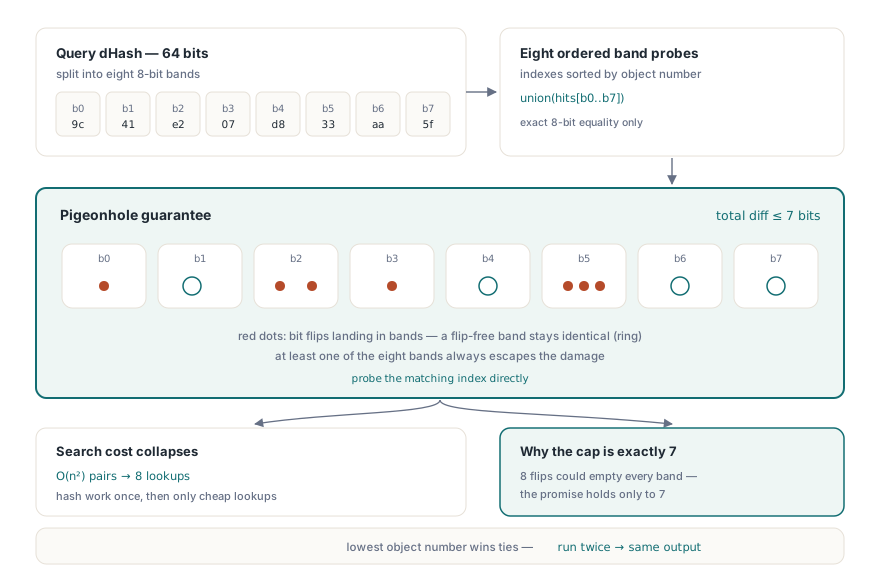
Candidates and band hits are ordered deterministically by object number and generation, and the lowest object number becomes canonical. That makes the output reproducible: running the optimizer twice on the same input produces the same canonical choices, which matters when the result is compared or signed
Dry runs and honest reporting
Because this is a lossy optimization in the sense that the merged images were not identical, the sensible workflow is to look before you leap. The dry-run option reports what would be merged and how much payload would be reclaimed without modifying the object graph, so a batch job can log the effect and a human can approve the thresholds once rather than per file
Two honesty notes in the reporting deserve mention. The reclaimable figure estimates the encoded payload of duplicate streams only; it does not count dictionary, indirect object and cross-reference overhead, so the actual file size reduction is slightly larger than reported rather than smaller. And the report exposes the maximum accepted error and the comparison workload, so you can see how close the merges came to your thresholds
The fixed 64 by 64 sampling grid is an intentional approximation, and it has a consequence worth stating plainly: a difference smaller than one sample cell may go unobserved even at a zero threshold. A single changed word in a scanned page might not survive that sampling. When byte-level proof is required, use the exact deduplication path instead — it merges only genuinely identical resources and makes no visual judgment at all
Where it belongs in a size-reduction pipeline
Order the passes by risk. Run exact resource deduplication first, since it is lossless and free. Then font subsetting, which is also lossless and usually the largest single win on text-heavy documents, as covered in PDF file size optimization and font subsetting. Then image recompression or downsampling if the target medium allows it. Perceptual deduplication belongs after those, because it is the only step whose result depends on a judgment call
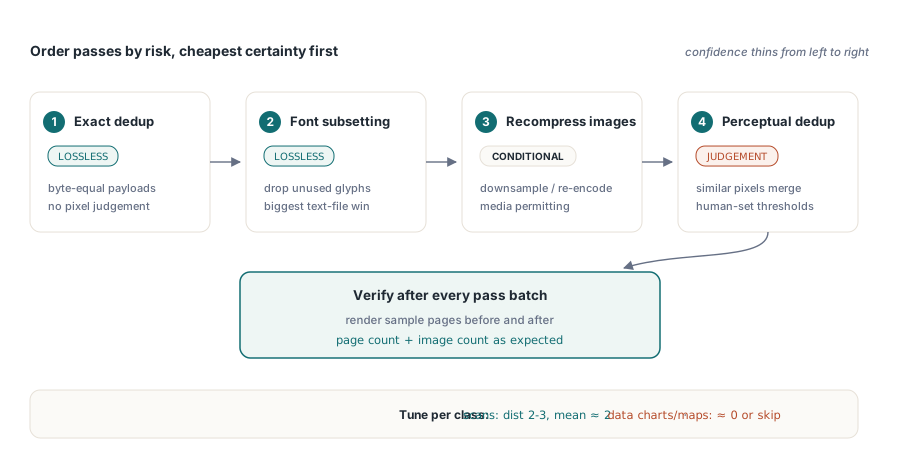
Choose thresholds by document class rather than globally. For scanned batches where every page carries the same letterhead, a hash distance of 2 to 3 with a mean error around 2 merges the letterhead reliably. For documents where images carry data — charts, maps, medical imagery — use zero or near-zero thresholds, or skip the pass entirely, because two charts that differ in one plotted point are two different charts no matter how similar they look at 64 by 64
After optimizing, verify. Render a sample of pages before and after and compare them, and check that the page count and image count changed the way you expected. The inspection route for what a document actually contains is described in auditing PDF file size by category, which is also the fastest way to find out whether images are your problem in the first place
Perceptual deduplication, exact resource deduplication and the size audit run on the same object graph for Delphi, C++Builder and Free Pascal; the complete feature list is on the PDF Library for Delphi page