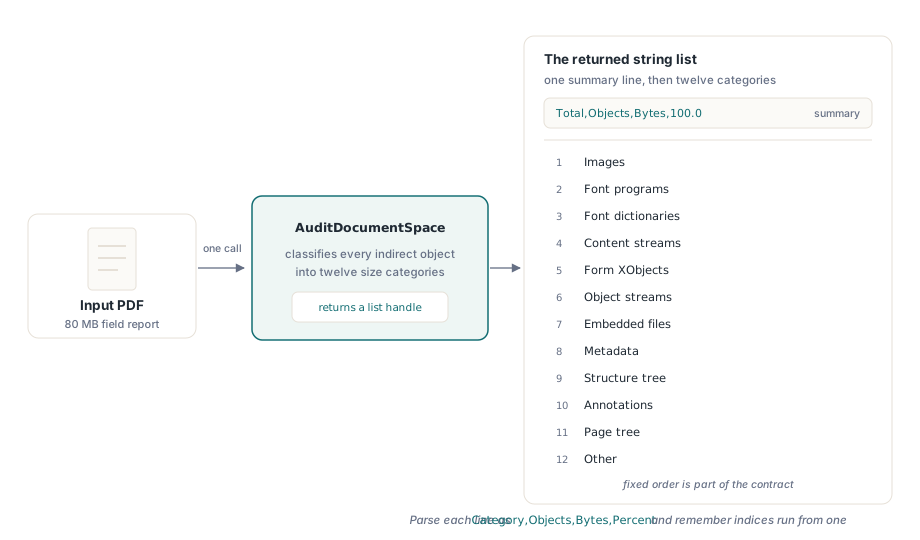
To find out where a PDF file size actually goes, losLab PDF Library exposes AuditDocumentSpace, which classifies every indirect object into twelve categories — images, font programs, font dictionaries, content streams, form XObjects, object streams, embedded files, metadata, structure tree, annotations, page tree, other — and reports the object count, stored bytes and percentage share of each
The situation this exists for is familiar. A 40-page report comes out of your generator at 80 MB, the customer asks why, and all you can offer is a guess. Probably the images. Maybe the fonts. So you turn on downsampling, ship it, and the file lands at 74 MB because the real weight was somewhere else entirely. Our companion article on font subsetting and image downsampling covers how to shrink a PDF; this one covers the step that should come first, which is measuring what you are about to shrink
Why measure before you compress?
Because the three standard optimization passes have wildly different payoffs on any given file, and nothing about the file tells you which one applies until you count. Subsetting fonts on a document whose fonts are already 2% of its bytes is an afternoon spent moving a rounding error. Downsampling images in a file whose bulk is uncompressed content streams produces the same disappointment. The optimizer is not the hard part — every library has one. Knowing which optimizer to point at this file is the hard part, and that is an accounting question, not a compression question. An audit also catches the cases where no optimizer is the answer: a file that turns out to be 60% embedded attachments does not need better compression, it needs a conversation about whether those attachments belong in the document, and a file that is 30% structure tree is paying for accessibility tagging, which is usually a deliberate cost you should not silently strip. Once the bytes are attributed you are making a product decision with numbers behind it instead of reaching for whichever switch is nearest
What the twelve-category report contains
AuditDocumentSpace returns a string list handle rather than a record, so the report survives the flat DLL and COM facades unchanged. The list holds a Total,Objects,Bytes,100.0 summary line followed by exactly twelve Category,Objects,Bytes,Percent lines in a fixed order that is part of the contract: Images, Font programs, Font dictionaries, Content streams, Form XObjects, Object streams, Embedded files, Metadata, Structure tree, Annotations, Page tree, Other. Thirteen lines, always, even when a category is empty
var
  Lib: TPDFlib;
  ListID, I: Integer;
begin
  Lib := TPDFlib.Create;
  try
    if Lib.LoadFromFile('report.pdf', '') <> 1 then
      Exit;
    ListID := Lib.AuditDocumentSpace;   // 0 when no document is selected
    if ListID = 0 then
      Exit;
    try
      // GetStringListItem is 1-based: items run 1..GetStringListCount
      for I := 1 to Lib.GetStringListCount(ListID) do
        Memo1.Lines.Add(Lib.GetStringListItem(ListID, I));
    finally
      Lib.ReleaseStringList(ListID);
    end;
  finally
    Lib.Free;
  end;
end;
One Delphi detail in that loop will bite you exactly once. GetStringListItem uses one-based item indices, matching GetStringListCount, and an out-of-range index returns an empty string rather than raising. Write the loop for I := 0 to Count - 1 out of habit and you get a blank first line, a silently dropped last line, and no exception anywhere to tell you the indexing is wrong. The report itself will look almost right, which is the worst failure mode a diagnostic tool can have
Why does the audit use stored length instead of decoded size?
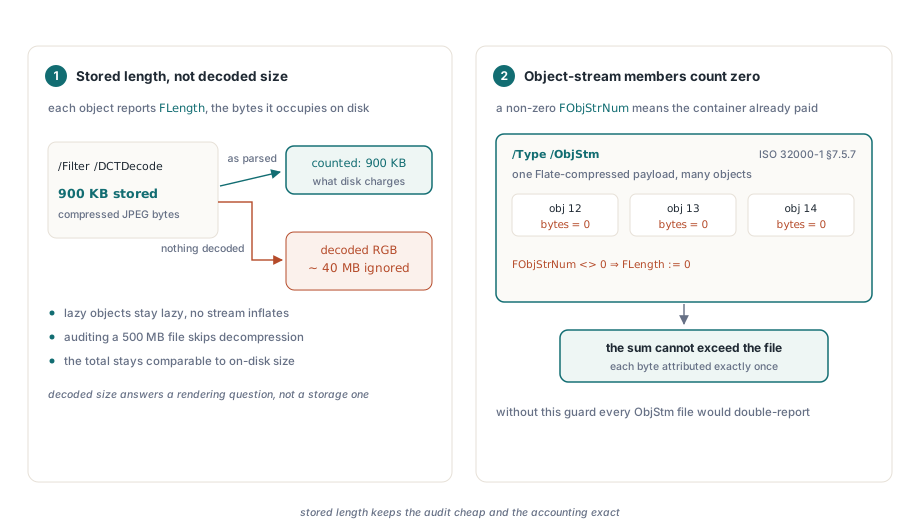
Because stored length is both the number you want and the number that is cheap to obtain. Each indirect object carries TPDFIndObj.FLength, the raw byte length the object occupies in the file as parsed. Using it means a 900 KB DCTDecode image is reported as 900 KB — the bytes it costs you on disk — rather than the 40 MB of RGB samples it decodes to. It also means the audit never has to decode anything: lazily loaded objects stay lazy, filters stay unrun, and auditing a 500 MB file is a pass over object headers rather than a full decompression cycle
The second rule is a double-counting defense. When an object lives inside a compressed object stream, indicated by a non-zero FObjStrNum, its byte count is recorded as zero. Its storage has already been paid for once by the container stream, which ISO 32000-1 §7.5.7 defines as a /Type /ObjStm stream holding many objects in one Flate-compressed payload. Charging each member its own share and then charging the container again would inflate the total past the real file size. This has a direct consequence for how you read the output, covered below and in more depth in our article on object streams and cross-reference streams
Why can a font program not classify itself?
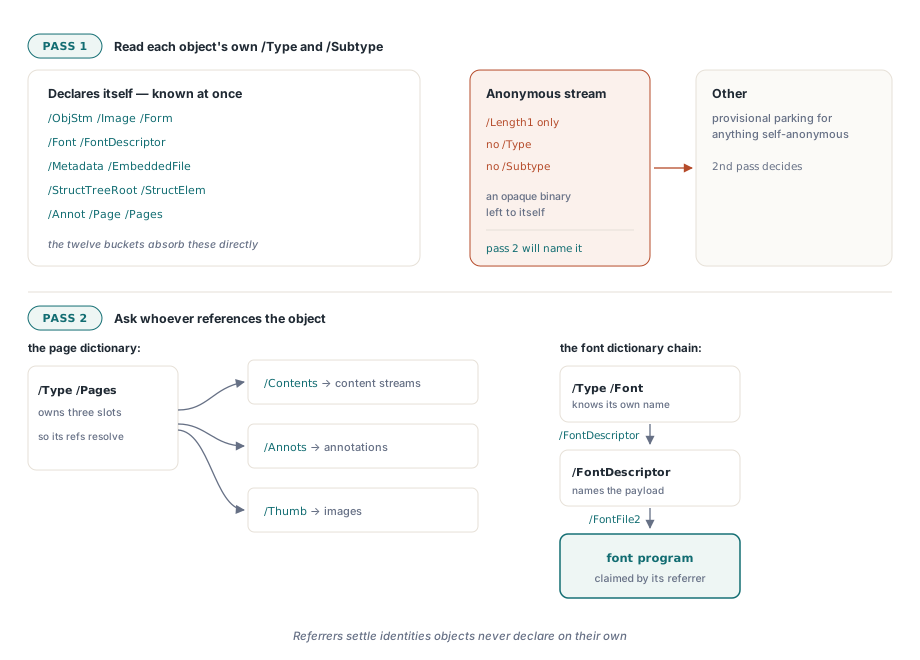
Because a TrueType font file embedded in a PDF has no marker saying so. ISO 32000-1 §9.8.1 defines the embedded font program as the value of /FontFile, /FontFile2 or /FontFile3 in a font descriptor, and the stream dictionary at the other end of that reference carries /Length1 and filter keys but no /Type and no /Subtype that identifies it as a font. Looked at in isolation it is an anonymous binary stream. Only the descriptor that points at it knows what it is. The same asymmetry appears for annotations: §12.5.2 makes /Type /Annot optional in an annotation dictionary, so the reliable signal is membership in a page /Annots array, not the dictionary itself
So classification runs twice. The first pass reads each object's own /Type and /Subtype and takes the easy wins: /ObjStm, /Subtype /Image, /Subtype /Form, /Type /Font and /Type /FontDescriptor, /Metadata, /EmbeddedFile and /Filespec, /StructTreeRoot and /StructElem, /Annot, /Page and /Pages. Everything else provisionally lands in Other. The second pass then walks the referencing side and overrides: each page dictionary reassigns its /Contents to content streams, its /Annots entries to annotations, and its /Thumb to images, while every font dictionary walks its own descriptor chain
// Shape of the second pass: the referrer names the object
Descriptor := DictOf(FontDict.FindValueByKeyName('FontDescriptor'));
if Assigned(Descriptor) then
begin
  MarkRef(FontDict.FindValueByKeyName('FontDescriptor'), catFontDicts);
  MarkRef(Descriptor.FindValueByKeyName('FontFile'),  catFontPrograms);
  MarkRef(Descriptor.FindValueByKeyName('FontFile2'), catFontPrograms);
  MarkRef(Descriptor.FindValueByKeyName('FontFile3'), catFontPrograms);
end;
// Type0 fonts keep the descriptor one level down
Descendants := FontDict.FindValueByKeyName('DescendantFonts', True);
if (Descendants is TPDFArray) and (TPDFArray(Descendants).Count > 0) then
  MarkFontProgramRefs(DictOf(TPDFArray(Descendants).Item[0]));
Reading the report and picking the next move
Read the shares first, the object counts second, and treat any large gap between them as a signal. A modern PDF puts most of its small dictionaries inside object streams, so Page tree and Structure tree routinely show dozens of objects against nearly zero bytes — their real cost has been folded into the Object streams line. If Object streams is itself large, the file is dense with metadata-like structure rather than content, and the lever is pruning objects, not compressing them. Annotation appearance streams behave similarly: they carry /Subtype /Form, so a heavily stamped document shows its weight under Form XObjects while the Annotations line stays small
function CategoryShare(Lib: TPDFlib; ListID: Integer;
  const Category: string): Double;
var
  I: Integer;
  Parts: TArray<string>;
  Inv: TFormatSettings;
begin
  Result := 0;
  Inv := FormatSettings;
  Inv.DecimalSeparator := '.';   // the report is locale-independent
  for I := 2 to Lib.GetStringListCount(ListID) do   // line 1 is Total
  begin
    Parts := string(Lib.GetStringListItem(ListID, I)).Split([',']);
    if (Length(Parts) = 4) and SameText(Parts[0], Category) then
      Exit(StrToFloatDef(Parts[3], 0, Inv));
  end;
end;
Two formatting facts matter if you parse the percentages rather than display them. The decimal separator is always a literal period regardless of the machine's locale, so parsing with the ambient FormatSettings on a German or French workstation will fail or, worse, misread. And trailing zeros are trimmed, so a category holding exactly 40% of the bytes prints as 40, not 40.0 — never assume a fixed decimal place. With the share in hand the routing is mechanical: a dominant Images share points at DownsampleImages, a dominant Font programs share at SubsetEmbeddedFonts, and bulky Content streams at CompressContent
What the audit deliberately does not tell you
The total is a sum over indirect objects, and a PDF file is slightly more than its objects. The file header, the trailer, inter-object whitespace and a classic cross-reference table are not indirect objects, so those bytes are attributed to nothing and the audit total lands a little under the on-disk size. A cross-reference stream is different — it is a real object with /Type /XRef, so in a modern file those bytes do appear, in the Other category. Neither behavior is a defect, but if you are reconciling the audit against a byte count from the file system, that is where the gap comes from
Two more boundaries are worth stating plainly. First, the numbers describe a file that was loaded, not one being authored: for objects built in memory that have no stored length yet, the size falls back to the serialized output with a nominal allowance for the stream dictionary, which is an estimate of the eventual write rather than a measurement. Audit after a save-and-reload if you want exact figures. Second, a fat Other line is a finding, not a bug report — it usually means orphaned objects that nothing references any more, which is a job for mark-and-sweep garbage collection rather than for any compression pass
Used this way the audit changes the shape of the conversation. Instead of guessing at the 80 MB report you open it, run one call, and read that images are 8%, font programs are 61%, and the document embeds nine full font programs for a house style that uses three faces. That is a fixable answer with a number attached to it. AuditDocumentSpace, together with the optimization passes it points you toward, ships in the losLab PDF Library for Delphi and C++Builder, where the reference pages document the full category list and the string-list API around it