PDF Library for Delphi converts PDF content into two editable formats without Office automation. ExportPageMarkdown and ExportDocumentMarkdown return semantic Markdown with inferred headings, ordered and unordered lists and pipe tables, while SaveDOCXToFile and SaveDOCXToStream write a WordprocessingML package containing paragraphs, headings, native list numbering, detected tables, font styling, page breaks and positioned PNG images
Both run entirely in Pascal, on a server, with no Word installed and no COM. That constraint is the reason the feature exists in a PDF library rather than in a desktop tool
Why is "PDF to Word" genuinely hard?
Because a PDF page does not contain paragraphs. It contains text-showing operators that place runs of glyphs at coordinates, in whatever order the producer emitted them, with no obligation to indicate that two runs belong to the same sentence, let alone the same list item. The format was designed to describe a printed page exactly, and it succeeds at that by discarding the structure that produced the page
So every converter has to reconstruct what the generator threw away. Line grouping comes from vertical spacing and baseline alignment. Paragraph boundaries come from spacing changes and indentation. A heading is a line whose font is larger or heavier than the body and which stands apart from what follows. A list is a run of paragraphs beginning with a bullet character or a number pattern. A table is a grid of text blocks whose edges align across rows and columns. Every one of those is an inference, and inference means a good result on documents that follow ordinary typographic conventions and a mediocre one on documents that do not
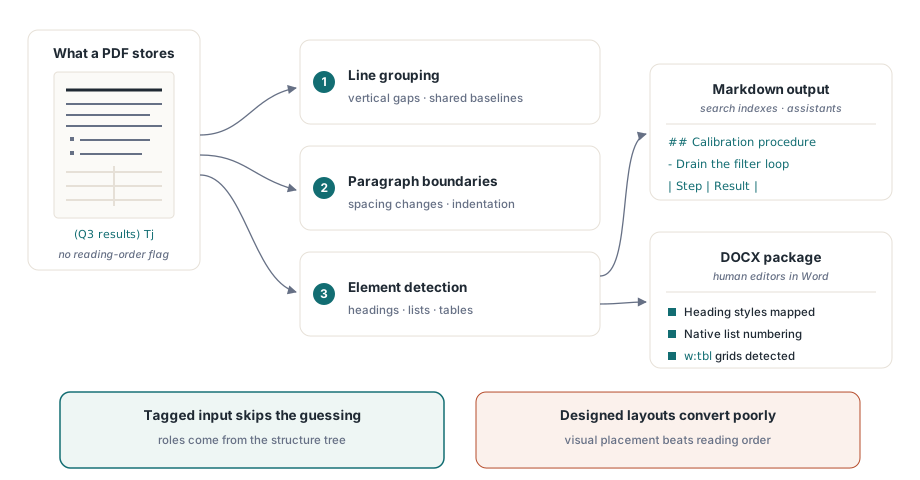
Tagged PDFs are the exception, and a large one. When the document carries a structure tree, the paragraph, heading, list and table roles are recorded rather than guessed, which is why the accessibility work described in tagged PDF accessibility structure pays off in conversion quality too. If you control the producer, tagging your output is the single highest-leverage thing you can do for anyone who later has to convert it
Markdown export, one page at a time
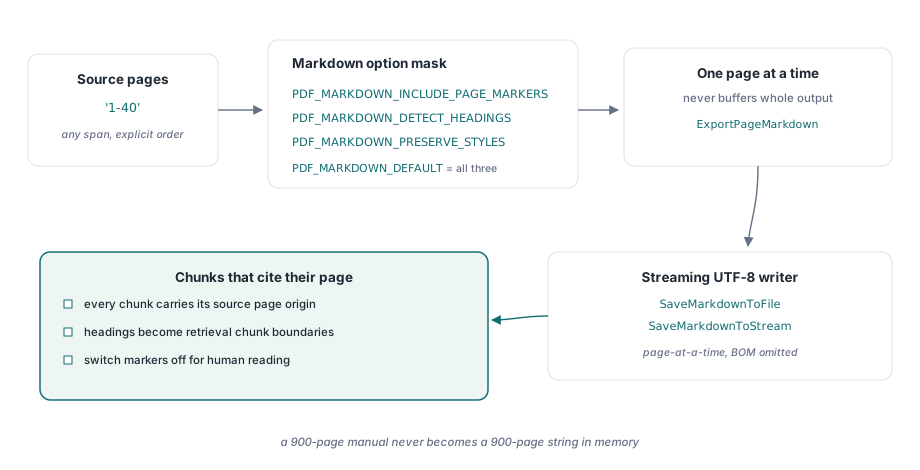
The Markdown path is the one to reach for when the destination is a text pipeline: a documentation site, a search index, a retrieval corpus for an assistant. Options are a bit mask: PDF_MARKDOWN_INCLUDE_PAGE_MARKERS, PDF_MARKDOWN_DETECT_HEADINGS, PDF_MARKDOWN_PRESERVE_STYLES, with PDF_MARKDOWN_DEFAULT combining all three
var
  Pdf: TPDFlib;
  Md: WideString;
begin
  Pdf := TPDFlib.Create;
  try
    Pdf.LoadFromFile('handbook.pdf', '');

    // One page, as a string
    Md := Pdf.ExportPageMarkdown(1, PDF_MARKDOWN_DEFAULT);

    // A page range, streamed to disk as UTF-8 without a BOM
    Pdf.SaveMarkdownToFile('1-40',
      PDF_MARKDOWN_DETECT_HEADINGS or PDF_MARKDOWN_PRESERVE_STYLES,
      'handbook.md');
  finally
    Pdf.Free;
  end;
end;
Page markers earn their keep in retrieval work. A chunk of text that carries the page it came from can be cited precisely, and a reader who follows the citation lands where the claim actually is. Turn them off when the Markdown is destined for human reading, where page boundaries from the source layout are noise
The streaming entry points matter for large documents. SaveMarkdownToStream and SaveMarkdownToFile write UTF-8 one page at a time and do not buffer the complete output, so a 900-page manual does not become a 900-page string in memory first. The absence of a byte-order mark is deliberate too: a BOM on a Markdown file confuses a surprising number of static site generators and diff tools
DOCX without Office on the machine
The DOCX writer produces the package itself: ZIP entries written as raw Deflate with CRC checks, the WordprocessingML parts, and the relationships that bind them. Nothing calls into Word, which means the conversion runs on a headless server, inside a service account, in a container, in all the places Office automation is either unlicensed, unstable or forbidden
var
  Pdf: TPDFlib;
  Target: TFileStream;
begin
  Pdf := TPDFlib.Create;
  Target := TFileStream.Create('handbook.docx', fmCreate);
  try
    Pdf.LoadFromFile('handbook.pdf', '');
    Pdf.SaveDOCXToStream('1-40',
      PDF_DOCX_INCLUDE_IMAGES or PDF_DOCX_DETECT_HEADINGS or
      PDF_DOCX_PRESERVE_STYLES or PDF_DOCX_PRESERVE_PAGE_BREAKS,
      Target);
  finally
    Target.Free;
    Pdf.Free;
  end;
end;
Image data is written as each page is processed rather than collected and appended at the end, so peak memory tracks one page rather than the whole document. Explicit page order is preserved, and the selected PDF page is restored afterward, which matters when the export is one step inside a longer job that had a page selected for other reasons
What does deterministic packaging buy you?
Byte-for-byte reproducibility. Two conversions of the same input with the same options produce the same package, which means you can hash the output to detect change, diff two builds of a generated document, and cache aggressively without worrying that an identical input produced a different artifact
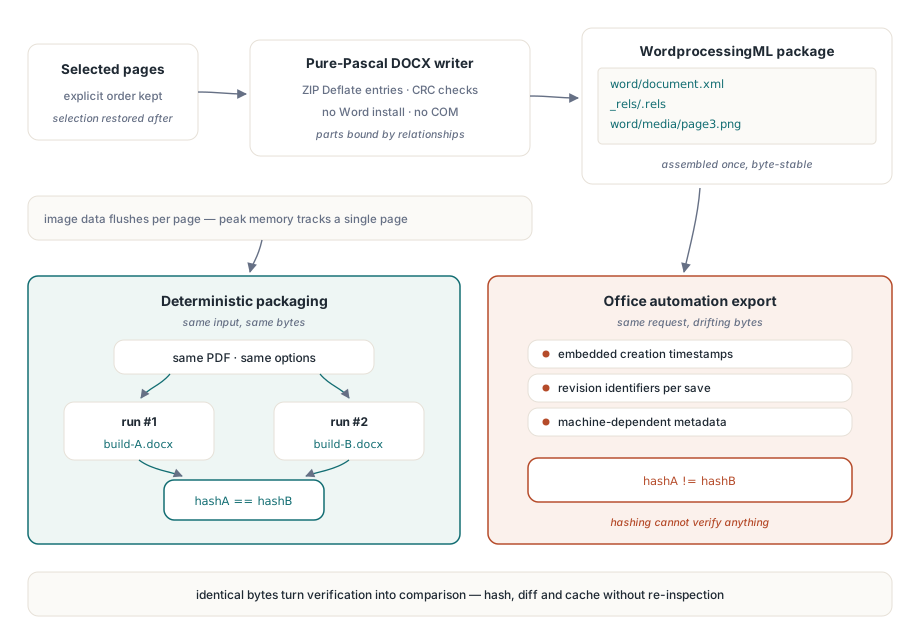
Office automation cannot promise that. It embeds timestamps, revision identifiers and machine-dependent metadata, so the same document converted twice differs in ways that defeat hashing. The same reasoning drives the deterministic file identifiers discussed in deterministic PDF IDs for reproducible builds: when output is reproducible, verification becomes a comparison instead of an inspection
Where the output is good, and where it is not
Be honest with your users about this, because conversion quality varies more with the input than with the converter. Tagged PDFs and cleanly generated business documents, invoices, reports, contracts, convert well: headings land as headings, tables survive, lists renumber correctly in Word. Two-column academic layouts convert acceptably if the column geometry is regular. Tables that span page breaks are reassembled by inference and sometimes split. Heavily designed marketing material, where text is placed for visual effect rather than in reading order, converts poorly, and no amount of inference fixes that
Scanned documents are a separate case entirely. A page that is one big image contains no text objects, so there is nothing to export until a text layer exists; the OCR path that produces one is a prerequisite, not an option. Before running a large batch, sample a dozen representative files and look at the output, and consider enumerating page elements first, as described in text search and page element enumeration, to see what the pages actually contain
For assistant and retrieval pipelines the Markdown path is usually the better target: headings become chunk boundaries, tables stay readable as pipe tables, and page markers give every chunk a citable location. For human editing, DOCX is the answer, because what the user wants is not the text but the ability to change it
PDF Library for Delphi is a Delphi, C++Builder and Lazarus PDF library with matching DLL and ActiveX interfaces, so the same export calls are available from C#, C++ or scripting hosts. Full documentation and a trial build are on the PDF Library for Delphi Delphi PDF library page