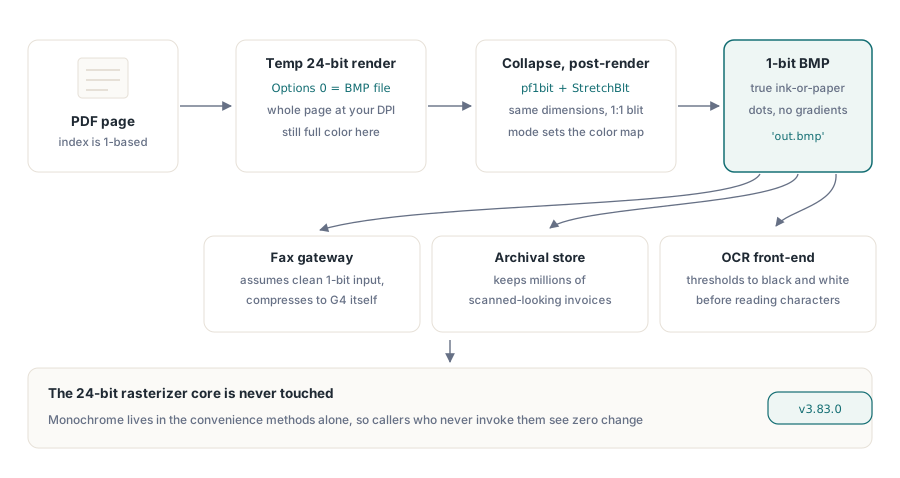
A fax gateway does not want your 24-bit page render. Neither does the archival pipeline that stores a million scanned-looking invoices, nor the OCR front-end that thresholds everything to black and white before it ever looks for a character. All three want the same thing: a clean 1-bit bitmap, one bit per pixel, where every dot is either ink or paper. Hand them a full-color BMP and they will throw away 23 bits per pixel anyway, usually with a worse dithering pass than you could have done yourself. The interesting question is where that down-conversion should happen, and the answer in PDF Library for Delphi turns out to say something useful about how to extend a renderer you would rather not rewrite
PDF Library for Delphi is a native Object Pascal PDF library for Delphi and C++Builder. Its rendering core rasterizes a page to a bitmap and can emit BMP, PNG, JPEG, WMF and a handful of other formats. What it did not do until recently was hand back a true monochrome bitmap, or render only part of a page. Both landed in v3.83.0, and both were built as thin convenience layers on top of the existing renderer rather than as changes to the rasterizer itself. That constraint is the whole story
Why down-convert after rendering, not inside the renderer
The obvious way to produce a 1-bit image is to tell the rasterizer to draw in 1-bit. That is also the way that breaks everything else. The renderer's internal bitmap is created with a hardcoded PixelFormat := pf24bit in the PDFlibRenderer constructor, and that 24-bit surface is shared by every render path: PNG export, the device-context preview, JPEG output, all of it. Flip it to pf1bit at the source and you have not added a monochrome feature, you have degraded color fidelity for every caller in the library and signed up to debug a dozen downstream regressions
So RenderPageToMonochromeFile takes the opposite route. It renders the page normally, to a temporary 24-bit BMP, and only then collapses it to 1-bit as a post-processing step. The renderer is untouched. The monochrome behavior lives entirely in the convenience method, which means it cannot affect anyone who does not call it. This is the kind of trade-off worth naming explicitly: a post-process pays one extra bitmap allocation and a temp file, and in exchange it keeps a load-bearing core completely out of scope. For a feature that exists to serve fax and archival edge cases, that is the right side of the ledger
var
  Pdf: TPDFlib;
begin
  Pdf := TPDFlib.Create;
  try
    Pdf.LoadFromFile('invoice.pdf');
    // 200 DPI is the classic Group 4 fax resolution; page index is 1-based
    Pdf.RenderPageToMonochromeFile(200, 1, 'invoice-page1.bmp');
  finally
    Pdf.Free;
  end;
end;
How the 1-bit collapse actually happens
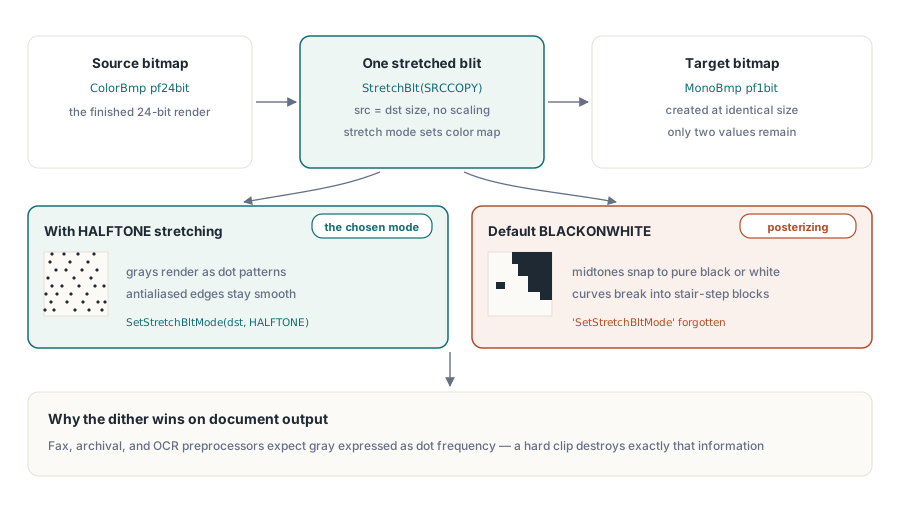
The down-conversion leans on GDI rather than a hand-rolled threshold loop, and the choice matters for output quality. Inside the method the 24-bit temp bitmap is loaded into a TBitmap, a second TBitmap is created with PixelFormat := pf1bit at the same dimensions, and the pixels move across with a single blit:
// inside RenderPageToMonochromeFile, after loading the 24-bit ColorBmp
MonoBmp.PixelFormat := pf1bit;
MonoBmp.Width  := ColorBmp.Width;
MonoBmp.Height := ColorBmp.Height;
// HALFTONE tells GDI to dither the 24-bit source down to 1-bit
SetStretchBltMode(MonoBmp.Canvas.Handle, HALFTONE);
StretchBlt(MonoBmp.Canvas.Handle, 0, 0, MonoBmp.Width, MonoBmp.Height,
  ColorBmp.Canvas.Handle, 0, 0, ColorBmp.Width, ColorBmp.Height, SRCCOPY);
MonoBmp.SaveToFile('out.bmp');
The trick is SetStretchBltMode with HALFTONE. Even though source and destination are the same size, so no scaling happens, the stretch mode still governs how GDI maps colors into the 1-bit palette. HALFTONE makes it apply halftone dithering, turning gray regions and antialiased text edges into patterns of black and white dots rather than a hard clip to the nearest of two colors. Drop the mode call, or use the default BLACKONWHITE, and grayscale content posterizes into blocky thresholded shapes. For scanned-document and OCR-preprocessing output, the dithered result is almost always what you want
One detail is non-negotiable and easy to get wrong: the temporary render must be a BMP. RenderPageToMonochromeFile calls the general renderer with an options code of 0, which is BMP. The options argument on RenderPageToFile is a small integer enum, and the values are not interchangeable for this purpose: 0 is BMP, 1 JPEG, 2 WMF, 3 EMF, 5 PNG, and so on. The down-converter then does TBitmap.LoadFromStream on the temp file. Feed it a WMF, by passing 2, and that load throws "Bitmap image is not valid", because a Windows Metafile is a vector record stream, not a DIB. Monochrome down-conversion is a raster operation end to end, so the intermediate has to be a raster format
Rendering only a sub-region of a page
The second method, RenderPageRegionToFile, renders just a rectangle of the page instead of the whole thing. The use cases are familiar once you have built any document viewer: cropping a signature block out of a contract, generating a tile for a zoomed map of a large drawing, or pulling one stamped region for a thumbnail without paying to rasterize the entire page at high DPI. The signature is straightforward:
// Clip is "Left,Top,Width,Height" in PDF points (72 pt = 1 inch)
// Here: a 2.5in x 1in box, one inch in from the top-left of the page
Pdf.RenderPageRegionToFile(150, 1, '72,72,180,72', 'sig-block.bmp');
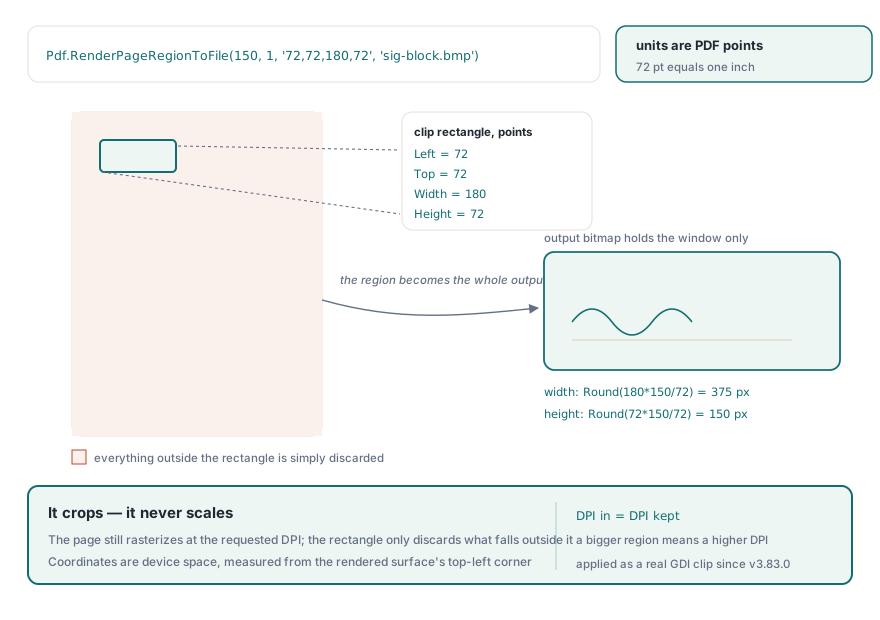
The clip string is four comma-separated doubles in PDF points, parsed manually inside the method to sidestep locale and DelimitedText quirks. From the width and height the method computes the output bitmap size as Round(Width * DPI / 72) by Round(Height * DPI / 72), allocates an in-memory pf24bit bitmap of exactly that size, and renders into its device context through RenderPageToDCClip. The result file contains only the clipped rectangle, sized to the region rather than to the full page
The clip parameter that did nothing
Here is where the work was sharper than it looks. RenderPageToDCClip had carried a Clip parameter for a long time, and it was a lie. The call accepted the argument, passed it down to TPDFPageTree.RenderPageToDC, and that implementation ignored it completely, never handing it to the renderer. You could pass any rectangle you liked and get the whole page back. Anyone who had wired up RenderPageToDCClip expecting a crop was getting a full-page render and, depending on their layout, might not have noticed
v3.83.0 connected the wire. RenderPageToDC now parses the same "Left,Top,Width,Height" point rectangle and applies it as a real GDI clip region on the target device context before the renderer draws. The conversion from points to device pixels is the usual DPI / 72 scale factor, applied to all four edges. The sequence around the render is the standard save/clip/restore dance:
// inside TPDFPageTree.RenderPageToDC, when Clip is non-empty
ScaleFactor := DPI / 72;
SaveDC(TargetDC);
IntersectClipRect(TargetDC,
  Round(ClipLeft * ScaleFactor),
  Round(ClipTop * ScaleFactor),
  Round((ClipLeft + ClipWidth) * ScaleFactor),
  Round((ClipTop + ClipHeight) * ScaleFactor));
// ... renderer draws the page here ...
// in the finally block:
RestoreDC(TargetDC, -1);
The SaveDC / RestoreDC(-1) pair is what keeps this safe to call repeatedly: the clip region is pushed onto the DC state stack, the page is drawn, and the original clip is popped back regardless of how the render exits. RestoreDC(TargetDC, -1) restores the most recently saved state, which is the standard idiom for balanced save/restore. Skip the restore and a caller that reuses the same DC for a subsequent full-page render would find it mysteriously clipped to the last region. Fixing the dead parameter also fixed RenderPageRegionToFile for free, since that new method routes through exactly this path
One behavioral point to internalize: the clip crops, it does not scale. The page is still rasterized at the DPI you asked for, in its normal position, and the clip region simply discards everything outside the rectangle. You are not zooming the region to fill the output; you are cutting a window out of the full-resolution render. If you want a region magnified, raise the DPI. The rectangle's coordinates are interpreted in device space after the points-to-pixels scaling, measured from the top-left corner of the rendered surface, so plan your Left and Top from the top of the page down. For a deeper tour of how PDF Library for Delphi drives a device context for on-screen output, the companion piece on print preview and device-context output walks through the same DC plumbing from the display side
The honest boundary: 1-bit BMP, not G4 TIFF
It would be easy to oversell this as "fax-ready output," so here is the limit stated plainly. RenderPageToMonochromeFile produces a pf1bit BMP. It does not produce a CCITT Group 4 TIFF, which is the format a real fax workflow or a TIFF archive usually expects. The reason is concrete rather than an oversight: PDF Library for Delphi's CCITT unit currently decodes G4 streams but has no G4 encoder. Without an encoder there is nowhere to write compressed monochrome runs, so the monochrome path stops at an uncompressed 1-bit DIB
In practice that is still useful. A 1-bit BMP is the correct pixel format, dithered and ready, and most fax, archival, or OCR toolchains will happily ingest it or convert it to G4 themselves with one downstream step. But if your requirement is literally a Group 4 TIFF straight out of the library, this is not that yet, and you should plan a compression stage of your own. Knowing where a feature stops is worth as much as knowing what it does
Both methods are deliberately small, and that is the design lesson worth carrying off this page: a convenience API that sits on top of a renderer can add real capability, monochrome output, region cropping, without reaching into the rasterizer and destabilizing every other caller. When you do need to pick between rendering engines for the underlying rasterization, the overview of multi-engine PDF rendering in Delphi covers the trade-offs in depth. To see the full rendering surface and the rest of the API, the PDF Library for Delphi Delphi PDF Library product page has the complete picture