PDF Library for Delphi renders HTML into a PDF page with real two-dimensional layout: display: flex and display: grid are measured and placed rather than degraded to stacked blocks, and footnotes are reserved at the bottom of the box that carries their reference, with numbering that stays continuous across columns and pages. The entry points are the familiar ones, DrawHTMLTextBox for a single box and DrawHTMLStory for multi-column flow
This matters because HTML is how most report content arrives now. Templates are authored by people who write CSS, dashboards are designed as cards, and a renderer that silently collapses a flex row into four stacked blocks produces a document that does not resemble the design at all. Until this capability existed, the only two-dimensional container the engine measured was the table, so every card layout had to be re-authored as a table by hand
What changed in the layout model?
The previous main loop maintained a single line box and advanced down the page. That model handles inline content and stacked blocks perfectly and cannot express a container whose children are sized in relation to each other. Tables were the sole exception, with their own two-pass measurement
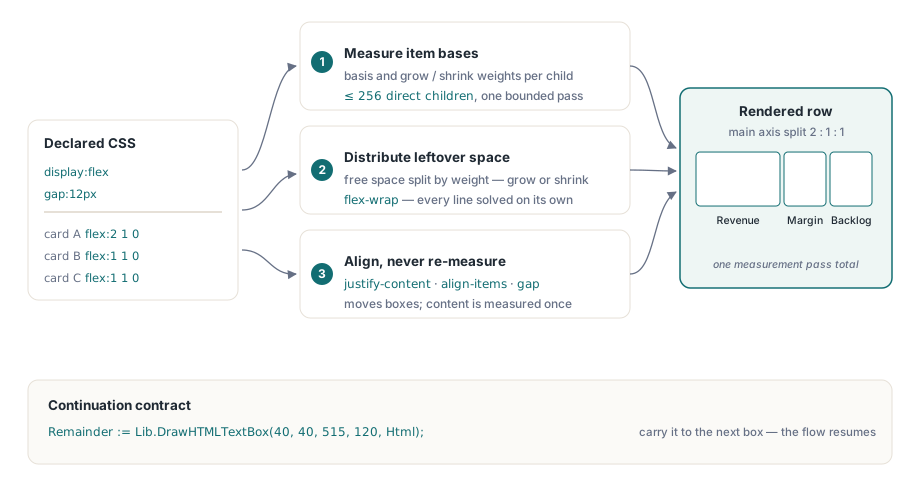
Flex and grid each add a bounded measurement pass over the children of a container, and the important word is bounded. A flex container measures up to 256 direct children into a fixed array. A grid uses an occupancy matrix of at most 64 by 64 cells for deterministic automatic placement. Those ceilings exist so that a hostile or generated stylesheet cannot drive unbounded recursion or quadratic placement memory, which is a real concern when the HTML comes from a template a customer edits
How flex items get their sizes
In the row direction, the container sums each item's basis along with its grow and shrink weights, then distributes the leftover space, positive or negative, according to those weights. With flex-wrap, each line is solved independently, so a row that breaks into two lines assigns free space per line rather than across the whole container. In the column direction the same main-axis distribution runs against either an explicit height or the content height
justify-content, align-items, gap and the reverse directions operate on geometry that has already been measured. They move boxes; they never trigger re-measurement of item content. That separation is what keeps a complex dashboard from measuring its children several times over
uses
  PDFlibrary;

var
  Lib: TPDFlib;
  Html, Remainder: WideString;
begin
  Lib := TPDFlib.Create;
  try
    Lib.NewDocument;
    Lib.SetPageSize('A4');
    Lib.NewPage;

    Html :=
      '<div style="display:flex; gap:12px;">' +
      '  <div style="flex:2 1 0; background:#f4f6f8; padding:8px;">' +
      '    <b>Revenue</b><br/>EUR 4,182,300</div>' +
      '  <div style="flex:1 1 0; background:#f4f6f8; padding:8px;">' +
      '    <b>Margin</b><br/>18.4%</div>' +
      '  <div style="flex:1 1 0; background:#f4f6f8; padding:8px;">' +
      '    <b>Backlog</b><br/>92 days</div>' +
      '</div>';

    Remainder := Lib.DrawHTMLTextBox(40, 40, 515, 120, Html);
    if Remainder <> '' then
      Log('content did not fit - carry the remainder to the next box');

    Lib.SaveToFile('dashboard.pdf');
  finally
    Lib.Free;
  end;
end;
The return value is the continuation string, which is how every HTML drawing entry point reports what did not fit. Pass it to the next box or the next page and the flow resumes where it stopped
Grid placement, and what a track can be
Grid tracks accept fixed lengths, percentages, the fr unit, simple repeat() expressions and minmax(). Automatic placement fills the occupancy matrix deterministically, so the same HTML always produces the same arrangement. Explicit coordinates are allowed to overlap, which is deliberate: a design that layers a badge over a card is expressing intent, not an error. When only one axis is given explicitly, placement searches the other axis only
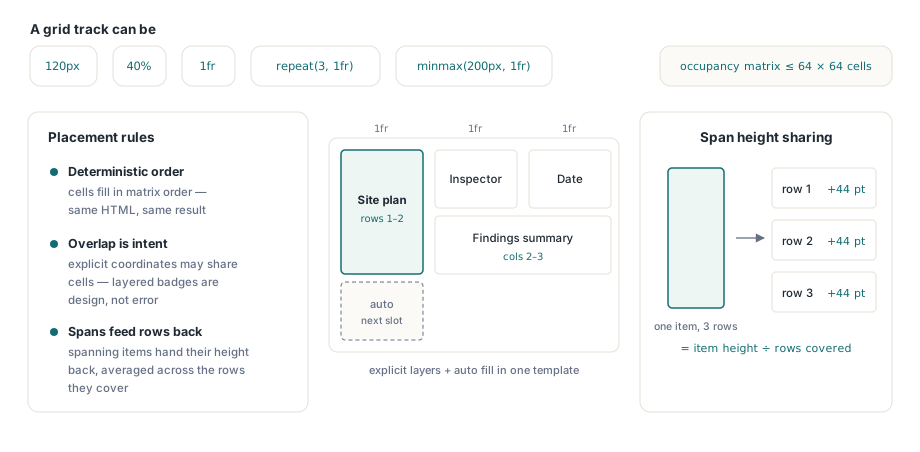
Items that span several rows contribute their measured height back to the rows they cover, averaged across them, which keeps a tall spanning item from squeezing a single row while leaving its neighbors short:
Html :=
  '<div style="display:grid; grid-template-columns:repeat(3, 1fr); ' +
  '            gap:10px;">' +
  '  <div style="grid-row:span 2; background:#eef;">Site plan</div>' +
  '  <div>Inspector</div>' +
  '  <div>Date</div>' +
  '  <div style="grid-column:2 / span 2;">Findings summary</div>' +
  '</div>';

Remainder := Lib.DrawHTMLTextBox(40, 180, 515, 260, Html);
Flex and grid children are rendered through the same HTML renderer as everything else, which is the property that makes the feature usable rather than a separate world. Fonts, the CSS cascade, links, images, tables and further nested flex or grid containers all behave inside a flex item exactly as they do at the top level, and the outer layout plan records the final text and rectangle commands so that repeated drawing reuses the existing measurement cache
Why are footnotes a pagination problem?
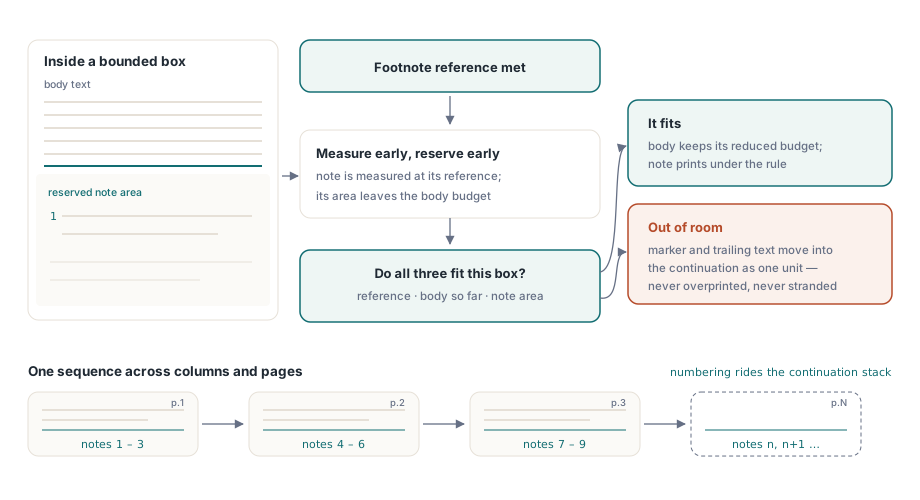
A footnote is not content that flows after the paragraph containing its reference; it is content that must appear at the bottom of the same box as its reference. That inverts the usual measurement order, because the space available for body text now depends on content that has not been laid out yet
The renderer therefore measures the note when it meets the reference, and subtracts the note area from the body height budget of the current bounded box. If the reference, the body text so far and the note cannot all fit, the footnote marker and everything after it move into the continuation string together. That rule is what prevents the two classic failures: a note overprinting the body text, and a note stranded on a page whose reference is on the previous one
In a bounded box the note area is pinned to the bottom with a separator rule above it. In unbounded measurement, where there is no box height to pin to, the note area follows immediately after the body. Numbering is carried in an extension field on the continuation stack, so DrawHTMLTextBox and DrawHTMLStory keep the sequence running across columns and pages, and a continuation string produced before that field existed still resumes correctly
// Footnotes inside a multi-column story keep one running sequence
Html := LoadTemplate('chapter.html');    // uses float:footnote markers
Remainder := Lib.DrawHTMLStory(40, 40, 515, 700,
  2,        // columns
  16,       // gutter in points
  20,       // maximum pages for this story
  Html);
if Remainder <> '' then
  Log('story exceeded its page budget');
Practical guidance for template authors
Design within the documented ceilings. A flex container with more than 256 direct children is almost always a data table wearing a flex costume, and the table path measures it better anyway. A grid larger than 64 by 64 is a spreadsheet, and the same advice applies. For multi-column body text, the column and hyphenation behavior described in hyphenation and balanced text columns governs how the flow looks inside each column
Measure before you draw when a layout has to fit. GetHTMLTextHeight reports the height a given width would need, which is the cheap way to decide between one layout and another before committing ink. And treat a non-empty continuation string as normal rather than exceptional: it is the mechanism by which long content paginates, not an error signal
Where the HTML comes from a report engine rather than from hand-written templates, the dataset-driven route in the dataset report engine composes well with this, generating the markup that flex and grid then arrange. And when the same content also has to leave the PDF again, the semantic export path in exporting PDF to Markdown and DOCX closes the round trip
HTML layout, report generation and semantic export are part of one library for Delphi, C++Builder and Free Pascal; the complete feature list is on the PDF Library for Delphi page