A validator rejects a PAdES signature for one of three reasons in very nearly every case we have debugged with the PDFium Component in Delphi: the /ByteRange array still holds its zero placeholders, the /M signing time is not a well-formed PDF date string, or an incremental update dropped the /Encrypt entry from an encrypted document. All three produce files that open fine, render fine and then fail the moment a conforming validator reads the signature dictionary
The scenario that motivates this article is painfully specific. You sign a contract with the workflow from the PAdES B-B signing article, your own inspection code reports the signature present and structurally sound, every local test is green — and then the counterparty uploads the file to their validation platform and gets a red cross. Nothing about the failure shows up in a viewer, because none of these three defects touches page content. They live entirely in the signature dictionary and the file trailer, which is precisely where validators look and viewers largely do not
Why is my PDF signature ByteRange invalid?
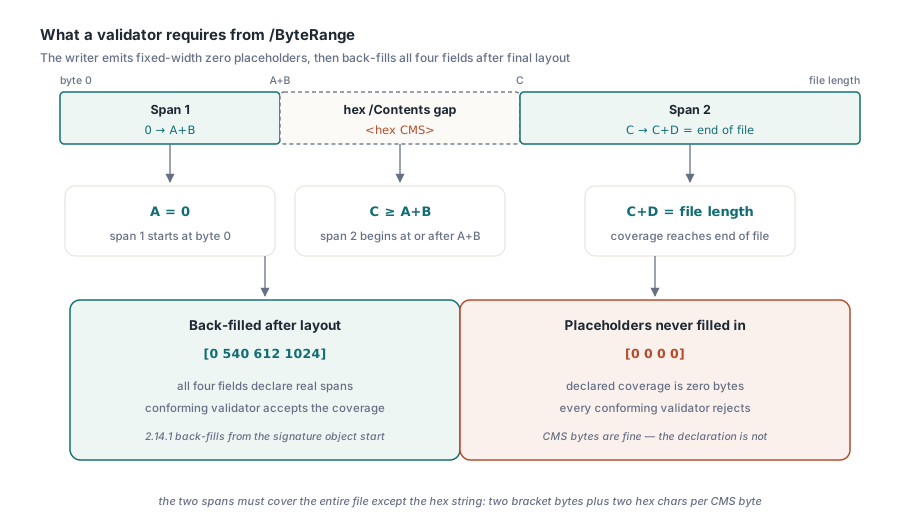
A ByteRange rejection nearly always means the four fields were never filled in, rather than that the ranges are subtly wrong. The /ByteRange [A B C D] array declares two spans, bytes A to A+B and bytes C to C+D, and EN 319 142-1 §6.3 (requirement k) demands that together they cover the entire file except the hex-encoded /Contents string. In numbers: A is 0, C >= A+B, C+D equals the file length, and the gap between B and C holds exactly the <...> hex string — two bracket bytes plus two hex characters per byte of CMS data. A validator that reads [0 0 0 0] concludes the signature covers nothing and throws it out, however correct the CMS structure inside /Contents happens to be
The mechanics of how this happens are worth understanding, because the same pattern turns up in every signing stack. A signer cannot know the final offsets until the file has been laid out, so the writer emits the array with fixed-width zero placeholders and back-fills them afterwards. In releases of the PDFium Component before 2.14.1, that back-fill searched for the placeholder pattern starting from the /Contents position — but /ByteRange sits before /Contents in the dictionary, so the search found nothing and all three replacements failed silently. The CMS digest was computed over the correct ranges, so the cryptography itself was sound; the declaration of those ranges stayed at zero, so every conforming validator turned the file away. PAdES B-LTA Document Time-stamps, which use the same dictionary layout, failed the same way — relevant if you build on long-term B-LT and B-LTA signatures. Version 2.14.1 back-fills from the signature object start, and the fix is covered by a regression test that parses the produced file and asserts the arithmetic below
function SignedByteRangeCoversFile(const FileName: string): Boolean;
var
  Raw: TBytes;
  Text: AnsiString;
  P, N: Integer;
  F: array[0..3] of Int64;
begin
  Raw := TFile.ReadAllBytes(FileName);
  SetString(Text, PAnsiChar(@Raw[0]), Length(Raw));
  P := Pos('/ByteRange', Text);          // first signature only
  Result := P > 0;
  if not Result then Exit;
  Inc(P, Length('/ByteRange'));
  for N := 0 to 3 do
  begin
    while (P <= Length(Text)) and not (Text[P] in ['0'..'9']) do Inc(P);
    F[N] := 0;
    while (P <= Length(Text)) and (Text[P] in ['0'..'9']) do
    begin
      F[N] := F[N] * 10 + Ord(Text[P]) - Ord('0');
      Inc(P);
    end;
  end;
  // EN 319 142-1 §6.3 req k: spans cover everything except /Contents
  Result := (F[0] = 0) and (F[2] >= F[0] + F[1]) and
            (F[2] + F[3] = Int64(Length(Raw)));
end;
Twenty lines of plain RTL code, no library calls, and it catches the whole failure class at the point of production. If you keep just one assertion from this article, keep that one: parse your own signed output and check the three equalities before the file ever leaves your process
Why do validators flag the /M signing time as malformed?
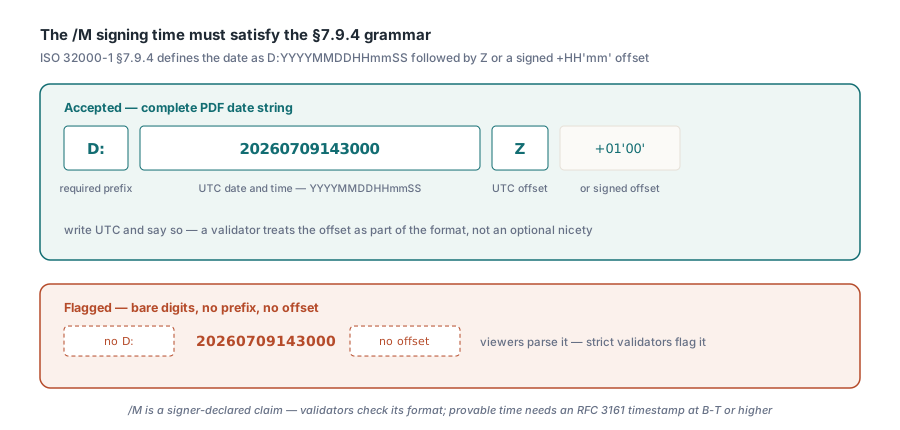
Strict validators reject a signing time that is not a complete PDF date string, and the two parts most often missing are the D: prefix and the UTC offset marker. ISO 32000-1 §7.9.4 defines the date format as D:YYYYMMDDHHmmSS followed by an offset — Z for UTC, or a signed +HH'mm' relationship to it. A bare 20260709143000 parses as a date for a lenient reader, but a validator applying the grammar to the letter sees a malformed string in a mandatory-format field and flags the signature. Releases of the PDFium Component before 2.14.4 wrote the /M entry of TPdf.SignPades and SignPadesBytes in exactly that bare form; since 2.14.4 the entry carries the D: prefix and the Z marker, so the declared signing time reads D:20260709143000Z
Two practical notes attach to this field. First, write UTC and say so: a timestamp with no offset marker forces the validator to guess at the time-zone relationship, and §7.9.4 treats the offset as part of the format rather than an optional nicety. Second, remember what /M actually is — the signer-declared time, a claim rather than a proof. A validator checks its format here, not its truth; provable time comes from an RFC 3161 timestamp at PAdES B-T and above. Formatting a field correctly and trusting it are separate decisions, and validators only enforce the first
Why does SignPades raise EPadesCrypto on an encrypted PDF?
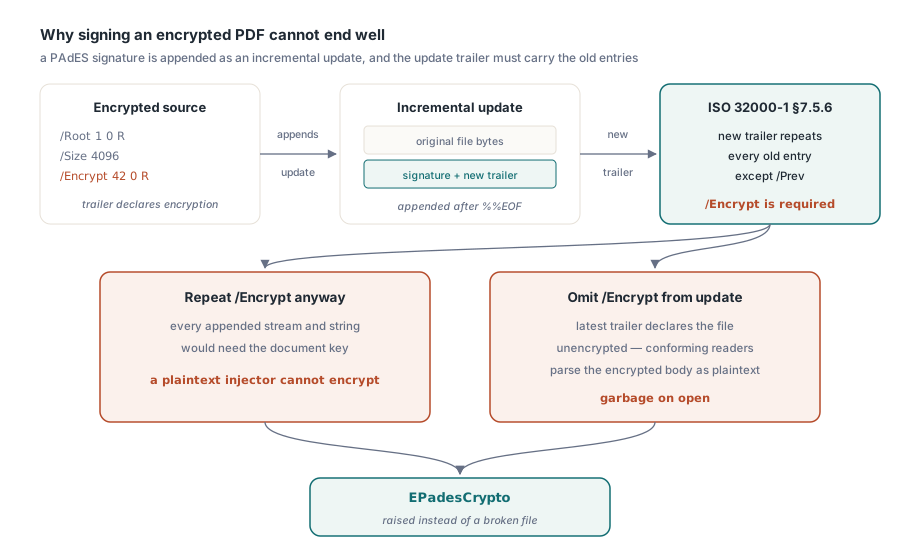
The PDFium Component refuses to sign an encrypted document because the alternative is producing a file that conforming readers will destroy on open. A PAdES signature is appended as an incremental update, and ISO 32000-1 §7.5.6 requires the new trailer of an update section to carry every entry of the previous trailer except /Prev — in an encrypted document that includes /Encrypt. Drop it and the latest trailer declares the file unencrypted, so a conforming reader parses the encrypted body as plaintext and gets rubbish. Worse, the streams and strings the signer appends would themselves have to be encrypted with the document key to be legal, which a plaintext signature injector cannot do. There is no way to append a valid plaintext signature to an encrypted file, so since version 2.14.2 TPdf.SignPades, SignPadesBytes and InjectPadesDssMarkers raise EPadesCrypto instead of emitting a corrupted or unverifiable result
try
  if not Pdf.SignPades('contract-signed.pdf', AThumbprint) then
    Writeln('Signing reported failure');
except
  on E: EPadesCrypto do
  begin
    // e.g. 'SignPadesBytes: the source document is encrypted;
    //       remove encryption before signing'
    Writeln('Cannot sign: ', E.Message);
  end;
end;
The exception is the correct outcome, so design the workflow around it rather than catching and retrying. Decrypt first with owner authority, sign the plaintext copy, and if the distribution channel requires encryption, accept that encrypt-then-sign and sign-then-encrypt produce different artefacts with different validation stories. A signature computed over plaintext bytes cannot survive re-encryption of those bytes, so the honest options are a signed plaintext file or a policy decision documented next to the code
How two bugs can certify each other
The ByteRange defect hid for as long as it did because our own validator was wrong in a complementary way, and that is the most transferable lesson in this article. The coverage check in ValidatePadesCompliance required the second span to start exactly at A+B — a zero gap — which misclassifies the standard layout where the gap holds the /Contents hex string. So the in-house validator rejected precisely the conforming layout whilst the in-house generator never produced one, and end-to-end sign-then-validate pipelines happened to stay green. Each bug denied the test suite the counterexample that would have exposed the other. Version 2.14.1 fixed both sides in the same release: the generator back-fills all four fields, and the validator accepts C >= A+B with C+D equal to the file length
The methodological fix is cross-validation against an implementation you did not write. A generator and a validator that share a codebase, an author, or even just a mental model of the format can agree on a shared misunderstanding indefinitely; an independent validator breaks the symmetry. Run your signed output through at least one external conformance checker before a release, and keep a structural self-check in the build as the quick first line of defence — TPdf.ValidatePades, described in the signature inspection article, reports the coverage failure as a named issue
var
  R: TPadesValidationResult;
begin
  Pdf.FileName := 'contract-signed.pdf';
  Pdf.Active := True;
  R := Pdf.ValidatePades;
  if ppeiByteRangeNotCoveringFile in R.Issues then
    Writeln('ByteRange does not cover the file');
  if not R.IsCompliant then
    Writeln('Structural issues present: do not ship this file');
end;
A rejection checklist for signed output
When a platform rejects your PAdES signature, rule out the cheap structural causes before you start suspecting certificates or trust chains. Read the /ByteRange array and verify the three equalities: first field zero, second span starting at or after the end of the first, second span ending exactly at end of file. Read the /M entry and verify it is a full §7.9.4 date string with the D: prefix and an offset marker. Confirm the source document was not encrypted when the signature was appended — and if your stack signed it anyway without complaint, treat that silence as a bug in the stack. All three checks run on raw bytes in milliseconds, and in our experience they account for the rejection far more often than any cryptographic cause
The signing, inspection and validation calls used here — SignPades, ValidatePades and the PAdES compliance checks with their corrected ByteRange arithmetic, date formatting and encryption gating — ship with the PDFium Component for Delphi, C++Builder and Lazarus