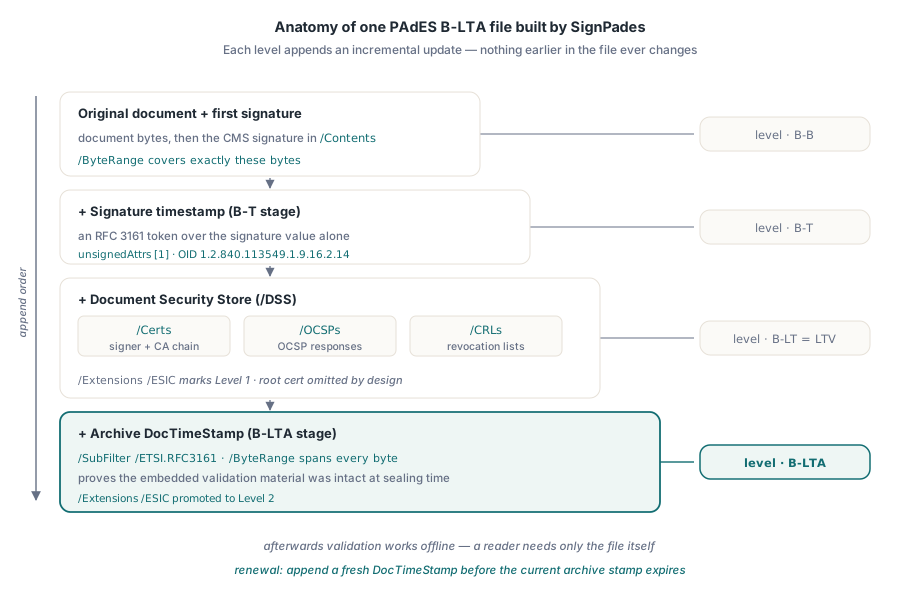
To make a signed PDF verify years from now, after the signing certificate expires and its CA rotates, the PDFium Component can produce long-term PAdES signatures on Windows: an RFC 3161 timestamp for trusted time, a Document Security Store that embeds the validation material, and an archive DocTimeStamp over the whole file. Those three additions are the PAdES B-T, B-LT and B-LTA baseline levels, and the PDFium Component reaches all of them from a single signing call. This is a Windows-only capability, gated by PadesCryptoAvailable
This article is the third in a series. The first, signing PDFs with PAdES B-B using PDFium VCL, covers the basic signature; the second, inspecting PDF digital signatures and PAdES levels, covers reading a signature back and telling which level it reached. Here the concern is the archive: signatures that must survive certificate expiry and stay verifiable for a retention period measured in years, not weeks
Why does a valid PDF signature stop verifying over time?
A basic signature answers only one question: were these bytes altered after signing. It does not, on its own, prove when the signing happened, and that gap is what breaks it later. The CMS structure carries a signing-time attribute, but the signer writes that value from their own clock, so a validator has no reason to trust it. When the signing certificate later expires or the CA revokes it, a strict validator can no longer distinguish a signature made while the certificate was valid from one forged after it lapsed. The signature was fine the day it was made and becomes unverifiable through no fault of its own
Long-term archiving fixes this in two moves. First, a trusted third party, a Time Stamping Authority, asserts the time cryptographically so it no longer depends on the signer honesty. Second, every certificate, revocation response and CRL needed to build and check the trust chain is embedded inside the PDF itself, so validation does not depend on servers that may be gone by the time anyone looks. PAdES, standardised as ETSI EN 319 142-1, layers these as baseline levels, and the PDFium Component writes the structures each level requires
What is an LTV or archive-timestamp PDF signature?
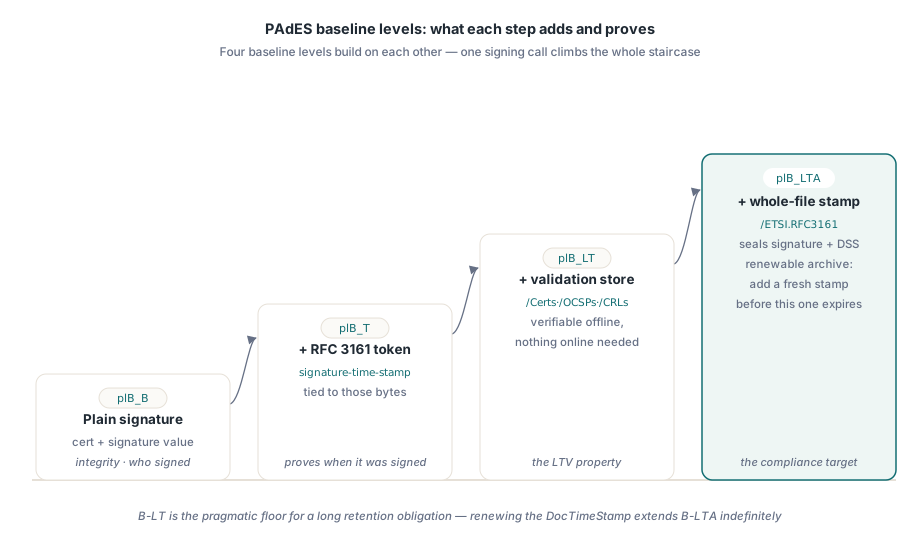
PAdES defines four baseline levels that build on each other, and the PDFium Component exposes them through the TPadesLevel enumeration (plB_B, plB_T, plB_LT, plB_LTA). B-B is the plain signature. B-T adds a trusted timestamp over the signature value. B-LT (long-term) adds the embedded validation material, the property most people mean by "LTV". B-LTA (long-term with archive timestamp) wraps everything in one more timestamp that covers the entire file, so the embedded material itself is provably intact from the moment of archiving
The practical reading is a staircase. B-T proves when. B-LT proves with what the signature can still be checked. B-LTA proves the whole package has not been tampered with since it was sealed, and it is the level you renew, by adding a fresh DocTimeStamp before the previous one expires, to extend the archive indefinitely. For a contract or a compliance record with a long retention obligation, B-LTA is the target; B-LT is the pragmatic floor
Adding trusted time: PAdES B-T with RFC 3161
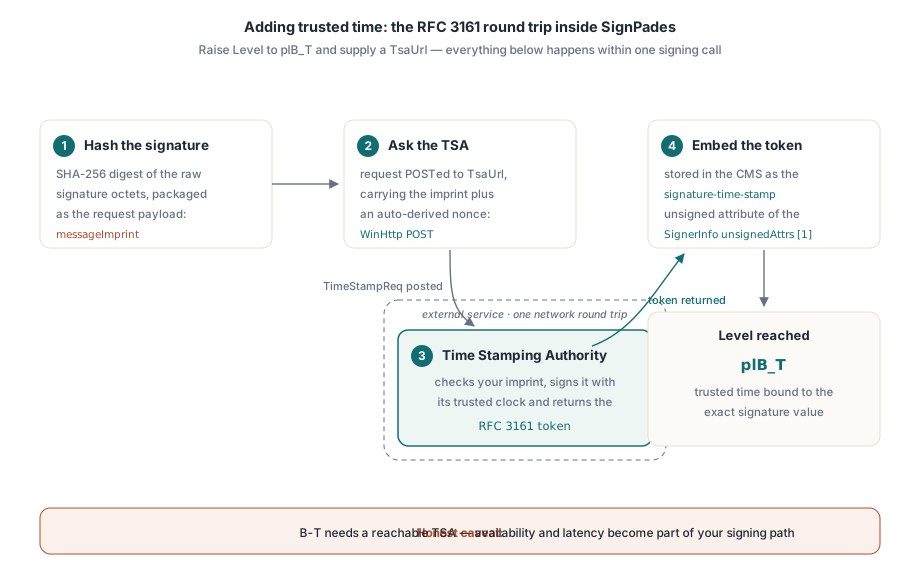
The PDFium Component turns a B-B signature into B-T by setting two fields on TPadesSignOptions: raise Level to plB_T and supply a TsaUrl. When both are present, the signing pipeline hashes the raw signature octets with SHA-256, packages that digest as the RFC 3161 messageImprint, POSTs the request to the TSA over WinHttp, and embeds the returned token as the signature-time-stamp unsigned attribute (OID 1.2.840.113549.1.9.16.2.14) in the SignerInfo unsignedAttrs [1], per EN 319 142-1 §6.3. The timestamp covers the signature value specifically, which is what binds the trusted time to that exact signature
uses
  PDFium, FPdfPades;

procedure SignWithTimestamp;
var
  Pdf: TPdf;
  Options: TPadesSignOptions;
begin
  Pdf := TPdf.Create(nil);
  try
    if not Pdf.PadesCryptoAvailable then
      raise Exception.Create('PAdES signing backend is Windows-only');
    Pdf.FileName := 'contract.pdf';
    Pdf.Active := True;

    Options := TPadesSignOptions.Default;
    Options.CertificateThumbprint := 'A1B2C3D4E5F6071829304152637485960A1B2C3D';
    Options.Level  := plB_T;
    Options.TsaUrl := 'http://timestamp.example-tsa.com/tsr';
    Options.Reason := 'Contract execution';
    // Nonce left at 0: the component derives a unique anti-replay value.

    Pdf.SignPades('contract-bt.pdf', Options);
  finally
    Pdf.Free;
  end;
end;
The CertificateThumbprint is the SHA-1 hash, in hex, of a certificate in the Current User "MY" store whose private key you can use. The Nonce field is the RFC 3161 anti-replay value; leave it zero and the component derives a unique one per request from a SHA-256 fold of a counter, the clock, the tick count and the process id, so two requests issued in the same millisecond do not collide. Pass your own value only when you have a cryptographic RNG you would rather trust. One honest caveat: B-T needs a reachable TSA, so signing now makes a network call and inherits the TSA availability and latency
Embedding validation material: B-LT and B-LTA in one call
The step up to long-term validation is a single change: set Level to plB_LTA and keep the TsaUrl. The PDFium Component then runs the full staircase inside one SignPades call. It signs B-B, timestamps for B-T, injects the Document Security Store for B-LT, and appends the archive timestamp for B-LTA, each as its own incremental update so the earlier bytes stay byte-for-byte intact
procedure SignForArchive;
var
  Pdf: TPdf;
  Options: TPadesSignOptions;
begin
  Pdf := TPdf.Create(nil);
  try
    Pdf.FileName := 'contract.pdf';
    Pdf.Active := True;

    Options := TPadesSignOptions.Default;
    Options.CertificateThumbprint := 'A1B2C3D4E5F6071829304152637485960A1B2C3D';
    Options.Level    := plB_LTA;   // drives B-B -> B-T -> B-LT -> B-LTA
    Options.TsaUrl   := 'http://timestamp.example-tsa.com/tsr';
    Options.Location := 'Head Office';

    // One call writes the timestamp, the DSS and the archive DocTimeStamp.
    Pdf.SignPades('contract-lta.pdf', Options);
  finally
    Pdf.Free;
  end;
end;
For the B-LT stage the PDFium Component builds the certificate chain with CertGetCertificateChain and writes a /DSS dictionary carrying the signer certificate plus every intermediate CA in a /Certs array (with parallel /OCSPs and /CRLs arrays), alongside an /Extensions /ESIC marker at Level 1, exactly as EN 319 142-1 §5.4.2 prescribes. The self-signed root is deliberately omitted, since RFC 5652 §10.2.3 allows it and the root is already a trust anchor the validator holds. The result is a signature a reader can verify with nothing but the file in hand
For B-LTA the component appends a Document Time-stamp: a signature dictionary with /SubFilter /ETSI.RFC3161 whose /ByteRange spans the entire file, its /Contents holding an RFC 3161 token over that range, and it promotes the ESIC marker to Level 2. This is the §5.4.3 and TS 119 142-3 archive step. Because the DocTimeStamp covers the DSS as well as the signature, it proves the embedded validation material was present and unaltered at archiving time, which is precisely what a long retention policy has to be able to show
Augmenting a signature that already exists
Sometimes the signature is already on the document and you only need to add or refresh the validation store, for example to bring a third-party B-B signature up to B-LT for your archive. The PDFium Component exposes the DSS injector directly through SaveAsPadesDss, which appends the /DSS and /Extensions structures as an incremental update without touching the existing signature bytes
procedure AddValidationStore;
var
  Pdf: TPdf;
  DssOpts: TPadesDssOptions;
  Cert: TPadesDssMaterial;
begin
  Pdf := TPdf.Create(nil);
  try
    Pdf.FileName := 'already-signed.pdf';
    Pdf.Active := True;

    DssOpts := TPadesDssOptions.Default;
    DssOpts.EsicExtensionLevel := 1;         // 1 for B-LT, 2 for B-LTA
    Cert.DerBytes := LoadSignerCertDer;       // your DER-encoded certificate
    SetLength(DssOpts.Certs, 1);
    DssOpts.Certs[0] := Cert;

    Pdf.SaveAsPadesDss('already-signed-lt.pdf', DssOpts);
  finally
    Pdf.Free;
  end;
end;
You supply the DER-encoded certificates, and optionally OCSP responses and CRLs, that a validator will need. Set EsicExtensionLevel to 1 for a B-LT store or 2 when a DocTimeStamp will follow. Leave IncludeVri at its default False: EN 319 142-1 §5.4.2.3 treats the per-signature /VRI dictionary as optional and advises against it unless a specific reader you target demands it
Costs and boundaries worth planning for
Three honest limits shape where these levels fit. First, the cryptographic backend is Windows-only: signing and timestamping go through the platform CNG and WinHttp stores, so PadesCryptoAvailable returns False elsewhere and SignPades raises. The read-side inspection covered in the companion article stays cross-platform; only the writing of signatures is bound to Windows. Second, B-T and B-LTA depend on a Time Stamping Authority, which means a network round trip at signing time and an external service whose uptime and rate limits become part of your signing path
Third, each level costs storage. Every stage appends an incremental update rather than rewriting the file, the DSS embeds a full certificate chain, and the archive DocTimeStamp reserves space for its token, so a B-LTA file is meaningfully larger than the B-B original. That is the deliberate trade: you spend bytes now to buy verifiability later. For most contract and compliance archives it is the right trade, but it is worth measuring on your own documents rather than assuming. When you need to confirm a finished file actually reached the level you intended, verify it with the techniques in inspecting PDF digital signatures and PAdES levels, and if you are hardening a document pipeline more broadly, the notes on auditing PDF security risks cover the surrounding checks
The PAdES signing, DSS and archive-timestamp features shown here are part of the PDFium Component for Delphi and C++Builder, whose product page carries the full signing reference and the platform requirements