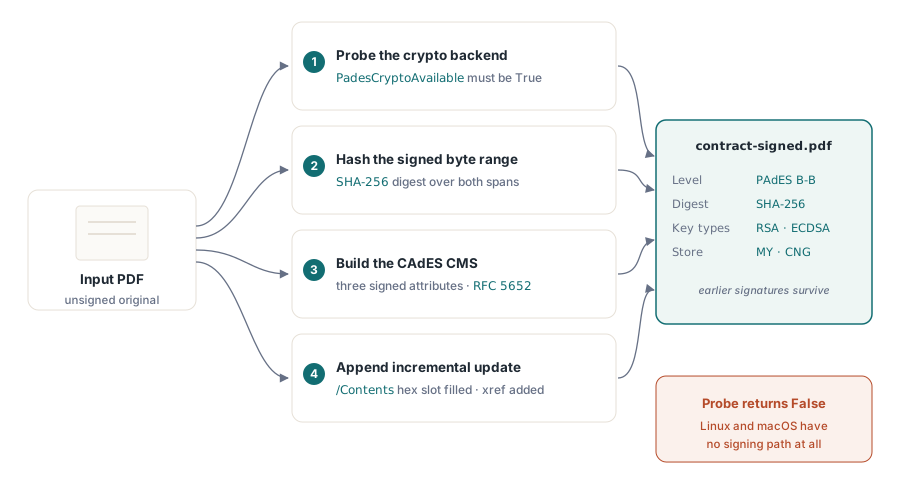
The PDFium Component signs a PDF with a PAdES B-B digital signature through its SignPades method: it loads the document, hashes the signed byte range, builds a CAdES CMS structure, and appends the signature as an incremental update. The cryptographic backend is Windows-only, so guard every call with PadesCryptoAvailable before you sign
The situation is familiar. A contract PDF lands on your desk, legal wants it digitally signed before it goes out, and you reach for the same PDFium build you already use to render and inspect documents, only to discover that PDFium cannot write a signature at all. Its signature API is strictly read-only. The PDFium Component closes that gap by owning the entire signing pipeline in Pascal, from the hash function up to the byte-level injection, and this article walks that pipeline end to end
Why can't PDFium write a digital signature?
PDFium exposes signatures as read-only objects and offers nothing that creates one. The FPDFSignatureObj_* family lets you enumerate an existing signature, read its /Contents, and inspect its /ByteRange, but there is no counterpart that builds a signature dictionary, reserves a /Contents slot, or writes a byte range; incremental saving exists (FPDF_SaveAsCopy with FPDF_INCREMENTAL) yet carries no signing hook. Any component that signs a PDF on top of PDFium must therefore generate every signature byte itself, which is why the PDFium Component builds the machinery from three pure-Pascal units. FPC 3.2.2 ships md5 and sha1 but no SHA-2 at all, and the Delphi System.Hash SHA-256 API is not source-compatible with FPC, so FPdfSha256 is a self-contained FIPS 180-4 implementation that keeps every CMS code path on one TSHA256Digest type with no compiler branching. FPdfAsn1 supplies the DER encoder and reader the CMS structures need, and FPdfCms assembles the CAdES SignedData on top of both
How do you digitally sign a PDF in Delphi?
Load the document, then call SignPades with a certificate thumbprint. The PDFium Component resolves that thumbprint against the Current User "MY" certificate store, pulls the matching certificate and its private key, and writes a signed copy to the path you name
uses
  PDFium, FPdfCrypto;

procedure SignContract(const AThumbprint: string);
var
  Pdf: TPdf;
begin
  if not PadesCryptoAvailable then
    raise Exception.Create('PAdES signing requires the Windows CNG backend');

  Pdf := TPdf.Create(nil);
  try
    Pdf.FileName := 'contract.pdf';   // the document to sign
    Pdf.Active := True;
    // Second argument: SHA-1 thumbprint of a certificate in the Current
    // User "MY" store. First argument: destination for the signed copy.
    if not Pdf.SignPades('contract-signed.pdf', AThumbprint) then
      raise Exception.Create('Signing failed');
  finally
    Pdf.Free;
  end;
end;
PadesCryptoAvailable is the probe you check first, every time. On Windows it returns True and the crypt32/ncrypt backend is live; on any other platform it returns False and a signing call would raise EPadesCrypto. Treating the guard as mandatory keeps a Linux or macOS build from failing at run time on a path that cannot work there. The thumbprint itself is the SHA-1 hash of the certificate, the same value the Windows certificate manager shows on its Details tab, and it names a specific signer without ever placing key material in your source
What goes into the CMS: signed attributes and RFC 5652
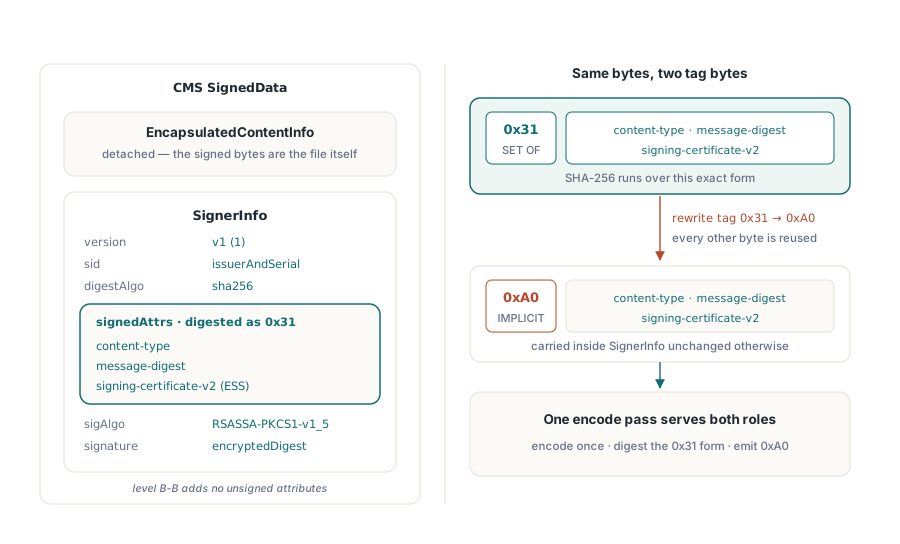
A PAdES baseline signature is not a raw RSA signature over the file; it is a CAdES CMS SignedData structure carrying a mandated set of signed attributes, and FPdfCms.BuildSignedData emits exactly that set: content-type, message-digest, and signing-certificate-v2, the ESS attribute that binds the signature to the signer certificate by hash. One detail here defeats almost every hand-rolled CMS implementation. RFC 5652 §5.4 requires the signed-attributes digest to be computed over the DER SET OF encoding, tag 0x31, while the same attributes travel inside SignerInfo under the IMPLICIT [0] tag, 0xA0. The PDFium Component encodes the attribute set once, digests the 0x31 form, then rewrites only the leading tag byte to 0xA0 for emission, so one buffer serves both roles with no second pass over the tree
var
  Pdf: TPdf;
  Opts: TPadesSignOptions;
begin
  Pdf := TPdf.Create(nil);
  try
    Pdf.FileName := 'contract.pdf';
    Pdf.Active := True;

    Opts := TPadesSignOptions.Default;
    Opts.CertificateThumbprint := 'a1b2c3d4e5f6...';  // signer in the MY store
    Opts.Reason := 'I approve this agreement';
    Opts.Location := 'Berlin, DE';
    Opts.ContentsSize := 16384;                        // hex width of /Contents

    if not Pdf.SignPades('contract-signed.pdf', Opts) then
      raise Exception.Create('Signing failed');
  finally
    Pdf.Free;
  end;
end;
The options overload adds the signature-dictionary metadata ISO 32000-1 §12.8.1 defines: Reason, Location, ContactInfo, and Name, all optional and all written into the signature value dictionary. One constraint is easy to trip over. If you set CommitmentTypeOid to add a CAdES commitment-type-indication signed attribute, do not also set Reason; ETSI EN 319 142-1 §6.3 forbids carrying both, because the two express the same intent by different means
How do the ByteRange and /Contents slot fit together?
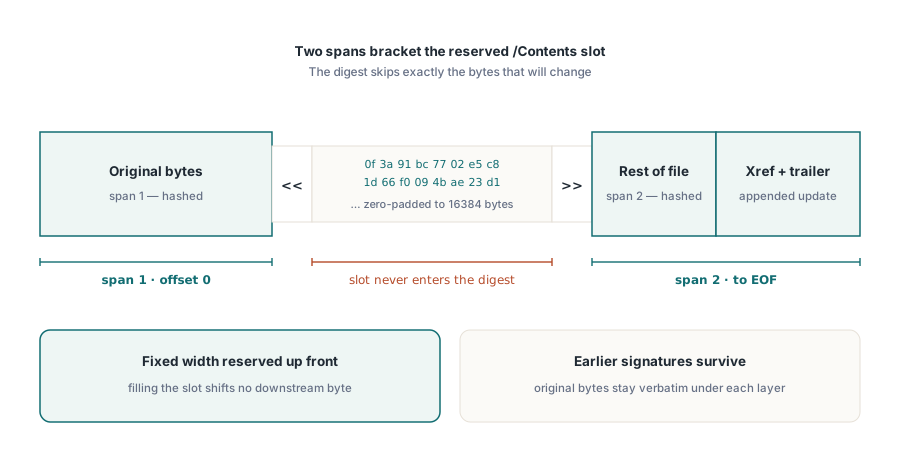
A signature has to cover the whole file except the bytes that hold the signature itself, and PAdES resolves that circularity with a fixed-width placeholder that SignPadesBytes manages precisely. It reserves a /Contents hex string of ContentsSize bytes (16384 by default, comfortably larger than a typical CMS SignedData), serialises the incremental update to locate the exact slot offset, then computes the /ByteRange as two spans that bracket the slot, everything before the opening delimiter of the hex string and everything after its closing delimiter. The SHA-256 runs over those two spans only. The finished CMS is hex-encoded into the reserved slot, zero-padded to the fixed width, and the cross-reference update is appended. Because the width is fixed up front, filling the slot shifts no downstream byte, which is the whole reason the byte range stays valid; the original document bytes are preserved verbatim, so an earlier signature on the same file survives intact exactly as ISO 32000-1 §12.8.1 incremental signing requires
The Windows CNG backend and its limits
The PDFium Component signs only on Windows, and that boundary is deliberate. FPdfCryptoWin binds crypt32.dll and ncrypt.dll dynamically, adding no compile-time DLL dependency, and the signing chain is standard CNG: open the MY store, find the certificate by hash, acquire its private key handle through CryptAcquireCertificatePrivateKey, and call NCryptSignHash. RSA with PKCS#1 v1.5, RSA-PSS, and ECDSA are all supported. ECDSA needs one fix-up the others do not, because NCryptSignHash returns the raw IEEE P1363 r-and-s pair while CMS expects a DER ECDSA-Sig-Value SEQUENCE, so the backend re-encodes it per RFC 5480
var
  Pdf: TPdf;
  Opts: TPadesSignOptions;
  Output: TFileStream;
begin
  if not PadesCryptoAvailable then
    Exit;   // no signing backend on this platform

  Opts := TPadesSignOptions.Default;
  Opts.CertificateThumbprint := ReadThumbprintFromConfig;

  Pdf := TPdf.Create(nil);
  Output := TFileStream.Create('contract-signed.pdf', fmCreate);
  try
    Pdf.FileName := 'contract.pdf';
    Pdf.Active := True;
    Pdf.SignPadesToStream(Output, Opts);
  finally
    Output.Free;
    Pdf.Free;
  end;
end;
The practical consequence is that the private key must live in the Windows certificate store. A certificate held in a PFX file works only after you import it into the Current User store, at which point its thumbprint is the value you pass to SignPades. This release has no PKCS#11 or HSM path and no software-key file backend, so when PadesCryptoAvailable returns False there is simply no signing to be had on that machine
Where PAdES B-B stops
PAdES B-B is the baseline, the floor of the four PAdES levels: it proves who signed and that the bytes have not changed since, and nothing beyond that. A B-B signature carries no trusted timestamp, so it cannot prove when the signing happened, and it embeds no revocation data, so a verifier years later must fetch the certificate chain and its status itself. Those gaps are precisely what the higher levels close. When you need a signing time an auditor will accept, adding an RFC 3161 timestamp and DSS for long-term validation moves the signature to B-T and above; when you want to read a finished signature back and confirm which level it reached, inspecting a PDF signature and its PAdES level is the companion tool; and before signing anything at all, auditing a PDF for security risks tells you what you are about to put your name on
The SignPades methods shown here ship with the PDFium Component for Delphi and C++Builder, alongside the read-only signature inspection PDFium provides out of the box