PDFium Component subsets fonts that are already embedded in an existing PDF through SubsetPdfDocumentFonts in the FPdfDocumentFontSubset unit. The function replaces an embedded TrueType /FontFile2 program with a smaller one only when the font resources themselves prove every glyph the document can reference; a font whose glyph domain cannot be proven is left exactly as it was
The usual reason to want this is an archive you did not produce. Invoices, statements and reports from older generators often carry a complete Arial or a full CJK face in every file, and a few hundred kilobytes of font per two-page document adds up fast across a few million documents. Re-rendering from source is rarely an option. What you have is the PDF, and the only safe question is how much of each embedded font can go without a single page losing a character
Why does subsetting an existing PDF risk losing glyphs?
Subsetting an existing PDF risks losing glyphs because the post-processor does not know which glyphs the original writer used. The producer that embedded the font knew its own text; a tool running afterwards has to reconstruct that knowledge, and any glyph it misses turns into an empty box or a .notdef shape on a page nobody looks at until a customer does
The obvious approach is to parse every content stream, every Form XObject, every annotation appearance and every field default appearance, collect the codes shown with each font, and keep those glyphs. It works until it meets a font resource shared across pages and forms, a form field whose appearance a viewer regenerates from /DA, or a content stream with an operator sequence the scanner does not model. SubsetPdfDocumentFonts deliberately does not scan content streams. It derives the glyph domain from the metadata the PDF has to carry about each font anyway: the /CIDToGIDMap, the /W and /W2 width arrays, the /CIDSet bitmap, the /ToUnicode CMap, the simple-font /Widths array and the /Encoding. When that metadata does not bound the domain, the font stays untouched
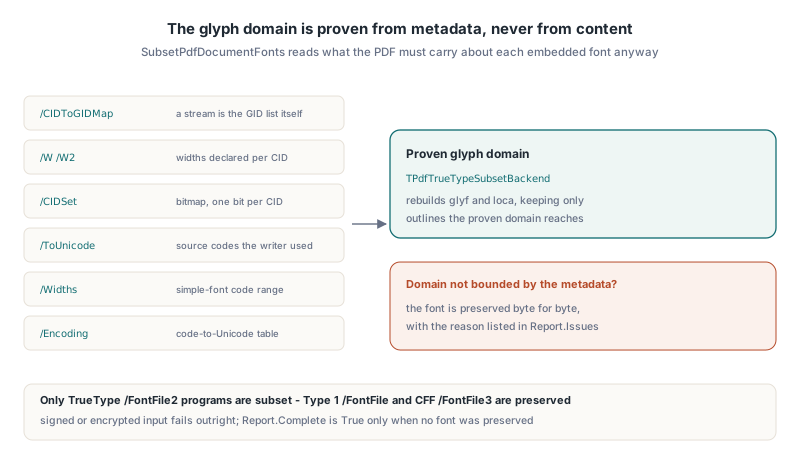
Keeping original glyph IDs so content streams stay untouched
The subset backend behind SubsetPdfDocumentFonts, TPdfTrueTypeSubsetBackend, keeps every original glyph ID slot, so no content stream, CID or /CIDToGIDMap ever has to be rewritten. It rebuilds the glyf and loca tables, gives every unused glyph a zero-length loca range and leaves maxp.numGlyphs unchanged. Glyph 4711 is still glyph 4711 after subsetting; it just has outlines only if the document can reach it
That choice removes the riskiest part of subsetting a finished document. Renumbering glyphs would mean rewriting every string in every content stream that uses the font, plus the mapping stream, plus anything that caches glyph IDs. Retained IDs cost a little size, because loca keeps one entry per original glyph, but the bulk of a TrueType program is outline data, and that is what goes. Composite glyphs are followed to their components, so an accented letter keeps the base letter and the accent it is built from; cyclic or over-deep composite references fail the font instead of producing a broken closure
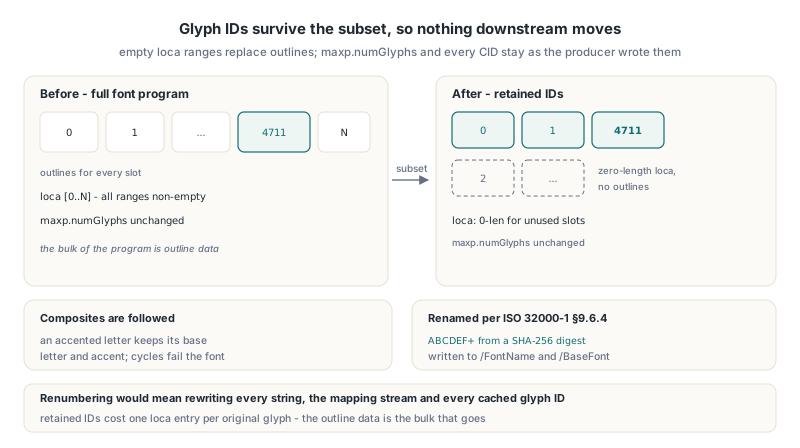
The renamed font also follows ISO 32000-1 §9.6.4, which requires a subset font name to start with six uppercase letters and a plus sign. The component derives the six letters from a SHA-256 digest of the new font program, strips any existing ABCDEF+ prefix first, resolves collisions between fonts in the same document, and writes the new name to both the descriptor /FontName and the font dictionary /BaseFont, including the Type0 parent of a CIDFont
uses
  System.SysUtils, System.Classes, FPdfDocumentFontSubset;

procedure SubsetEmbeddedFonts(const SourceName, TargetName: string);
var
  Source, Target: TFileStream;
  Options: TPdfDocumentFontSubsetOptions;
  Report: TPdfDocumentFontSubsetReport;
  Output: TBytes;
begin
  Options := TPdfDocumentFontSubsetOptions.Default;
  Source := TFileStream.Create(SourceName, fmOpenRead or fmShareDenyWrite);
  try
    if not SubsetPdfDocumentFonts(Source, Options, Output, Report) then
      raise Exception.Create('Font subsetting failed: ' + Report.ErrorMessage);
  finally
    Source.Free;
  end;
  // Output is always a complete PDF: the rebuilt file when Report.Applied
  // is True, otherwise a byte-for-byte copy of the source
  Target := TFileStream.Create(TargetName, fmCreate);
  try
    if Length(Output) > 0 then
      Target.WriteBuffer(Output[0], Length(Output));
  finally
    Target.Free;
  end;
end;
How does SubsetPdfDocumentFonts prove the glyph domain of a CIDFont?
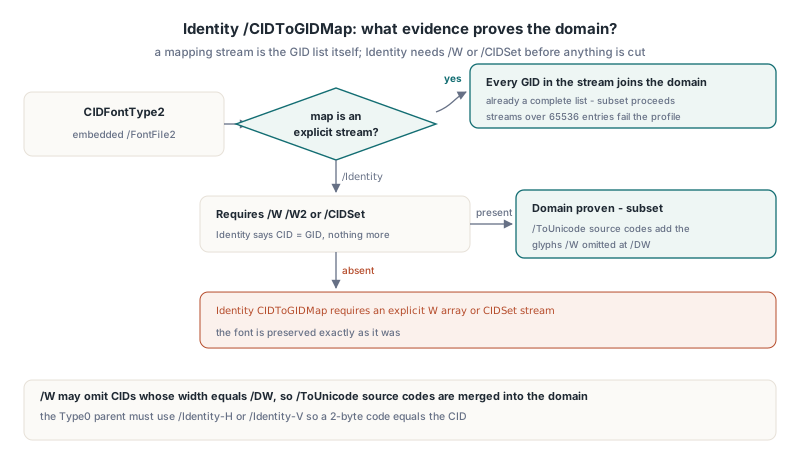
SubsetPdfDocumentFonts proves the glyph domain of a CIDFontType2 font from its CID-to-glyph mapping, and the mapping decides how much extra evidence is needed. An explicit /CIDToGIDMap stream (ISO 32000-1 §9.7.4.2) is already a list of every glyph the font can address, so every GID in the stream joins the domain. A mapping stream larger than 65536 entries, or one with an odd byte count, fails the bounded profile and the font is preserved
/CIDToGIDMap /Identity is the hard case, and it is also the most common one in modern files. Identity says CID equals GID, which tells you nothing about which CIDs the document uses. The component therefore requires primary evidence: an explicit /W or /W2 width array (§9.7.4.3), whose CID entries mark glyphs the producer declared metrics for, or a /CIDSet stream in the font descriptor (§9.8.3), a bitmap with one bit per CID, most significant bit first. A bare Identity font with neither is preserved with the reason Identity CIDToGIDMap requires an explicit W array or CIDSet stream
The trap in using /W as evidence is /DW. A producer is allowed to leave out every CID whose width equals the default width, and a well-optimised writer does exactly that for the most common glyph widths. If the domain came from /W alone, those glyphs would quietly disappear from the subset. To close that gap the component walks every Type0 font whose /DescendantFonts points at the CIDFont, requires its /Encoding to be /Identity-H or /Identity-V so a 2-byte code is the CID, and merges the source codes of every beginbfchar and beginbfrange entry from its /ToUnicode CMap (§9.10.3) into the domain. Any other encoding, or a /ToUnicode stream that cannot be decoded within budget, preserves the font
Simple TrueType fonts: from Widths to glyph IDs
Single-byte /Subtype /TrueType fonts are proven through their code range and their encoding, then resolved to glyph IDs through the font program's own cmap. The component requires 0 <= FirstChar <= LastChar <= 255 and a /Widths array whose length is exactly LastChar - FirstChar + 1; a short, long or non-numeric array means the code domain is not proven, and the font stays as it is
Each code in that range, plus any code named in /Differences or covered by /ToUnicode, is then mapped the way ISO 32000-1 §9.6.6 describes. Codes under /WinAnsiEncoding, /MacRomanEncoding or /StandardEncoding go through the matching table to Unicode. /Differences glyph names are resolved through the Adobe Glyph List, uniXXXX and uXXXX names, the 258 standard Macintosh glyph names and the font's own post format 2.0 name table. The resulting values are looked up in format 0, 4, 6 and 12 cmap subtables, including Unicode (3,1), (3,10) and (0,*), Mac Roman (1,0), and Windows Symbol (3,0) at F000 plus the code
When a font has no base encoding at all, the component marks the union of every plausible interpretation instead of guessing one. That keeps a few glyphs that are probably unused, which is the right direction to err in. The opposite case is strict: a /Differences name that maps to no proven glyph ID rejects the whole font, because one unresolved name means the domain is incomplete
procedure ReportFontSubset(Source: TStream; Log: TStrings);
var
  Options: TPdfDocumentFontSubsetOptions;
  Report: TPdfDocumentFontSubsetReport;
  Output: TBytes;
  I: Integer;
begin
  Options := TPdfDocumentFontSubsetOptions.Default;
  Options.SubsetOptions.MinimumSavingPercent := 10;  // per font
  Options.MinimumDocumentSavingPercent := 5;         // whole file
  if not SubsetPdfDocumentFonts(Source, Options, Output, Report) then
  begin
    Log.Add('Rejected: ' + Report.ErrorMessage);
    Exit;
  end;
  Log.Add(Format('Fonts %d, subset %d, preserved %d, glyphs %d',
    [Report.FontCount, Report.SubsetFontCount, Report.PreservedFontCount,
     Report.GlyphCount]));
  Log.Add(Format('Font bytes %d -> %d, file bytes %d -> %d',
    [Report.OriginalFontBytes, Report.SubsetFontBytes,
     Report.SourceByteCount, Report.OutputByteCount]));
  for I := 0 to High(Report.Issues) do
    Log.Add(Format('  object %d kept: %s',
      [Report.Issues[I].ObjectNumber, Report.Issues[I].Reason]));
end;
What does SubsetPdfDocumentFonts leave alone?
SubsetPdfDocumentFonts leaves alone every font it cannot prove, and it reports each one in Report.Issues with the object number and a reason instead of failing the document. Report.Complete is True only when no font was preserved. The preserved cases are worth knowing before you promise a size reduction:
- Type 1
/FontFileand CFF or OpenType/FontFile3programs, reported asOnly TrueType FontFile2 programs are supported - Identity CIDFonts with no
/W,/W2or/CIDSet, and CIDFonts with neither a mapping stream nor/Identity - Font programs referenced from somewhere other than their font descriptors, and descriptors shared with a consumer that is not
CIDFontType2or simpleTrueType - Fonts whose subset misses
SubsetOptions.MinimumSavingPercent, and every font when the rebuilt file missesMinimumDocumentSavingPercent; in that caseReport.AppliedisFalseand the output is the original bytes
Two inputs fail outright rather than being preserved. Signed documents and documents with signature fields are rejected, because replacing font objects would invalidate the byte range of every signature, and encrypted files need a decrypted source first. A successful run writes the replacement objects as a sparse update and then rebuilds the file through the same reachability pass described in the guide to pruning orphan objects and deduplicating resources, so the old font programs do not survive as unreachable objects and the result is a single clean revision
Subsetting new text at save time with saSubsetNewFonts
Fonts that PDFium Component embeds during the current session are a separate case, handled by the saSubsetNewFonts save option rather than by SubsetPdfDocumentFonts. saSubsetNewFonts maps to the PDFium FPDF_SUBSET_NEW_FONTS flag, which runs the native HarfBuzz subsetter over fonts that native calls such as TPdf.AddText loaded from the system, including OpenType CFF faces. Upstream PDFium still labels the flag experimental. It does not touch fonts that were already in the file
var
  Pdf: TPdf;
begin
  Pdf := TPdf.Create(nil);
  try
    Pdf.CreateDocument;
    Pdf.AddPage(0, 595, 842);
    Pdf.AddText('Quarterly statement', 'Arial', 14, 72, 770, clBlack, $FF, 0.0);
    if not Pdf.SaveAs('statement.pdf', saSubsetNewFonts) then
      raise Exception.Create('Save failed');
  finally
    Pdf.Free;
  end;
end;
In the component's probe, a document with Arial text dropped from 590 KB to 22 KB under saSubsetNewFonts, and text extraction from the saved file still matched exactly. A COLR v0 colour font, Segoe UI Emoji at 7.0 MB, went through the same path to 10.5 KB, rendered as its base outlines since PDF has no notion of COLR layers. Variable fonts are the exception, and the block sits in front of the subsetter: GDI GetFontData returned an 18.3 MB substitute stream for the 1.85 MB Segoe UI Variable file, and text object creation failed before any subsetting began. The walkthrough of CID Type 2 font embedding from Delphi covers the embedding path those fonts go through first
Where the proof stops
The proof inside SubsetPdfDocumentFonts is exactly as strong as the font metadata the producer wrote. An Identity CIDFont whose evidence is /W alone still has one blind spot: a glyph whose width equals /DW, that has no /ToUnicode entry, and that the descriptor does not list in a /CIDSet. Such a glyph is not provable from the resources, and the component cannot know it exists without the content stream scan it avoids on purpose. Producers that omit both /ToUnicode and /CIDSet whilst compressing /W are rare, but they exist, so for an archive from an unknown generator, render a sample before and after and compare pixels and extracted text
Before running a batch, it also helps to know what you are dealing with. The approach in reading PDF font properties with PDFium Component tells you which fonts are embedded at all, and Report.Issues from a dry run tells you which of those will be preserved and why. The default options also bound the work: 1024 fonts, about one million glyphs in total, 128 MB of source and a fixed work budget, with an optional CancellationToken for long batch jobs
FAQ
Does SubsetPdfDocumentFonts change the text or layout of the PDF?
No. Original glyph IDs, CIDs, widths and content streams are kept, so text extraction and rendering use the same glyphs as before; only unreachable outlines are removed and the font names get a new subset prefix
Why was an embedded font not subset?
Read Report.Issues. Each preserved font carries a reason such as a missing /W or /CIDSet on an Identity CIDFont, a non-TrueType program, a malformed /Widths array or a saving below the threshold
Is saSubsetNewFonts the same as SubsetPdfDocumentFonts?
No. saSubsetNewFonts subsets fonts embedded in the current session when you save, whilst SubsetPdfDocumentFonts works on an existing PDF stream and replaces fonts that were already embedded by another producer
Document font subsetting, save-time font subsetting and the orphan pruning pass behind them all ship with PDFium Component for Delphi and C++Builder, which wraps PDFium for Delphi, C++Builder and Lazarus projects