PDFium Component writes text into a PDF page at the glyph level with AddCidType2Text, embedding TrueType data you supply as a CID Type 2 font. It assigns each glyph instance a sequential CID, generates the explicit CID-to-GID map and the ToUnicode CMap, and merges glyphs on the same baseline into a single native text object. Optional subsetting keeps the file small, with an explicit policy for what happens when subsetting fails
Glyph-level writing is what you need when the text has already been shaped. Arabic, Devanagari and any script with contextual forms produce a sequence of glyph identifiers that no longer maps one-to-one onto characters, so an API that takes a string and a font name cannot express the result. Handing over glyphs and positions directly is the only way to put correctly shaped complex script text into a PDF
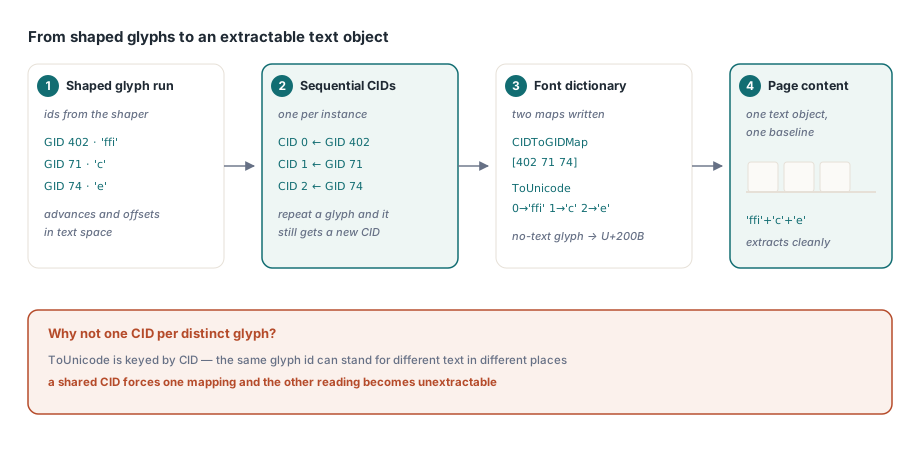
Why every glyph instance gets its own CID
The tempting optimisation is to deduplicate: one CID per distinct glyph identifier, reused wherever that glyph appears. It produces a smaller font and it breaks text extraction, because the same glyph can legitimately correspond to different Unicode content in different places
A ligature glyph is the clear case. The same "ffi" glyph may stand for the three characters in one word and, after a different shaping decision, for something else elsewhere. The ToUnicode map is keyed by CID, so a shared CID can only carry one mapping, and whichever text loses that contest becomes unextractable
So each glyph instance takes its own CID, and each mapping is free to be several UTF-16 code units. A glyph with no meaningful text — a decorative element, a positioning-only glyph — maps explicitly to U+200B, a zero-width space, so every CID has an observable extraction result rather than a gap
uses
  PDFium;

var
  Pdf: TPdf;
  Glyphs: TPdfCidGlyphs;
  Options: TPdfCidFontOptions;
  Report: TPdfCidFontReport;
begin
  Pdf := TPdf.Create(nil);
  try
    Pdf.FileName := 'label.pdf';
    Pdf.LoadDocument;
    Pdf.PageNumber := 1;

    // One entry per shaped glyph: the glyph id, the text it represents,
    // and its advance and offsets in text space
    SetLength(Glyphs, 3);
    Glyphs[0].GlyphID := 402;  Glyphs[0].UnicodeText := 'ffi';
    Glyphs[0].Advance := 18.4;
    Glyphs[1].GlyphID := 71;  Glyphs[1].UnicodeText := 'c';
    Glyphs[1].Advance := 9.8;
    Glyphs[2].GlyphID := 74;   Glyphs[2].UnicodeText := 'e';
    Glyphs[2].Advance := 9.2;

    Options := TPdfCidFontOptions.Default;   // subset preferred
    Options.VerifyExtraction := True;

    if Pdf.AddCidType2Text(LoadFileBytes('NotoSans.ttf'), Glyphs,
         11, 72, 700, Options, Report) then
      Writeln(Format('%d glyphs, %d unique, font %d -> %d bytes, match=%s',
        [Report.GlyphCount, Report.UniqueGlyphCount,
         Report.OriginalFontBytes, Report.EmbeddedFontBytes,
         BoolToStr(Report.ExtractionMatches, True)]));
  finally
    Pdf.Free;
  end;
end;
Subsetting, and the checks a return code does not give you
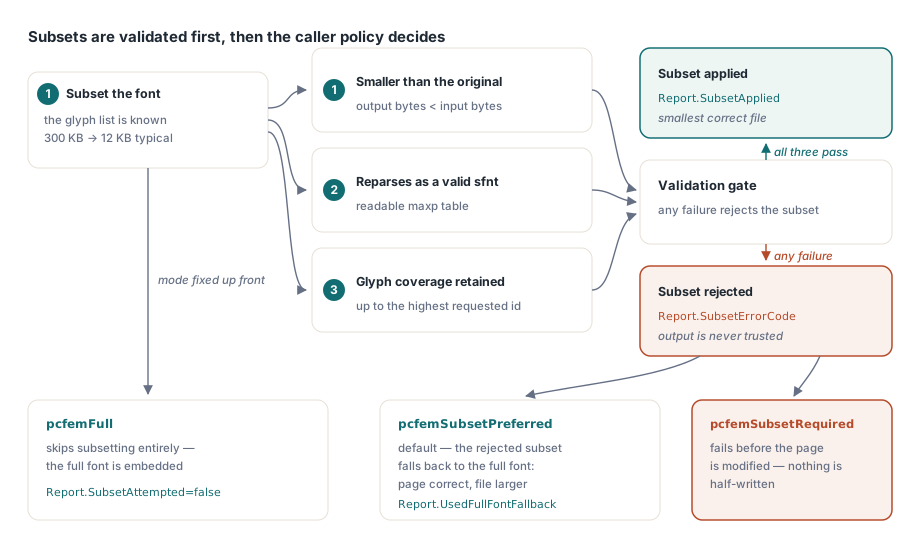
Subsetting a font to the glyphs actually used is the difference between embedding 300 KB and embedding 12 KB, and on a document with several fonts that decides whether the file is emailable. The platform subsetting path accepts a glyph list directly, which fits this API perfectly since the caller already knows every glyph identifier in use
What it does not give you is confidence. A subsetting call can report success and return output that is unusable, so the component validates three properties before accepting the result: the output must be smaller than the original, it must reparse as a valid sfnt with a readable maxp table, and it must retain glyphs up to the highest original identifier requested. Any failure means the subset is rejected
What happens next is the caller's policy. Under pcfemSubsetPreferred, the default, a rejected subset falls back to embedding the full font, so the page is correct and merely larger. Under pcfemSubsetRequired, the operation fails before the page is modified, which is what a size-constrained pipeline wants. pcfemFull skips subsetting entirely. The report tells you which path was taken through SubsetAttempted, SubsetApplied, UsedFullFontFallback and SubsetErrorCode
Verification that cannot produce a false positive
With VerifyExtraction enabled, the component confirms that what it wrote can be read back. The naive way to do that is to extract the whole page and search for the expected string, and it is wrong: a page that already contained that text passes the check even when the new text was written incorrectly
Instead the text page is rebuilt and the object handles inserted by this call are read individually, in insertion order, and concatenated. The result is compared against the expected text, and the report exposes both strings along with the boolean, so a mismatch can be diagnosed rather than merely detected
Turn it on during development and in any pipeline where extractability is a requirement — searchable archives, accessibility compliance, downstream text mining. The cost is one text page rebuild per call, which is why it is not on by default in tight loops
Budgets and atomic failure
Font bytes, glyph instances and Unicode code units are each capped before allocation, and the font format, TTC index, glyph identifier range and geometry values are validated before anything is written. Geometry must be finite, which sounds obvious until a shaping engine hands you a NaN advance from a malformed font
Failure is atomic at the page level. If font loading, object writing, content generation or extraction verification fails, every object inserted by that call is removed in reverse order and the page content is regenerated. A failed call leaves the page as it was, not with half a text run on it
Where this fits in a text pipeline
The division of labour is worth stating plainly. Shaping — turning characters into positioned glyphs — is not this API's job; it belongs to a shaping engine, and the component's own bidirectional and complex-script support is covered in emoji, CJK and surrogate pair handling. This API is what you call afterwards, with the glyph run the shaper produced
For ordinary Latin text with no contextual shaping, the simpler string-based text APIs are the right tool and produce smaller code. Reach for CID Type 2 writing when you have shaped output, when you need exact control of glyph identifiers, or when the font must be embedded from bytes you hold rather than resolved by name — the font resolution alternative being the provider mechanism described in controlling PDF font substitution
One deployment note: embedding a font is a licensing question as much as a technical one. Fonts vary in whether embedding is permitted at all, permitted for viewing only, or permitted for editing. The library will embed whatever bytes you give it, and checking the licence is your responsibility, not the file format's
Glyph-level text writing, font provisioning and text extraction share the same page model in Delphi, C++Builder and Lazarus; the full API is described on the PDFium Component for Delphi page