PDFium Component table extraction, from version 3.117.0, treats a thin filled rectangle as a table ruling. With DetectFilledRulings enabled, which is the default, a filled axis-aligned box no thicker than MaxRulingThickness (3 points) becomes one ruling along its long axis, a larger filled box contributes its four edges, and every ruling coordinate is snapped within RulingSnapTolerance (4 points) before the grid is assembled. Tables exported from Word, Google Docs and browsers therefore reach the ruled detector as complete grids instead of falling through to whitespace detection as fragments
The earlier article on table detection and extraction stated that ruled detection uses the drawn lines and that each stroked path segment is transformed into page coordinates. That sentence was true and incomplete. Counting path objects across a set of 13 real-world sample documents showed that 9 of them contain no stroked path at all, yet each of their pages carries hundreds of filled rectangles 0.5 to 1 point thick. The stroke-only detector saw nothing, every page fell to whitespace detection, and the output was a scatter of small fragments rather than tables. The compact-columns preset added in 3.116.4 softened that at the fragment level; the root cause was that the detector was reading the wrong painting operator
Why does a Word-exported table have no stroked lines?
A word processor does not think of a border as a line; it thinks of it as a box with a width, and it paints that box with a fill. ISO 32000-1 §8.5.2.1 defines the re operator as appending a rectangle subpath, and §8.5.3 separates the painting operators: S strokes the path with the current line width, f fills its interior. A 0.5-point cell border comes out as x y w 0.5 re f, and the stroke machinery, line width, joins and dash pattern included, never runs. Cell shading is the same construction with a bigger box. A stroked grid drawn with m, l and S is what the original detector expected, and it is what nearly nothing exported from an office application produces:
% one cell border from a word-processor export: a 0.5 pt tall filled box
72 700 468 0.5 re f
% cell shading: a filled box the size of the cell
72 676 117 24 re f
% the stroked grid line the original detector was written for
72 700 m 540 700 l S
To a detector that asks FPDFPath_GetDrawMode only whether the stroke flag is set, both filled boxes are invisible. The words inside the cells then reach whitespace detection, where columns separated by a 6-point gutter sit below the default MinColumnGap of 12 points, and what comes back is whatever subset of rows happens to align well enough to pass MinRows. That is the fragment behaviour, and no amount of parameter tuning turns it into the grid the author drew
How does PDFium Component turn a filled box into a ruling?
TableCollectObjectRulings inspects every path object one subpath at a time. The draw mode comes from FPDFPath_GetDrawMode; a path counts as filled when DetectFilledRulings is on and the fill mode is not none. Each point is transformed through the object matrix and collected, up to MaxSubpathPoints (8) per subpath, and any curve segment marks the subpath as curved. When the subpath closes or a new MoveTo begins, FlushSubpath decides what it was: a curved subpath is discarded, and so is any closed polygon whose points do not all sit within PointTolerance (0.05 points) of the bounding box edges on at least one axis. A triangle, a chevron or a rounded tab never becomes a ruling, which is what keeps decorative artwork out of the grid
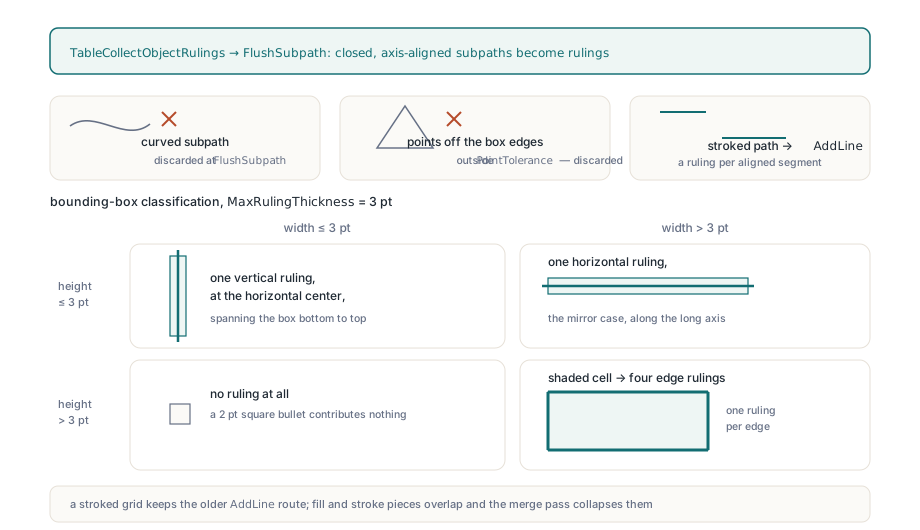
What survives is an axis-aligned rectangle, classified by its bounding box. Width at or below MaxRulingThickness with height above it yields one vertical ruling at the horizontal centre, spanning the box from bottom to top; the mirror case yields one horizontal ruling. Both dimensions above the threshold means a shaded cell, and the box contributes four rulings, one per edge. Both dimensions at or below the threshold contribute nothing, so a 2-point square bullet is not mistaken for a line. A stroked path takes the older route through AddLine, one ruling per axis-aligned segment, so a grid drawn with S is handled exactly as before, and a path painted with both fill and stroke produces overlapping pieces that the merge pass collapses:
uses
  PDFium;

var
  Pdf: TPdf;
  Options: TPdfTableExtractionOptions;
  Tables: TPdfTables;
  Mode: string;
  I: Integer;
begin
  Pdf := TPdf.Create(nil);
  try
    Pdf.FileName := 'itinerary-from-word.pdf';
    Pdf.LoadDocument;
    Pdf.PageNumber := 1;                     // 1-based

    Options := TPdfTableExtractionOptions.Default;
    // these are the 3.117.0 defaults, spelled out for clarity
    Options.DetectFilledRulings := True;     // thin filled boxes become rulings
    Options.MaxRulingThickness := 3.0;       // points; thicker boxes count as shading
    Options.RulingSnapTolerance := 4.0;      // points; 0 disables snapping
    Options.IncludeFormXObjects := True;

    Tables := Pdf.ExtractTables(Options);
    for I := 0 to High(Tables) do
    begin
      if Tables[I].DetectionMode = ptdmRuled then
        Mode := 'ruled'
      else
        Mode := 'whitespace';
      Writeln(Format('%dx%d %s, confidence %.2f',
        [Tables[I].RowCount, Tables[I].ColumnCount, Mode,
         Tables[I].Confidence]));
    end;
  finally
    Pdf.Free;
  end;
end;
What does RulingSnapTolerance do for shaded-cell tables?
RulingSnapTolerance is what makes a table built from shading alone connect into one grid. Some exports draw no border at all: every cell is a filled box in its own colour, and neighbouring boxes are separated by a 1 to 3 point gutter of white. Each box yields four edge rulings, but the right edge of one cell and the left edge of the next sit 2 points apart, and the connectivity test uses RulingTolerance, which defaults to 1 point. Without snapping, every cell forms its own connected component of four rulings, no component reaches MinRows, and the page reports nothing. TableSnapRulings gathers every X coordinate in play (the position of each vertical ruling plus the start and end of each horizontal one) and every Y coordinate likewise, sorts each list, clusters it by chaining values whose neighbour differs by no more than the tolerance, replaces each cluster by its mean, and then moves every position, start and end to the nearest cluster centre. The two sides of a gutter become the same line, and connectivity holds
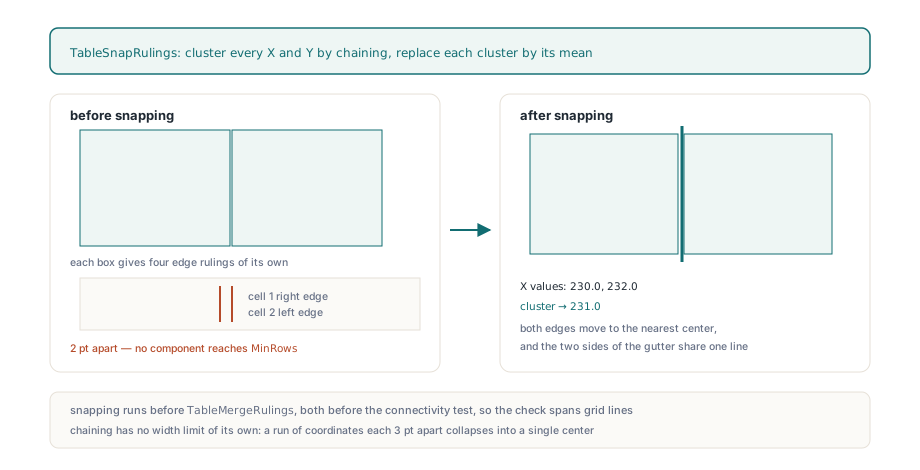
Snapping runs before TableMergeRulings, which sorts the rulings and joins collinear pieces that touch or overlap within RulingTolerance, and both run before TableDetectRuled ever sees the data, so the pairwise connectivity check is proportional to the number of grid lines rather than the number of per-cell fragments. On a stroked grid the passes are harmless, because coordinates that were already identical snap to themselves. The one thing to keep in mind is that chain clustering has no width limit of its own: a run of coordinates each 3 points apart collapses into a single centre. At the 4-point default that only affects columns narrower than a character, but if a document has real 3-point gutters that must stay separate, lower the tolerance or set it to 0 to switch snapping off:
// Isolate the ruled strategy and compare what each setting sees on one page
function CountRuledTables(Pdf: TPdf; FilledRulings: Boolean;
  SnapTolerance: Double): Integer;
var
  Options: TPdfTableExtractionOptions;
begin
  Options := TPdfTableExtractionOptions.Default;
  Options.DetectWhitespaceTables := False;
  Options.DetectFilledRulings := FilledRulings;
  Options.RulingSnapTolerance := SnapTolerance;
  Result := Length(Pdf.ExtractTables(Options));
end;

// A Word export typically reports 0, N and then fewer than N:
// stroke-only sees nothing, snapping connects the shaded cells,
// and disabling the snap leaves each shaded cell as its own island
Writeln(CountRuledTables(Pdf, False, 4.0));
Writeln(CountRuledTables(Pdf, True, 4.0));
Writeln(CountRuledTables(Pdf, True, 0.0));
Rulings inside form XObjects
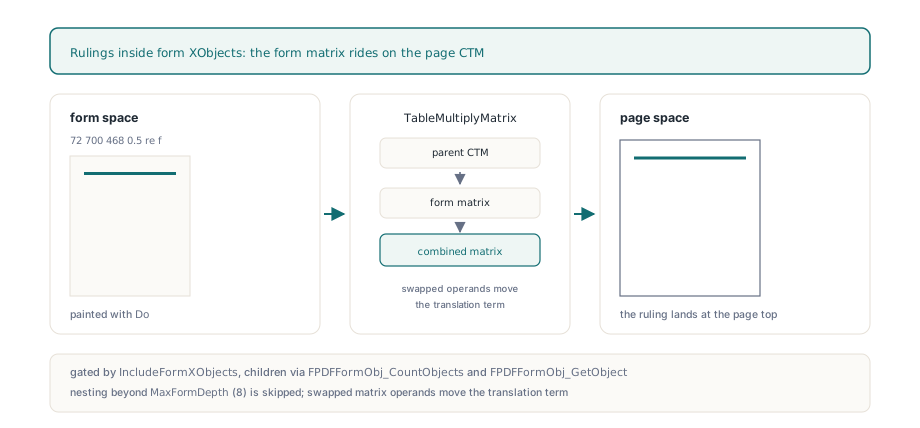
Page-layout tools frequently wrap a table, or the whole page body, in a form XObject and paint it with Do. ISO 32000-1 §8.10.1 specifies that the form matrix is concatenated with the current transformation matrix when the form is painted, so a rectangle inside the form lives in form space and only lands on the page after two or more transforms. TableCollectObjectRulings recurses into form objects when IncludeFormXObjects is set: it reads the object matrix, combines it with the parent matrix through TableMultiplyMatrix, whose argument order means "map through the first matrix, then the second", and enumerates the children with FPDFFormObj_CountObjects and FPDFFormObj_GetObject, passing the combined matrix down. Nesting deeper than MaxFormDepth (8) is skipped silently, which is a guard against pathological files rather than a limit any real export approaches. The reason the multiplication order matters is the same one discussed in matrix prepend versus append: swapping the operands moves the translation term, and a ruling that should land at the top of the page lands at the origin instead
Why did the ruling budget quadruple?
The default MaxRulingSegments rose from 4096 to 16384 in 3.117.0 because per-cell borders arrive in far greater numbers than stroked grid lines. A stroked 30-row, 6-column table is 38 line segments. The same table exported as filled boxes is up to four borders per cell, 720 pieces before merging, and a form with shaded cells doubles that. Two such tables on a page would have exhausted the old budget. The budget is enforced in TableAppendRuling through Check, which raises EPdfError with the message "Table ruling-segment budget exceeded"; there is no degraded result, no partial grid, and the whitespace pass does not run either. If you set a tighter budget of your own for untrusted input, catch the exception and decide, rather than reading an empty result as "no tables":
Options := TPdfTableExtractionOptions.Default;
Options.MaxRulingSegments := 2048;        // deliberately tight for untrusted input
try
  Tables := Pdf.ExtractTables(Options);
except
  on E: EPdfError do
  begin
    Log(E.Message);                       // 'Table ruling-segment budget exceeded'
    Options.MaxRulingSegments := 16384;   // the 3.117.0 default
    Tables := Pdf.ExtractTables(Options);
  end;
end;
Measured results and where the approach stops
On the same 13 sample documents, extraction went from 43 tables, 9 of them ruled and 34 whitespace fragments or false positives, to 41 ruled tables and no whitespace false positives. Part of that cleanup belongs to two companion changes in 3.117.0: words already claimed by a ruled grid are removed before whitespace detection runs, so a table is never reported twice, and a whitespace column boundary must now be a text-free corridor across every row it separates, which is what stopped justified paragraphs from scoring as 5x4 tables. The filled-rectangle reader is what moved the tables themselves from the fragment column to the ruled column
The boundaries are worth stating plainly. A page with no text layer still yields the grid skeleton, every cell empty, because rulings come from geometry and text comes from the text page; scanned pages need OCR first. Filled shapes with curves, rounded corners or non-rectangular outlines are dropped entirely, so a table whose borders are drawn as rounded-rectangle outlines needs whitespace detection as before. A table with neither borders nor shading is unchanged by any of this and remains the province of the whitespace strategy described in the table extraction article; when even that is not enough, the word boxes and blocks from structured text and reading order are the raw material for a domain-specific reader. The TableExtractionLab demo that ships with the component exposes DetectFilledRulings in its options panel, which is the quickest way to see what a given export looks like with and without it; the full API is described on the PDFium Component for Delphi page