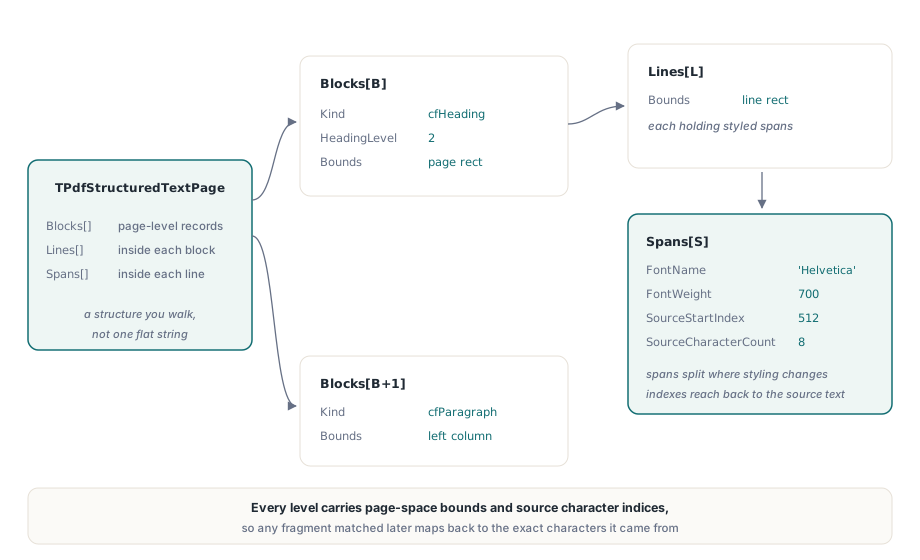
PDFiumPas returns page text as a structure rather than a string. GetStructuredText produces a TPdfStructuredTextPage containing blocks, each holding lines, each holding styled spans, with page-space bounds at every level and the source character indices preserved so any fragment can be mapped back to the underlying text page
The flat-string extraction that most code starts with is still there and still correct for its purpose. It stops being enough as soon as you need to know which words were a heading, which belonged to the left column, or where on the page a match actually sits
Why is a flat string the wrong output for most jobs?
Because the questions people ask of extracted text are almost never "what characters are on this page". They are "what is the title", "is this a table", "does this paragraph belong to section 4", "where do I draw the highlight". A single string answers none of them, and every answer you reconstruct from it is a heuristic you now own
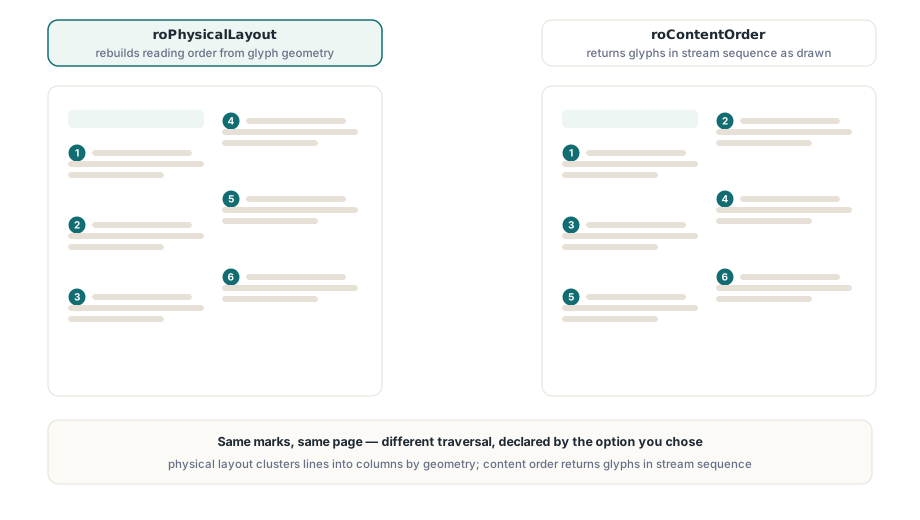
Two-column layouts make the point concrete. Extract a two-column article as a string and, depending on how the producer wrote the content stream, you may get column one followed by column two, or you may get line one of column one, line one of column two, line two of column one, and so on down the page. Both come out of a conforming PDF. Neither is wrong at the format level, because PDF describes marks on a page, not a document outline. A block-based model lets the extractor make the ordering decision explicitly and tell you which decision it made
Content order or physical layout?
TPdfStructuredTextOptions.ReadingOrder selects between roContentOrder and roPhysicalLayout, and the right answer depends on what you trust more, the producer or the geometry
Content order returns text in the sequence the content stream draws it. That is fast, and for documents generated by a well-behaved producer, typically the intended reading order. Physical layout ignores the stream sequence and reconstructs order from where the characters actually sit, clustering into lines and then into columns. That is what you want for scanned-then-OCRed pages, for output from tools that emit text in font order rather than reading order, and for anything where the visual result is the only thing you can rely on
uses
  PDFium;

var
  Pdf: TPdf;
  Options: TPdfStructuredTextOptions;
  Page: TPdfStructuredTextPage;
  B, L: Integer;
begin
  Pdf := TPdf.Create(nil);
  try
    Pdf.FileName := 'article.pdf';
    Pdf.LoadDocument;
    Pdf.PageNumber := 1;                     // 1-based

    Options := TPdfStructuredTextOptions.Default;
    Options.ReadingOrder := roPhysicalLayout;
    Options.IncludeFontInfo := True;
    Options.IncludeSemantics := True;
    Options.MaxCharacters := 200000;         // fail-closed budget

    Page := Pdf.GetStructuredText(Options);

    for B := 0 to High(Page.Blocks) do
    begin
      if Page.Blocks[B].Kind = cfHeading then
        Emit(Format('H%d: %s',
          [Page.Blocks[B].HeadingLevel, Page.Blocks[B].Text]))
      else
        for L := 0 to High(Page.Blocks[B].Lines) do
          Emit(Page.Blocks[B].Lines[L].Text);
    end;
  finally
    Pdf.Free;
  end;
end;
What does tagging add that geometry cannot?
Intent. With IncludeSemantics enabled, blocks from a tagged PDF carry a Kind drawn from the structure tree, so a heading is a heading because the producer said so, not because its font was larger than average. The kinds cover the shapes that matter for reuse: cfParagraph, cfHeading with a HeadingLevel, cfListItem, cfTableCell, cfCaption, cfFigure and the untagged fallback cfPlain
The Source field records where each classification came from, rosStructure for the structure tree and rosHeuristic for inference, which is the field to log when you are deciding how far to trust an extraction pipeline across a document set. Figures are a special case worth knowing: for a cfFigure block the text comes from the alternate description rather than from any glyphs, since a figure has no characters of its own. Unmatched alternate text is still represented instead of being dropped, which is what lets an accessibility audit see that a description exists even when nothing on the page draws it. The tagging model itself is covered in PDF/UA structure tree validation
Spans carry the styling and the provenance
Each TPdfStructuredTextSpan holds its text, its page-space bounds, FontName, FontSize, FontWeight and Angle, plus SourceStartIndex and SourceCharacterCount. Spans break where styling changes, so a sentence with three bold words becomes three spans, and rebuilding emphasis in HTML or Markdown is a matter of reading properties rather than guessing from font names
The two source-index fields are the ones that turn extraction into a feature rather than a report. They point back into the page's character sequence, which means a block you matched in a search can be converted into character-level selection geometry or a highlight rectangle without a second, differently ordered pass over the text; the mechanics are described in visual text line selection with character boxes. The Angle field matters more than it looks: rotated text in a stamp or a watermark lands in the same coordinate space as body text, and a pipeline that ignores angle will happily merge a diagonal "DRAFT" into the middle of a paragraph
Budget, and the two quality counters
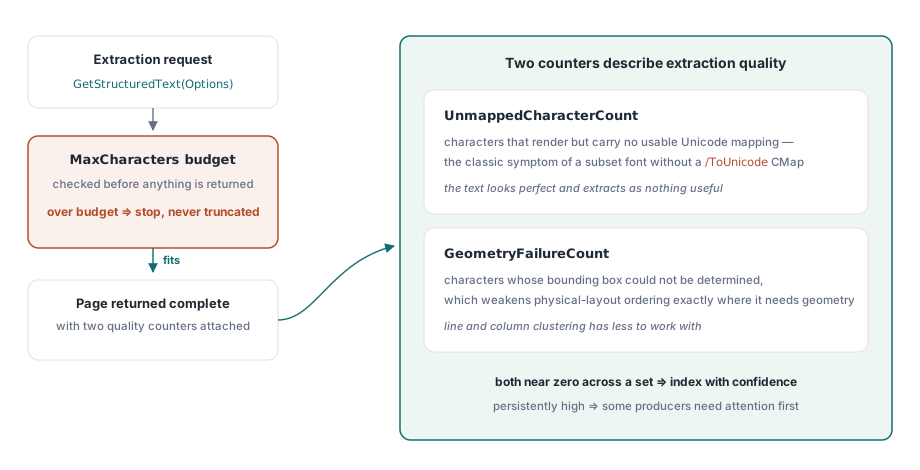
MaxCharacters is a fail-closed budget, not a truncation setting: a page exceeding it stops rather than silently returning part of the content. On an untrusted intake path that is the behaviour you want, because a page with a million characters is either a machine-generated monster or an attempt to make your extractor the slowest part of the system
Two counters on the returned page describe extraction quality directly. UnmappedCharacterCount counts characters with no usable Unicode mapping, which is the classic symptom of a subset font embedded without a /ToUnicode CMap; text like that renders perfectly and extracts as nothing useful. GeometryFailureCount counts characters whose bounding box could not be determined, which degrades physical-layout ordering. Log both. A document set where those numbers are consistently near zero can be indexed with confidence, and one where they are not is telling you that some producers in your pipeline need attention before any downstream result is trustworthy
var
  Page: TPdfStructuredTextPage;
  B, S, L: Integer;
  Emphasised: Boolean;
begin
  Page := Pdf.GetStructuredText(Options);

  if Page.UnmappedCharacterCount > 0 then
    Log(Format('page %d: %d characters without a Unicode mapping',
      [Page.PageNumber, Page.UnmappedCharacterCount]));
  if Page.GeometryFailureCount > 0 then
    Log(Format('page %d: %d characters without geometry',
      [Page.PageNumber, Page.GeometryFailureCount]));

  for B := 0 to High(Page.Blocks) do
    for L := 0 to High(Page.Blocks[B].Lines) do
      for S := 0 to High(Page.Blocks[B].Lines[L].Spans) do
      begin
        Emphasised := Page.Blocks[B].Lines[L].Spans[S].FontWeight >= 600;
        AppendRun(Page.Blocks[B].Lines[L].Spans[S].Text, Emphasised,
          Page.Blocks[B].Lines[L].Spans[S].SourceStartIndex);
      end;
end;
Performance on real pages
Physical-layout extraction is the expensive mode, and the implementation is built for pages that are actually large: character ordering runs in O(n log n) rather than by repeated scanning, line and span buffers grow geometrically instead of reallocating per character, Unicode text is built in buffers rather than by string concatenation, and font lookups for adjacent text objects are cached. That combination is what keeps a dense 5,000-character page predictable instead of quadratic
For a page-count-heavy job it is still worth choosing the cheaper mode where you can. Use roContentOrder with semantics enabled for tagged documents you trust, and reserve roPhysicalLayout for the scanned and legacy material where geometry is the only signal. If all you need is a plain string, the simpler API described in extracting text from PDF documents remains the faster path, and when you need to trace text back to marked-content identifiers, reading and writing BDC and MCID marked content covers that layer
The block model also maps cleanly onto what retrieval pipelines want: a heading with its paragraphs is a chunk with a title, and the bounds let a citation point at a location on a page rather than at a document. PDFiumPas is a Delphi and Lazarus component around the PDFium engine, documented with examples on the PDFium Delphi component page