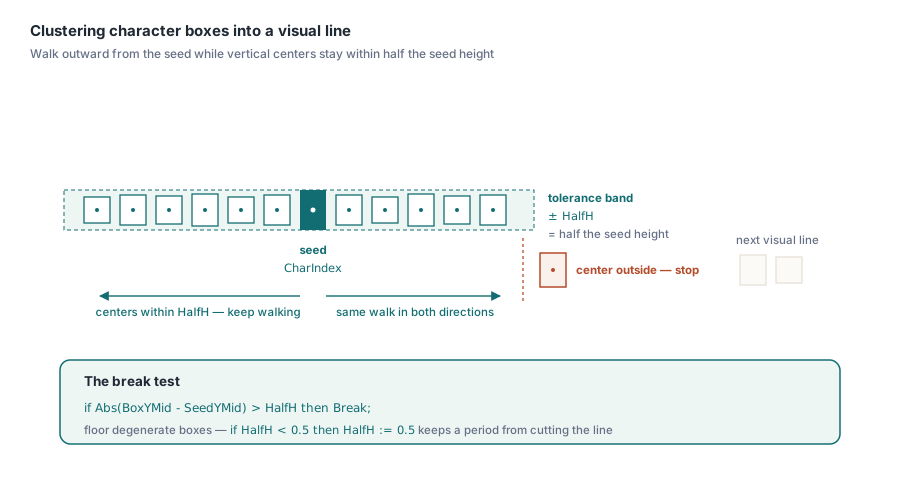
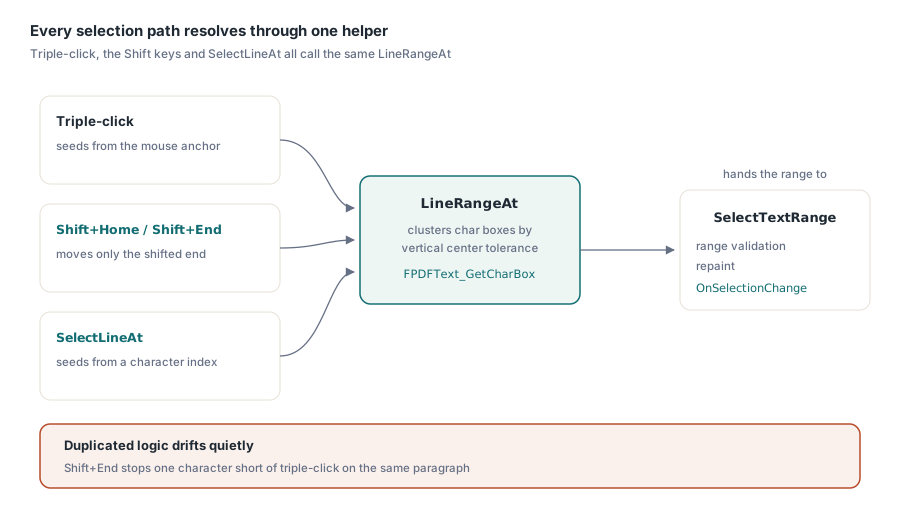
A PDF text page exposes characters and boxes, never lines. PDFium Component builds a visual line by clustering character boxes whose vertical centres fall within half the seed character height, scanning outward from the clicked character until the tolerance is exceeded. Every selection path in the viewer calls that one helper, so mouse, keyboard, and code agree
The symptom that sends you looking for this is specific and unpleasant. A user triple-clicks a paragraph in a two-column report and gets half the page. Or they triple-click a table cell and the selection swallows the entire row plus the page number in the footer. The viewer is not broken; it is asking a question the file cannot answer. There is no line in a PDF to select, and any implementation that pretends otherwise is guessing. This article is about making the guess deliberate and making it consistent. If what you actually need is pulling text out of a document, see extracting text from PDF documents with PDFium; if you are laying text out and need widths, see text measurement and word wrap. Here the subject is narrower: deciding where a visual line starts and ends, and selecting exactly that
Why does a PDF text page have no line objects?
Because a PDF content stream describes drawing, not structure. ISO 32000-1 §9.4 defines a text object as a BT / ET pair containing positioning and showing operators. The positioning operators of §9.4.2 (Td, TD, Tm, T*) move a text matrix around the page, and the showing operators of §9.4.3 (Tj, TJ, ', ") paint glyphs at wherever that matrix currently points. Nothing in that model says "this run of glyphs is a line". A line is what a human sees after the painting is done
Producers make this worse in ways you cannot control. A justified paragraph may be emitted as one TJ array per line, or as one Tj per word with an explicit Tm before each, or as a single show operation with kerning adjustments carrying the spacing. A two-column layout may emit the left column top to bottom and then the right column, or it may interleave them if the producer walked its own internal object list in a different order. The character sequence PDFium hands you follows the content stream, and the content stream follows whatever the generating application felt like doing. So the two functions you actually get are FPDFText_CountChars, which reports how many characters the page holds, and FPDFText_GetCharBox, which returns the bounding box of one character in page space. That is the whole raw vocabulary. Everything above it, words, lines, paragraphs, columns, is inference you perform on geometry
Why is CR and LF detection the wrong test?
Because the characters you would test against are not reliably present, and when they are present they are not reliably yours. PDFium injects synthetic characters into the text page to make extracted text readable: a space where two runs are visually separated, a CR or LF where the next run starts on a new baseline. FPDFText_IsGenerated exists precisely so you can tell those apart from characters that came out of the file, and PDFium Component surfaces it as the CharacterGenerated property
Split on those characters and you inherit every judgement call PDFium made while synthesising them. A hard line break inside a wrapped paragraph and a soft wrap look identical after synthesis. A table row that the producer emitted cell by cell may get no break at all between the last cell and the first cell of the next row, because the baselines happen to be close enough. Meanwhile a heading followed by body text at a different size may get two breaks where a human sees one. The generated characters are a rendering convenience for whole-page extraction; they are not a line model, and they degrade in exactly the documents where selection matters most
Clustering character boxes by vertical centre
The reliable signal is geometry. Take the character the user clicked as the seed, compute the vertical centre of its box, and walk outward in both directions while neighbouring boxes keep their vertical centres within tolerance. PDFium Component uses half the seed box height as that tolerance, with a floor of 0.5 page units so that degenerate boxes, a period, a thin space, a glyph with a near-zero height box, do not collapse the tolerance to nothing and cut the line after one character
function TPdfView.LineRangeAt(TxtPage: FPDF_TEXTPAGE; CharIndex: Integer;
  out StartIndex, Count: Integer): Boolean;
var
  Lo, Hi, Total: Integer;
  SeedBox, Box: TPdfRectangle;
  SeedYMid, BoxYMid, HalfH: Double;
begin
  Result := False;
  StartIndex := -1;
  Count := 0;
  Total := FPDFText_CountChars(TxtPage);
  if (CharIndex < 0) or (CharIndex >= Total) then
    Exit;

  if FPDFText_GetCharBox(TxtPage, CharIndex, SeedBox.Left, SeedBox.Right,
    SeedBox.Bottom, SeedBox.Top) = 0 then
    Exit;
  SeedYMid := (SeedBox.Top + SeedBox.Bottom) / 2;
  HalfH := Abs(SeedBox.Top - SeedBox.Bottom) / 2;
  if HalfH < 0.5 then          // floor for degenerate boxes
    HalfH := 0.5;

  Lo := CharIndex;
  Hi := CharIndex;
  while Lo > 0 do
  begin
    if FPDFText_GetCharBox(TxtPage, Lo - 1, Box.Left, Box.Right,
      Box.Bottom, Box.Top) = 0 then
      Break;
    BoxYMid := (Box.Top + Box.Bottom) / 2;
    if Abs(BoxYMid - SeedYMid) > HalfH then
      Break;
    Dec(Lo);
  end;
  while Hi < Total - 1 do
  begin
    if FPDFText_GetCharBox(TxtPage, Hi + 1, Box.Left, Box.Right,
      Box.Bottom, Box.Top) = 0 then
      Break;
    BoxYMid := (Box.Top + Box.Bottom) / 2;
    if Abs(BoxYMid - SeedYMid) > HalfH then
      Break;
    Inc(Hi);
  end;
  StartIndex := Lo;
  Count := Hi - Lo + 1;
  Result := True;
end;
Three details in that loop earn their place. The tolerance derives from the seed rather than from a constant, so a 24pt heading gets a wide band and 7pt footnote text gets a narrow one, and neither steals characters from the other. The comparison uses vertical centres rather than baselines or box tops, which keeps a superscript, an inline different-size run, or a mixed-font sentence on the same line as its neighbours. And a failed FPDFText_GetCharBox terminates the scan rather than being skipped, because a character with no retrievable geometry gives you no evidence either way, and continuing past it would let the walk jump across a genuine boundary on the strength of a character further along
Why must every selection path share one helper?
Because three code paths that each implement "the line" will diverge, and they will diverge quietly. In PDFium Component, triple-click expansion, Shift+Home, Shift+End, and the public SelectLineAt method all resolve their boundaries through the same LineRangeAt call. Triple-click seeds it from the selection anchor; the shift keys seed it from the selection cursor and move only that end; SelectLineAt seeds it from a caller-supplied character index and hands the result to SelectTextRange, the same range validator the mouse path uses. Duplicate the logic instead and the failure is not a crash, it is a slow drift. Someone tunes the triple-click tolerance to fix a report with tight leading, and now Shift+End stops one character short of where triple-click stops on the same paragraph. A user selects a line with the mouse, extends it with the keyboard, and watches the selection shrink. Because SelectLineAt feeds the ordinary selection pipeline, programmatic selection also stays independent of whether mouse input is enabled, and still gets range validation, repaint, and the OnSelectionChange notification for free
// Select the visual line under a client-space point, then read it back
procedure TForm1.SelectLineUnderCursor(X, Y: Integer);
var
  CharIndex: Integer;
begin
  CharIndex := PdfView1.CharacterIndexAtPos(X, Y, 6.0, 6.0);
  if CharIndex < 0 then
    Exit;
  if PdfView1.SelectLineAt(PdfView1.CurrentPage, CharIndex) then
    Memo1.Lines.Add(PdfView1.SelectedText);
end;
Note the tolerance arguments on CharacterIndexAtPos. Hit testing has its own slack, expressed in page units, and it is a separate concern from the line tolerance. A click that lands in the leading between two lines resolves to whichever character is nearest within that box; the line scan then runs from whatever character that turned out to be. Feeding a too-generous hit tolerance into the seed is one of the easier ways to select a line the user was not pointing at
Two index spaces: character index and text index
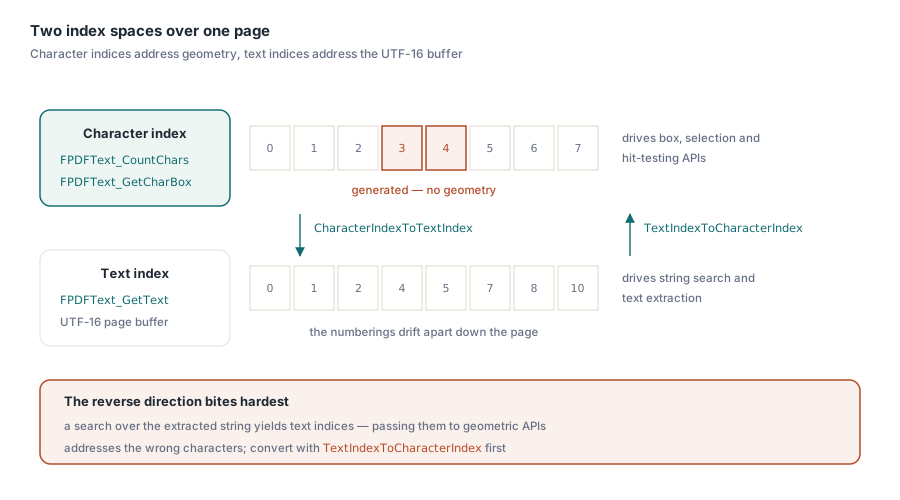
Once you have a range, resist the urge to use it as a string offset. FPDFText_GetText returns the page text as a UTF-16 buffer, but its indices are not the same index space as the character indices used by FPDFText_GetCharBox and FPDFText_CountChars. The generated characters discussed earlier sit in the text buffer while occupying character slots with no usable geometry, and the two numberings drift apart across the page. The bridges are FPDFText_GetTextIndexFromCharIndex and FPDFText_GetCharIndexFromTextIndex, wrapped by PDFium Component as CharacterIndexToTextIndex and TextIndexToCharacterIndex
var
  TextStart, TextEnd: Integer;
begin
  // char-index range from LineRangeAt -> offsets into the page text buffer
  TextStart := Pdf.CharacterIndexToTextIndex(StartIndex);
  TextEnd   := Pdf.CharacterIndexToTextIndex(StartIndex + Count - 1);
  if (TextStart >= 0) and (TextEnd >= TextStart) then
    Caption := Pdf.Text(TextStart, TextEnd - TextStart + 1);
end;
The direction that bites hardest is the reverse one. A search implemented over the extracted string gives you text indices, and passing those straight to a box or selection API silently addresses the wrong characters, with an error that grows the further down the page you go. Convert with TextIndexToCharacterIndex before anything geometric touches the number. Surrogate pairs add a second, independent offset problem on top of this, which is covered in the article on emoji, CJK, and surrogate pairs
Where the heuristic bends
Be honest with yourself about the limits, because they are real and they are reachable. Rotated text is the clearest case: a character box is an axis-aligned rectangle in page space, so for text rotated 90 degrees the boxes of one visual line have vertical centres spread across the page, and the scan stops almost immediately. What you get is a short selection rather than a wrong one, which is the better failure mode, but it is still a failure. Vertical writing modes behave the same way for the same reason. Two-column layouts work when the columns are vertically offset from each other and break when they are not. If both columns share a baseline grid, characters from the right column sit within tolerance of the left column line, and the scan will run straight across the gutter, because in pure geometry there is nothing there to stop at. Detecting that needs a horizontal gap test on top of the vertical clustering, and choosing the gap threshold is its own judgement call about which documents you are willing to be wrong about. Mixed font sizes are the case the seed-relative tolerance handles well: an inline 8pt code span inside 11pt body text keeps its centre inside the band, and a 24pt heading on the next baseline does not pull the body line into itself
The line-selection semantics described here ship in the PDFium Component for Delphi and C++Builder, alongside the hit testing, selection range, and text index APIs used in the examples; the product page carries the full reference for the text page and selection model