The call that puts text on a PDF page is straightforward. You give AddText a string, a font, a size, and a position, and the glyphs appear. What it does not do is tell you how wide that string will be once it is drawn, and it does not break a long string across several lines. A single call paints one run of text at one position. If the run is wider than the column you meant it to fit, it simply runs past the edge, and nothing in the drawing call warns you. The moment you want a paragraph rather than a single label, the missing piece is the width of a string in the chosen font and size, measured before you commit it to the page
This is the classic layout problem. To wrap a paragraph into a column you have to know, word by word, how much horizontal space each candidate line will take, and you have to know it ahead of drawing anything. Word wrap is a measurement loop wrapped around a drawing call, and a binding that only draws gives you the second half. The text measurement support in the PDFium component closes that gap with two functions, MeasureText and MeasureTextWidth, that report the rendered extent of a string without putting a mark on any page
Why measurement is a class helper, not a new method on TPdf
The measurement support arrives as a Delphi class helper for TPdf, living in its own unit, rather than as new methods bolted into the TPdf class. A class helper is a language feature that lets you attach methods to an existing type from outside its declaration. Once the unit is in scope, the new methods are called exactly as if they belonged to the class, so a helper method reads as Pdf.MeasureTextWidth(...) with no separate object to construct or pass around
The reason to layer it this way is separation. The core TPdf type stays as it is, with no field added and no existing signature touched, so a project that never needs layout never carries the measurement code. A project that does need it adds one unit to a uses clause and the methods light up. Capability becomes opt-in at the granularity of a single unit, which is the cleanest way to extend a type you do not own or do not want to disturb
uses
  PDFium, FPdfView, FPdfEdit,
  FPdfMeasure;   // the helper unit; brings MeasureText into scope on TPdf

// With the unit in scope the methods read as members of TPdf:
var
  W, H: Double;
begin
  Pdf.MeasureText('Subtotal', 'Helvetica', 11, W, H);
  // W and H are now the rendered width and height in PDF user units
end;
Measuring without touching the page
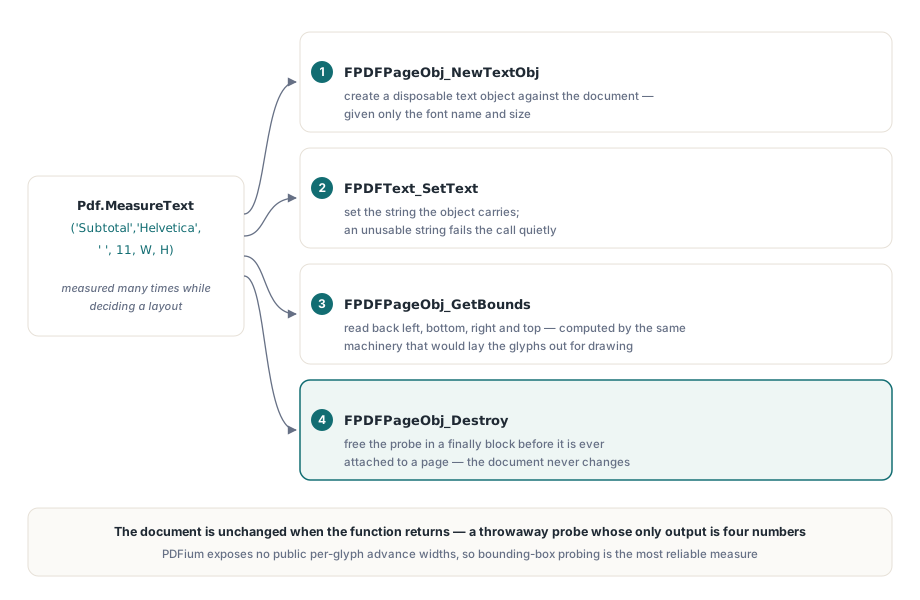
The measurement has to be free of side effects. It must report a width without leaving anything behind, because you call it many times while deciding a layout and the page must look exactly as it would have if you had never measured at all. The technique that makes this possible is to build a text object, ask it for its size, and throw it away before it is ever attached to a page
The sequence is four PDFium calls. FPDFPageObj_NewTextObj creates a text object against the document, given the font name and size. FPDFText_SetText sets the string that object carries. FPDFPageObj_GetBounds reads back the object's bounding box. FPDFPageObj_Destroy frees the object. Crucially, nothing in that sequence calls the page-insertion API. The object is created, queried, and destroyed in isolation, so the document is unchanged when the function returns. It is a throwaway probe whose only output is the four numbers of its bounding box
This is the robust way to do it because PDFium does not expose a convenient per-glyph advance width that you could sum yourself. Glyph metrics depend on the font program, on the encoding, and on how PDFium loads the face, and there is no public call that hands you the advance of each character in a string. The bounding box of a real text object, on the other hand, is computed by the same machinery that would lay the glyphs out for drawing, so it reflects the actual rendered extent rather than an approximation. Building one disposable object and reading its bounds is the most reliable measurement the library can give
// The shape of MeasureText, expressed against the verified PDFium calls.
// A text object is built, measured, and destroyed; no page is involved.
procedure TPdfMeasureHelper.MeasureText(const Text, Font: WString;
  FontSize: Single; out Width, Height: Double);
var
  TextObject: FPDF_PAGEOBJECT;
  L, B, R, T: Single;
begin
  Width  := 0;
  Height := 0;
  if Self.Document = nil then
    Exit;
  TextObject := FPDFPageObj_NewTextObj(Self.Document,
    FPDF_BYTESTRING(AnsiString(Font)), FontSize);
  if TextObject = nil then
    Exit;
  try
    if FPDFText_SetText(TextObject, FPDF_WIDESTRING(WideString(Text))) = 0 then
      Exit;
    if FPDFPageObj_GetBounds(TextObject, L, B, R, T) <> 0 then
    begin
      Width  := R - L;
      Height := T - B;
    end;
  finally
    FPDFPageObj_Destroy(TextObject);   // probe discarded, page untouched
  end;
end;
Coordinates and units of the result
The bounding box comes back as four edges, left, bottom, right, and top, and the two dimensions fall out by subtraction. Width is right minus left and height is top minus bottom. Both are expressed in PDF user units, where one unit is one seventy-second of an inch, the same coordinate space in which you position text on the page. There is no hidden device unit and no pixel involved at this stage. A width of 36 means half an inch of page, whatever the eventual rendering resolution
The vertical axis runs the way PDF defines it, with Y increasing upward, which is why height is top minus bottom rather than the reverse. That detail matters when you advance a cursor down a column. You measure a line's height, then subtract it from the current baseline to find the next one, because moving down the page means moving towards smaller Y. If your destination is a screen rather than paper, you convert user units to device pixels with the display resolution: a value in user units multiplied by the DPI and divided by 72 gives pixels, so a column width you set in points can be matched against a measured run before you decide where the break goes
What happens on degenerate input
The functions are written to fail quietly. If there is no document open, or if the text object cannot be created, the result is a zero extent rather than a raised exception. The width and height are initialised to zero at the top and only overwritten once a bounding box has been read back successfully. An empty string, a missing document, a font the library cannot resolve into an object, each of these returns zero rather than throwing
That choice keeps a measurement loop simple, because a loop that runs over thousands of words is not the place for exception handling on every iteration. The cost is that the caller carries the check. A zero width is a sentinel, not a fact about the text, so code that divides by a measured width or assumes a positive value has to guard against zero before trusting it. Treat zero as "could not measure" and the contract is clear; ignore it and a degenerate input quietly becomes a layout with a column of overlapping glyphs
A greedy word wrap built on the measurement
With a width function in hand, word wrap is a short greedy loop. You split the paragraph into words, keep a current line, and for each word you measure what the line would be if you appended that word. While the trial line still fits the column width you keep adding; when it would overflow you flush the current line with AddText and start a new one with the word that did not fit. The accumulation is done entirely with MeasureTextWidth, and the only thing that ever reaches the page is a line you have already confirmed fits

procedure WrapParagraph(Pdf: TPdf; const Para, Font: WString;
  FontSize: Single; X, TopY, ColumnWidth, LineHeight: Double);
var
  Words: TArray<string>;
  Line, Trial: WideString;
  I: Integer;
  Y: Double;
begin
  Words := string(Para).Split([' ']);
  Line  := '';
  Y     := TopY;
  for I := 0 to High(Words) do
  begin
    if Line = '' then
      Trial := Words[I]
    else
      Trial := Line + ' ' + Words[I];
    // Measure the candidate line before drawing anything.
    if (Line <> '') and (Pdf.MeasureTextWidth(Trial, Font, FontSize) > ColumnWidth) then
    begin
      Pdf.AddText(Line, Font, FontSize, X, Y);   // flush the line that fit
      Y    := Y - LineHeight;                    // Y decreases going down
      Line := Words[I];                          // overflowing word starts next line
    end
    else
      Line := Trial;
  end;
  if Line <> '' then
    Pdf.AddText(Line, Font, FontSize, X, Y);      // flush the final line
end;
The loop measures the trial line rather than measuring each word and summing, because the width of a line is not the sum of the widths of its words. Spaces between words contribute, and a measured run captures that directly. The greedy rule, fit as many words as the column allows and break at the last one that fits, is the same rule that fills the gap between a raw AddText and a real paragraph. The drawing call was never the hard part. The measurement that has to precede it is, and that is exactly what the helper provides
Where this fits
Measurement is the layer between generating content and rendering it, so it pairs naturally with the rest of a from-scratch document workflow. If you are assembling pages and placing text in the first place, the groundwork is in creating PDF documents from scratch with the PDFium component in Delphi, where AddText and page setup are covered in full. When the font you are measuring matters as much as the string, because metrics depend on the face, analysing PDF font properties with the PDFium component in Delphi shows how the library reports the font information that drives those bounding boxes. Both build on the same binding, the PDFium Component for Delphi and Lazarus, where the measurement helper ships alongside the document, page, and text APIs described across this blog