PDFium Component detects tables on a PDF page and returns them as a grid of cells with row and column spans, header rows and a confidence value, through ExtractTables for one page and ExtractDocumentTables for a whole document. Each table converts to CSV or JSON with one call, and tables that continue across a page break can be linked into a continuation chain
PDF has no table object. A table in a PDF is a set of text runs positioned so that a human reads them as a grid, sometimes with lines drawn around them and often without. Recovering the grid means reconstructing an intent that the file never recorded, which is why every extraction tool produces slightly different results and why a tool that tells you its confidence is more useful than one that does not
Two detection modes for two kinds of table
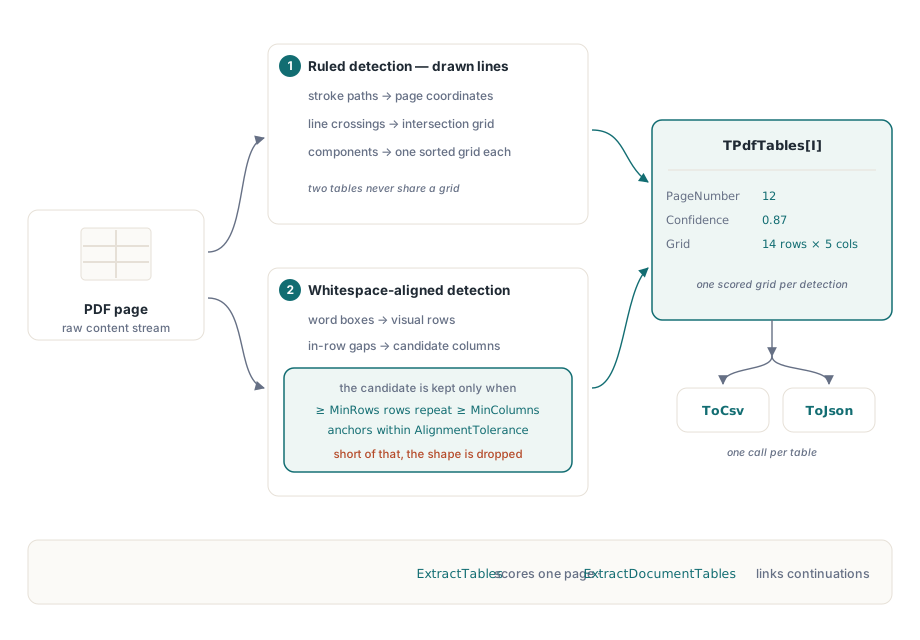
Ruled detection uses the drawn lines. Each stroked path segment is transformed into page coordinates through the page object's matrix, horizontal and vertical lines are intersected, and the intersections form connected components. Each component becomes its own sorted grid of X and Y positions, which is what keeps two separate tables on the same page from being merged into one nonsensical grid
Whitespace detection handles tables drawn with alignment instead of lines. Word boxes are grouped into visual rows, gaps within a row split it into candidate columns, and a table is accepted only when at least MinRows rows repeat at least MinColumns left-aligned anchors within AlignmentTolerance. The row gap factor defaults to 3, which covers the roughly 30-point baseline spacing typical of 12-point text without letting a single line containing several text runs masquerade as a table
uses
  PDFium;

var
  Pdf: TPdf;
  Options: TPdfTableExtractionOptions;
  Tables: TPdfTables;
  I: Integer;
begin
  Pdf := TPdf.Create(nil);
  try
    Pdf.FileName := 'annual-report.pdf';
    Pdf.LoadDocument;
    Pdf.PageNumber := 12;                    // 1-based

    Options := TPdfTableExtractionOptions.Default;
    Options.DetectRuledTables := True;
    Options.DetectWhitespaceTables := True;
    Options.MinConfidence := 0.6;            // default is 0.5
    Options.HeaderRowCount := 1;

    Tables := Pdf.ExtractTables(Options);
    for I := 0 to High(Tables) do
      Writeln(Format('table %d: %dx%d cells, confidence %.2f, mode %d',
        [I, Tables[I].RowCount, Tables[I].ColumnCount,
         Tables[I].Confidence, Ord(Tables[I].DetectionMode)]));

    if Length(Tables) > 0 then
      SaveText('page12-table0.csv', Tables[0].ToCsv);
  finally
    Pdf.Free;
  end;
end;
The complete project ships with the component as Demo/Delphi/TableExtractionLab/TableExtractionLab.dpr, with C++Builder and Lazarus twins under Demo/CBuilder/TableExtractionLab and Demo/Lazarus/TableExtractionLab. The lab builds a sample document that contains a ruled table with merged header cells, a whitespace-aligned table with no ruling at all, and a long table that breaks across a page boundary, then extracts each one and shows the cells, spans, confidence, continuation groups, and CSV / JSON output, which makes it the fastest way to watch these options interact. Table detection arrived in version 3.36.0, so if TPdfTableExtractionOptions or TPdfTables compiles as an unknown identifier, the library copy in your project predates that release and needs updating before this code will build
How are merged cells recovered?
This is the part naive extractors get wrong. A merged cell cannot be identified from the global grid alone, because the grid is derived from all the lines on the page and a merged region simply lacks the interior line that would have separated it
The rule used here is local: two adjacent base cells are merged when no boundary line covers the interval between them. Union-find joins them, the resulting rectangular components become RowSpan and ColumnSpan values, and text is assigned to a base cell by its centre point and then follows that cell to its merge root. Doing it this way also keeps the cost linear in words plus cells, instead of the quadratic scan you get from testing every word against every cell
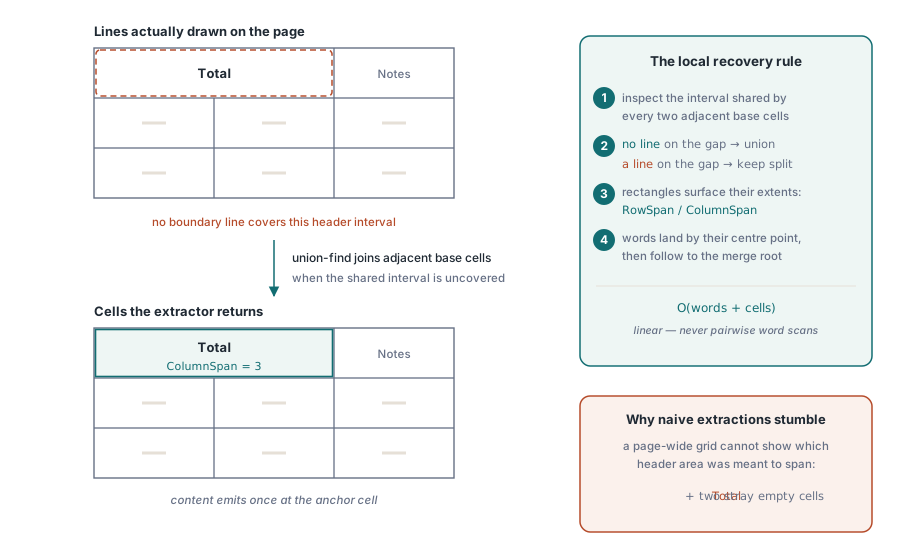
The practical effect is that a financial table with a merged "Total" header spanning three columns comes out with one cell of span three, rather than one populated cell and two mysterious empty ones
Continuation across pages
Long tables break across pages, and treating each page's fragment as an independent table forces the caller to stitch them. ExtractDocumentTables can link them instead, but only under strict conditions: the fragment must be the lowest table on the earlier page, the next must be the topmost table on the following page, the page numbers must be adjacent, and the column boundaries must match
All four conditions together are what prevent the obvious error, which is chaining every four-column table in a document into one imaginary mega-table because they happen to share a column count. When the conditions hold, the tables share a continuation group identifier and carry continuation metadata; when they do not, you get separate tables and can decide for yourself
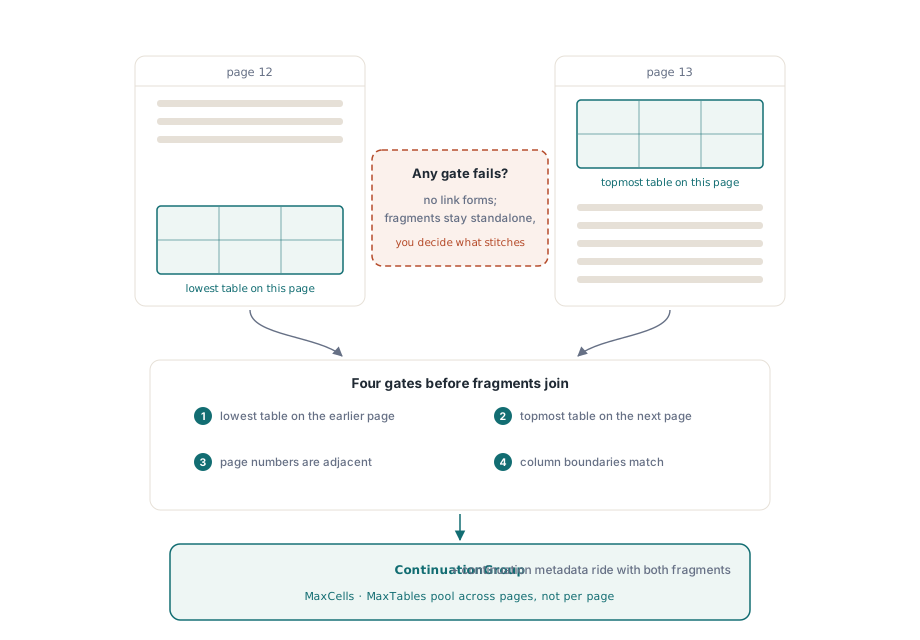
Document-level extraction shares the MaxCells and MaxTables budgets across pages rather than resetting them per page, and it restores the active page in a finally block, so an extraction run in a viewer leaves the user looking at the page they were on
Exporting without corrupting the data
Both exporters are deliberate about escaping. CSV always quotes fields and doubles internal quotation marks, which avoids the classic failure where a cell containing a comma silently becomes two columns. For merged cells, content is emitted only at the top-left anchor, so a CSV round-trip does not duplicate a spanning header across the columns it covers
JSON preserves Unicode rather than escaping it into ASCII, escapes control characters, and includes the metadata that a consumer needs to judge quality: detection mode, confidence, bounds, span values, header flags and continuation information. If you are feeding extracted tables into a downstream system, prefer JSON, because a CSV row cannot tell you that the table it came from scored 0.51 confidence:
// Document-wide extraction, keeping only tables worth trusting
Tables := Pdf.ExtractDocumentTables(Options);
for I := 0 to High(Tables) do
begin
  if Tables[I].Confidence < 0.75 then
  begin
    Log(Format('page %d table needs review (%.2f)',
      [Tables[I].PageNumber, Tables[I].Confidence]));
    Continue;
  end;
  if Tables[I].ContinuationGroup > 0 then
    AppendToGroup(Tables[I].ContinuationGroup, Tables[I].ToJson)
  else
    EmitStandalone(Tables[I].ToJson);
end;
Tuning, and knowing when to stop
Three settings matter more than the rest. MinConfidence is the quality gate, and 0.5 is deliberately permissive; raise it for automated ingestion and lower it for a review UI where a human confirms each result. MinColumnGap decides what counts as a column boundary in whitespace mode, and tightly set tables in dense reports may need it reduced from the 12-point default. MaxRowGapFactor decides when vertical distance ends a table, which matters for tables with occasional blank rows
Be honest about the limits. Ruled tables extract reliably. Cleanly aligned whitespace tables extract well. Tables with rotated text, nested tables, or cells whose content wraps into what looks like another row will need review no matter how the parameters are set. For those, the structured-text model gives you the raw material to build a domain-specific reader, described in structured text blocks and reading order
One useful pairing: when a scanned document has no text at all, table detection has nothing to work with until a text layer exists. Add one first, as described in adding a searchable text layer to scanned PDFs, then extract. The word boxes an OCR provider returns are exactly the input whitespace detection needs
Table extraction, structured text and reflow all read from the same page model in Delphi, C++Builder and Lazarus; the full API is described on the PDFium Component for Delphi page