PDFium Component creates axial and radial PDF gradients in Delphi through TPdf.SaveAsShadingCreated. You describe each gradient in a TPdfShadingCreate record (type, colour space, coordinates, colours or stops, target page), and the method writes a verified copy in which every fill is a real ISO 32000-1 shading dictionary, registered in the page /Resources /Shading dictionary and painted by the sh operator, so PDFium renders it natively
The need shows up in report and certificate generators. A designer hands over a mock-up with a soft blue-to-white header band or a radial glow behind a seal, and the page-object API that covers text, paths and images has nothing for it. You can fake a gradient with a hundred thin rectangles in slightly different colours, but the result bands visibly when zoomed, bloats the content stream, and prints badly. PDF has had smooth shadings since 1.3; the work is in writing them so a renderer actually draws them
Why does PDFium Component write gradients as a separate save?
TPdf.SaveAsShadingCreated is a save operation rather than a page-object call because PDFium's public ABI has no function that creates a shading dictionary or emits an sh operator. The page-object layer used when creating PDFs from scratch with PDFium Component builds paths, text and images, and that is where it stops. Shadings live one level lower, in the object graph and the content stream syntax
So the method works in stages. PDFium first saves the open document natively, which keeps every edit you made through the normal API. PDFium Component then rewrites that staged output: it allocates one indirect object per shading, adds the resource entry to each target page, appends a new content stream to the page /Contents, and writes a fresh cross-reference table. Before anything reaches your stream or file, the result is reloaded with a strict cross-reference check, and the method returns False with a message in the report if that reload fails. The file overload writes to a temporary file first, so a failed save does not clobber an existing target
Building a two-colour axial gradient
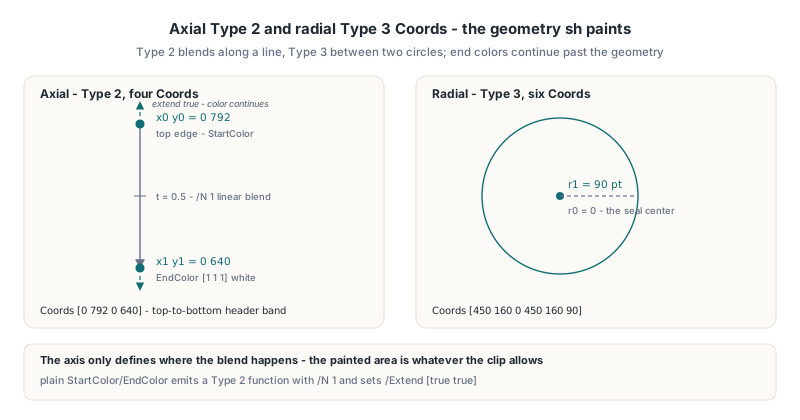
An axial shading (ISO 32000-1 §8.7.4.5.3, Type 2) blends colours along a line from x0 y0 to x1 y1, so Coords takes four values. A radial shading (§8.7.4.5.4, Type 3) blends between two circles and takes six: x0 y0 r0 x1 y1 r1. With plain StartColor and EndColor, PDFium Component emits a Type 2 exponential function (§7.10.3) with /N 1, which is a straight linear interpolation, and sets /Extend [true true] so the end colours continue past both ends of the axis
uses
  System.SysUtils, PDFium, FPdfCompress;

procedure AddHeaderBand(const InFile, OutFile: string);
var
  Pdf: TPdf;
  Fills: TPdfShadingCreateShadings;
  Report: TPdfShadingCreateReport;
begin
  Pdf := TPdf.Create(nil);
  try
    Pdf.FileName := InFile;
    Pdf.Active := True;

    SetLength(Fills, 1);
    Fills[0] := Default(TPdfShadingCreate);
    Fills[0].ShadingType := pstAxial;
    Fills[0].ColorSpace := pscDeviceRGB;
    Fills[0].Coords := [0, 792, 0, 640];        // x0 y0 x1 y1, top to bottom
    Fills[0].StartColor := [0.12, 0.35, 0.75];  // dark blue at the top edge
    Fills[0].EndColor := [1, 1, 1];             // white lower down
    Fills[0].PageNumber := 1;                   // 1-based
    Fills[0].ResourceName := 'HeaderBand';      // optional, default is Sh1, Sh2...

    if not Pdf.SaveAsShadingCreated(OutFile, Fills, Report) then
      raise Exception.Create('Shading creation failed: ' + Report.ErrorMessage);
  finally
    Pdf.Free;
  end;
end;
The component count of every colour must match the colour space: one for pscDeviceGray and pscCalGray, three for pscDeviceRGB, pscCalRGB and pscLab, four for pscDeviceCMYK. For pscICCBased the count comes from the profile bytes you pass in IccProfile, which must expose 1, 3 or 4 components; the profile is embedded as its own ICC stream with the matching /N. Calibrated spaces accept optional CalWhitePoint (three values, positive Y), CalGamma (one value for CalGray, three for CalRGB) and, for Lab, a six-value LabRange. Every coordinate and component is checked for NaN and infinity before a byte is written
Note that coordinates are in default user space, with the origin at the bottom-left of the page. Remember that the axis only defines where the blend happens: the painted area is whatever the clip allows, which matters more than it sounds, as the next sections show
Multi-stop gradients compile to a Type 3 stitching function
PDFium Component turns a Stops array into the function a PDF reader expects: two stops become a single Type 2 function, and 3 to 256 stops become a Type 3 stitching function (ISO 32000-1 §7.10.4) made of one linear Type 2 segment per adjacent pair. Each TPdfShadingCreateStop carries a Position and a Color. When Stops is non-empty it replaces StartColor and EndColor entirely
The stitching function needs three arrays that are easy to get subtly wrong by hand. /Functions holds the segments, /Bounds holds the interior stop positions only (k segments need k-1 bounds), and /Encode maps each subdomain back to [0 1] so every segment sees its full input range. The component derives all three from your stops, which is why it is strict about the input: positions must be finite, strictly increasing, start at 0 and end at 1 (within 1e-6). A stop list that starts at 0.1 would leave part of the domain without a defined function, and the method rejects it rather than guessing
function Stop(Position: Double; const Rgb: array of Double): TPdfShadingCreateStop;
var
  I: Integer;
begin
  Result.Position := Position;
  SetLength(Result.Color, Length(Rgb));
  for I := 0 to High(Rgb) do
    Result.Color[I] := Rgb[I];
end;

procedure BuildSealGlow(var Fill: TPdfShadingCreate);
begin
  Fill := Default(TPdfShadingCreate);
  Fill.ShadingType := pstRadial;
  Fill.ColorSpace := pscDeviceRGB;
  // x0 y0 r0 x1 y1 r1: a point at the seal centre growing to a 90 pt circle
  Fill.Coords := [450, 160, 0, 450, 160, 90];
  Fill.Stops := [Stop(0.0, [1.00, 0.95, 0.70]),
                 Stop(0.4, [0.95, 0.75, 0.30]),
                 Stop(1.0, [1.00, 1.00, 1.00])];
  Fill.PageNumber := 1;
end;
For a three-stop gradient that produces /Functions with two Type 2 segments, /Bounds [0.4] and /Encode [0 1 0 1]. The segment boundaries are hard colour joins, so a stop list does not smooth across them; if a join looks too sharp, add stops rather than expecting the reader to interpolate curvature
![PDFium Component multi-stop gradient compilation in Delphi: three Stops at positions 0.0, 0.4 and 1.0 become a Type 3 stitching function with one Type 2 segment per adjacent stop pair, /Bounds [0.4] for the interior position and /Encode [0 1 0 1] mapping each subdomain back to full range](../../assets/media/PDFium-Multistop-Stitching-Function-Bounds.svg)
Why does PDFium silently draw nothing?
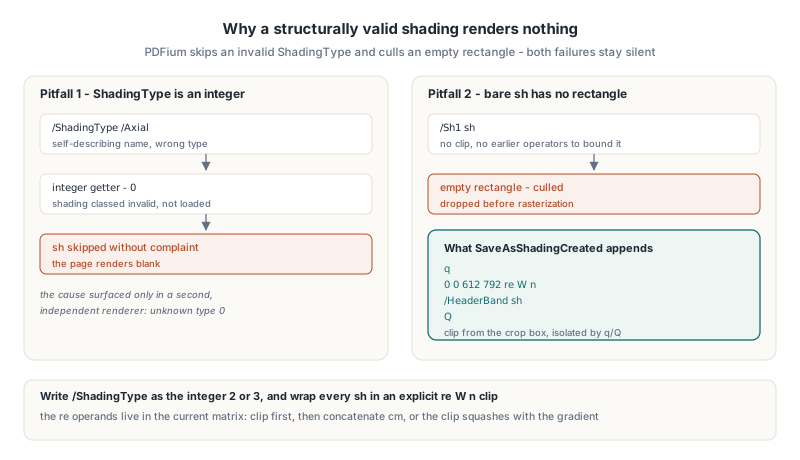
PDFium renders a newly created shading only when two details are right: /ShadingType must be an integer, and the sh call must sit inside a clipping path. Get either one wrong and the file opens, validates structurally, and shows an untouched page. No error, no warning, no log line
Pitfall one: /ShadingType is a number, not a name
ISO 32000-1 Table 78 defines /ShadingType as an integer: 2 for axial, 3 for radial. The first version of this writer emitted /ShadingType /Axial because it read better in a hex dump. PDFium reads the key with an integer getter, gets 0 for a name, classifies the shading as invalid, fails to load it, and skips the sh operator without complaint. The page rendered blank and nothing in PDFium said why. The cause only became visible after building a minimal hand-written PDF and opening it in a second, independent renderer, which reported an unknown shading type of 0. The lesson generalises to every PDF writer: when the specification types an enumeration as an integer, write the integer, however tempting a self-describing name looks
Pitfall two: a content stream holding only sh has no bounding box
The sh operator (ISO 32000-1 §8.7.4.2) paints the shading over the current clipping region, so the page's own extent bounds it on paper. PDFium, however, builds a shading page object whose rectangle comes either from the active clip path or from the bounding box accumulated by earlier drawing operators in the same stream, and the renderer culls objects with an empty rectangle. A freshly appended stream that contains nothing but /Sh1 sh has neither, so the gradient is dropped before rasterisation. TPdf.SaveAsShadingCreated therefore reads each page's crop box (falling back to the media box, then to the page size) and wraps every invocation in an explicit re W n clip. On a US Letter page with its origin at zero, the appended stream looks like this:
q
0 0 612 792 re W n
/HeaderBand sh
Q
The q/Q pair isolates the clip and any transform from the existing page content, so nothing drawn later on the page inherits them. If you write shading invocations yourself in another tool, copy this shape: an explicit clip in the same stream is cheap and removes the dependency on whatever came before
How does a custom gradient matrix interact with the clip?
A gradient matrix in PDFium Component is applied as a cm operator placed after the clip and before sh, so the clip stays full-page whilst only the gradient geometry is transformed. Set HasMatrix to True and fill MatrixA through MatrixF, the same six numbers as any PDF transformation matrix. The values must be finite and the determinant non-zero, because a singular matrix would collapse the shading onto a line. The component also records the six values as /Matrix in the shading dictionary, but for a direct sh call it is the cm in the content stream that sets the coordinate system PDFium paints in
Order matters here, and it is the third trap. The re operands are interpreted in the current transformation matrix. Put the cm first and the page-sized clip rectangle is scaled, rotated or skewed along with the gradient, so a matrix that squashes an ellipse also squashes the visible area and parts of the page lose their fill. Clipping first in untransformed user space, then concatenating the matrix, gives the expected result: a transformed gradient covering the whole page. The guide to Form XObject stamps and their six-number matrix walks through what each matrix component does if you need to build one
procedure MakeEllipticalGlow(var Fill: TPdfShadingCreate);
begin
  BuildSealGlow(Fill);       // radial fill centred at 450,160
  Fill.Coords := [0, 0, 0, 0, 0, 90];  // circles at the origin
  Fill.HasMatrix := True;
  Fill.MatrixA := 1.6;       // stretch horizontally
  Fill.MatrixB := 0;
  Fill.MatrixC := 0;
  Fill.MatrixD := 0.8;       // compress vertically
  Fill.MatrixE := 450;       // then move to the seal centre
  Fill.MatrixF := 160;
end;
Reading the report and knowing the limits
TPdfShadingCreateReport tells you what was written: SourceByteCount and OutputByteCount, CreatedShadingObjectNumbers (one object number per input entry, in order), AttachedShadingCount, Succeeded and ErrorMessage. Validation errors name the entry and the field, for example a stop list that is not strictly increasing, so they are worth logging verbatim
if Pdf.SaveAsShadingCreated(OutFile, Fills, Report) then
  Writeln(Format('%d shading(s) attached, %d -> %d bytes',
    [Report.AttachedShadingCount, Report.SourceByteCount,
     Report.OutputByteCount]))
else
  Writeln('Rejected: ' + Report.ErrorMessage);
The profile is deliberately bounded. It creates axial and radial shadings only; function-based and mesh shadings (Types 1 and 4 to 7) and pattern colour spaces are rejected. One call accepts 1 to 4096 fills, page numbers must exist, and resource names are limited to 127 characters of letters, digits, underscore, minus and period. Encrypted input is refused at the trailer stage. A signed document needs AllowSignedDocument := True, and since the output is a full rewrite rather than an incremental update, existing signatures will no longer validate, so sign after adding gradients. Each fill is painted at the end of the page content, on top of what is already there; for a background effect, create the gradient first and add text and images afterward, or use optional content as described in the article on controlling PDF optional content layers in Delphi when the fill should be switchable
FAQ
Does SaveAsShadingCreated support multi-stop gradients?
Yes. Pass 2 to 256 entries in Stops with positions strictly increasing from 0 to 1. Two stops produce a Type 2 function and three or more produce a Type 3 stitching function with derived /Bounds and /Encode arrays
Why is my gradient invisible in PDFium when the file looks valid?
Check that /ShadingType is the integer 2 or 3 rather than a name, and that the sh operator runs inside a re W n clip in the same content stream. PDFium silently skips invalid shading types and culls shading objects with an empty rectangle
Which colour spaces can a created shading use?
TPdfShadingCreate accepts DeviceGray, DeviceRGB, DeviceCMYK, CalGray, CalRGB, Lab and ICCBased with a 1, 3 or 4 component profile. Pattern and Indexed colour spaces are not part of the creation profile
Gradient creation, optional content and the rest of the staged writers ship with the PDFium Component for Delphi and C++Builder, which wraps PDFium for Delphi, C++Builder, and Lazarus projects