PDFium Component controls PDF optional content layers (OCGs) in Delphi through two TPdf methods: InspectOptionalContent lists every layer together with the visibility PDFium will actually render, and SaveAsOptionalContentConfigured writes a verified copy in which the layers you choose are switched on or off. The second method also neutralises the Usage and /AS rules that would otherwise quietly undo your edit. Both work on the document already open in TPdf, so there is no second parser to keep in sync with what the viewer shows
The request usually arrives from a CAD or GIS shop: the drawing set ships with dimensions, annotations and a title block on separate layers, and the customer wants a copy with the dimensions hidden before it goes to a supplier. PDFium renders optional content correctly, but its public ABI has no function to enumerate OCGs, pick a configuration or flip a layer state. So you drop to the object level, edit /OCProperties, save, reload, and the layer is still there. The reason is PDFium's visibility logic, and it is worth understanding before touching any bytes
Why does editing /ON and /OFF not change what PDFium renders?
Editing the /ON and /OFF arrays of the configuration dictionary is not enough, because PDFium lets an explicit state inside the OCG's own /Usage dictionary win over those arrays, and an /AS auto-state rule can then override both. ISO 32000-1 §8.11.4 describes configurations and usage dictionaries as separate mechanisms; PDFium's renderer folds them into a single decision, and InspectOptionalContent reproduces it in this order:
- Start from the configuration's
/BaseState, where/ONand/Unchangedboth count as visible and only/OFFhides - Apply the configuration's
/ONarray, then its/OFFarray, so a group listed in both ends up hidden - Apply the group's explicit Usage state for the requested usage, such as
/Usage << /View << /ViewState /OFF >> >>, which overrides everything above - Treat a group whose
/Intentcontains neither/Viewnor/Allas visible, since it takes no part in view-intent visibility - Finally run the
/ASarray of the selected configuration, whose entries for the matching event set the state of the groups they list
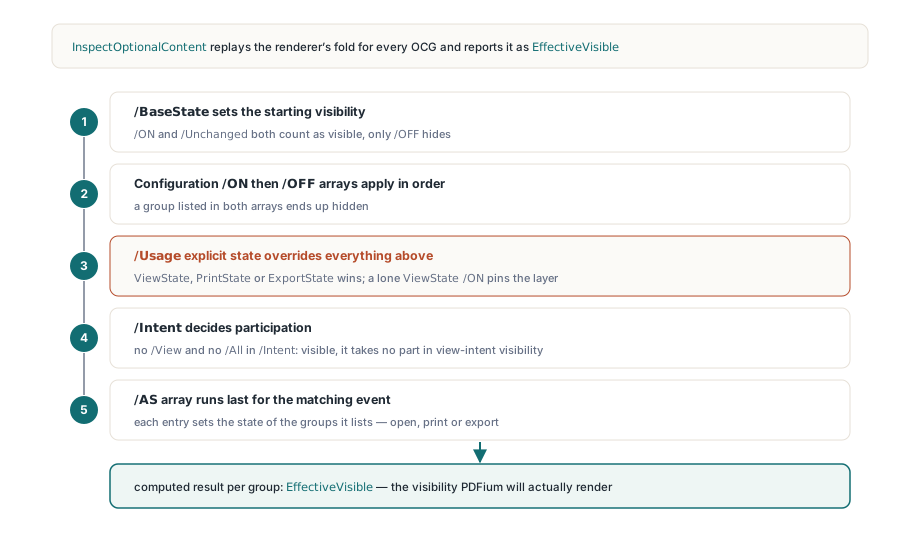
The third step is the one that burns people. A file saved by a layout tool often carries /ViewState /ON on every OCG, and PDFium then ignores your carefully edited /OFF array: the save succeeds, the file reopens cleanly, and the layer still paints. For Print and Export, OcExplicitUsageState reads PrintState or ExportState first and falls back to ViewState when the specific entry is absent, so a lone ViewState /ON pins the layer for printing too. Marked content that references an OCMD (§8.11.2.2) is then resolved against these per-group results, through the /P policy or, when present, the /VE visibility expression
How do you list the layers PDFium will actually show?
TPdf.InspectOptionalContent returns a TPdfOptionalContentInventory whose Groups array carries each OCG's object number, name, intents, the three Usage states, language, zoom range, Locked flag, radio-group index and the computed EffectiveVisible. The method first has PDFium save the current in-memory document, expands object streams, and scans the result, so edits made earlier in the session are reflected. Configuration index 0 is always the default /D dictionary and the entries of /Configs follow from index 1; the default argument of -1 selects index 0. A document without /OCProperties makes the method return False with the reason in ErrorMessage rather than raising
procedure TFormMain.ListLayers;
var
  Inv: TPdfOptionalContentInventory;
  G: TPdfOptionalContentGroup;
begin
  // Usage defaults to ocuView; -1 selects configuration 0, the /D dictionary
  if not Pdf.InspectOptionalContent(Inv) then
  begin
    Memo1.Lines.Add('No usable layers: ' + Inv.ErrorMessage);
    Exit;
  end;
  Memo1.Lines.Add(Format('Configuration %d: %s',
    [Inv.SelectedConfigurationIndex,
     string(Inv.Configurations[Inv.SelectedConfigurationIndex].Name)]));
  for G in Inv.Groups do
    Memo1.Lines.Add(Format('obj %d  %s  visible=%s  locked=%s  radio=%d',
      [G.ObjectNumber, string(G.Name),
       BoolToStr(G.EffectiveVisible, True),
       BoolToStr(G.Locked, True), G.RadioGroupIndex]));
end;
The Memberships array reports every OCMD with its Policy (ocmpAnyOn, ocmpAllOn, ocmpAnyOff, ocmpAllOff), the raw VisibilityExpression text and its own EffectiveVisible. A few edge rules are deliberate. /P defaults to /AnyOn, and an OCMD with no groups counts as visible. A reference to an object number that is not a known OCG is treated as visible rather than failing the whole expression. /VE evaluation stops at a nesting depth of 32 and treats anything deeper as hidden, which keeps a hostile or self-referencing expression from turning inspection into a stack overflow
Writing a new layer state with SaveAsOptionalContentConfigured
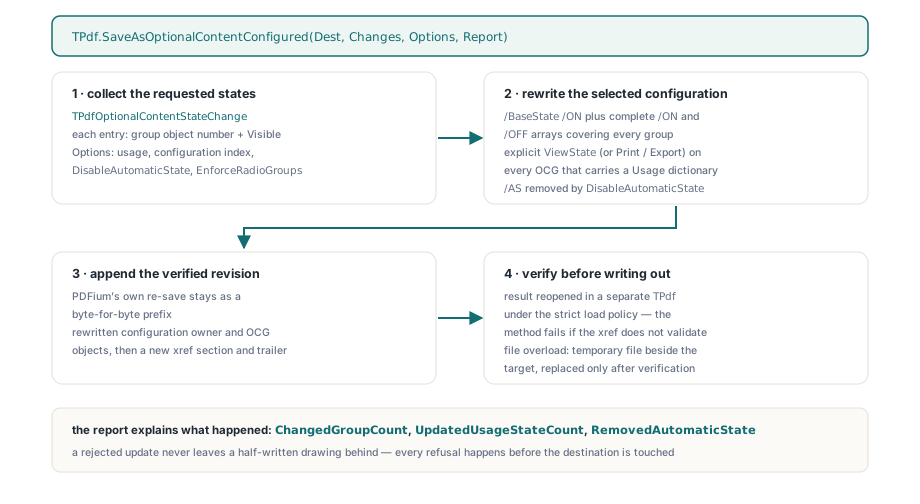
TPdf.SaveAsOptionalContentConfigured takes an array of TPdfOptionalContentStateChange records (group object number plus Visible) and writes a document in which the selected configuration produces exactly that state. The selected configuration gets /BaseState /ON plus complete /ON and /OFF arrays covering every group, and each OCG that already has a Usage dictionary receives an explicit ViewState (or PrintState / ExportState, following Options.Usage) matching its new state. With TPdfOptionalContentConfigureOptions.Default, the /AS key of the selected configuration is removed so that an open, print or export event cannot flip the layers back
procedure TFormMain.SaveWithoutDimensions(DimensionsObj, NotesObj: Integer);
var
  Changes: TPdfOptionalContentStateChanges;
  Options: TPdfOptionalContentConfigureOptions;
  Report: TPdfOptionalContentConfigureReport;
begin
  SetLength(Changes, 2);
  Changes[0].GroupObjectNumber := DimensionsObj;
  Changes[0].Visible := False;
  Changes[1].GroupObjectNumber := NotesObj;
  Changes[1].Visible := True;

  // Configuration 0, ocuView, DisableAutomaticState and EnforceRadioGroups True
  Options := TPdfOptionalContentConfigureOptions.Default;

  if not Pdf.SaveAsOptionalContentConfigured('C:\Out\Drawing-NoDims.pdf',
    Changes, Options, Report) then
    raise Exception.Create('Layer update rejected: ' + Report.ErrorMessage);

  Log(Format('%d of %d groups changed, %d Usage states rewritten, /AS removed: %s',
    [Report.ChangedGroupCount, Report.GroupCount,
     Report.UpdatedUsageStateCount,
     BoolToStr(Report.RemovedAutomaticState, True)]));
end;
The write path keeps PDFium's own saved output as a byte-for-byte prefix and appends only the rewritten configuration owner and the OCG objects that carry Usage dictionaries, followed by a new xref section and trailer. Before a single byte reaches your destination, the result is reopened in a separate TPdf under the strict load policy, and the method fails if the cross-reference table does not validate. The file overload goes one step further: it writes to a temporary file beside the target and replaces the target only after verification succeeds, so a rejected update never leaves a half-written drawing behind. It is the same verified incremental revision approach used by the PDF name tree and number tree editor in PDFium Component
What does the configured save refuse to do?
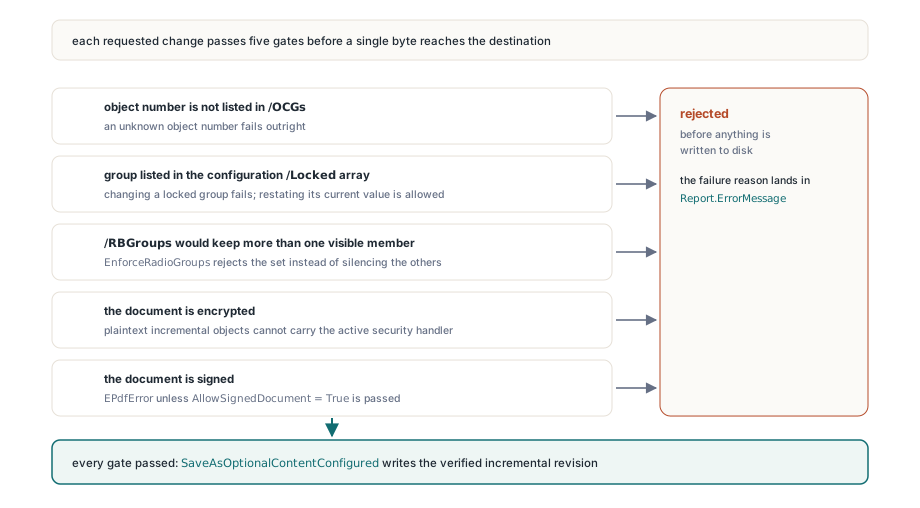
The configured save refuses any change the document itself forbids or cannot represent safely, and every refusal happens before the destination is touched. An object number that is not in /OCGs fails outright. Changing a group listed in the configuration's /Locked array fails, although restating its current value is allowed. With EnforceRadioGroups on, any /RBGroups set that would end up with more than one visible member is rejected instead of silently switching the others off. Encrypted documents are rejected because plaintext incremental objects cannot carry the active security handler. Signed documents raise EPdfError unless you pass AllowSignedDocument = True, since changing what a page shows can break signature coverage or a certification policy
function TFormMain.SavePrintPreset(Target: TStream;
  const Changes: TPdfOptionalContentStateChanges): Boolean;
var
  Options: TPdfOptionalContentConfigureOptions;
  Report: TPdfOptionalContentConfigureReport;
begin
  Options := TPdfOptionalContentConfigureOptions.Default;
  Options.Usage := ocuPrint;          // writes /Print << /PrintState ... >>
  Options.ConfigurationIndex := 1;    // first entry of /Configs, not /D
  try
    Result := Pdf.SaveAsOptionalContentConfigured(Target, Changes, Options,
      Report);                        // AllowSignedDocument stays False
    if not Result then
      ShowMessage(Report.ErrorMessage);
  except
    on E: EPdfError do
    begin
      ShowMessage(E.Message);         // signed file: nothing written to Target
      Result := False;
    end;
  end;
end;
Know the trade-offs before wiring this into a batch job. The appended revision sits on top of PDFium's full re-save, not your original file bytes, which is exactly why signed input needs explicit consent. The rewrite also normalises the selected configuration to /BaseState /ON, so an author's /Unchanged or /OFF baseline is replaced by explicit arrays with the same resulting visibility. Dropping /AS removes print-only tricks such as a watermark layer that appears only on paper; set DisableAutomaticState to False to keep those rules, accepting that they may override your requested state for that event. On the plus side, PDF/A-2 (ISO 19005-2 clause 6.9) and PDF/UA (ISO 14289-1 clause 7.10) both forbid /AS in configuration dictionaries, so the default output removes one issue your PDF/A preflight validation with PDFium Component would otherwise report
Where layer control fits in a Delphi PDF viewer
In a viewer, layer control is a checklist driven by the inventory plus a reload of the saved result. Populate the checklist from Groups, disable the entries that are Locked, treat members sharing a RadioGroupIndex as mutually exclusive, and on apply write to a TMemoryStream and load that stream back into TPdf so the view paints the new state. The wiring between TPdf and TPdfView is covered in building a feature-rich PDF viewer with PDFium VCL in Delphi. Licensing, trial downloads and the rest of the feature set are on the PDFium Component for Delphi product page