Stamping a watermark or a logo onto every page of a document looks like a five-minute job until you open the result in a file-size inspector. The obvious approach is to walk the pages and, on each one, build the same text or image objects again. That works visually, and it is wasteful in a way that compounds. A diagonal "DRAFT" watermark drawn directly onto a hundred-page report is a hundred copies of the same path and text data sitting in the content streams, and the saved file carries every one of them
A Form XObject is the construct PDF provides to avoid exactly this. It wraps a piece of reusable content, a whole page or a small template, into a single named object that can be painted many times at many positions. The content lives in the file once. Each page that wants the stamp holds a short instruction that says "paint XObject N here, with this transform." A hundred-page watermark then adds one content object to the file rather than a hundred, and that is the difference between a document that grows linearly with its page count and one that does not. Watermarks, logo stamps, page-number templates, and seals are all the same shape of problem, and the Form XObject is the right tool for every one of them
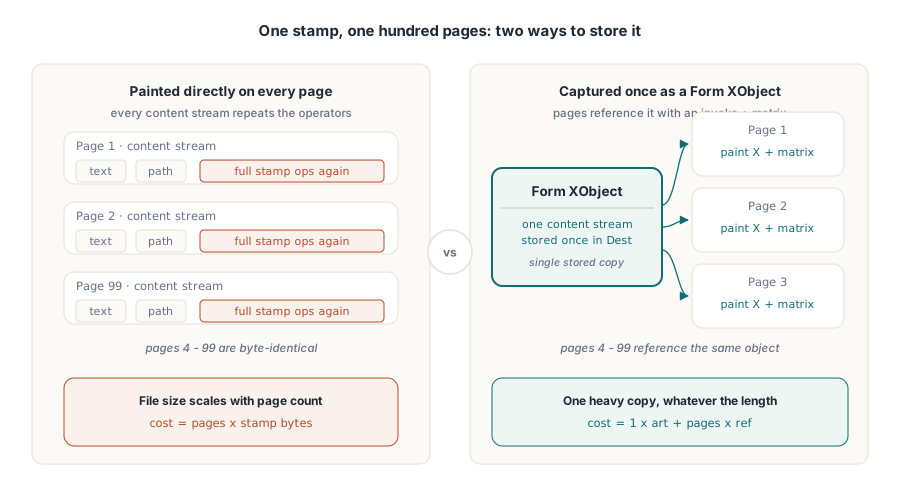
Why one stored object beats a hundred redraws
The saving is structural, not cosmetic. A PDF page renders by executing its content stream, a sequence of drawing operators. When you redraw a stamp per page, you are appending the full operator sequence for that stamp to every page's stream, and the bytes are duplicated as many times as you have pages. A Form XObject moves those operators into one stream stored once in the document. The reference an individual page keeps is small: it pushes a transformation matrix, invokes the XObject, and restores state. The page count no longer multiplies the cost of the artwork
This matters most when the stamp is heavy. A vector seal with hundreds of path segments, or a logo bitmap, is expensive to store. Stored once and referenced, the heavy part is paid for a single time and the per-page overhead is a few bytes of invocation. The visual result on the page is identical to a direct redraw, which is the point. The reader cannot tell the difference; the file size very much can
Capturing a page into an XObject
PDFium builds the reusable object from an existing page. The source is a page in some document you have open, a small one-page PDF that contains nothing but your watermark artwork, or a particular page of a larger file. CreateXObjectFromPage captures that source page's content into a reusable handle that belongs to the destination document, the one you are stamping
var
  Dest, Stamp: TPdf;
  XObject: TPdfXObject;
begin
  Dest := TPdf.Create(nil);
  Stamp := TPdf.Create(nil);
  try
    Dest.FileName := 'Report.pdf';
    Dest.Active := True;
    Stamp.FileName := 'Watermark.pdf';   // one page of artwork
    Stamp.Active := True;
    if not (Dest.Active and Stamp.Active) then
      raise Exception.Create('Could not open the input documents');

    // Capture page 0 of the stamp document into a reusable handle that
    // is owned by Dest. Source must be Active; the index is zero-based.
    XObject := Dest.CreateXObjectFromPage(Stamp, 0);
    if XObject = nil then
      raise Exception.Create('Could not build the stamp XObject');
    // ... place it, then free it before closing Stamp (see below) ...
The signature is CreateXObjectFromPage(Source: TPdf; SourcePageIndex: Integer): TPdfXObject. The method raises if the source document is not Active, and it returns nil rather than raising when PDFium cannot build the object, so the explicit check above is not optional. The handle that comes back is a TPdfXObject you own, and the two lifetime constraints attached to it are the part of this whole exercise that catches people out, so they get their own section below
Placing the stamp on a page
A captured XObject does nothing on its own. To make it appear, you insert a copy of it onto the document's current page, the one selected by the 1-based PageNumber property, with InsertFormObjectFromXObject. That call returns the underlying page object, an FPDF_PAGEOBJECT, and the returned handle is how you position the placement. Without a transform the stamp lands at the origin in the source page's own coordinates, which is rarely where you want it
Because InsertFormObjectFromXObject inserts one copy per call and hands back a fresh page object each time, you can paint the same XObject several times on one page at different transforms, and the stored content is still counted once in the file. A corner logo and a faint full-page watermark can come from the same captured object
var
  PageObj: FPDF_PAGEOBJECT;
  M: TPdfMatrix;
  RawM: FS_MATRIX;
begin
  // The current page of Dest receives one copy of the XObject.
  PageObj := Dest.InsertFormObjectFromXObject(XObject);
  if PageObj = nil then
    raise Exception.Create('Insert failed on this page');

  // Position it: move 200 units right, 500 up, at 70% scale.
  M := TPdfMatrix.Create;
  try
    M.Scale(0.7, 0.7);
    M.Translate(200, 500);
    RawM := M.Handle;
    if FPDFPageObj_SetMatrix(PageObj, RawM) = 0 then
      raise Exception.Create('Cannot assign the stamp matrix');
  finally
    M.Free;
  end;
  Dest.UpdatePage;   // commit this page's edits to its content stream
  // if not Dest.SaveAs(...) then ... when every page is done.
end;
Two housekeeping details make this safe. First, once inserted, the page object belongs to the page, not to the XObject. Freeing the XObject later does not invalidate the placements you already made. That is what lets the create-place-free ordering described below work. Second, inserting and positioning only changes the page's object list in memory; UpdatePage is what serialises that list back into the page's content stream, so a page you edit without calling it saves as if the stamp were never placed
The handle lifetime rule that bites people
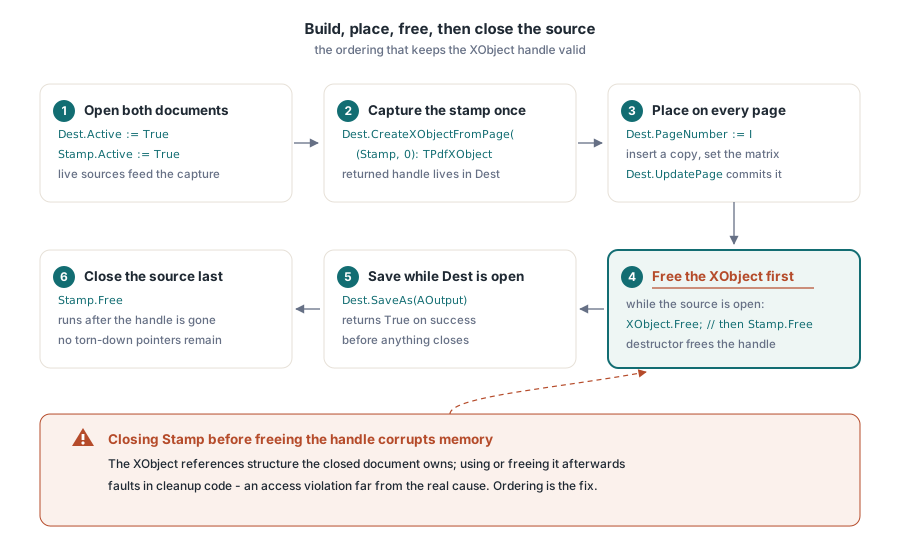
Two constraints govern the XObject handle, and ignoring either produces a failure that looks unrelated to its cause. First, the source document must be active at the moment you call CreateXObjectFromPage. The capture reads the source page's content from the live source document, so that document and its page have to be open and valid when the handle is built. Second, and this is the one that surprises people, the handle must be freed before the source page is closed, and in practice before you close or free the source document it came from
The reason is that the XObject is a reference into structure that the source document still owns. It is not a detached, self-contained copy you can carry around after the source is gone. Close the source first and the handle is left pointing at content that has been torn down, so freeing it later, or any other use of it, operates on memory that is no longer valid. The symptom is the classic one for a dangling handle: an access violation at shutdown, or intermittent corruption that moves around depending on allocation order, with a stack that points at cleanup code rather than at the line that actually caused the problem. The fix is ordering, not defensive coding. Build the XObject, insert it onto every page that needs it, free the XObject, and only then close the source document. The TPdfXObject destructor releases the underlying PDFium handle for you, so freeing the wrapper at the right time is the whole of your responsibility
The matrix, and what its six numbers mean
Placement is a 2D affine transform, the same one PDF uses everywhere for positioning content (ISO 32000-1, section 8.3.4). It is six numbers, written a, b, c, d, e, f, and PDFium exposes them as the FS_MATRIX record. They map a point from the object's own space to page space:
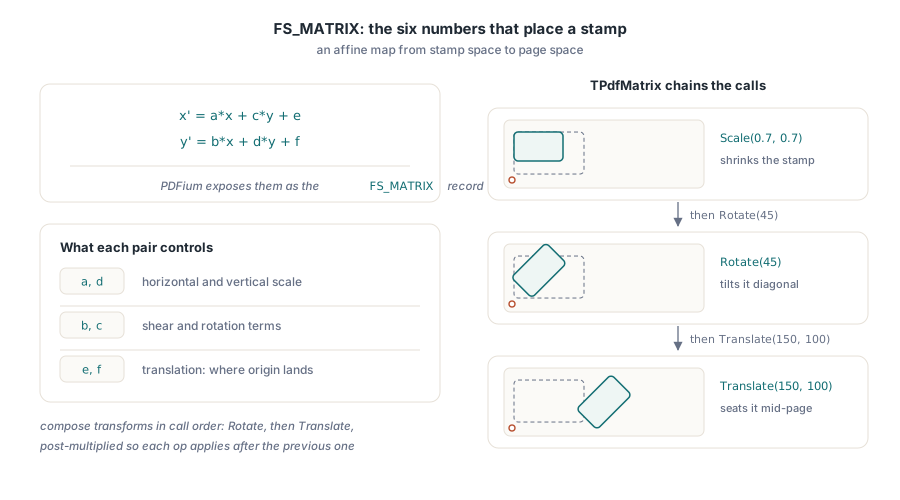
// x' = a*x + c*y + e
// y' = b*x + d*y + f
//
// a, d : horizontal and vertical scale
// b, c : the shear / rotation terms
// e, f : translation (where the origin lands on the page)
You can fill those six values by hand, but composing them by hand is where rotation goes wrong, because rotation mixes all four of a, b, c, d together. The TPdfMatrix wrapper, from the FPdfMatrix unit, composes the common operations for you and post-multiplies as it goes, so Translate, Scale, and Rotate chain in the order you call them. A diagonal watermark is a rotate followed by a translate to recentre it; a corner logo is a scale followed by a translate. When the matrix is ready, copy its raw value, the Handle property of type FS_MATRIX, into a local variable and pass that to FPDFPageObj_SetMatrix; the import declares the matrix as a var parameter, so a property cannot be handed to it directly, and its result is 0 on failure. The lower-level FPDFPageObj_Transform, which takes the six values directly as doubles, is available when you would rather pass numbers than build a wrapper
Stamping every page, in the right order
The full pattern puts the pieces together with the ordering the lifetime rule demands. Open both documents, capture the stamp once, walk the destination pages by setting the 1-based PageNumber in turn and inserting plus positioning a copy, committing each page with UpdatePage, then free the XObject, then save with SaveAs, and let the source document close last
procedure StampEveryPage(const ASource, AStamp, AOutput: string);
var
  Dest, Stamp: TPdf;
  XObject: TPdfXObject;
  PageObj: FPDF_PAGEOBJECT;
  M: TPdfMatrix;
  RawM: FS_MATRIX;
  I: Integer;
begin
  Dest := TPdf.Create(nil);
  Stamp := TPdf.Create(nil);
  try
    Dest.FileName := ASource;
    Dest.Active := True;
    Stamp.FileName := AStamp;
    Stamp.Active := True;
    if not (Dest.Active and Stamp.Active) then
      raise Exception.Create('Could not open the input documents');

    // 1. Capture the artwork once. Stamp is Active here.
    XObject := Dest.CreateXObjectFromPage(Stamp, 0);
    if XObject = nil then
      raise Exception.Create('Could not capture the stamp page');
    try
      // 2. Place a copy on every page of Dest. PageNumber is 1-based.
      for I := 1 to Dest.PageCount do
      begin
        Dest.PageNumber := I;                // make page I current
        PageObj := Dest.InsertFormObjectFromXObject(XObject);
        if PageObj = nil then
          Continue;

        M := TPdfMatrix.Create;
        try
          M.Rotate(45);                      // diagonal watermark
          M.Translate(150, 100);             // nudge into position
          RawM := M.Handle;
          FPDFPageObj_SetMatrix(PageObj, RawM);
        finally
          M.Free;
        end;
        Dest.UpdatePage;                     // commit this page's edits
      end;
    finally
      XObject.Free;                          // 3. free BEFORE Stamp closes
    end;

    // 4. Write the result while Dest is still open.
    if not Dest.SaveAs(AOutput) then
      raise Exception.Create('Could not save ' + AOutput);
  finally
    Stamp.Free;                              // source closes last
    Dest.Free;
  end;
end;
The shape of the try blocks is doing the real work. The inner finally frees the XObject before control can ever reach the outer finally that frees Stamp, so the handle is always released while its source is still alive, even if an exception fires mid-loop. Get that nesting right and the lifetime rule takes care of itself
Stamping is one corner of a larger toolkit for building and editing page content. If your stamp is itself an image rather than a captured page, converting images to PDF documents with PDFium covers getting that bitmap into a document first. And when the thing you want to carry alongside the visible stamp is a file rather than ink on the page, working with PDF attachments in Delphi shows the embedded-file side. All of it ships with the PDFium Component for Delphi and C++Builder, alongside the rendering, editing, and document APIs covered elsewhere on this blog