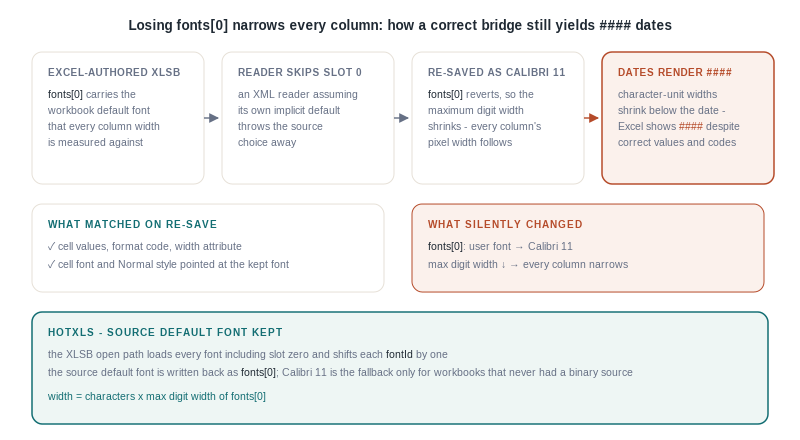
An Excel-authored .xlsb opens cleanly, goes through a converter and comes back with a date column full of ####. The cell values match the original. So do the format code and the column width attribute. What changed is the workbook default font in fonts[0], which Excel uses to measure every column, and a faithful XLSB round trip has to carry that slot across untouched
XLSB shares nearly everything with XLSX. The parts it does not share are where a converter makes quiet assumptions, and the two worst ones only show up with workbooks Excel itself wrote
XLSB is an XLSX package with binary parts
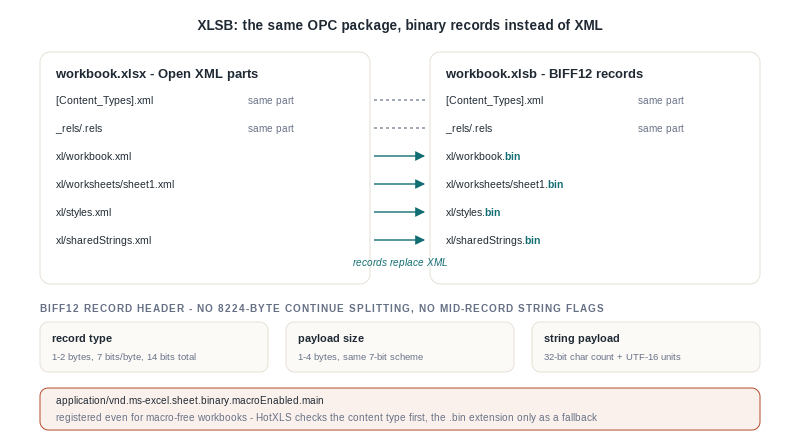
An XLSB file is an OPC package with the same part structure as an XLSX workbook, but the workbook, worksheet, style and shared-string parts hold binary records instead of XML. The format is specified in [MS-XLSB], and its record encoding is usually called BIFF12. You still get [Content_Types].xml, relationship parts and a ZIP container; the difference is that xl/workbook.bin replaces xl/workbook.xml, xl/worksheets/sheet1.bin replaces the worksheet XML, and so on down the list
Each BIFF12 record opens with a compact variable-length header. The record type takes one or two bytes, seven bits per byte with the high bit as a continuation flag, so a record type fits in 14 bits. The payload size follows in one to four bytes under the same seven-bit scheme. Strings are a 32-bit character count followed by UTF-16 code units. Anyone who has written a BIFF8 reader will notice what is missing: no 8224-byte CONTINUE splitting, and no compressed-versus-wide flag switching halfway through a string. Compared with XLSX, Excel skips XML tokenising entirely when it loads the file
One packaging detail trips up detection code written from the file extension outward. Excel registers the XLSB workbook part with the content type application/vnd.ms-excel.sheet.binary.macroEnabled.main, even for workbooks that contain no macros at all. HotXLS reads that registration in [Content_Types].xml first and falls back to the .bin part extension only when no content type is declared for the workbook part; either way, the package still has to pass the strict binary record validator. The general rules for part names, relationships and content types are the ones covered in why Excel repairs a valid XLSX and the OPC package rules behind it
Opening and saving XLSB with TXLSXWorkbook
TXLSXWorkbook.Open takes no format hint: the same call loads XLSX, XLSM or XLSB, and after a successful binary load TXLSXWorkbook.SourceFormat reports xlsxExcelBinaryWorkbook. Writing works the other way round. SaveAs(FileName) without a format argument always produces an Open XML workbook, even when the file name ends in .xlsb. The result is a file whose extension promises binary parts that are not there
uses
  SysUtils, lxHandleX;

procedure ConvertToXlsb(const Source, Target: string);
var
  Book: TXLSXWorkbook;
begin
  Book := TXLSXWorkbook.Create;
  try
    // Open detects XLSX, XLSM or XLSB from the package itself
    if Book.Open(Source) <> 1 then
      raise Exception.Create('Input is unsupported or invalid');

    // The .xlsb extension alone never selects binary output
    if Book.SaveAsChecked(Target, xlsxExcelBinaryWorkbook) <> 1 then
      raise Exception.Create('XLSB output is unsupported or failed');

    // Worksheet rows were streamed into the output
    // (an Assert you add yourself, not part of the library)
    Assert(Book.LastSaveUsedStreaming);
  finally
    Book.Free;
  end;
end;
Stream output uses SaveAs(Stream, xlsxExcelBinaryWorkbook) or the stream overload of SaveAsChecked. File output is written to a temporary file next to the target and moved into place with one final replacement, so a failed save leaves the existing file as it was. A stream destination must be readable and seekable: before writing, the library copies the stream's current bytes, size and position aside, and puts them back if the final copy fails
Memory behaves differently on each side. On save, worksheet rows stream into an intermediate package on disk, which is then encoded to binary records, so the temp folder needs room for both stages and the backup of a stream destination. LastSaveUsedStreaming reports True after a binary save, and LastSaveBufferedWorksheetXmlChars stays at 0 when no worksheet had to be buffered whole; checking those two properties after a save on your own largest workbook tells you more than any general claim. On open, the binary package is converted to an Open XML package in memory before the parser reads it, so a very large XLSB costs more RAM to read than to write
For new output, start with XLSX. It is an ISO standard (ISO/IEC 29500), it can be inspected with a ZIP tool and a text editor, and every spreadsheet product reads it. Choose XLSB when a downstream archive or reporting system accepts nothing else, or when Excel users open large value-heavy workbooks often enough to notice load time. "It sounds more efficient" is not on that list
Why does a binary save refuse features instead of approximating them?
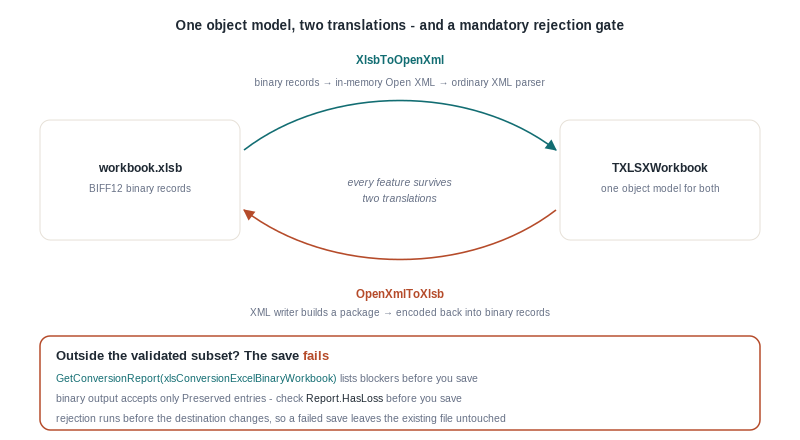
HotXLS keeps one object model for both formats, so every XLSB feature has to survive two translations, and a feature that cannot make the trip exactly fails the save. On open, XlsbToOpenXml in the lxXlsb unit converts the binary package to Open XML and the ordinary XML parser loads it; on save, the XML writer builds a package and OpenXmlToXlsb encodes it as binary records. A converter that approximates what it cannot map produces files that open fine and are wrong
The supported set covers typical data workbooks: typed values, shared and inline strings, common fonts, fills, borders and number formats, row heights and column widths, ordinary cell formulas with cached results, defined names, merged cells, hyperlinks, frozen and split panes, AutoFilter ranges with simple custom criteria, and ordinary worksheet tables. Beyond that list, the authority for any particular workbook is the conversion report, which names each feature that will keep the save from going through
uses
  Classes, lxHandleX, lxDiagnostics;

function CanSaveAsXlsb(Book: TXLSXWorkbook; Log: TStrings): Boolean;
var
  Report: TXLSConversionReport;
  I: Integer;
begin
  Report := Book.GetConversionReport(xlsConversionExcelBinaryWorkbook);
  try
    // Binary output accepts only Preserved entries
    Result := not Report.HasLoss;
    for I := 0 to Report.Count - 1 do
      if Report[I].Fidelity <> xlsConversionPreserved then
        Log.Add(Report[I].SheetName + ' ' + Report[I].Location + ': ' +
          Report[I].Feature + ' - ' + Report[I].Message);
  finally
    Report.Free;   // the caller owns the report
  end;
end;
Binary output is lossless only: the XLSB writer accepts a save when every report entry is xlsConversionPreserved, so AAllowLossy only changes the outcome for XML targets, where True lets entries marked xlsConversionDegraded or xlsConversionDropped through. Pre-check with Report.HasLoss, as the function above does. A check that looks only for xlsConversionUnsupported lets a degraded entry through to a save that will then be refused
The report inspects the live model. Final package validation still runs for things the model never sees, such as a malformed record or an unfamiliar attribute in the source file, so a clean report followed by a failed save is possible. Act on the save result and read Diagnostics when it is not 1
Why does a date column turn into #### after an XLSB round trip?
Excel computes column widths from the workbook default font in fonts[0], and a converter that replaces that font narrows every column in the workbook. Column width is stored in character units of the default font's maximum digit width. Change fonts[0] and the pixel width of every column changes with it, including columns whose cells all use a different font. The full width arithmetic is in Excel column width and max digit width (MDW) in Delphi
The trap comes from a reasonable shortcut in XML-based libraries. A library that writes its own XLSX files usually puts an implicit default font into slot zero and has its reader skip that slot, so the user-facing font list starts with real fonts. An Excel-authored workbook carries an explicit default in the same slot. Skip it on the way in, write Calibri 11 on the way out, and the maximum digit width shrinks. A date that fit at Excel's original font no longer fits, even though the re-saved file has the same values, the same format code, the same width attribute, and a Normal style pointing at the right font. Every cell-level property you inspect is correct
HotXLS treats slot zero differently when the source is binary. The XLSB open path loads every font including slot zero and shifts each fontId by one, so Fonts[0] in the model is the workbook default Excel wrote. On save, that font goes back out as fonts[0]. Calibri 11 is written only when the workbook carries no usable source default font, which typically means one built from scratch in code
Built-in number formats without a format code
The second trap has the same shape. XLSB style records can reference a built-in number format by id alone, with no format code stored anywhere in the file. A reader that only maps custom ids (164 and above) leaves a styled blank cell carrying built-in id 2 as General, even though id 2 means 0.00. The binary import path in HotXLS turns each supported built-in id into an explicit format code in the model, ids 0 to 22, 37 to 40 and 45 to 49, covering codes such as 0.00, 0%, mm:ss and @. Built-in date ids keep their date meaning
The remaining ids below 164 render according to the regional settings of whichever Excel installation opens the file. For those, the import fails with "A locale-dependent number format requires an explicit format code". Guessing would be worse. A made-up East Asian date pattern looks plausible, round-trips without complaint and shows the wrong thing to half your users. The check runs while the binary package is being converted, before the XML parser loads anything, and the diagnostic names the reason, so a batch job can log the file and move on. The Excel date serial and numFmt article covers how built-in date ids interact with the 1900 and 1904 date systems
Loading only some sheets of a binary workbook
MetadataOnly and SelectedSheets work with XLSB input the same way they do with XLSX: sheets outside the selection are created with their names and visibility but no cells, and LoadSheet fills one in later. Two details are easy to miss
First, LoadSheet takes a zero-based position while the Sheets indexer is one-based, so LoadSheet(0) loads the sheet you reach as Sheets[1], and it needs a workbook opened from a file, not a stream. Second, a sheet that has not been loaded yet cannot be saved. The conversion report lists it under DeferredWorksheets and the save fails with "Load every deferred binary worksheet before saving". Writing cells into a skipped sheet before loading it does not help: LoadSheet then refuses with a diagnostic asking you to clear those cells first. The same goes for deleting unused styles, which has to wait until every deferred sheet is in, because those sheets still reference the original style pools
function OpenSummaryThenSave(const Source, Target: string): Boolean;
var
  Book: TXLSXWorkbook;
  I: Integer;
begin
  Result := False;
  Book := TXLSXWorkbook.Create;
  try
    Book.SelectedSheets.Add('Summary');   // other sheets are deferred
    if Book.Open(Source) <> 1 then
      Exit;

    // ... read the Summary sheet here ...

    // Materialize every deferred sheet before any binary save.
    // LoadSheet is zero-based; Sheets[] is one-based.
    for I := 0 to Book.Sheets.Count - 1 do
      if not Book.LoadSheet(I) then
      begin
        Writeln('Cannot load ', Book.Sheets[I + 1].Name);
        Exit;
      end;

    // Formulas need a cached result or a recalculation at save time
    Book.RecalcBeforeSave := xrmAlways;

    Result := Book.SaveAsChecked(Target, xlsxExcelBinaryWorkbook) = 1;
    if not Result then
      for I := 0 to Book.Diagnostics.Count - 1 do
        Writeln(Book.Diagnostics[I].Message);
  finally
    Book.Free;
  end;
end;
The RecalcBeforeSave line matters for any workbook you edit. Binary formula records carry a typed cached result, and a formula cell without one is rejected with "Formula output requires an explicit typed cache or recalculation before save" under the default xrmManual, and under xrmIfDirty when the dependency graph reports nothing to recalculate. xrmAlways costs one recalculation per save and removes that failure mode for every formula cell the program writes
Habits that keep XLSB output predictable
- Pass
xlsxExcelBinaryWorkbookon every binary save; the.xlsbextension on its own still yields an Open XML package - Run
GetConversionReport(xlsConversionExcelBinaryWorkbook)before saving user-edited workbooks, and show every entry that is notxlsConversionPreservedto the user - After a selective open, load every deferred sheet before saving or trimming styles, and remember that
LoadSheetcounts from 0 - Set
RecalcBeforeSavetoxrmAlwayswhenever formulas may lack a cached value - Leave temp-folder space for the intermediate package, the binary output and, for stream targets, a copy of the destination
Test against Excel through the public API rather than comparing converted parts. The default-font and 0.00 traps both pass a part-by-part comparison and both show up the moment an Excel-authored workbook is opened with Open, saved with SaveAsChecked and reopened in Excel: look at a date column sized to fit its contents and at a blank cell formatted as 0.00 before typing a number into it
The binary workbook backend, the conversion report and selective sheet loading are all part of HotXLS, a native spreadsheet component for Delphi and C++Builder