HotXLS writes ISO/IEC 29500 Strict Open XML workbooks from Delphi and C++Builder by setting a single property, StrictOOXML, before saving. Every part in the package, from xl/workbook.xml down to the relationship files and content types, is written with the strict purl.oclc.org vocabularies instead of the transitional schemas.openxmlformats.org ones, and features that Strict does not permit are rejected with an explicit exception rather than written out anyway
Most developers meet this requirement through a procurement document. Public sector tenders in several jurisdictions ask for the ISO standardised form of Open XML, not the transitional form that Office writes by default, and an archive that mandates ISO 29500 Strict will reject a normal .xlsx even though Excel opens it perfectly. The transitional namespaces exist to accommodate legacy binary behaviour; the strict ones are the standard proper
What actually differs between Strict and Transitional?
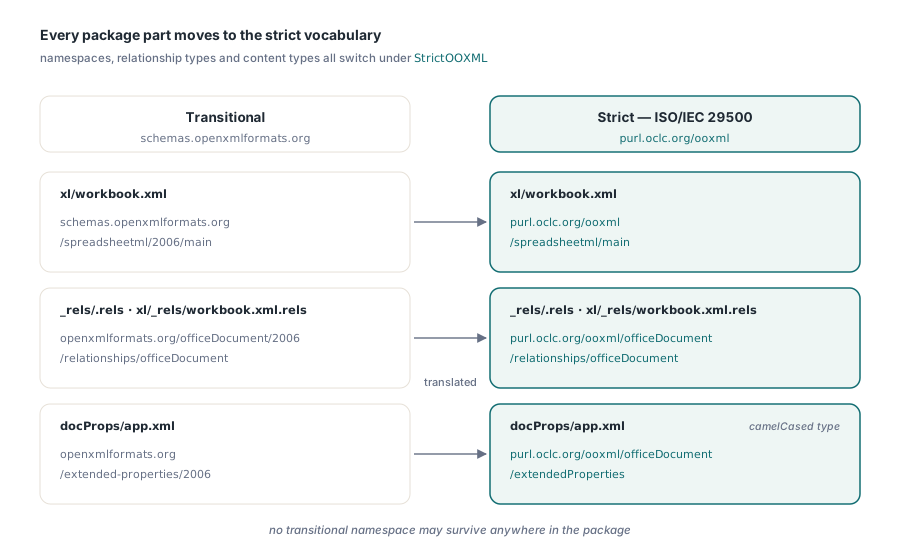
The visible difference is vocabulary. A strict workbook part declares http://purl.oclc.org/ooxml/spreadsheetml/main as its root namespace and http://purl.oclc.org/ooxml/officeDocument/relationships for relationship references, and no transitional namespace may survive anywhere in the package. Relationship types change with it, so the root relationships part names .../ooxml/officeDocument/relationships/officeDocument rather than the familiar openxmlformats equivalent, and the extended properties type is camelCased as extendedProperties
The invisible difference is scope. Strict deliberately omits parts of the transitional schema that only existed to round-trip legacy binary files, along with the vendor extensions Office added afterwards. That is why the conversion is not a search and replace over strings: some features simply have no strict spelling and must not be written at all
Turning it on
Ordinary authoring code does not change. Build the workbook the way you always do, set the flag, and save:
var
  Wb: TXLSXWorkbook;
  Sh: TXLSXWorksheet;
begin
  Wb := TXLSXWorkbook.Create;
  try
    Sh := Wb.Sheets.Add('Data');
    Sh.Cells[1, 1].Value := 'Product';
    Sh.Cells[1, 2].Value := 'Amount';
    Sh.Cells[2, 1].Value := 'Widget';
    Sh.Cells[2, 2].Value := 17;
    Sh.Cells[3, 2].Formula := '=SUM(B2:B2)';

    Wb.StrictOOXML := True;          // ISO/IEC 29500 Strict output
    if Wb.SaveAs('archive-copy.xlsx') <> 1 then
      raise Exception.Create('strict save failed');
  finally
    Wb.Free;
  end;
end;
The flag is reset at the start of every save operation and reassigned from the workbook property, so an exception during one save cannot leak strict mode into the next one. That detail matters in server processes where a single workbook object serves several export requests
Why can a strict save refuse to run?
Four feature families are Microsoft extensions with no ISO 29500 Strict equivalent, and HotXLS raises an exception at save time rather than emitting a package that claims strict conformance and is not:
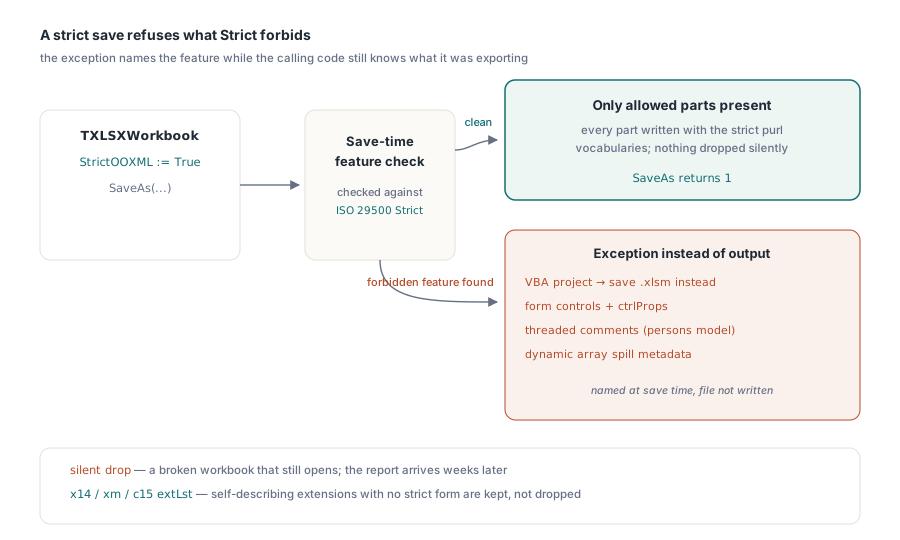
// Strict output cannot embed a VBA project
//   -> save macro-enabled workbooks as transitional .xlsm
// Strict output cannot carry form controls
//   -> buttons, checkboxes, combo boxes and their ctrlProps
// Strict output cannot carry threaded comments
//   -> the modern persons/threads model, not classic notes
// Strict output cannot carry dynamic array metadata
//   -> spill ranges recorded through the metadata part
Failing loudly is the right trade here. A silently dropped VBA project turns a working workbook into a broken one that still opens, and the report of the failure arrives from a user weeks later. An exception names the feature and the property to change while the calling code still knows what it was exporting. Macro and external link preservation on the transitional path is covered in preserving VBA projects and external links
Two extension families are handled differently, and it is worth knowing why. Data bars, sparklines and similar features live in the x14 and xm vocabularies, and the SVG variants of pictures live in c15. These are extension list content whose namespaces are self-describing, general spreadsheet parsers tolerate them, and there is no ISO equivalent to translate them into. HotXLS keeps them rather than dropping user content on the floor. If a validator in your pipeline is strict about extensions as well as namespaces, remove those features from the source workbook before exporting
Translation has to reach parts nobody normally rewrites
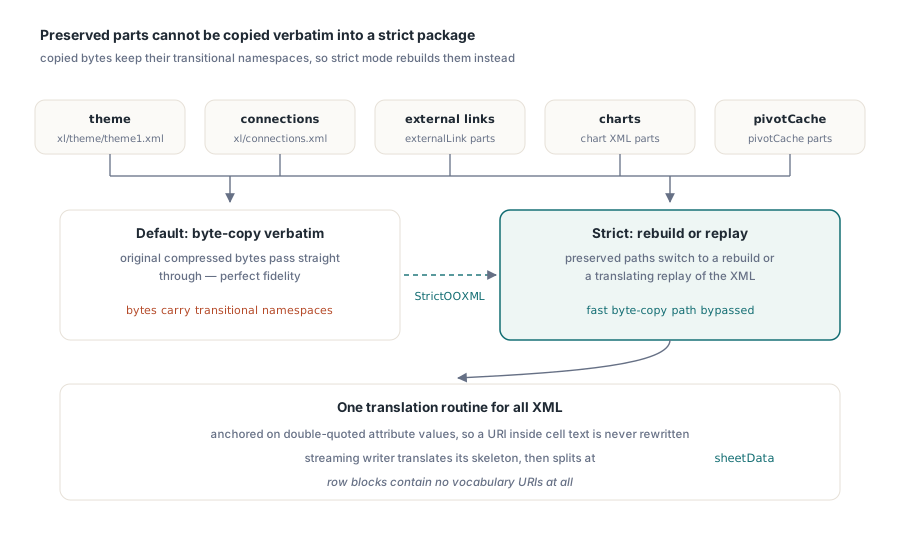
The interesting engineering problem in strict output is not the worksheet XML. It is the parts a fast writer would rather copy verbatim. HotXLS preserves themes, connections, external links, charts and pivot blobs by copying their original compressed bytes straight through, which is exactly the right thing to do for fidelity and exactly the wrong thing for strict output, because copied bytes carry transitional namespaces
Under StrictOOXML those five preserved paths switch to rebuilding or to a translating replay, bypassing the byte-copy fast path. All XML goes through one translation routine, which anchors on double-quoted attribute values so that a URI-looking string inside a cell can never be rewritten by accident. Cell text containing the same URI is escaped as an entity in the XML, so the anchored replacement cannot see it. The streaming writer translates its skeleton first and then splits at sheetData, since the row blocks contain no vocabulary URIs at all. Related mechanics for the preservation path are covered in lossless round-trips of themes, extension lists and calcChain
Reading files that Excel saved as strict
Output is only half the story. Excel offers "Strict Open XML Spreadsheet" as a save option, and files produced that way must open correctly. HotXLS normalises relationship types at every relationship parsing site in the package, the root, external links, worksheets, drawings and pivot tables, so a strict relationship type matches the same internal constant as its transitional counterpart
The reader-side counterpart is namespace prefix normalisation, which allows arbitrary prefixes and both vocabularies to resolve to one canonical name table. That work benefits ordinary files as well as strict ones, since third-party generators bind prefixes freely, and it is the same machinery described in OPC relationship resolution in XLSX packages
A short checklist before you ship strict output
Verify with the package, not with Excel. Excel opens both forms happily, so a successful open proves nothing about conformance. Unzip the result and confirm that xl/workbook.xml declares the purl namespace, that no part contains schemas.openxmlformats.org/spreadsheetml, and that relationship types in _rels/.rels and xl/_rels/workbook.xml.rels use the strict forms
Then reopen the file through HotXLS and compare values, formulas, formats and hyperlinks against the source. A read-back test is the only cheap way to prove that translation did not damage content, and it exercises the reader-side normalisation at the same time. If your workbooks carry charts, check those too, since the chart part is one of the preserved parts that switches to a rebuilt path under strict mode
Strict output, tolerant reading and lossless preservation are all part of the same OOXML engine for Delphi and C++Builder; the complete feature list is on the HotXLS Delphi spreadsheet component page