Excel 365 inserts @ into a formula such as =SUM(A1:B1*{10,100}) and shows #VALUE! when the file stores it as an ordinary formula, because Excel then applies legacy implicit intersection to every operator operand. Since v2.384.68, HotXLS Delphi Component stores these array-operator formulas the way Excel 365 does: as single-cell dynamic-array formulas in XLSX and as one-cell array formulas in XLS
The symptom survives code review. Your Delphi service writes a workbook, HotXLS recalculates it and caches 210 for =SUM(A1:B1*{10,100}), and the customer opens it in Excel 16 to find =SUM(@A1:B1*@{10,100}) in the formula bar and #VALUE! in the cell. Nothing in the file is malformed. What is missing is the metadata that tells Excel the formula was written under dynamic-array rules, and without it Excel falls back to its pre-dynamic-array evaluation model
Why does Excel 365 add @ to a formula HotXLS calculated correctly?
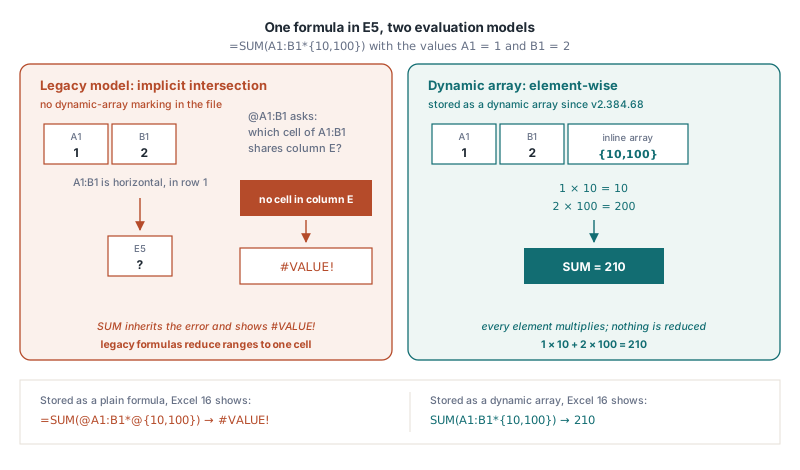
Excel 365 adds @ because a formula without dynamic-array marking is, by definition, a legacy formula, and legacy formulas reduce a multi-cell range to one cell wherever an operator expects a single value. That reduction is implicit intersection: Excel takes the cell of the range that shares the formula's row (for a vertical range) or column (for a horizontal range), and if no such cell exists the result is #VALUE!. Excel 365 keeps that meaning for old-style formulas and displays @ to make the reduction visible
Put =SUM(A1:B1*{10,100}) in E5 and the legacy reading becomes obvious. A1:B1 is a horizontal range, the formula sits in column E, the range has no cell in column E, so @A1:B1 is #VALUE! and the whole SUM inherits it. Under dynamic-array rules the same text multiplies element by element, 1 × 10 + 2 × 100, and returns 210. The HotXLS formula engine has evaluated the dynamic-array way since the v2.384.61 and v2.384.63 releases; the file format simply did not say so. With A1:B2 holding 1, 2, 3 and 4, these are the probe formulas and what Excel 16 displays:
| Formula | HotXLS result | Excel 16, stored as plain formula | Stored since v2.384.68 |
|---|---|---|---|
=SUM(A1:B1*{10,100}) | 210 | #VALUE! | Dynamic array, Excel shows 210 |
=SUM((A1:B2>2)*1) | 2 | Implicit intersection, wrong or error | Dynamic array, Excel shows 2 |
=SUMPRODUCT((A1:B2>2)*1) | 2 | Implicit intersection, wrong or error | Dynamic array, Excel shows 2 |
=MAX(A1:B2-1) | 3 | Implicit intersection, wrong or error | Dynamic array, Excel shows 3 |
=SUM(A1:B2) | 10 | 10 | Plain formula, unchanged |
The last row matters as much as the first four. SUM(A1:B2) passes a range directly to a function parameter that accepts references, so no operator ever sees a multi-cell range and no intersection can happen. Excel 365 itself saves that formula as a plain formula, and HotXLS does the same
How HotXLS stores array-operator formulas in XLSX and XLS
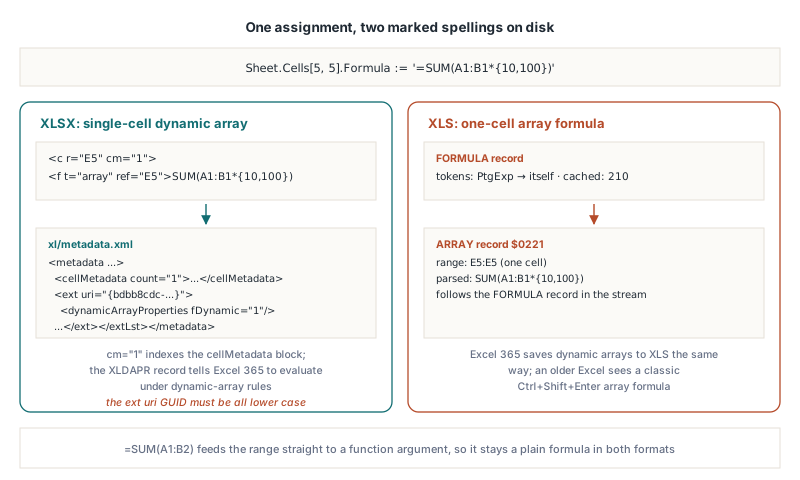
HotXLS writes an array-operator formula in XLSX as a single-cell dynamic array: the <c> element carries cm="1", the formula is <f t="array" ref="E5">, and the package gains xl/metadata.xml with an XLDAPR metadata type whose extension holds dynamicArrayProperties fDynamic="1". The cm attribute is a one-based index into the cellMetadata block of that part, and the XLDAPR record behind it is what tells Excel "evaluate this under dynamic-array rules". This is the same structure Excel 16 writes when you type the same formula and save, which is how the target layout was established in the first place
In XLS there is no metadata part, so HotXLS uses the only construct BIFF8 has for array evaluation: a one-cell array formula. The cell gets a FORMULA record whose token stream is a single PtgExp pointing at itself, followed by an ARRAY record ($0221) carrying the real parsed formula over the one-cell range. Excel 365 writes dynamic-array formulas to XLS the same way, and an older Excel version reading the file sees a classic Ctrl+Shift+Enter array formula
No new API is involved. The marking happens when you assign the formula through the normal cell API, in both engines. On the XLSX side that is TXLSXCell.Formula:
var
  Book: TXLSXWorkbook;
  Sheet: TXLSXWorksheet;
begin
  Book := TXLSXWorkbook.Create;
  try
    Sheet := Book.Sheets.Add('Data');
    Sheet.Cells[1, 1].Value := 1;
    Sheet.Cells[1, 2].Value := 2;
    Sheet.Cells[2, 1].Value := 3;
    Sheet.Cells[2, 2].Value := 4;

    // Operator over a range or inline array: stored as a dynamic array
    Sheet.Cells[5, 5].Formula := '=SUM(A1:B1*{10,100})';
    Sheet.Cells[6, 5].Formula := '=SUM((A1:B2>2)*1)';
    // Range passed straight to a function: stays an ordinary <f>
    Sheet.Cells[7, 5].Formula := '=SUM(A1:B2)';

    if Book.Recalculate = lxOk then
      Writeln(VarToStr(Sheet.Cells[5, 5].Value));   // 210

    // The array root keeps its text without the leading '='
    Writeln(Sheet.Cells[5, 5].Formula);              // SUM(A1:B1*{10,100})

    Book.SaveAs('probe.xlsx');   // E5 and E6 get cm="1" + t="array"
  finally
    Book.Free;
  end;
end;
After the conversion, TXLSXCell.Formula returns the text without =, the same form TXLSXRange.SetDynamicArrayFormula stores, so code that compares formula strings after assignment should normalise the leading =
The classic engine follows the same rule through IXLSRange.Formula on a single cell. Assigning the formula reroutes it to the one-cell array path internally, so the saved XLS contains the FORMULA plus ARRAY pair:
var
  Wb: IXLSWorkbook;
  Sh: TXLSWorksheet;
begin
  Wb := TXLSWorkbook.Create;
  Sh := Wb.Sheets.Add;
  Sh.Range['A1', 'A1'].Value := 1;
  Sh.Range['B1', 'B1'].Value := 2;
  Sh.Range['A2', 'A2'].Value := 3;
  Sh.Range['B2', 'B2'].Value := 4;

  Sh.Range['E5', 'E5'].Formula := '=SUM(A1:B1*{10,100})';  // ARRAY record
  Sh.Range['E6', 'E6'].Formula := '=MAX(A1:B2-1)';         // ARRAY record
  Sh.Range['E7', 'E7'].Formula := '=SUM(A1:B2)';           // plain FORMULA

  Writeln(VarToStr(Sh.Range['E5', 'E5'].Value));   // 210
  Writeln(VarToStr(Sh.Range['E6', 'E6'].Value));   // 3
  Wb.SaveAs('probe.xls');
end;
If you are anchoring a multi-cell result rather than a scalar aggregate, the explicit APIs are still the right tool: SetArrayFormula for a pre-sized rectangle, as described in dynamic array spill formulas with HotXLS, or TXLSXRange.SetDynamicArrayFormula when you want the XLSX dynamic-array marking on a range you size yourself. The automatic path in this article only covers formulas typed into one cell
Which formulas does HotXLS mark as dynamic arrays?
HotXLS marks a formula only when an operator has an operand subtree that produces an array. The check runs on the compiled syntax tree, and an operand produces an array if it is a multi-cell range, an inline array constant, or another operator expression that itself has such an operand. Parentheses are transparent. The operators that count are the arithmetic ones (+ - * / ^), concatenation (&), the six comparisons, unary plus and minus, and percent:
A1:B1*{10,100},(A1:B2>2)*1,--(B1:B2>0)andA1:B2-1are marked, wherever they appear in the formula, including inside SUMPRODUCTSUM(A1:B2)andSUMPRODUCT(A1:A2,{1;10})are not marked, because the range and the array go directly into a function argument and no operator touches themA1*2orSUM(A1,B1)*2are not marked: single-cell references and function results are scalars to this check
Three boundaries are deliberate. First, marking happens only when a formula is entered through the API, meaning TXLSXCell.Formula in the XLSX engine and a single-cell Formula or Value assignment in the classic engine. Formulas loaded from a file are written back exactly as they were found, because a legacy formula from another producer may depend on implicit intersection on purpose. Second, text that contains neither : nor { is skipped without a second compile. Third, a formula that would spill, such as =A1:B1*2 on its own, is marked as a single-cell dynamic array anchored where you put it. HotXLS does not spill it, and Excel will extend the result to the neighbouring cells the next time it recalculates
This operand rule is the sibling of the argument-class rule covered in implicit intersection for defined names in HotXLS. That article is about function parameters declared as value class; this one is about operators, which in the legacy model always demand values
What changed in the calculation engine to make the results match
The storage fix in v2.384.68 relies on the HotXLS formula engine already returning Excel 365 values, which took several earlier fixes in both engines. The most visible was SUMPRODUCT: until v2.384.61 it accepted only two or more plain ranges, so SUMPRODUCT((B1:B2>0)*1), SUMPRODUCT(--(B1:B2>0)) and even the single-argument SUMPRODUCT(B1:B2) returned #N/A. HotXLS now evaluates expression arguments element by element with Excel's rules:
- every argument must have exactly the same shape, a scalar counting as 1 × 1, or the result is
#VALUE! - an error value inside any argument is returned as the result
- text and logical elements count as 0, so
(B1:B2>0)*1or--is still needed to turn TRUE into 1 - arguments that are all plain ranges keep the original streaming loop, so large ranges are not materialised as arrays
The SUM family (SUM, COUNT, AVERAGE, MIN, MAX, COUNTA) uses the same element-wise evaluator when an argument is an operator expression over a range, so =SUM((B1:B2>0)*1) counts both rows instead of looking at the first cell only. v2.384.62 made the space intersection operator return the common rectangle of two references, with #NULL! when they do not overlap, so =SUM(A1:B2 B1:B2) is 6 rather than 2 and the result can feed reference parameters such as ROWS and INDEX. v2.384.63 added inline array constants like {1,2;3,4} (commas separate columns, semicolons separate rows) and reference unions like (A1:B2,D4) to the parser. Element-wise comparisons also give a blank element the type of the other side, FALSE against a logical, matching the scalar rule from v2.384.53 described in comparison chains and blank cells in HotXLS
var
  V: Variant;
begin
  // Book is the TXLSXWorkbook from the first example;
  // its active sheet holds A1:B2 = 1, 2, 3, 4
  V := Book.Calculate('=SUMPRODUCT((A1:B2>2)*1)');   // 2
  V := Book.Calculate('=SUMPRODUCT(A1:B2)');          // 10, single argument
  V := Book.Calculate('=SUMPRODUCT(A1:A2,{1;10})');   // 31 = 1*1 + 3*10
  V := Book.Calculate('=SUM(A1:B2 B1:B2)');           // 6, common range B1:B2
  V := Book.Calculate('=SUM((A1:B2,B1:B2))');         // 16, overlap counted twice
  V := Book.Calculate('=ROWS({1,2,3;4,5,6})');        // 2
  V := Book.Calculate('=TRUE*1');                     // 1, was -1 before v2.384.61
end;
TXLSXWorkbook.Calculate evaluates a formula string against the active sheet without storing it, a quick way to check engine behaviour. One caution about @ itself: HotXLS has historically accepted @ between two references as a binary intersection, and it now evaluates that form with true intersection semantics. In Excel 365, @ is a unary implicit-intersection prefix. Do not write @ into formula text and expect Excel's meaning; use a space for intersection and let the storage rules above handle dynamic-array semantics
Why did Excel refuse to open the file or compute the wrong value?
Getting Excel to accept the dynamic-array marking took three fixes that no self-round-trip test would catch, because HotXLS read its own output correctly in every case. Each was found by opening HotXLS output in Excel 16 and replacing one variable at a time:
- The extension GUID must be all lower case. The
ext uriinxl/metadata.xmlhas to be exactly{bdbb8cdc-fa1e-496e-a857-3c3f30c029c3}. An older HotXLS template spelled it with mixed case, and Excel 16 refused to open the entire package, not just the cell. Workbooks created withTXLSXRange.SetDynamicArrayFormulabefore v2.384.68 had the same problem - The array root text carries no leading
=. The XLSX writer emits the stored text of an array root verbatim into<f>. If the converted cell kept its=, the element would read<f t="array" ref="E5">=SUM(...)</f>, which Excel also rejects at open time. HotXLS strips it during the conversion, which is whyTXLSXCell.Formulareads back without it Double(True)is -1 in Delphi. Variant conversion follows the COM convention where TRUE is all bits set, andVarIsNumeric(True)returns True as well. Before v2.384.61 that made=TRUE*1return -1 and let logical array elements be classified as numbers, so a comparison like(B1:B2>0)=TRUEwent wrong. HotXLS now tests forvarBooleanbefore treating a Variant as a number in scalar arithmetic, array arithmetic and array element classification, and TRUE counts as 1
BIFF8 operand classes: the byte-level details for format implementers
In BIFF8, every operand token carries its operand class in the token byte itself, and Excel trusts that class more than the formula's structure. [MS-XLS] defines the class as a two-bit PtgDataType field in bits 5 and 6 of the token: 1 for reference, 2 for value, 3 for array. The low five bits name the token, so the same area reference has three spellings:
| Token | Reference class | Value class | Array class |
|---|---|---|---|
PtgRef | $24 | $44 | $64 |
PtgArea | $25 | $45 | $65 |
PtgArray | $20 | $40 | $60 |
HotXLS got three of these wrong in different places, and each produced a distinct symptom in Excel while reading back fine in HotXLS:
- Reference-class array constants. The encoder chose the class from the context, and SUM or ROWS parameters are reference class, so
=SUM({1,2})was written withPtgArrayas$20. Excel displays the whole formula as=#N/A. An array constant can never be a reference, so since v2.384.63 HotXLS writes array class$60wherever the context asks for a reference - Value-class operands of
PtgIsectandPtgUnion. Binary operators took value-class operands, which is right for*but wrong for the reference operators. With$45areas beforePtgIsect($0F), Excel read=SUM(A1:B2 B1:B2)as=SUM(@A1:B2 @B1:B2)and returned#VALUE!. Since v2.384.62 the operands ofPtgIsectandPtgUnion($10) are written in reference class,$25 - Value-class operands inside the ARRAY record. Excel applies implicit intersection even inside an array formula when an operand is value class. HotXLS wrote
$45there, so the one-cell array formula for=SUM(A1:B1*{10,100})evaluated to 10 in Excel. Since v2.384.68, the token stream of an ARRAY record promotes every value-class reference and array constant to array class,$65and$60, which is what Excel writes
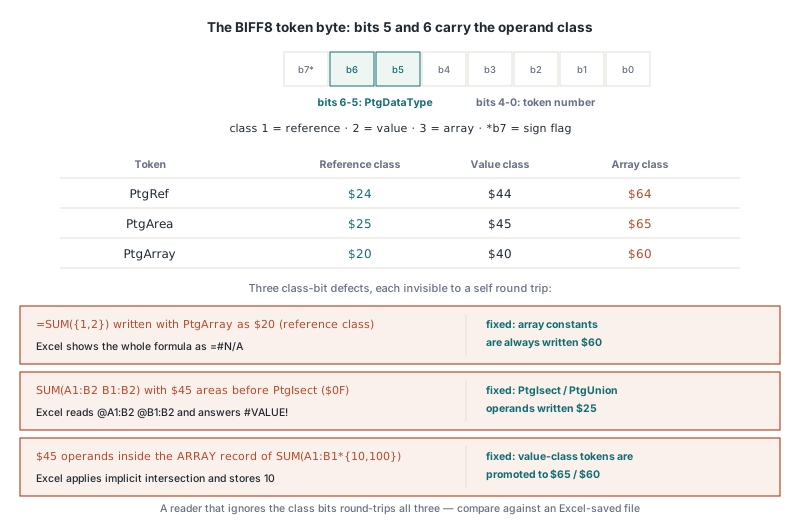
A reader that ignores the class bits round-trips all three happily, so if you maintain your own BIFF8 writer, compare the class bits of every operand token against an Excel-saved file of the same formula, not just the token numbers
Quick reference
- Excel 365 shows
@when an operator in a plain, unmarked formula receives a multi-cell range or inline array - HotXLS v2.384.68 and later stores such formulas as XLSX single-cell dynamic arrays (
cm="1",t="array",XLDAPRmetadata) and as XLS one-cell array formulas (FORMULA withPtgExpplus ARRAY$0221) - Only operator operands count; a range passed straight to a function argument stays a plain formula
- Only formulas entered through
TXLSXCell.Formulaor the classic single-cellFormula/Valueare marked; loaded formulas are untouched - The converted root cell reads back without the leading
= - The dynamic-array
ext uriGUID must be lower case or Excel rejects the package - In Delphi,
Double(True)is -1; testvarBooleanbefore numeric conversion - BIFF8: array constants never reference class,
PtgIsect/PtgUnionoperands in reference class, ARRAY record operands in array class
HotXLS reads, writes and calculates XLS and XLSX workbooks natively from Delphi and C++Builder, and stores array-operator formulas so Excel 365 opens them with the same values HotXLS computed. See the HotXLS Delphi spreadsheet component for editions, documentation and a trial download