A budget workbook has a sheet named FY2024, a summary cell says =FY2024!B7, and Excel cannot read the formula. FY2024 is also a cell address, so the name needs apostrophes, as in 'FY2024'!B7; HotXLS writes them by the same rule Excel applies when it saves, and its XLSX workbook rewrites every formula when a sheet is renamed or deleted
Which sheet names must be quoted in a formula?
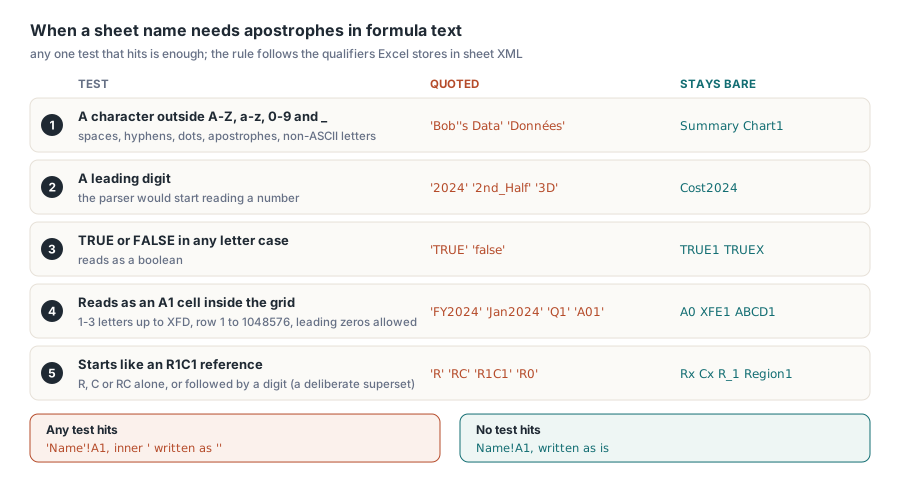
A sheet name needs apostrophes whenever the formula parser could read it as something other than a sheet name: a number, a boolean, or a cell reference. The formula grammar in ECMA-376 Part 1 §18.17 covers quoted and unquoted sheet names, but the practical reference is the text Excel writes into the <f> elements of sheet1.xml, because that is the text every other reader has been tuned against. Excel's COM Range.Formula echo and its saved XML disagree for some names: R1. and A1.x come back bare from .Formula yet carry apostrophes in the file. A rule derived from the COM echo is contradicted by Excel's own files. HotXLS follows the stored form, which requires quotes for:
- Any character outside
A-Z,a-z,0-9and the underscore: spaces, hyphens, dots, parentheses - A leading digit:
2024,2nd_Halfand3Dare all quoted TRUEorFALSEin any letter case.TRUE1andTRUEXstay bare, since neither reads as a boolean- A name that reads as an A1 cell inside the grid: one to three letters forming a column no later than
XFD, followed by a row from 1 to 1048576, leading zeros allowed - A name that starts like an R1C1 reference:
R,CorRCon its own, or followed by a digit - Inside a quoted name, an apostrophe is doubled —
Bob's Datais written'Bob''s Data'!A1
The A1 rule is the one real workbooks run into, because so many business sheet names happen to be valid cell addresses. FY2024 is column FY, row 2024. Jan2024 is column JAN, row 2024, and JAN sits well inside the 16,384 columns a modern sheet has. Q1, CR1 and Ra1 are all addresses too, and all three must be quoted. The boundary cases go the other way: A0 has no row zero, XFE1 is one column past the edge, XFD1048577 is one row past it, and ABCD1 has four letters, so Excel leaves every one of them bare. Leading zeros do not rescue a name, and A01 still gets apostrophes because the parser reads it as A1. A writer that only checks the character class of the name will emit FY2024!B7 for a fiscal-year report, and Excel cannot read that formula back
R1C1 lookalikes and the case for over-quoting
For R1C1-shaped names there is no clean rule to recover from Excel's output. Excel quotes R, C, RC, R1, C1, R1x, R1C1x, and also R1C16385 and C99999, which name columns that do not exist. Yet it leaves R0, C0, RC0, R0C1, R1048577, Rx, Cx and R_1 bare. No combination of grid limits and token shapes reproduces both lists, so HotXLS takes a superset: a name that is R, C or RC, or that begins with one of those followed by a digit, gets apostrophes. The superset quotes a few names Excel leaves bare, R0 and R1048577 among them. That is acceptable for a plain reason: the quoted spelling of any sheet name is valid formula syntax, so every reader that parses formulas accepts it, while a list that tried to match Excel name by name would rest on a rule nobody can state. Ordinary names such as Chart1, Region1 and Cost2024 fall outside both tests and stay bare. If you also work with R1C1 text, the notes on R1C1 formula notation in HotXLS describe how those references are parsed in the first place
Names with letters outside ASCII are over-quoted too. Excel is more lenient here. Excel writes Données!A1 and 数据!A1 without apostrophes, because accented and CJK letters count as name characters to its parser. HotXLS reads those bare qualifiers when it opens a file, since Excel produces them, but writes such names quoted, as in 'Données'!A1. The quoted form is valid everywhere, and the writer's test stays a short, predictable list rather than a Unicode letter table that every consumer would need to agree with
Building sheet qualifiers in Delphi
lxStandard.XlsSheetNameNeedsQuotes is the public form of that rule, and it is the function the XLSX writer and the classic engine both use when they emit a sheet reference. When your own code assembles formula text from sheet names, such as a summary sheet that points at one sheet per region or per year, run each name through it rather than concatenating Name + '!'. The function only answers yes or no. Doubling inner apostrophes is up to the caller, as the helper below does, and XLSX cell formulas are assigned without the leading =
program SheetQualifiers;

{$APPTYPE CONSOLE}

uses
  System.SysUtils, lxStandard, lxHandleX;

// Qualifier for hand-built formula text: apostrophes when the name
// needs them, with any apostrophe inside the name doubled
function SheetQualifier(const Name: WideString): WideString;
begin
  if XlsSheetNameNeedsQuotes(Name) then
    Result := '''' + StringReplace(Name, '''', '''''', [rfReplaceAll]) + '''!'
  else
    Result := Name + '!';
end;

const
  Candidates: array[0..10] of WideString = (
    'Summary', '2024', 'FY2024', 'Q1', 'TRUE', 'TRUE1',
    'R1C1', 'Region1', 'XFE1', 'Données', 'Bob''s Data');
var
  Book: TXLSXWorkbook;
  Map, Sheet: TXLSXWorksheet;
  I: Integer;
begin
  Book := TXLSXWorkbook.Create;
  try
    Map := Book.Sheets.Add('Map');
    for I := Low(Candidates) to High(Candidates) do
    begin
      Sheet := Book.Sheets.Add(Candidates[I]);
      Sheet.Cells[1, 1].Value := (I + 1) * 10;
      // Use the name the sheet actually got, not the one requested
      Map.Cells[I + 1, 1].Value := Sheet.Name;
      Map.Cells[I + 1, 2].Formula := SheetQualifier(Sheet.Name) + 'A1';
      Writeln(Format('%-12s %s', [Sheet.Name, Map.Cells[I + 1, 2].Formula]));
    end;
    Book.SaveAs('sheet-map.xlsx');
  finally
    Book.Free;
  end;
end.

// Expected:
// Summary      Summary!A1
// 2024         '2024'!A1
// FY2024       'FY2024'!A1
// Q1           'Q1'!A1
// TRUE         'TRUE'!A1
// TRUE1        TRUE1!A1
// R1C1         'R1C1'!A1
// Region1      Region1!A1
// XFE1         XFE1!A1
// Données      'Données'!A1
// Bob's Data   'Bob''s Data'!A1
A worksheet name in an XLSX file cannot contain : \ / ? * [ ], cannot start or end with an apostrophe, is capped at 31 characters, must be unique regardless of case, and cannot be History, which Excel reserves. TXLSXSheets.Add and the TXLSXWorksheet.Name setter both enforce that: forbidden characters become underscores, a clash gets a (2) suffix, and a reserved or empty name falls back to Sheet. The value you assign and the value you read back can therefore differ, and a qualifier built from the requested name points at a sheet that does not exist. Read Name back after every assignment and quote that
Sheet := Book.Sheets.Add('Totals');
Sheet.Name := 'Q1/Q2 Sales';                 // '/' is not allowed in a sheet name
Writeln(Sheet.Name);                         // Q1_Q2 Sales
Writeln(SheetQualifier(Sheet.Name) + 'C9');  // 'Q1_Q2 Sales'!C9
What does Excel store after a sheet is deleted?
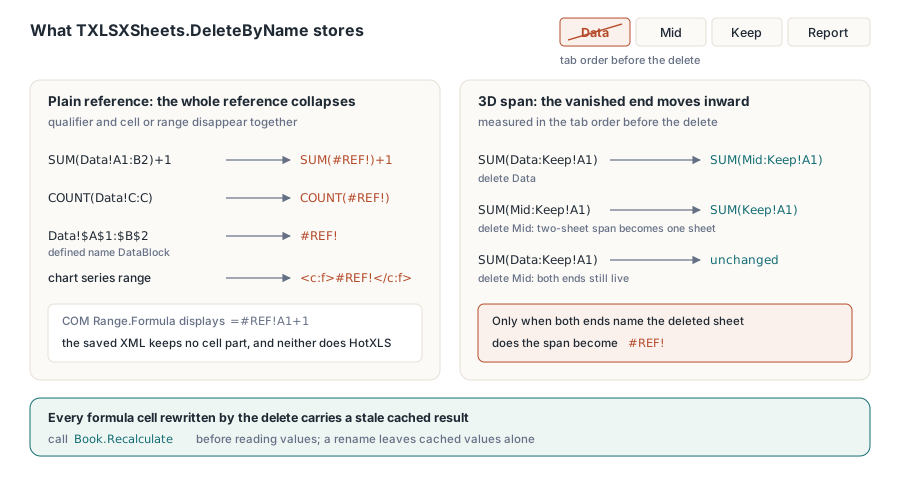
When a sheet is deleted, Excel replaces the whole reference to it with #REF!, qualifier and cell or range together. SUM(Data!A1:B2)+1 is stored as SUM(#REF!)+1, COUNT(Data!C:C) as COUNT(#REF!), a defined name that pointed at Data!$A$1:$B$2 as plain #REF!, and a chart series range as <c:f>#REF!</c:f>. The COM view is misleading here too: Range.Formula displays =#REF!A1+1, as if the cell part survived, while the XML Excel saves has no cell part at all. Copying the COM display yields formula text Excel never writes itself — a poor bet for a file other tools will read. TXLSXSheets.DeleteByName writes the stored form. The same collapse-to-#REF! logic governs references whose rows or columns disappear, which the piece on how inserting and deleting rows adjusts formula references covers for the in-sheet case
Three-dimensional references behave differently. Excel shrinks a 3D span instead of destroying it. With sheets ordered Data, Mid, Keep, deleting Data turns SUM(Data:Keep!A1) into SUM(Mid:Keep!A1): the end that vanished moves one sheet inward, measured in the tab order as it stood before the delete. With only two sheets in the span, the result is the single-sheet form SUM(Keep!A1). Deleting Mid changes no formula text at all, since the span still names two live sheets and simply covers one fewer in between. Only when both ends name the deleted sheet does the reference become #REF!. A dead reference changes what a formula returns, so HotXLS marks the cached result of every formula cell it rewrote during a delete as stale; call Recalculate before reading values. A rename leaves cached values alone, since the numbers cannot change
uses
  System.SysUtils, lxHandleX;

procedure ShowFormulas(Book: TXLSXWorkbook; const Caption: string);
var
  Report: TXLSXWorksheet;
  Row: Integer;
begin
  Writeln(Caption);
  Report := Book.Sheets.SheetByName('Report');
  for Row := 1 to 4 do
    Writeln('  B', Row, ': ', Report.Cells[Row, 2].Formula);
  Writeln('  DataBlock: ', Book.DefinedNames.FindByName('DataBlock').Formula);
end;

var
  Book: TXLSXWorkbook;
  Report: TXLSXWorksheet;
begin
  Book := TXLSXWorkbook.Create;
  try
    Book.Sheets.Add('Data');
    Book.Sheets.Add('Mid');
    Book.Sheets.Add('Keep');
    Report := Book.Sheets.Add('Report');
    Book.DefinedNames.Add('DataBlock', 'Data!$A$1:$B$2');

    Report.Cells[1, 2].Formula := 'SUM(Data:Keep!A1)';
    Report.Cells[2, 2].Formula := 'SUM(Data!A1:B2)+1';
    Report.Cells[3, 2].Formula := 'Keep!A1*2';
    Report.Cells[4, 2].Formula := 'INDIRECT("Data!A1")';

    Book.Sheets.DeleteByName('Data');
    ShowFormulas(Book, 'After deleting Data:');

    Book.Sheets.SheetByName('Keep').Name := '2025';
    ShowFormulas(Book, 'After renaming Keep to 2025:');

    Book.Recalculate;   // cells that lost Data carry stale cached values
    Book.SaveAs('report.xlsx');
  finally
    Book.Free;
  end;
end.

// Expected:
// After deleting Data:
//   B1: SUM(Mid:Keep!A1)
//   B2: SUM(#REF!)+1
//   B3: Keep!A1*2
//   B4: INDIRECT("Data!A1")
//   DataBlock: #REF!
// After renaming Keep to 2025:
//   B1: SUM('Mid:2025'!A1)
//   B2: SUM(#REF!)+1
//   B3: '2025'!A1*2
//   B4: INDIRECT("Data!A1")
//   DataBlock: #REF!
Renaming a sheet rewrites references across the workbook
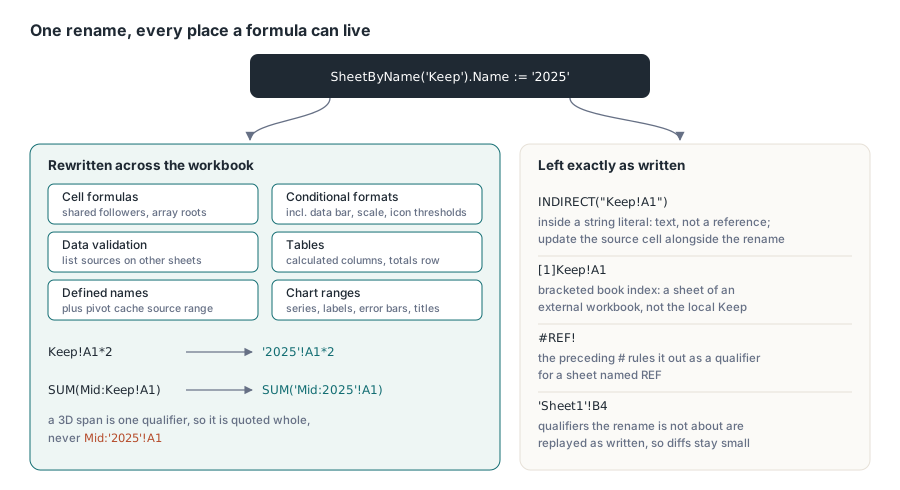
Assigning TXLSXWorksheet.Name in an XLSX workbook carries the new name into every place a formula can live, and DeleteByName walks the same places to apply the #REF! collapse. The list goes well beyond cell formulas:
- Cell formulas on every sheet. A shared formula is held expanded on each follower cell and an array formula lives on its root cell, so both are covered without special handling
- Conditional-format formulas, including formula-type thresholds in data bars, colour scales and icon sets
- Data-validation formulas, such as a list source on another sheet
- Table calculated-column and totals-row formulas
- Defined names, the backbone of models built on defined names and cross-sheet formulas; on a rename, a pivot cache that reads its source range from the renamed sheet follows too
- Chart ranges: series names, categories, values, bubble sizes and data-label ranges, error-bar plus and minus ranges, and the cell references behind chart and axis titles
A 3D span is quoted as a whole when either end needs quotes: renaming Keep to 2025 produces 'Mid:2025'!A1, never Mid:'2025'!A1, because the span is one qualifier. Every qualifier the rename is not about is replayed as written. If a formula elsewhere says 'Sheet1'!B4, with apostrophes that are technically unnecessary, it still says that afterwards. Normalising those qualifiers on the way past would be harmless to Excel, but a one-sheet rename would then touch every formula in the workbook, and a diff between two versions of a generated report would bury the real change under hundreds of cosmetic ones
Text that only looks like a sheet reference
Three kinds of text look like a Name! qualifier to a pattern search and are not. Inside a string literal, "Data!A1" is text, so INDIRECT("Data!A1") keeps pointing at the old name after a rename or a delete, the same as in Excel; if a report builds sheet names for INDIRECT, keep them in a cell your code updates alongside the rename. A qualifier preceded by a bracketed book index, as in [1]Data!A1, belongs to an external workbook that happens to have a sheet called Data, and renaming the local Data sheet must not touch it; a quoted qualifier that contains a [ is treated the same way. And #REF! itself has the shape of a qualifier named REF, which is why HotXLS checks for the preceding # before it treats REF! as a sheet name. Without that check, renaming a sheet called REF would rewrite every #REF! in the workbook
The sheet names most likely to break a generated formula are ordinary ones like FY2024, Q1 and 2025, not names with spaces or punctuation. Quote them through XlsSheetNameNeedsQuotes wherever your Delphi code builds formula text. From there on, a rename or delete in the HotXLS Delphi spreadsheet component leaves every formula in the form Excel itself would have saved