HotXLS compiles formulas written in R1C1 reference notation through TXLSCalculator.GetCompiledFormulaR1C1, which accepts forms like R2C3 (absolute), R[-1]C[2] (relative offset), and RC (the current cell), converts them to A1 notation against the row and column of the cell the formula lives in, and feeds the result to the same compiler that handles ordinary A1 formulas. For Delphi and C++Builder code that generates the same formula across hundreds of rows, that one method removes an entire class of string-concatenation bugs
The bug class is familiar to anyone who has programmatically filled a column. You loop over rows, and for each row you build an A1 formula string with Format('D%d*E%d', [Row, Row]). Every iteration splices row numbers into text, and the row numbers are the only part that changes. Get the offset wrong once, mix a 0-based loop counter with 1-based A1 row numbers, or shift the data block by a header row, and every formula in the column points one row off. Nothing raises; the numbers are simply wrong. The formula you actually meant, "multiply the two cells to my left," never mentions a row number at all, and R1C1 notation lets you write it that way
What is R1C1 notation and when should you use it?
R1C1 notation addresses cells by row and column number instead of column letter plus row number, and it marks relative references as explicit offsets from the formula cell. R2C3 is the absolute cell at row 2, column 3, which A1 spells $C$2. R[-1]C[2] is one row up and two columns right of wherever the formula sits. RC is the formula cell itself. The bracketed offsets are the point: a relative reference in R1C1 reads the same no matter which cell hosts it, whereas the A1 rendering of that same reference changes with every row
The notation earns its keep in exactly one scenario, and it is a common one: template generation, where the same relative formula must be planted into every row of a data region. In A1 you must re-render the formula text per row. In R1C1 the text is a constant. This is also closer to how spreadsheet file formats think internally: shared-formula records store relative references as row and column offsets from the host cell, so a per-row A1 string is something your code synthesises only for the parser to decompose it right back into offsets. R1C1 skips the round trip. For interactive, human-authored formulas A1 remains the natural choice, which is why it stays the default everywhere in HotXLS
![Spreadsheet column filled by per-row A1 strings in Delphi compared with one constant HotXLS R1C1 formula RC[-2]*RC[-1]](../../assets/media/HotXLS-R1C1-RowFill-ConstantFormula.svg)
How does HotXLS compile an R1C1 formula?
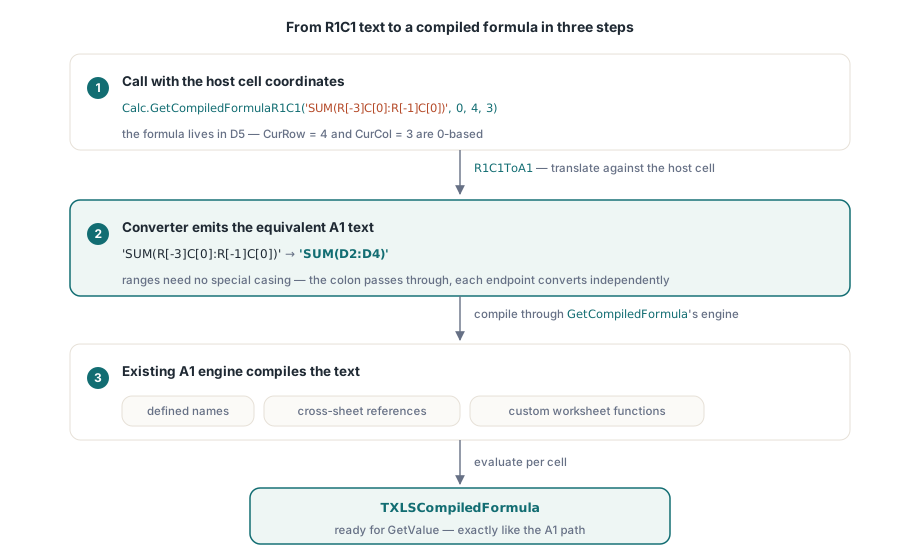
HotXLS exposes the feature at two levels, added in v2.175.0. TXLSCalculator.GetCompiledFormulaR1C1(UncompiledFormula: String; SheetID, CurRow, CurCol: Integer): TXLSCompiledFormula is the one most code calls: it returns a compiled formula ready for evaluation, exactly like its A1 sibling GetCompiledFormula, but with two extra parameters naming the 0-based row and column of the cell the formula belongs to. Underneath it, TXLSFormula.GetCompiledR1C1 produces the raw syntax tree, and a standalone function R1C1ToA1(const AFormula: String; CurRow, CurCol: Integer): String performs the actual notation conversion. The pipeline is deliberately simple: translate R1C1 text to equivalent A1 text using the host cell coordinates, then compile the A1 text through the existing engine — the same engine that resolves defined names and cross-sheet references and dispatches custom worksheet functions
Because conversion happens before compilation, everything downstream behaves as if you had written the A1 formula yourself. R1C1ToA1('R2C3', 4, 3) returns '$C$2' regardless of the host cell, because both coordinates are absolute. R1C1ToA1('SUM(R[-3]C[0]:R[-1]C[0])', 4, 3) — a formula living in D5, since CurRow = 4 and CurCol = 3 are 0-based — returns 'SUM(D2:D4)': the offsets were resolved against row 5, column D, and emitted as plain relative A1 references. Ranges need no special casing; the colon passes through and each endpoint converts independently
// The formula lives in D5: CurRow = 4, CurCol = 3 (both 0-based)
S := R1C1ToA1('R2C3', 4, 3);
// S = '$C$2'  (absolute row and column)

S := R1C1ToA1('SUM(R[-3]C[0]:R[-1]C[0])', 4, 3);
// S = 'SUM(D2:D4)'  (offsets resolved against D5)

S := R1C1ToA1('ROUND(R[-1]C[0], 2)', 4, 3);
// S = 'ROUND(D4, 2)'  (the R in ROUND is left alone)
Filling a column with one relative formula
The payoff shows up in the loop. Compare the A1 version, which re-renders the formula text on every iteration, with the R1C1 version, where the formula is a constant and only the host coordinates move. Both compile through TXLSCalculator and evaluate with GetValue; the calculator takes a cell-provider callback at construction so the evaluator can pull cell values from your data source
// A1 style: a different formula string for every row
for Row := 1 to 500 do
begin
  FormulaText := Format('D%d*E%d', [Row + 1, Row + 1]);  // 1-based A1 rows
  Compiled := Calc.GetCompiledFormula(FormulaText, 0);
  // ... evaluate, store, free ...
end;
const
AmountFormula = 'RC[-2]*RC[-1]'; // two cells to the left, same row
var
Calc: TXLSCalculator;
Compiled: TXLSCompiledFormula;
Value: Variant;
Row: Integer;
begin
Calc := TXLSCalculator.Create(nil, Provider.GetValue);
try
for Row := 1 to 500 do
begin
Compiled := Calc.GetCompiledFormulaR1C1(AmountFormula, 0, Row, 5);
try
if Calc.GetValue(0, Compiled, Row, 5, Value, 1) = lxOk then
StoreResult(Row, 5, Value);
finally
Compiled.Free;
end;
end;
finally
Calc.Free;
end;
end;The R1C1 loop has no row arithmetic in the formula text at all. 'RC[-2]*RC[-1]' means "same row, two columns left, times same row, one column left" in row 2 and in row 500 alike, and if the data block later moves down by a header row, the formula constant does not change — only the loop bounds do. The A1 version has two places to get the + 1 adjustment wrong; the R1C1 version has zero
Which R1C1 forms does the converter accept?
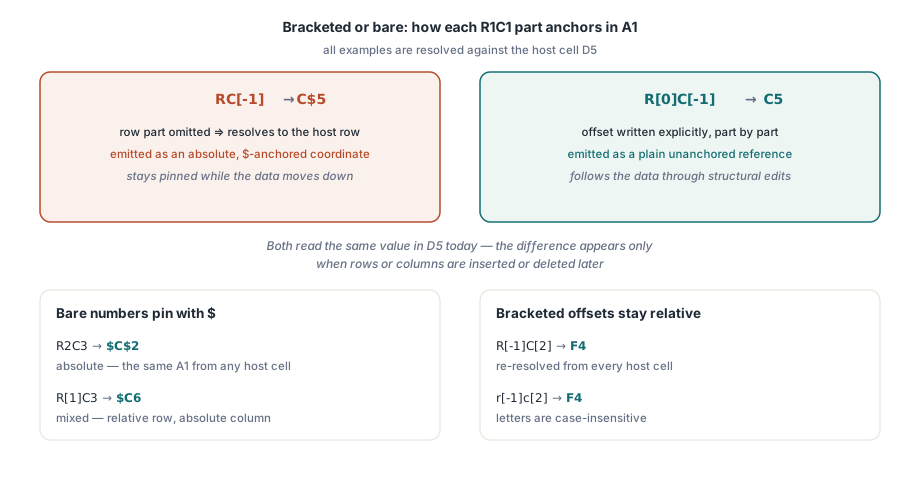
The R1C1ToA1 converter recognises the forms documented for v2.175.0: R[n]C[m] for relative offsets in either direction, RnCm for absolute row-and-column, R[-n]C[m] with negative offsets, bare RC for the formula cell itself, and ranges such as R1C1:R3C3 or R[-1]C:R[1]C. The row and column parts parse independently, so mixed forms like R[1]C3 — relative row, absolute column — work as well, and the letters are case-insensitive, so r[-1]c[2] compiles the same as its uppercase twin. Bracketed parts become unanchored (relative) A1 coordinates; bare numbers become $-anchored absolute coordinates
The interesting question is how the converter avoids mangling everything else in the formula, because R and C are common letters. Its discrimination rule is token-based: an R is only considered the start of a reference when it is not preceded by another letter, and the candidate must then parse completely — optional row part, mandatory C, optional column part — or the text is restored untouched. That is why ROUND(R[-1]C[0], 2) converts only the inner reference: the R in ROUND is followed by O rather than a digit, bracket, or C, so the parse fails and the function name passes through verbatim. The same logic protects ROW(), and function names beginning with C are never candidates at all, since only R starts a reference. The v2.175.0 release notes state that string literals and identifiers are skipped as well; even so, if a quoted literal in your formula happens to contain text shaped exactly like an R1C1 reference, it is worth checking the compiled output once before trusting it in production
Coordinate bases and anchoring details worth knowing
Two conventions meet inside this API, and keeping them straight avoids the only real trap. The CurRow and CurCol parameters of GetCompiledFormulaR1C1 are 0-based, following the calculator API, while the numbers inside the notation itself are 1-based, matching what Excel displays: R2C3 is row 2, column 3, which is $C$2, not $D$3. If your loop counter is already 0-based you pass it straight through as CurRow; the + 1 lives inside the converter, not in your code
One more detail matters if the compiled formula will outlive the cell it was compiled for. When you omit a row or column part — the forms RC[-1] or R[2]C — the omitted coordinate resolves to the host cell and is emitted as an absolute, $-anchored coordinate in the converted A1 text. At evaluation time this is invisible, since the value is the same either way. But relative-versus-absolute anchoring decides how references shift when rows or columns are inserted or deleted later, as covered in the companion article on formula reference adjustment. If you need a coordinate to stay relative through structural edits, write the offset explicitly — R[0]C[-1] instead of RC[-1] — so the converter emits an unanchored A1 reference
R1C1 compilation is part of the formula engine in the HotXLS Delphi Excel Component, alongside the A1 compiler, the recalculation graph, and the evaluation API shown above. If your code builds spreadsheets by looping formulas down columns, moving those loops from string-spliced A1 to a single R1C1 constant is one of the cheapest reliability upgrades available