HotXLS verifies and re-signs Excel digital signatures in Delphi without Excel installed. The lxSignatureOpcIntegrity unit checks ECMA-376 Part 2 package signatures directly from the workbook bytes: RSA-SHA256 over the canonical SignedInfo, every SHA-256 Reference digest, and the exact parts each signature selects. Certificate chain trust is a separate, explicit step, and editing or re-signing only publishes output that verifies again
The usual trigger is a document workflow that outgrew the desktop. A controller signs a budget workbook in Excel, a Delphi service later has to confirm the signature before importing the numbers, and a third step needs to correct one sheet and sign again under a service certificate. Automating Excel on a server for that is fragile and unsupported, and treating the signature as a yes/no flag hides the two questions that actually matter: which bytes did the signer commit to, and do you trust the person who holds that key
What does an OPC package signature actually cover?
An OPC package signature covers only the parts its Manifest lists, not the whole XLSX file. ECMA-376 Part 2, §13 (Digital Signatures) places a signature origin part in the package, typically /_xmlsignatures/origin.sigs, with relationships to one or more signature parts such as /_xmlsignatures/sig1.xml. Each signature part is a W3C XML-DSig Signature whose SignedInfo references an internal idPackageObject, and that Object carries a Manifest of References to individual package parts, each with its own digest
HotXLS supports three ways a Reference can bind a part, and they are not interchangeable. A raw Reference hashes the stored part bytes. A canonical XML Reference hashes the Canonical XML (without comments) form, so attribute order and namespace declaration spelling no longer matter. A relationship Reference applies the OPC RelationshipTransform first and then canonicalizes, and that transform keeps only the relationships matched by its SourceId or SourceType selectors. A selector authenticates exactly the relationships it selects: the rest of that .rels part can change freely whilst the signature stays valid
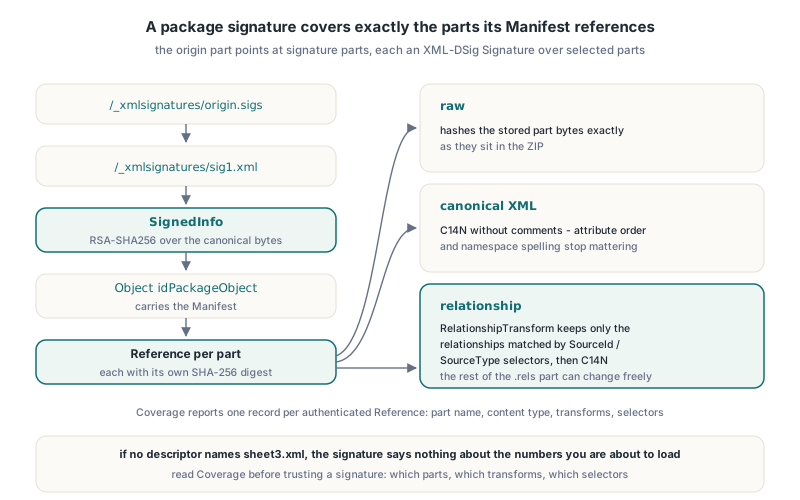
That last point is why HotXLS reports coverage instead of a single green check. TXLSSignatureOpcIntegrityResult.Coverage is an array of TXLSSignatureOpcCoverage records, one per authenticated Manifest Reference, each with ReferenceUri, PartName, ContentType, Transforms, RelationshipSourceIds and RelationshipSourceTypes. If your import reads sheet3.xml and no descriptor names it, the signature says nothing about the numbers you are about to load
Verifying signatures from an immutable ZIP snapshot
HotXLS verifies a package from one immutable byte snapshot, never from the file on disk or a live TWorkbook. XlsVerifySignatureOpcPackage and its multi-signature siblings take a TBytes array, read only that array, and never fetch external targets, certificates, local files or network resources. The point is that the bytes you verified are the bytes you parse afterward: if the file is reread later, another process may have replaced it in between
Canonicalization is where homegrown verifiers usually go wrong. SignedInfo and the package Object must be canonicalized in the namespace context of the complete Signature envelope. An isolated fragment cut out of the document inherits different namespace declarations than the verifier sees in place, so its C14N bytes differ, the digest differs, and a perfectly valid signature fails. HotXLS uses the full envelope context on both the verifying and the issuing side
For packages that may carry more than one signature, XlsVerifyAllSignaturesOpcPackage verifies every attached signature and keeps the individual outcomes. The aggregate status is xsoiIntegrityVerified only when every admitted signature verifies; otherwise it is the first failure in inventory order, and each report still tells you which signature part failed
uses
  System.SysUtils, System.IOUtils, lxSignatureOpcIntegrity;

function AllSignaturesIntact(const FileName: string): Boolean;
var
  Bytes: TBytes;
  Reports: TXLSSignatureOpcVerifications;
  Status: TXLSSignatureOpcIntegrityStatus;
  I, J: Integer;
begin
  Bytes := TFile.ReadAllBytes(FileName);  // one snapshot, verified and parsed
  Status := XlsVerifyAllSignaturesOpcPackage(Bytes, Reports);
  for I := 0 to High(Reports) do
  begin
    Writeln(String(Reports[I].SignaturePart), ': ', Ord(Reports[I].Status));
    if Reports[I].Status = xsoiIntegrityVerified then
      for J := 0 to High(Reports[I].Integrity.Coverage) do
        Writeln('  covers ', String(Reports[I].Integrity.Coverage[J].PartName));
  end;
  Result := Status = xsoiIntegrityVerified;  // xsoiUnsigned is not a pass
end;
The status values are specific enough to act on. xsoiDigestMismatch means a selected part changed after signing, xsoiInvalidSignature means the RSA value does not verify against SignedInfo with the embedded certificate key, xsoiPartUnavailable means a selected part is missing, and xsoiUnsupportedProfile or xsoiResourceLimit mean the verifier refused rather than guessed. The ZIP layer underneath applies the same fail-closed reading described in the article on ZIP EOCD validation for untrusted XLSX files, and part lookup follows the rules in XLSX OPC relationship resolution
Why does editing a signed workbook invalidate the signature?
Editing a signed workbook invalidates the signature as soon as a changed byte falls inside a signed selection, because the stored SHA-256 digest for that Reference no longer matches. A spreadsheet writer that loads the workbook and saves it again almost always touches signed parts: it reserialises XML, renumbers shared strings, rewrites workbook.xml and the content type manifest. Even when the cell values are identical, the bytes are not, and the next verification returns xsoiDigestMismatch
HotXLS lets you ask the question before committing to an edit. XlsEditVerifiedOpcPackage replaces existing parts in a verified package and then verifies the candidate. With xsoePreserve it returns xsoePreserved only when the signature still verifies, which happens when the edited parts lie outside every signed selection, and xsoeWouldInvalidate otherwise. With xsoeInvalidateChanged it removes the signature binding from the root relationships and [Content_Types].xml and returns an explicitly unsigned package as xsoeInvalidated, instead of handing you a file that still looks signed
function EditKeepsSignature(const Signed, NewSheetXml: TBytes;
  out Edited: TBytes): Boolean;
var
  Edits: TXLSSignatureOpcEdits;
  Details: TXLSSignatureOpcEditResult;
begin
  SetLength(Edits, 1);
  Edits[0].PartName := '/xl/worksheets/sheet2.xml';
  Edits[0].Data := NewSheetXml;
  case XlsEditVerifiedOpcPackage(Signed, Edits, xsoePreserve, Edited, Details) of
    xsoePreserved:       Result := True;   // sheet2 was outside the signed selection
    xsoeWouldInvalidate: Result := False;  // a signed digest covers sheet2
  else
    raise Exception.CreateFmt('Edit refused, original integrity %d',
      [Ord(Details.OriginalIntegrity)]);
  end;
end;
Integrity versus trust: what does a verified signature prove?
A verified signature proves that the selected parts are unchanged since someone holding the private key signed them, and nothing about who that someone is. HotXLS keeps the two layers apart on purpose: every TXLSSignatureOpcIntegrityResult carries Trust = xsstUntrusted, including successful checks, and ClaimedSignatureTime is signer-supplied data, not a trusted timestamp. Anyone can generate a self-signed certificate, sign a workbook, and pass the integrity check
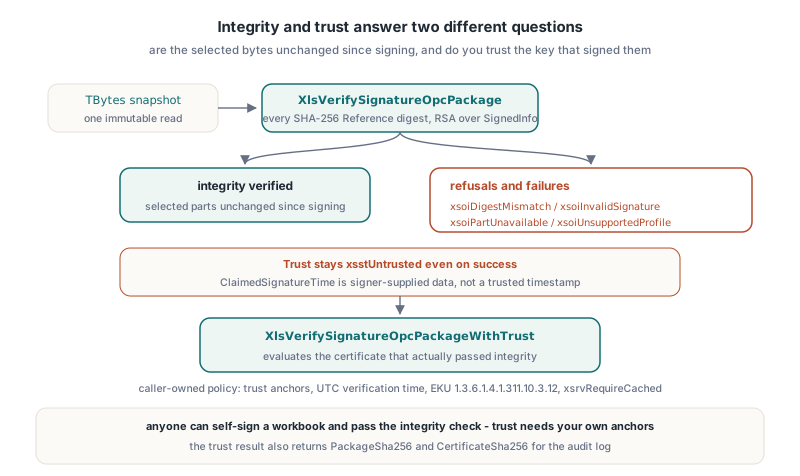
Trust is a separate call with a caller-owned policy. XlsDefaultSignatureOpcTrustPolicy returns a fail-closed policy with no anchors, no verification time, the document-signing EKU 1.3.6.1.4.1.311.10.3.12 and xsrvRequireCached revocation. XlsVerifySignatureOpcPackageWithTrust first runs the complete integrity verifier and then evaluates the certificate that actually passed it; a caller cannot substitute a different leaf certificate
uses
  System.SysUtils, System.DateUtils, lxSignatureOpcIntegrity;

function SignedUnderCorporateCA(const Bytes, RootDer, IssuingCaDer: TBytes): Boolean;
var
  Policy: TXLSSignatureOpcTrustPolicy;
  Trust: TXLSSignatureOpcTrustResult;
begin
  Policy := XlsDefaultSignatureOpcTrustPolicy;
  SetLength(Policy.TrustAnchors, 1);
  Policy.TrustAnchors[0] := RootDer;
  SetLength(Policy.Intermediates, 1);
  Policy.Intermediates[0] := IssuingCaDer;
  Policy.VerificationTimeUtc := TTimeZone.Local.ToUniversalTime(Now);

  Result := XlsVerifySignatureOpcPackageWithTrust(Bytes, Policy, Trust)
    = xsotTrustedSelection;
  if not Result then
    Writeln(Format('trust %d, integrity %d, policy error %.8x, chain errors %.8x',
      [Ord(Trust.Status), Ord(Trust.IntegrityStatus),
       Trust.NativePolicyError, Trust.NativeChainErrors]));
end;
The Windows backend has two traps that are easy to miss when you call WinCrypt yourself. CertVerifyCertificateChainPolicy returning True only means the call executed; acceptance still requires a zero dwError in the policy status, zero aggregate chain errors, an explicit digitalSignature key usage on the leaf and the required EKU. HotXLS found that a certificate missing key usage can pass the ordinary base policy, so it checks DigitalSignatureUsage and RequiredEkuPresent itself. The second trap: combining an exclusive root store with hRestrictedOther in the chain engine config returns E_INVALIDARG on the current backend, so HotXLS uses the exclusive caller root store and then authorises every element of the returned primary chain against the DER bytes you supplied. An issuer that merely happens to sit in a local system store never becomes trusted
xsotTrustedSelection still describes only that signature and its reported coverage. Unsigned cells and unselected relationships can change whilst the selected signature stays trusted, which is why the trust result also returns PackageSha256 and CertificateSha256 for your audit log
How do you re-sign or counter-sign a workbook without Excel?
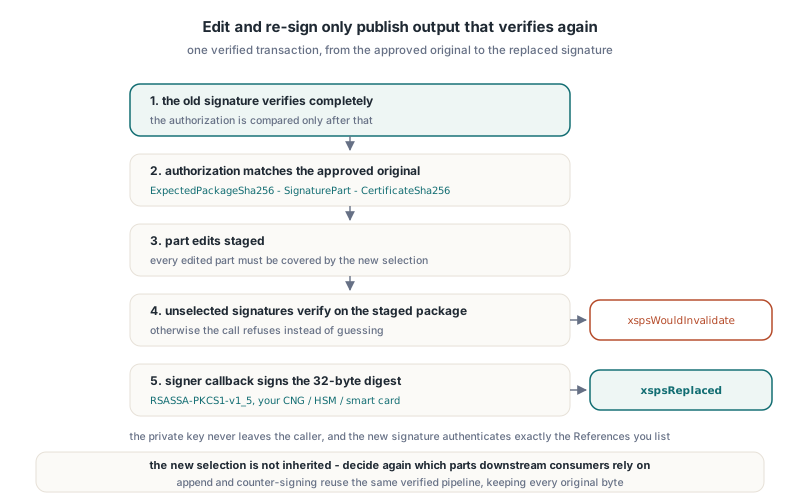
At the byte-array level HotXLS re-signs through explicit, authorised transactions, and the Workbook signed-save paths reuse the same verified pipelines. XlsReplaceVerifiedSignatureOpcPackage swaps one verified signature for a new one, XlsEditAndReplaceSelectedSignatureOpcPackage applies part edits and replaces one selected signature in the same transaction, and XlsAppendVerifiedSignatureOpcPackage adds a signature whilst keeping every verified original byte-for-byte. The replace calls take a TXLSSignatureOpcReplaceAuthorization, the append call verifies every original first, and all of them take a TXLSSignatureOpcIssueOptions selection and a signer callback; the library never touches your private key
The authorisation record binds the operation to the exact original you approved: ExpectedPackageSha256, ExpectedSignaturePart and ExpectedCertificateSha256, all compared only after the old signature has fully verified. Every edited part must be covered by the new selection, every unselected signature must still verify against the staged package before the signer is called, and the call returns xspsWouldInvalidate otherwise
uses
  System.SysUtils, System.DateUtils, lxHash, lxSignatureOpcIntegrity;

type
  TWorkbookResigner = class
  private
    function SignDigest(const Request: TXLSSignatureOpcSelectedReplaceRequest;
      var Signature: TBytes): TXLSSignatureOpcSignerStatus;
  public
    function Resign(const Approved, NewSheetXml, NewCertDer: TBytes;
      const OldCertSha256: WideString; var Output: TBytes): Boolean;
  end;

function TWorkbookResigner.SignDigest(
  const Request: TXLSSignatureOpcSelectedReplaceRequest;
  var Signature: TBytes): TXLSSignatureOpcSignerStatus;
begin
  // Request.NewSignature.Digest is the 32-byte SHA-256 the library computed;
  // RsaSignSha256Pkcs1 stands for your own CNG, HSM or smart card wrapper and
  // must return the full big-endian RSASSA-PKCS1-v1_5 signature
  if RsaSignSha256Pkcs1(Request.NewSignature.Digest, Signature) then
    Result := xsosSigned
  else
    Result := xsosFailed;
end;

function TWorkbookResigner.Resign(const Approved, NewSheetXml, NewCertDer: TBytes;
  const OldCertSha256: WideString; var Output: TBytes): Boolean;
var
  Auth: TXLSSignatureOpcReplaceAuthorization;
  Options: TXLSSignatureOpcIssueOptions;
  Edits: TXLSSignatureOpcEdits;
  Details: TXLSSignatureOpcSelectedReplaceResult;
begin
  Auth.ExpectedPackageSha256 := XLSComputeSHA256Hex(Approved); // or the hash stored at approval
  Auth.ExpectedSignaturePart := '/_xmlsignatures/sig1.xml';
  Auth.ExpectedCertificateSha256 := OldCertSha256;

  SetLength(Edits, 1);
  Edits[0].PartName := '/xl/worksheets/sheet1.xml';
  Edits[0].Data := NewSheetXml;

  SetLength(Options.References, 2);
  Options.References[0].PartName := '/xl/workbook.xml';
  Options.References[0].Mode := xsimCanonicalXml;
  Options.References[1].PartName := '/xl/worksheets/sheet1.xml';
  Options.References[1].Mode := xsimCanonicalXml;
  Options.ClaimedSignatureTimeUtc := FormatDateTime('yyyy"-"mm"-"dd"T"hh":"nn":"ss"Z"',
    TTimeZone.Local.ToUniversalTime(Now));

  Result := XlsEditAndReplaceSelectedSignatureOpcPackage(Approved, NewCertDer,
    Auth, Options, Edits, SignDigest, Output, Details) = xspsReplaced;
end;
Two details in that code are deliberate. Output and Details must be separate variables; passing a field of Details as Output is explicitly unsupported, because the library cannot publish a package and keep a certificate report in the same storage. And the old coverage is not inherited: the new signature authenticates exactly the References you list, so decide again which parts a downstream consumer will rely on
Counter-signing uses the same append call. Since HotXLS 2.384.296, TXLSSignatureOpcIssueOptions.References passed to XlsAppendVerifiedSignatureOpcPackage may name parts from the verified original-signature inventory, so a reviewer can sign over an existing signature part, chain several counter-signatures, or mix signature parts and content parts in one selection. Each appended signature records only its direct selections. The qualification for that release ran 222 boundary checks and 122 independent checks with the .NET WindowsBase packaging verifier across 7 output packages, confirming exactly one new signature and byte-identical original signatures and certificates
Pitfalls and limits worth knowing
The most instructive bug came from a character that is perfectly legal. OPC Reference URIs carry the content type as a query, for example /xl/worksheets/sheet1.xml?ContentType=application/vnd.openxmlformats-officedocument.spreadsheetml.worksheet+xml. An early HotXLS issuer percent-encoded the literal + as %2B. HotXLS's own RSA, C14N and Reference checks accepted the result, but WindowsBase reported InvalidSignature; a controlled sample that changed only that spelling went from InvalidSignature to Success. The issuer now keeps supported literal ASCII query punctuation whilst still escaping XML attributes, and the lesson for any signer is to test against an independent native verifier, not just your own
- The trust backend is Windows-only; other targets return
xsotTrustUnavailableafter integrity succeeds - The verifier accepts packages up to 64 MiB, 16 MiB per part, and at most 32 signature parts under one origin
- Issuing accepts up to 256 References and 4096 combined selectors per signature
- The supported profile is RSA-SHA256, SHA-256 digests and Canonical XML without comments; other algorithms, extra application Objects and external References return
xsoiUnsupportedProfile xsrvRequireCacheduses cache-only revocation data; missing status rejects, andxsrvNotCheckedgives no revocation assurance- Signing a workbook that Excel also has to accept still runs into the package rules in why Excel repairs a valid XLSX; a duplicated Override or relationship Id breaks the file before any signature is checked
FAQ
Does a HotXLS integrity check mean the signer is trusted?
No. XlsVerifySignatureOpcPackage proves the selected parts match their digests under the embedded certificate key and always reports xsstUntrusted. Use XlsVerifySignatureOpcPackageWithTrust with your own anchors and a UTC verification time to evaluate the certificate chain
Why does Excel show my workbook signature as invalid after a Delphi edit?
A saved workbook rewrites signed XML parts, so the SHA-256 digest of at least one Reference changes. Use XlsEditVerifiedOpcPackage with xsoePreserve to test an edit first, or XlsEditAndReplaceSelectedSignatureOpcPackage to edit and re-sign in one verified transaction
Can HotXLS sign with a key stored on a smart card or HSM?
Yes, because signing is a caller callback. The library passes the canonical SignedInfo and its 32-byte SHA-256 digest, your code returns the RSASSA-PKCS1-v1_5 signature, and the private key never leaves the provider you control
OPC signature verification, trust evaluation, counter-signing and verified re-signing are part of HotXLS, the native Excel spreadsheet component for Delphi and C++Builder, which reads and writes XLS, XLSX, XLSB and ODS without Excel or COM automation