A workbook with two charts goes through an open-and-save that edits nothing, and three different things can come out the other end. One output has three chart parts where the source had two. Another still has two, but a byte comparison shows every xl/charts/chartN.xml was rewritten and the series colours have drifted. A third keeps the chart XML intact while every chart has jumped a few pixels onto the cell gridlines. Excel opens all three without a repair prompt. Each symptom comes from one decision in the load and save path: how a worksheet finds its drawing, when the chart's change fingerprint is taken, and whether the anchor offsets inside the drawing part are written back
A worksheet finds its drawing through its relationships
The three-parts symptom comes from a loader that guesses part names. In an XLSX package a worksheet points to its drawing with a <drawing r:id="…"/> element (ECMA-376 Part 1 §18.3.1.36), and the r:id resolves through the sheet's .rels part to a target such as ../drawings/drawing1.xml. Excel happens to number drawings in a predictable way, so a hand-written reader often grows a fallback: when the relationship is missing, try xl/drawings/drawing{n}.xml for sheet position n and use it if the archive has it
// A shortcut that shows up in hand-written XLSX readers (do not ship this)
function GuessDrawingPart(Zip: TZipFile; SheetPos: Integer;
  const RelTarget: string): string;
begin
  Result := RelTarget;   // resolved from the sheet's .rels, '' when absent
  if Result = '' then
  begin
    Result := 'xl/drawings/drawing' + IntToStr(SheetPos + 1) + '.xml';
    if Zip.IndexOf(Result) < 0 then
      Result := '';
  end;
end;
The guess holds until a sheet without charts comes first. In a workbook whose first sheet has no drawing and no .rels part at all, while the second sheet reaches xl/drawings/drawing1.xml through Target="../drawings/drawing1.xml", the fallback hands sheet 1 a drawing it never referenced. chart1.xml is parsed twice, once per sheet, and the save writes three chart parts. Part names in an OPC package carry no meaning beyond what the relationship graph assigns them, which is the whole argument of the walkthrough on OPC relationship resolution in HotXLS
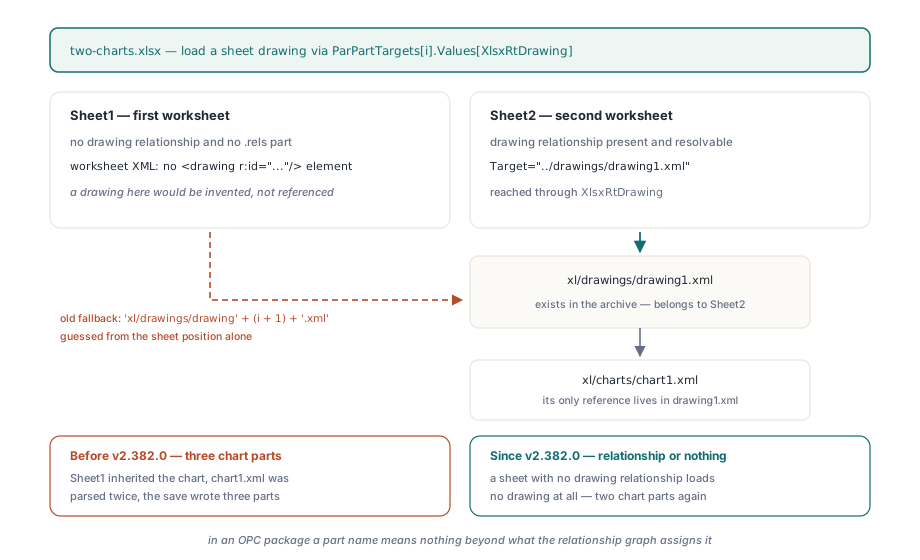
HotXLS Delphi Component takes the strict reading. A worksheet's drawing is loaded only from the target of that sheet's drawing relationship, and a sheet without one gets no drawing, whatever files happen to sit in xl/drawings/. A drawing part that nothing references is never attached to a sheet
What decides whether an untouched chart is copied or rebuilt?
A per-chart fingerprint decides it. When PreserveUnsupportedParts is True at the time of Open (True is the default), HotXLS keeps the original bytes of every chart part next to the parsed chart model. It then serializes the model with its own chart writer and records two numbers for that output: its length, and a 64-bit FNV-1a hash over its UTF-16 code units, using the standard offset basis 14695981039346656037 and prime 1099511628211. TXLSXChart.HasPreservedXml reports whether a chart is carrying those original bytes
At save time the chart model is serialized again and both numbers are compared. Equal length and equal hash mean the model is exactly what it was at import, so nothing the application could have changed has changed. In that case, with StrictOOXML off, the writer copies the compressed entry from the source archive straight into the output under the chart's new part name; the bytes are never decoded or re-deflated. If either number differs, the original XML is merged with the model instead. Changing the line formatting of an error bar or trendline also counts as an edit, even though that formatting is not part of the serialized model
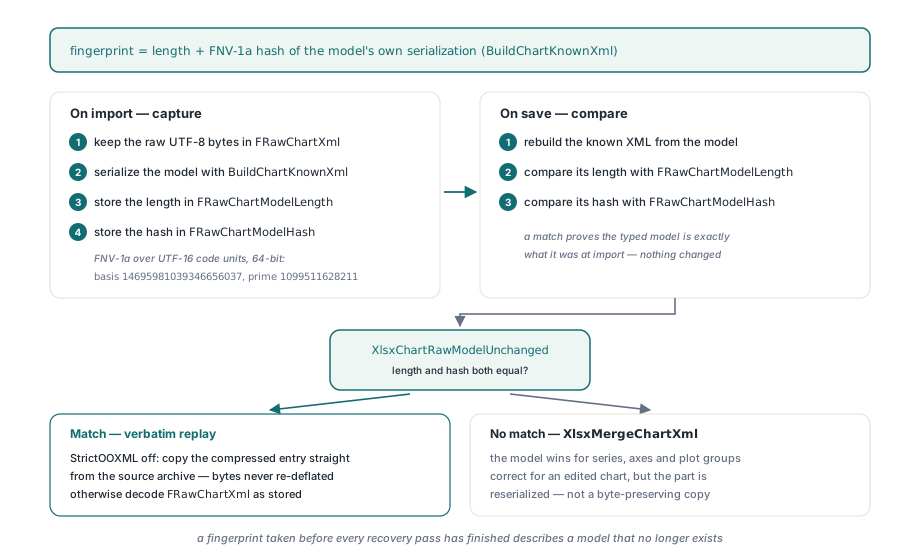
The merge is the right operation for a chart somebody edited. It keeps the parts of the original XML the model does not cover, lets the model win for series, axes and plot groups, and reserializes the result. What it cannot do is reproduce the original bytes. The note on editing Excel charts without losing ChartML covers what the merge keeps; this article is about the conditions under which an unedited chart never reaches it
uses System.SysUtils, lxHandleX;

procedure ResaveUntouched(const Src, Dst: string);
var
  Book: TXLSXWorkbook;
  Sheet: TXLSXWorksheet;
  S, C: Integer;
begin
  Book := TXLSXWorkbook.Create;
  try
    Book.PreserveUnsupportedParts := True;  // the default; must hold before Open
    Book.StrictOOXML := False;              // Strict output regenerates every chart
    if Book.Open(Src) <> 1 then
      raise Exception.Create('Cannot open ' + Src);
    for S := 1 to Book.Sheets.Count do      // Sheets[] is 1-based
    begin
      Sheet := Book.Sheets[S];
      for C := 0 to Sheet.Charts.Count - 1 do  // Charts[] is 0-based
        Writeln(Sheet.Name, ' / ', Sheet.Charts[C].Name, ': original kept = ',
          BoolToStr(Sheet.Charts[C].HasPreservedXml, True));
    end;
    if Book.SaveAs(Dst) <> 1 then
      raise Exception.Create('Cannot save ' + Dst);
  finally
    Book.Free;
  end;
end;
When a chart should be regenerated from the model on purpose, for example to strip formatting the source carried, TXLSXChart.ClearPreservedXml drops the stored bytes and that chart is written from the model alone
Why would every chart take the merge path anyway?
Because a fingerprint taken one step too early never matches. Chart XML is rarely read in a single pass. A streaming parse builds the series, axes and plot groups, and then a set of follow-up passes reads details out of the raw chart text that are easier to recover once the series exist: the <c:smooth> flag on each <c:ser>, the srgbClr values of marker fill and marker line, axis crossing modes, and the major and minor tick-mark styles. The series collection simply does not exist yet while the streaming pass is running, so those passes have to come after it
Suppose the fingerprint is captured at the end of the streaming pass, before the follow-up passes run. It then describes a model with no smooth flags, no marker colours and default tick marks. At save time the serializer runs against the completed model and emits <c:smooth val="1"/> plus the recovered colours. The XML is longer, the hash differs, and every chart in every preserved workbook goes through the merge on every save. On a line chart with smoothed series and custom markers the regenerated <c:ser> nodes replace the originals, and that is where the colour drift comes from
HotXLS captures the fingerprint only after every recovery pass has finished, so the hash describes the model as the application first sees it. The same two numbers are re-established after a successful save, this time from the output file, and that second capture also starts from a fully parsed model. A change-detection hash has to be taken after the last pass that can still mutate the model. Taking it earlier gives a check that fails on every save
Anchor offsets live in the drawing part
The grid-snap symptom has nothing to do with chart XML. Where a chart sits on the sheet is stored in the drawing part, and the usual form is xdr:twoCellAnchor (ECMA-376 Part 1 §20.5): a from corner and a to corner, each with col, colOff, row and rowOff. The offsets are English Metric Units, 914400 to the inch and 12700 to the point, and Excel writes nonzero values whenever a chart is dragged or resized with the mouse. For a file that declares a from corner at column 0, row 0 with a rowOff of 19049, and a to corner at column 8, row 15 with a colOff of 247650 and a rowOff of 66674, the chart starts 1.5 points below the top of row 1 and ends a little over a quarter inch into column I
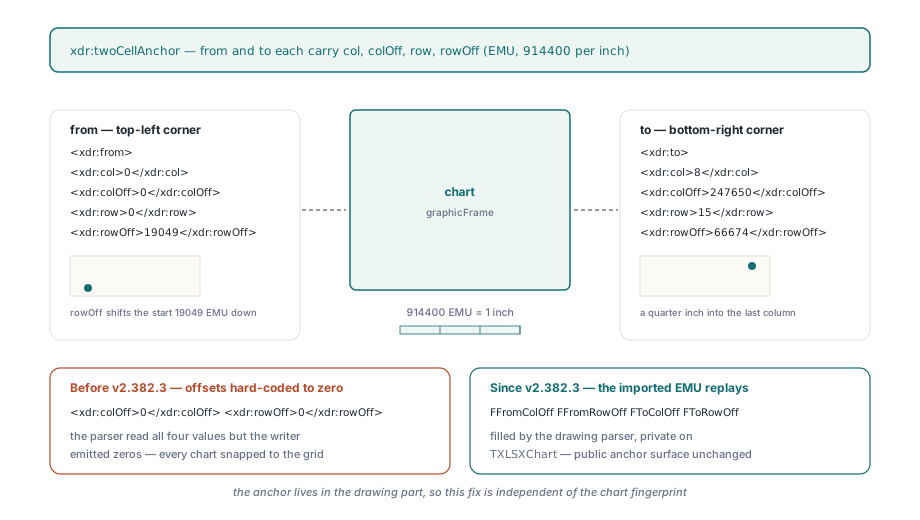
A writer that reads those four numbers and then emits <xdr:colOff>0</xdr:colOff> for every corner moves each chart onto the gridlines. The chart part can replay byte for byte and the chart still moves, because the two live in different parts. HotXLS keeps the anchor kind it loaded (twoCellAnchor, oneCellAnchor or absoluteAnchor, exposed as PhysicalAnchorKind) together with its EMU values, and writes them back unchanged. The offsets are readable as FromOffsetXEMU, FromOffsetYEMU, ToOffsetXEMU and ToOffsetYEMU, and the unit conversions behind them are worked through in the note on HotXLS image geometry and EMU scaling
procedure NudgeChart(Chart: TXLSXChart);
const
  EmuPerPoint = 12700;
begin
  if Chart.PhysicalAnchorKind <> xlsxAnchorTwoCell then
    Exit;
  Writeln(Format('from R%dC%d +(%d, %d) EMU  to R%dC%d +(%d, %d) EMU',
    [Chart.FromRow, Chart.FromCol, Chart.FromOffsetXEMU, Chart.FromOffsetYEMU,
     Chart.ToRow, Chart.ToCol, Chart.ToOffsetXEMU, Chart.ToOffsetYEMU]));
  // Replace the whole frame in one call: rows and columns are 1-based,
  // offsets are EMU inside the cell, the last argument is the editAs behaviour
  Chart.SetTwoCellAnchor(Chart.FromRow, Chart.FromCol, Chart.ToRow, Chart.ToCol,
    Chart.FromOffsetXEMU + 6 * EmuPerPoint, Chart.FromOffsetYEMU,
    Chart.ToOffsetXEMU + 6 * EmuPerPoint, Chart.ToOffsetYEMU, Chart.AnchorType);
end;
Use SetTwoCellAnchor when the intent is to move or resize. Assigning FromRow, FromCol, ToRow or ToCol on a two-cell chart changes only that cell index and leaves the offsets where they were, which is the right behaviour for a small adjustment and the wrong one for placing a chart from scratch. SetTwoCellAnchor validates the frame as a whole and raises ERangeError when the end corner precedes the start or the offsets fall outside the Excel EMU range. A chart created with AddChart starts with zero offsets, so it sits exactly on cell boundaries until you give it any
Proving the round trip with a byte comparison
Opening the output in Excel proves very little here. Excel normalises enough on load that a reserialized chart looks identical right up until somebody notices a marker colour changed, and a grid snap of a few points is easy to miss on screen. The check worth automating compares the chart parts byte for byte after an open-and-save with no edits, and the RTL's TZipFile is all it needs
uses System.Zip, System.SysUtils;

function ChartPartsIdentical(const Original, Resaved: string): Boolean;
var
  Src, Dst: TZipFile;
  Name: string;
  A, B: TBytes;
begin
  Result := True;
  Src := TZipFile.Create;
  Dst := TZipFile.Create;
  try
    Src.Open(Original, zmRead);
    Dst.Open(Resaved, zmRead);
    for Name in Src.FileNames do
      if Name.StartsWith('xl/charts/chart') and Name.EndsWith('.xml') then
      begin
        Src.Read(Name, A);
        Dst.Read(Name, B);   // raises if the part vanished
        if (Length(A) <> Length(B)) or
           ((Length(A) > 0) and not CompareMem(@A[0], @B[0], Length(A))) then
        begin
          Writeln('changed: ', Name);
          Result := False;
        end;
      end;
  finally
    Dst.Free;
    Src.Free;
  end;
end;
A few conditions decide whether a mismatch in that check means anything:
PreserveUnsupportedPartsmust be True beforeOpen; with it off no original bytes are kept and every chart is written from the modelStrictOOXMLmust be False, since Strict output regenerates charts by design. Leave it off in any pipeline that promises unedited charts survive a save- A source package written with Strict OOXML namespaces is converted to transitional namespaces on a transitional save, so its chart bytes differ even when nothing else changed
- The code between
OpenandSaveAsmay read chart properties freely, but any setter that changes the model changes the fingerprint and sends that chart through the merge, which is correct and outside what this test measures - Chart parts are renumbered from a workbook-wide counter on save, so a workbook whose sheet or chart order changed puts identical bytes under a different
chartN.xmlname; a checker for that case follows the drawing relationships instead of matching names
Anchors need a comparison by value. The drawing part is written fresh around the charts it holds, so its bytes are the wrong thing to diff; reopening both files and comparing FromOffsetXEMU through ToOffsetYEMU chart by chart catches a writer that turns 247650 into 0. A structural check that walks worksheet, drawing and chart relationships and fails on any duplicate, orphaned or dangling chart reference catches the three-parts case before the byte comparison even runs
All of this runs in native Delphi and C++Builder code with no Excel installation on the machine, so the workbook that comes back from a batch job is the only evidence of what happened to its charts. Licensing, the full chart API and a trial build are on the HotXLS Delphi spreadsheet component page