HotXLS evaluates the AutoFilter criteria already stored in an XLSX file without starting Excel. Since v2.384.136, TXLSXWorksheet.PreviewAutoFilterRows, ApplyAutoFilter and AutoFilterRowVisible execute value lists, date groups, Top/Bottom-n and percentage filters, relative date and average filters, fill and font colour filters and conditional formatting icon filters, under a frozen reference date and explicit resource limits
The usual trigger is a workbook that a person filtered in Excel and a server that has to act on it. Someone sets "Top 10 by revenue", "This month" on the order date and a red fill on overdue rows, saves, and uploads the file. Your Delphi service now needs the row set Excel would show: to count it, export it, or write the file back with the right rows hidden. The file only holds the definition. Before this release HotXLS could evaluate ordinary custom criteria, but the advanced kinds sat in the stored XML with nothing executing them, so the honest answer was "open it in Excel"
What does HotXLS actually execute from a saved AutoFilter?
HotXLS executes one filter kind per column, taken from the filterColumn element that Excel wrote, and combines columns with AND, exactly like the Excel dropdowns. The elements come from the AutoFilter group in ECMA-376 Part 1 §18.3.2, and each one maps to a distinct evaluation path:
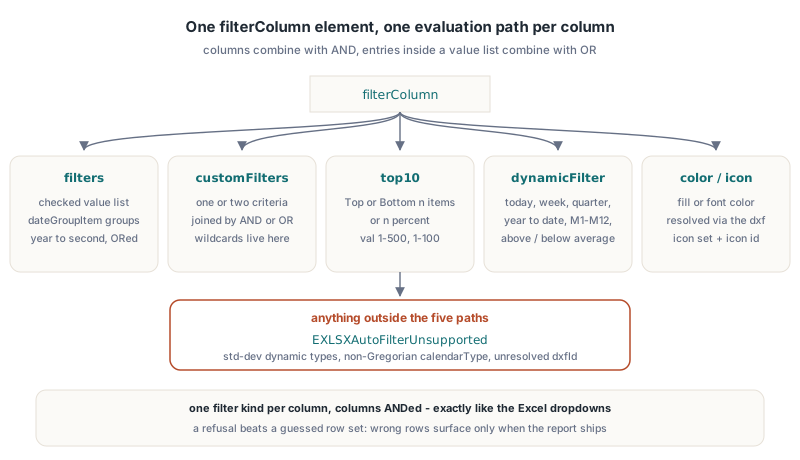
filterswithfilteranddateGroupItemchildren: a checked value list, an optional blank entry and calendar date groups from year down to second, ORed togethercustomFilters: one or two comparison criteria joined by AND or OR, the path that already existedtop10: Top or Bottom n items, or n percent, withvallimited to 1-500 items or 1-100 percentdynamicFilter: today, yesterday, tomorrow, this/last/next week, month, quarter and year, year to date, M1-M12, Q1-Q4, above average and below averagecolorFilterandiconFilter: effective fill or font colour resolved through the differential style, and conditional formatting icons by icon set and zero-based icon id
Anything outside that list fails with EXLSXAutoFilterUnsupported instead of producing a guessed row set. That includes the above and below standard deviation types of ST_DynamicFilterType, non-Gregorian calendarType values, unknown extension elements, unresolved dxfId references and a column that somehow carries two filter kinds at once. A filter engine that quietly returns "close enough" rows is worse than one that refuses, because nobody notices until a report goes out with the wrong customers in it
Preview first, apply second
HotXLS splits the work into a read-only preview and a transactional apply, and both take the same TXLSXAutoFilterExecutionOptions record. PreviewAutoFilterRows returns the number of matching data rows and never touches row visibility. ApplyAutoFilter(AResetVisible, Options) prepares every row decision first and only then publishes the new hidden-row set in one step, so an exception during preparation leaves the sheet exactly as it was
var
  Book: TXLSXWorkbook;
  Sheet: TXLSXWorksheet;
  Options: TXLSXAutoFilterExecutionOptions;
  Matching: Integer;
begin
  Book := TXLSXWorkbook.Create;
  try
    Book.Open('orders-filtered-by-sales.xlsx');
    Sheet := Book.Sheets[1];   // the Sheets indexer is 1-based

    // Always start from the defaults, then change single fields
    Options := XLSDefaultAutoFilterExecutionOptions;
    Options.ReferenceDate := EncodeDate(2026, 10, 19);

    Matching := Sheet.PreviewAutoFilterRows(nil, Options);  // count only
    WriteLn('Rows Excel would show: ', Matching);

    // True: matching rows become visible even if they were hidden before
    Sheet.ApplyAutoFilter(True, Options);
    Book.SaveAs('orders-applied.xlsx');
  finally
    Book.Free;
  end;
end;
Initialize the record with XLSDefaultAutoFilterExecutionOptions every time. The function zero-fills the record and then sets every limit, and the execution context rejects a record whose limits are not all positive with EXLSXAutoFilterLimit. A record declared on the stack and filled field by field will usually carry garbage or zeros in the fields you forgot. The parameterless overloads (ApplyAutoFilter(True), PreviewAutoFilterRows(Callback), AutoFilterRowVisible(Row)) use the same defaults, with the current date as reference
The AResetVisible flag decides what happens to rows that pass the filter but were already hidden. True makes every matching row visible, which is what Excel does when you reapply. False keeps earlier manual hiding on matching rows and only adds hiding for rows that fail. Rows outside the AutoFilter range keep their state either way. If the workbook changed between preparation and publication, ApplyAutoFilter raises rather than publishing decisions computed from stale data
Why do value lists ignore asterisks and question marks?
Value-list entries in a filters element are literal display tokens, so HotXLS compares * and ? as ordinary characters. A checked entry A* in the dropdown means the cell shows exactly A*, not "starts with A". Wildcards belong to customFilters, where "begins with" and "contains" really are patterns, and those keep the separate rules covered in how HotXLS matches Excel wildcard criteria and tilde escapes. Mixing the two semantics up is the fastest way to filter a part-number column into nonsense
The comparison is against the displayed value, which raises the question of which display. HotXLS formats the cell with its base number format, including stored style overlays, and deliberately ignores a number format that conditional formatting applies on top. The native Excel controls in the HotXLS fixture show why the token matters: numeric 1 and text "1" both match a selection of 1, a numeric 1 formatted as 0.0 instead matches 1.0 together with the text "1.0", and text "01" stays distinct from both. Date-looking text is never parsed into a date, so a text cell holding "2026-10-19" will not fall into a date group
How do Top 10, average and dynamic date filters decide?
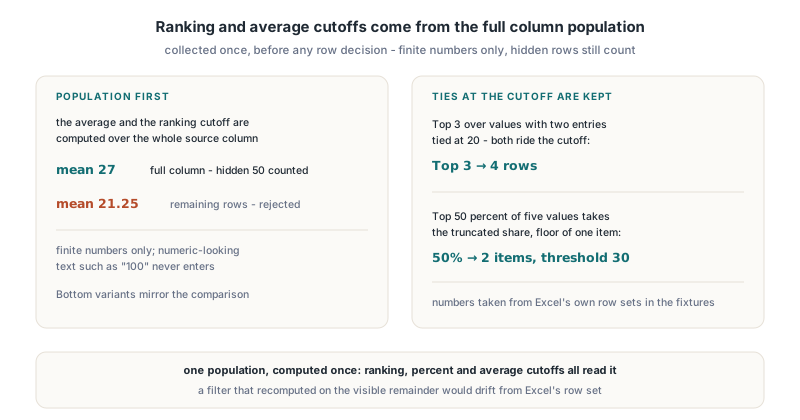
HotXLS computes ranking and average cutoffs once over the whole source column, not over the rows another filter left visible. Only finite numbers enter the population, which means numeric-looking text such as "100" is excluded, and the population is collected before any row decision is made. In the native control workbook an above-average filter keeps a mean of 27 across the full column even after a second column hides the value 50; it does not switch to the 21.25 mean of the remaining rows
Ties are included at the cutoff, as in Excel. A Top 3 filter over values with two entries tied at 20 selects four rows. Percentage mode takes the truncated share of the numeric population, with a floor of one item, so Top 50 percent of five values selects two values with a threshold of 30. Bottom variants mirror the comparison. These numbers come from Excel's own row sets recorded in the HotXLS test fixtures, not from reading the specification, which is silent on most of them
Dynamic dates need a frozen reference date
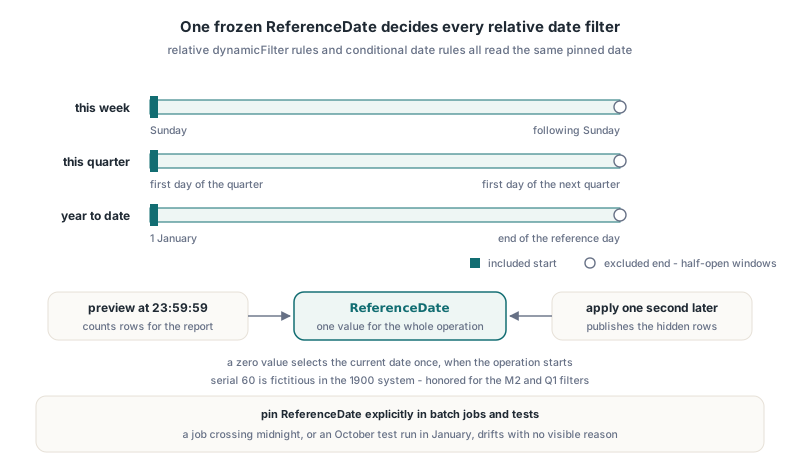
TXLSXAutoFilterExecutionOptions.ReferenceDate freezes the meaning of "today" for a whole operation. Relative filters such as this week or last quarter, and conditional formatting date rules that feed colour filters, are all evaluated against that one date, so a preview at 23:59:59 and an apply one second later agree. A zero value selects the current date once when the operation starts; serial values respect the workbook's 1900 or 1904 date system, including Excel's fictitious serial 60 in the 1900 system for the M2 and Q1 filters
The windows are half-open calendar intervals: this week runs from Sunday to the following Sunday, this quarter from the first day of the quarter to the first day of the next, and year to date from 1 January up to the end of the reference day. Pin ReferenceDate explicitly in anything that runs in a batch or a test. A nightly job that crosses midnight, or a unit test written in October that has to pass in January, will otherwise produce row sets that differ for no visible reason
Formula cells are filtered on their cached values. The filter engine does not silently recalculate the workbook, so a file saved by a writer that left no cached results needs an explicit calculation pass before the filter can see meaningful numbers or dates
Which colours does a colour filter see?
A HotXLS colour filter sees the effective colour from direct cell formatting plus any matching conditional formatting override, and nothing that comes only from a table style. Excel behaves the same way: a banded row painted light blue by a built-in table style is not "light blue" to the filter dropdown. In the native controls, a cell painted red by conditional formatting is selected by a red fill filter, whilst a cell formatted red directly but overridden by an active yellow rule is excluded
Three refinements arrived in follow-up releases. Version 2.384.138 treats linear and path gradient fills as distinct from both solid colours and no fill, so a gradient never matches a solid-colour criterion even when one of its stops has that exact colour. Version 2.384.140 added font colour filtering for rich text, where a cell matches if any nonempty run carries the requested RGB, automatic or inherited colour. Version 2.384.150 completed conditional rich-text decisions, which turned out to be the strange one
Native Excel can reuse a colour decision between a rich-text cell and a plain cell with the same text, the same base style and the same matching conditional rule path, so the visible row set can depend on the order of those cells. HotXLS reproduces that by preparing the complete data range in ascending row order, even when you only ask AutoFilterRowVisible about one row. Inspecting row 40 therefore costs a pass over the range, but row inspection, preview and apply always return the same answer for the same row
Every resource has a limit, and what to catch
HotXLS bounds each kind of work in an AutoFilter operation with its own field in TXLSXAutoFilterExecutionOptions, because a filtered workbook from an upload form is untrusted input. The defaults are 1048576 for MaxXmlCharacters, 16384 for MaxXmlNodes, 4096 for MaxFilterItems, 4000000 for MaxExaminedCells, 1000000 each for MaxEffectiveFormatCells and MaxPopulationValues, 67108864 bytes for MaxContextBytes and 16000000 for MaxConditionalSteps. MaxContextBytes measures retained logical state and reserved temporary envelopes, not process memory
type
  TFilterJob = class
  public
    Deadline: TDateTime;
    VisibleRows: TList<Integer>;
    procedure HandleRow(Sender: TObject; SheetIndex, Row: Integer;
      Visible: Boolean; var Cancel: Boolean);
    procedure HandleWork(Sender: TObject; ACompleted: Int64;
      var ACancel: Boolean);
  end;

procedure TFilterJob.HandleRow(Sender: TObject; SheetIndex, Row: Integer;
  Visible: Boolean; var Cancel: Boolean);
begin
  // Called for every data row; Visible is the filter decision
  if Visible then
    VisibleRows.Add(Row);
end;

procedure TFilterJob.HandleWork(Sender: TObject; ACompleted: Int64;
  var ACancel: Boolean);
begin
  // ACompleted counts examined cells and may stay flat during formatting
  ACancel := Now > Deadline;
end;
The row callback of PreviewAutoFilterRows receives every data row with its decision, not only the matching ones, and the function still returns the matching count. Setting its Cancel parameter stops the visit early without an exception. OnWork is the cancellation hook: setting ACancel to True raises EXLSXAutoFilterCancelled. Whilst the operation prepares decisions it holds a read lease on the workbook, so neither callback may modify that workbook
Options := XLSDefaultAutoFilterExecutionOptions;
Options.ReferenceDate := Date;
Options.MaxExaminedCells := 500000;   // tighter cap for uploaded files
Options.OnWork := Job.HandleWork;
try
  Sheet.PreviewAutoFilterRows(Job.HandleRow, Options);
  Sheet.ApplyAutoFilter(True, Options);
except
  on E: EXLSXAutoFilterUnsupported do
    Log('Filter needs Excel: ' + E.Message);
  on E: EXLSXAutoFilterLimit do
    Log('Filter exceeded a budget: ' + E.Message);
  on E: EXLSXAutoFilterCancelled do
    Log('Filter cancelled at deadline');
  on E: EXLSXAutoFilterExecution do
    Log('Filter state invalid: ' + E.Message);
end;
All three specific exceptions derive from EXLSXAutoFilterExecution, which itself covers invalid state such as a reference date outside the supported calendar or a workbook that changed before publication, so keep the base class last. In every case the sheet's row visibility is unchanged, which makes "log, skip, flag the file for manual review" a safe default policy
Where the boundaries are
The coverage is broad, but a few edges are worth knowing before you promise parity to a customer:
- Standard deviation dynamic filters are rejected until a verified policy exists, even though the enumeration has values for them
- Week windows start on Sunday; workbooks that rely on a different week start are not modelled
- Formula results come from the stored cache only, with no recalculation inside the filter call
- Table-style colours never match a colour filter, by design and in agreement with Excel
- Unknown rich-text structure or unknown colour metadata fails explicitly, whilst known non-colour properties such as font family do not block a colour match
- The XLS facade and its BIFF8 storage are a separate path, covered in how HotXLS writes BIFF8 AutoFilter DOPER criteria
If you are still deciding how AutoFilter definitions, data validation and tables relate in a workbook you generate yourself, start with HotXLS data validation, AutoFilter and tables in Delphi, which covers SetAutoFilter, column ids and when a filter actually takes effect
FAQ
Does PreviewAutoFilterRows change which rows are hidden?
No. PreviewAutoFilterRows only evaluates the stored criteria and reports decisions through its return value and optional callback. Only ApplyAutoFilter publishes a new hidden-row set, and it does so after all decisions are prepared, so a failure leaves the original visibility intact
Why does a relative date filter give different rows on different days?
Filters such as today, this week or last month are defined relative to the current date, exactly as in Excel. Set ReferenceDate in TXLSXAutoFilterExecutionOptions to a fixed date when you need repeatable results; a zero value means the date at which the operation starts
Can HotXLS filter on colours that come from a table style?
No, and neither can Excel. HotXLS colour filters match direct cell formatting and supported conditional formatting overrides only. Colours painted solely by a built-in or custom table style do not participate, so a colour filter result agrees with what the Excel dropdown would select
Advanced AutoFilter execution ships with the XLSX worksheet API of HotXLS, the Delphi spreadsheet component for reading and writing Excel files without Excel, from v2.384.136 onward, with gradient, rich-text and conditional rich-text colour handling added through v2.384.150