Chasing a pipe that never reports end-of-file is an odd way to spend an afternoon on an OCR feature. One thread in your application reads the standard output of a helper program, waiting for ReadFile to fail with ERROR_BROKEN_PIPE. Another thread launches tesseract.exe via CreateProcess with bInheritHandles set to True, because that is how you give a child process a file for its standard error. The write end of the helper pipe was inheritable, so Tesseract now holds a copy of it, and the reading thread hangs about until Tesseract has finished its page — which, on a 300 DPI scan with two language models loaded, takes a while
The hang is only the first of several problems an external recogniser raises: what the child can see, what to do with half-valid output, and how to turn pixel boxes into searchable PDF text. The built-in template-matching OCR engine deliberately covers machine-printed ASCII letters and digits. Accented names, Chinese contracts and mixed-language archives want trained language models, and Tesseract is the usual candidate, being a command-line program you can install alongside your executable
Wiring Tesseract into the HotPDF OCR text layer
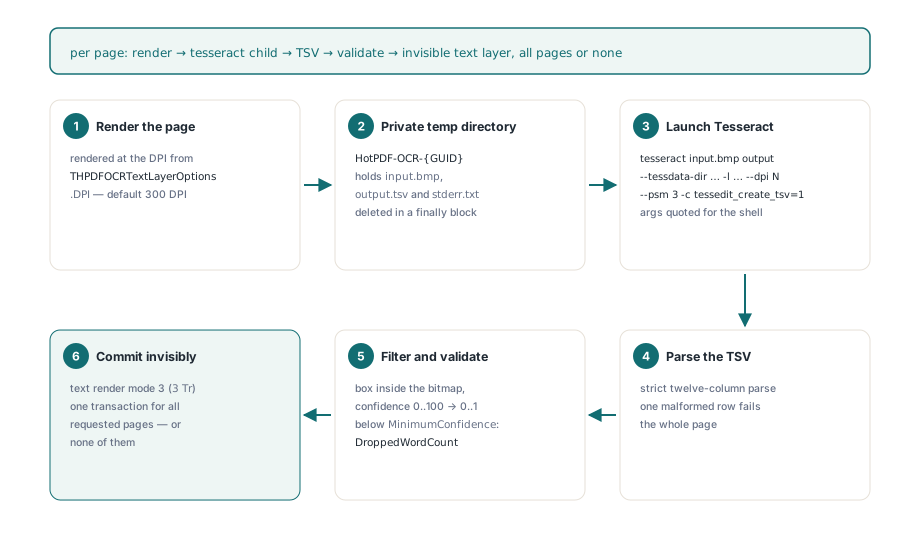
HotPDF wraps a locally installed Tesseract executable as an IHPDFOCREngine via HPDFCreateTesseractOCREngine from the HPDFTesseractRecognition unit. Hand that engine to THotPDF.ApplyLoadedOCRTextLayer, which renders each requested page, runs Tesseract once per page, filters the words and then writes an invisible Unicode text layer for every requested page in a single transaction, or for none of them. Coordinate mapping, rotation, confidence filtering and the commit come straight from the pipeline the built-in engine already uses; only recognition itself changes
The factory raises EArgumentException before any page gets touched. The executable and tessdata directory have to exist, the timeout has to sit between 1 and 3,600,000 milliseconds, and the language may hold only ASCII letters, digits, _ and +, because it ends up on a command line: eng+chi_sim is fine, whilst a value with quotes or spaces is an injection waiting to happen. A second overload accepts a THPDFTesseractOptions record. Its Default gives --psm 3, --oem 3, 60 seconds per page and a ceiling of 16,777,216 pixels, and it turns away tpsOSDOnly and tpsAutoOnly, the two modes that yield no words
uses
  SysUtils, HPDFTypes, HPDFDoc, HPDFTesseractRecognition;

function MakeSearchable(const SourceFile, TargetFile: string;
  Token: THPDFCancellationToken): Boolean;
var
  Doc: THotPDF;
  Engine: IHPDFOCREngine;
  TessOptions: THPDFTesseractOptions;
  Options: THPDFOCRTextLayerOptions;
  Info: THPDFOCRTextLayerInfo;
begin
  TessOptions := THPDFTesseractOptions.Default; // psm 3, oem 3, 60 s, 16,777,216 px
  TessOptions.TimeoutMilliseconds := 120000;    // applies to each page
  // raises EArgumentException for a missing executable or tessdata folder,
  // a bad language identifier, or options outside their ranges
  Engine := HPDFCreateTesseractOCREngine(
    'C:\OCR\Tesseract\tesseract.exe',
    'C:\OCR\Tesseract\tessdata',
    'eng+chi_sim',                              // models joined with '+'
    TessOptions);
  Doc := THotPDF.Create(nil);
  try
    Doc.AutoLaunch := False;
    if Doc.LoadFromFile(SourceFile) < 1 then
      raise Exception.Create('Cannot load ' + SourceFile);
    Options := THPDFOCRTextLayerOptions.Default; // 300 DPI, MinimumConfidence 0.5
    Options.CancellationToken := Token;
    // an empty page list means every page; pages that already have text are skipped
    Result := Doc.ApplyLoadedOCRTextLayer([], Engine, Options, Info);
    if Result then
    begin
      Writeln(string(Info.EngineName), ': ', Info.AcceptedWordCount,
        ' words kept, ', Info.DroppedWordCount, ' below the threshold');
      Doc.SaveLoadedDocument(TargetFile);
    end
    else
      case Info.Status of
        otlsCancelled:      Writeln('Cancelled, document unchanged');
        otlsEngineError:    Writeln('Engine: ', string(Info.Diagnostic));
        otlsBudgetExceeded: Writeln('Budget: ', string(Info.Diagnostic));
      else
        Writeln(string(Info.Diagnostic));
      end;
  finally
    Doc.Free;
  end;
end;
Work the pixel arithmetic out once. An A4 page at 300 DPI comes to roughly 2,481 by 3,508 pixels, some 8.7 million, which fits. An A3 page at the same resolution is nearer 3,508 by 4,961, about 17.4 million, so it fails with a pixel-budget diagnostic and the run finishes as otlsEngineError. The overload that takes only a timeout applies no pixel cap whatsoever. For a service accepting files from the outside world, stick with the options overload and raise MaxPixels (up to 67,108,864), or lower THPDFOCRTextLayerOptions.DPI deliberately where large formats are expected
For every page, the engine creates a private HotPDF-OCR-{GUID} directory beneath the temp path, saves the bitmap as input.bmp and runs tesseract input.bmp output --tessdata-dir … -l … --dpi N --psm 3 -c tessedit_create_tsv=1, adding --oem where an engine mode is set. Paths are quoted using the Windows rules for backslashes and embedded quotes, and --dpi passes the render resolution along so Tesseract never has to guess it. Tesseract and its .traineddata files ship unbundled; provisioning them is the application's job. On our own Linux test machines the recogniser runs from a user-level bundle of the binary, its shared-library closure and the tessdata folder, since leaning on /usr/bin/tesseract only works where somebody has installed the system package
Why does a single broken TSV row empty the whole page?
On the first malformed row the Tesseract adapter fails the whole page, because a partially parsed word list yields a text layer that disagrees with the image, and nothing in the saved PDF records which words went missing. The output has to decode as strict UTF-8 with no embedded NUL. The first line has to match the twelve-column Tesseract header, level through text, once an optional byte order mark has been stripped. Every row has to split into exactly twelve fields, and the split stops after the eleventh tab, so a tab inside the recognised text lands in the text field rather than creating a thirteenth column, which the control-character check below then rejects
Only level 5 rows count as words; page, block, paragraph and line rows are skipped, along with words that are empty or pure whitespace. Any word carrying a control character (below U+0020, or U+007F to U+009F) fails the page. Everything else needs integer geometry, a confidence parsed with invariant formatting so a German-locale application still reads 93.5, a box wholly inside the bitmap, and a confidence between 0 and 100. One valid word followed by one broken row leaves you with zero words
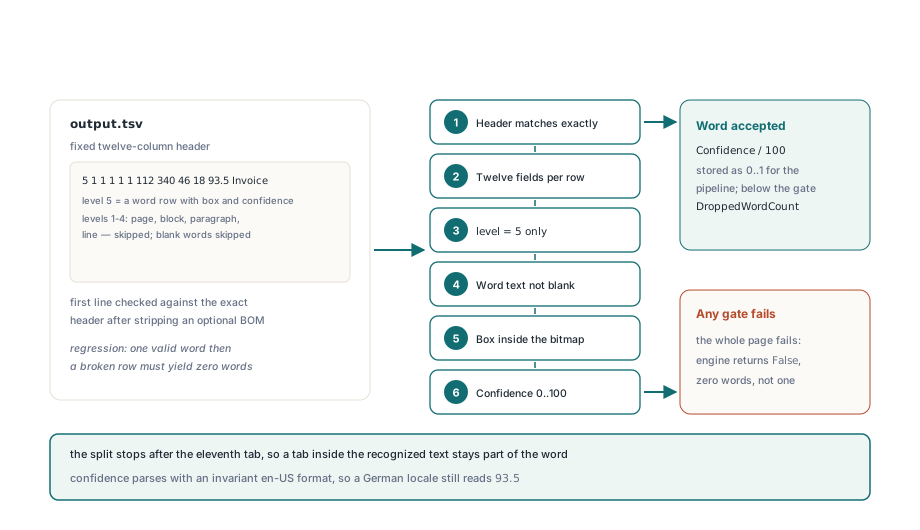
One odd row therefore fails the whole run and every page stays untouched. That is the right trade to make. A rerun costs little; a searchable PDF in which a search for an invoice number misses the one page that matters tends to surface months later, in somebody else's hands
The last step also enforces a default you might not expect. Tesseract reports confidence from 0 to 100, the pipeline divides by 100, and THPDFOCRTextLayerOptions.MinimumConfidence defaults to 0.5, so any word scoring under 50 lands in Info.DroppedWordCount rather than on the page. On a clean scan that floor is sensible. On a noisy fax it can strip out a large share of the text, so compare Info.ReceivedWordCount with Info.AcceptedWordCount before you lower it
Re-running OCR on a file that already carries text
By default SkipPagesWithText is True, and that trips people up the second time round. Imagine a batch processed with eng that now needs eng+deu: every page already carries invisible text, so Info.SkippedPageCount equals the page count. HotPDF marks the content stream it writes as its own OCR layer, and ReplaceExistingOCRTextLayer uses that mark to recognise those pages afresh, discarding the old layer whilst keeping the original page content
Options := THPDFOCRTextLayerOptions.Default;
Options.ReplaceExistingOCRTextLayer := True;  // swap our earlier layer
Options.UseOptionalContentGroup := True;      // layer named 'OCR Text Layer'
Options.CancellationToken := Token;
if Doc.ApplyLoadedOCRTextLayer([], Engine, Options, Info) then
  Writeln(Info.ReplacedPageCount, ' replaced, ',
    Info.SkippedPageCount, ' skipped, ',
    Info.RecognizedPageCount, ' recognized')
else
  Writeln(string(Info.Diagnostic));
A file OCR'd by a scanner driver carries no such mark, so its pages still count as pages with text. Switching SkipPagesWithText off would pile a second invisible layer on top of the first, and every search hit would appear twice. Leave those files well alone
Which handles does the Tesseract process inherit?
The Tesseract child process inherits precisely two handles from HotPDF: one opened on NUL for standard input and output, and one for stderr.txt in the private directory. The pipe hang described above comes from CreateProcess itself: bInheritHandles = True is needed to pass standard handles, and left to its own devices it passes every inheritable handle in the host, pipes, files and events opened by unrelated code included. HotPDF uses STARTUPINFOEX with an attribute list carrying PROC_THREAD_ATTRIBUTE_HANDLE_LIST plus the EXTENDED_STARTUPINFO_PRESENT flag. bInheritHandles remains True, yet only the listed handles make it across
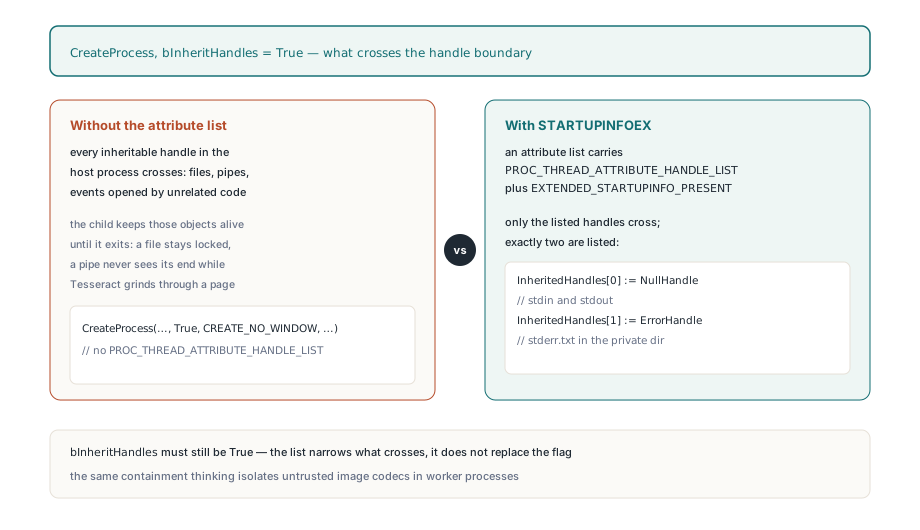
The same pattern belongs in every other child process your application starts, for one launcher that inherits everything is quite enough to hang every pipe reader in the process:
// Pattern for your own CreateProcess calls (fragment: NullHandle, ErrorHandle,
// Exe, CommandLine, WorkDir and ProcessInfo are declared elsewhere).
// Older Delphi RTLs do not declare the attribute-list functions; add your own
// external declarations from kernel32 if the compiler cannot find them
// Check each BOOL result in production code
type
  TStartupInfoExRec = record
    StartupInfo: TStartupInfo;
    AttributeList: Pointer;
  end;
const
  HANDLE_LIST_ATTRIBUTE = $00020002;   // PROC_THREAD_ATTRIBUTE_HANDLE_LIST
  EXTENDED_STARTUP_FLAG = $00080000;   // EXTENDED_STARTUPINFO_PRESENT
var
  Startup: TStartupInfoExRec;
  HandleList: array[0..1] of THandle;
  Size: NativeUInt;
begin
  FillChar(Startup, SizeOf(Startup), 0);
  HandleList[0] := NullHandle;         // created with bInheritHandle = True
  HandleList[1] := ErrorHandle;        // likewise
  Size := 0;
  InitializeProcThreadAttributeList(nil, 1, 0, Size);
  GetMem(Startup.AttributeList, Size);
  InitializeProcThreadAttributeList(Startup.AttributeList, 1, 0, Size);
  UpdateProcThreadAttribute(Startup.AttributeList, 0, HANDLE_LIST_ATTRIBUTE,
    @HandleList[0], SizeOf(HandleList), nil, nil);
  Startup.StartupInfo.cb := SizeOf(Startup);
  // ... set dwFlags and hStdInput / hStdOutput / hStdError as usual ...
  CreateProcess(PChar(Exe), PChar(CommandLine), nil, nil,
    True,                              // still required with a handle list
    CREATE_NO_WINDOW or EXTENDED_STARTUP_FLAG,
    nil, PChar(WorkDir), Startup.StartupInfo, ProcessInfo);
  // after the child exits: DeleteProcThreadAttributeList, FreeMem, CloseHandle
end;
Bridge scripts add one more Windows wrinkle. A Python launcher can start a second interpreter process, and killing the process you created leaves that one running. Given a script path, as the RapidOCR adapter below is, HotPDF starts the child suspended, assigns it to a job object with JOB_OBJECT_LIMIT_KILL_ON_JOB_CLOSE and only then resumes it, so closing the job ends the whole tree. The same containment idea drives isolating PDF image codecs in worker processes, where the child is untrusted; here the child is trusted, but your process is not the only code holding handles within it
Cancellation, timeouts and the all-or-nothing commit
IHPDFOCREngine.Recognize returns a single Boolean, and False covers both "Tesseract failed" and "the user pressed Cancel". Whilst Tesseract runs, the adapter polls the token and its timeout every 25 milliseconds, and on cancellation it tidies up and returns False. Read at face value that would come across as otlsEngineError, so ApplyLoadedOCRTextLayer consults the token first whenever Recognize returns False. Recognition and content construction complete for every requested page before the document transaction opens, so cancelling on page 40 of 50 reports otlsCancelled and leaves all 50 pages as loaded. The other limits follow the same pattern:
- The timeout starts with each
Recognizecall, so the 60,000 ms default acts as a per-page limit - A child still running at timeout or cancellation is terminated and waited on for as long as 5 seconds; the private directory goes in a
finallyblock, with deletion retried for up to a second because output files can stay locked briefly once the process has ended output.tsvis capped at 64 MiB andstderr.txtat 1 MiB, checked both whilst the child runs and after it exits- Words and UTF-16 code units per page are capped by whatever remains of
MaxWordsPerPage,MaxTotalWordsandMaxTextCodeUnits; exceeding them fails the run rather than truncating the list - A non-zero exit code returns with up to 4,096 characters of
stderr.txt, the quickest way to discover a missing.traineddatafile
What the invisible text layer looks like within the page
HotPDF writes the words in text rendering mode 3 (neither fill nor stroke, ISO 32000-1 §9.3.6), so the scan stays visible whilst search and copy operate on the words. The content stream opens BT with 3 Tr; each word receives a Tm matrix at its baseline, a font size of box height in pixels times 72 over the render DPI, and a Tz scale stretching the run to the box width. That stretch is what keeps a search highlight sitting on the word in the image
The TSV gives you boxes but no baselines, so each baseline sits one fifth of the box height above the bottom edge. Between neighbouring words on a left-to-right line in space-separated scripts such as Latin or Cyrillic, a stretched space fills the gap, so copied text keeps its word breaks; Chinese gets none. Glyphs travel through a shared unembedded Type0 font with Identity-H encoding and a generated ToUnicode CMap, one CID per distinct Unicode scalar, which is how Chinese, accented Latin and supplementary-plane characters survive copy and search. A single run holds up to 65,535 distinct scalars, and because ISO 19005 insists on embedded fonts, PDF/A output needs a separately embedded conforming font. To check a result, save, reload and run the ordinary path from extracting text from a loaded PDF in Delphi; if the expected words come back on the expected pages, the layer is genuine
RapidOCR and the native DLL working to the same contract
For Simplified Chinese scans, HPDFCreateRapidOCREngine(PythonExecutable, BridgeScript, ModelDirectory, TimeoutMilliseconds) reuses the same process runner and TSV parser. The bridge script path trails the Python executable, and the language is pinned to chi_sim. HotPDF ships the bridge as tools/OCR/rapidocr_tsv.py; it wants the rapidocr and onnxruntime packages, local ONNX models and a font file, refuses automatic downloads and writes Tesseract-shaped TSV; a THPDFRapidOCROptions overload sets model files, thread counts and a pixel cap. The generic factory standing behind both adapters, HPDFCreateLocalTSVOCREngine in HPDFLocalTSVRecognition, accepts any program that takes the Tesseract-style arguments and emits the twelve-column TSV, inheriting the handle list, timeout, cancellation and budgets
HPDFCreateTesseractDLLOCREngine(LibraryPath, TessDataDirectory, Language) instead loads the Tesseract C API in-process, reports Tesseract (native DLL), checks up front that every requested .traineddata file exists and maps cancellation and timeout onto the Tesseract progress monitor. It saves a process start and a BMP round trip per page; the executable keeps the recogniser's crashes and memory growth out of your address space. For a desktop tool working on the user's own scans the DLL is perfectly fine. For a service ingesting documents from strangers, the command-line engine remains the safer choice. Either way recognition runs on Windows, one page at a time, on the rendered bitmap, so deskew and clean up awkward scans before they reach the engine
The OCR adapters, the text-layer writer, the renderer feeding them and the extraction that checks the output all live inside one native VCL component for Delphi and C++Builder. Should your capture or archiving application need searchable PDF output, the HotPDF Delphi PDF component covers everything bar the OCR engine you install yourself