HotPDF ships THPDFBuiltInOCREngine, a bounded template-matching OCR engine written entirely in Object Pascal: it binarises a rendered page with Otsu thresholding, extracts glyphs as connected components, and scores each glyph by greyscale coverage against cached multi-font templates, so a Delphi application can build a searchable text layer with no external OCR dependency. The engine had to be rebuilt from scratch in v2.731.0, and the reason was not the matcher. It was the pixels
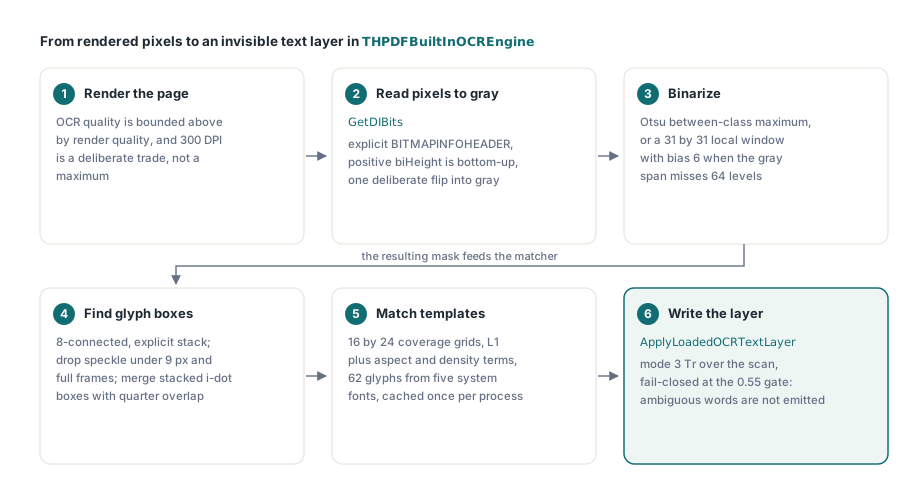
The old engine passed its tests. It recognised uppercase ASCII on synthetic bitmaps, and on Win32 it kept doing so for months. Then the same code was run under Win64 and produced nothing at all: no words, no diagnostic beyond "found no high-contrast foreground", no crash. The bug turned out to be two independent mistakes in the pixel-reading path that had been cancelling each other out, and unpicking them is a good illustration of why OCR code fails silently rather than loudly
Why did the old OCR engine only work by accident?
The old engine worked because its template bitmaps and its target bitmaps were flipped the same way, so a vertical inversion in the pixel reader was invisible to the matcher. TBitmap.ScanLine hands back rows in the opposite order from the positive-biHeight DIB convention that the rest of the imaging path assumes. Render an M upside down, compare it against a template that is also upside down, and the L1 difference is identical to the correct comparison. Every glyph matched. Nothing was right
That symmetry is exactly what makes this class of bug expensive. Any one-sided fix breaks matching: correct the target read and leave the templates alone, and recognition collapses to noise; correct the templates first and you get the same collapse from the other direction. There is no incremental repair path. The rebuild therefore replaced the whole read with GetDIBits against an explicitly declared BITMAPINFOHEADER, where a positive biHeight means bottom-up rows by contract rather than by VCL convention, and flips once, deliberately, when copying into the greyscale buffer
The second mistake is the one that only Win64 surfaced. The HDC passed to GetDIBits must not be the bitmap's own memory DC, because the bitmap is already selected into it and Windows documents that as invalid. Passing Bitmap.Canvas.Handle was tolerated by the Win32 process and failed consistently in the Win64 test process. The fix is a throwaway screen DC from GetDC(0), released in a finally block, which owes nothing to any bitmap
procedure BitmapToGray(Bitmap: TBitmap; out Gray: TBytes);
var
  Work: TBitmap;
  Info: TBitmapInfo;
  Buffer: TBytes;
  DC: HDC;
  P: PByte;
  Stride, X, Y: Integer;
begin
  Work := TBitmap.Create;
  try
    Work.Assign(Bitmap);
    Work.PixelFormat := pf24bit;
    Stride := ((Work.Width * 24 + 31) div 32) * 4;
    SetLength(Buffer, Stride * Work.Height);
    FillChar(Info, SizeOf(Info), 0);
    Info.bmiHeader.biSize := SizeOf(BITMAPINFOHEADER);
    Info.bmiHeader.biWidth := Work.Width;
    Info.bmiHeader.biHeight := Work.Height;   // positive => bottom-up rows
    Info.bmiHeader.biPlanes := 1;
    Info.bmiHeader.biBitCount := 24;
    Info.bmiHeader.biCompression := BI_RGB;
    DC := GetDC(0);            // never Work.Canvas.Handle: Work is selected there
    if DC = 0 then
      raise EInvalidOperation.Create('Recognition bitmap pixels could not be read');
    try
      if GetDIBits(DC, Work.Handle, 0, Work.Height,
        @Buffer[0], Info, DIB_RGB_COLORS) <> Work.Height then
        raise EInvalidOperation.Create('Recognition bitmap pixels could not be read');
    finally
      ReleaseDC(0, DC);
    end;
    SetLength(Gray, Work.Width * Work.Height);
    for Y := 0 to Work.Height - 1 do
    begin
      P := @Buffer[(Work.Height - 1 - Y) * Stride];   // one deliberate flip
      for X := 0 to Work.Width - 1 do
        Gray[Y * Work.Width + X] :=
          (Integer(P[X * 3]) * 29 + Integer(P[X * 3 + 1]) * 150 +
           Integer(P[X * 3 + 2]) * 77) shr 8;
    end;
  finally
    Work.Free;
  end;
end;
Binarisation and connected components: from grey pixels to glyph boxes
HotPDF binarises with Otsu's method first and falls back to a local-window threshold only when Otsu is not applicable. The global path requires a real bimodal histogram: the engine computes the between-class variance maximum, and additionally demands that the grey range span at least 64 levels before it trusts the result. A washed-out scan, a page with a gradient background, or a bitmap that is almost entirely ink all fail that test. The fallback then compares each pixel against the mean of a 31 by 31 window with a bias of 6 grey levels, computed with running column sums so the sliding window stays linear in pixel count
Glyph extraction is 8-connected component labelling over the resulting mask, with an explicit stack rather than recursion, because a full-page mask will happily blow a Delphi thread stack on a deep flood fill. Two filters run at labelling time: components smaller than 9 pixels are dropped as speckle noise, and any component spanning more than three fifths of both the width and the height of the image is dropped as a frame or a rule rather than a glyph. A second pass merges vertically stacked boxes whose horizontal overlap is at least a quarter of the narrower box, which is what reunites the dot of an i or a j with its stem. All of this operates on a raster, and the raster comes from the same renderer described in rendering a loaded PDF page to a bitmap in Delphi, which matters for a practical reason: OCR quality is bounded above by render quality, and the default text-layer DPI of 300 is a deliberate trade rather than a maximum
What makes capital I and lowercase l undecidable?
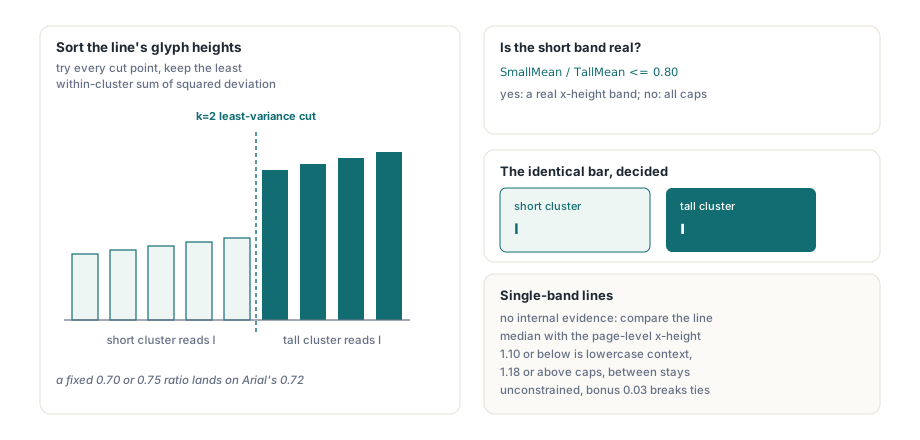
In Arial, capital I and lowercase l rasterise to pixel-identical bars, so no shape feature can separate them and case has to come from somewhere else entirely. The engine's answer is line-level height clustering. Glyph boxes are grouped into text lines by vertical overlap, each line is analysed for its cap height and modal baseline, and the heights within a line are split into a short cluster and a tall cluster. A bar that sits in the short cluster is an l; the same bar in the tall cluster is an I
The obvious implementation of that split is a fixed ratio threshold, and it does not work. Arial's x-height to cap-height ratio is about 0.72, which lands squarely on the 0.70 and 0.75 values that everyone reaches for first. Move the constant a hundredth in either direction and an entire corpus flips case. HotPDF instead does a one-dimensional k=2 variance-minimising split: sort the candidate heights, try every cut point, and keep the cut whose within-cluster sum of squared deviations is smallest. The threshold becomes a property of the page rather than a constant in the source
// ClusterHeights is sorted ascending; find the k=2 split with least variance
BestSplit := 1;
BestVariance := 1E18;
for I := 1 to ClusterCount - 1 do
begin
  SumA := 0;
  for J := 0 to I - 1 do SumA := SumA + ClusterHeights[J];
  SumB := 0;
  for J := I to ClusterCount - 1 do SumB := SumB + ClusterHeights[J];
  MeanA := SumA / I;
  MeanB := SumB / (ClusterCount - I);
  Variance := 0;
  for J := 0 to I - 1 do
    Variance := Variance + Sqr(ClusterHeights[J] - MeanA);
  for J := I to ClusterCount - 1 do
    Variance := Variance + Sqr(ClusterHeights[J] - MeanB);
  if Variance < BestVariance then
  begin
    BestVariance := Variance;
    BestSplit := I;
  end;
end;
// only the ratio between the two cluster means decides what the short band is
if SmallMean / TallMean <= 0.80 then
  SmallGroup := ggSmall          // a real x-height band: lowercase shapes
else
  SmallGroup := ggTall;          // one height band: everything is cap height
Line.LowercaseContext := (SmallGroup = ggSmall);
Lines with a single height band carry no internal evidence at all. An all-caps heading and an all-lowercase caption look the same in isolation. For those, HotPDF compares the line's median height against the page-level median x-height taken from lines that did split: a ratio at or below 1.10 marks the line as lowercase context, a ratio at or above 1.18 marks it as cap context, and anything between stays unconstrained. Matching then applies a small case-preference bonus of 0.03 towards the candidate that agrees with that context, which nudges ties without ever overriding a clear shape difference
Why did a 12x18 template grid confuse c and o?
The template grid was widened from 12 by 18 cells to 16 by 24 because at the smaller resolution the greyscale coverage margin between c and o fell below 0.007, well inside the engine's ambiguity threshold. Each glyph box is resampled into the grid as coverage values from 0 to 255 rather than as a binary stencil, so a cell that is one third ink reads as roughly 85 rather than rounding to black or white. At 12 by 18 the open side of a c spans barely more than one cell column and the antialiased average washes the gap away. At 16 by 24 the gap survives resampling, and most of the easily-confused pairs move back to a safe distance
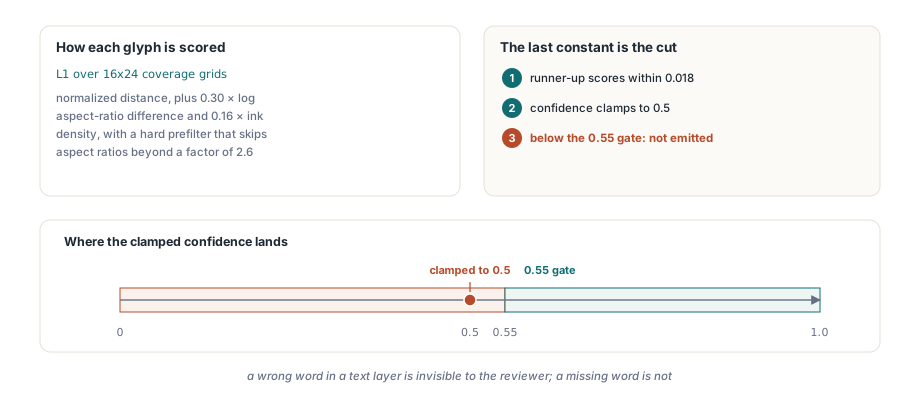
Scoring is the normalised L1 distance between the two coverage grids, plus a penalty of 0.30 times the log aspect-ratio difference and 0.16 times the ink-density difference, with a hard prefilter that skips any template whose aspect ratio differs by more than a factor of 2.6. Templates are rasterised once per process from five system fonts (Arial, Times New Roman, Courier New, Tahoma, and Segoe UI) across a 62-character alphabet, cached behind a critical section, and reused by every subsequent call
The last constant is the interesting one. When the runner-up character scores within 0.018 of the winner, HotPDF clamps the glyph's confidence to 0.5, which is below the 0.55 acceptance gate, so the glyph is simply not emitted. That is a deliberate fail-closed cut, not a tuning artefact: a bounded engine that guesses produces a searchable layer whose text does not match the image, and a wrong word in a text layer is worse than a missing one because it is invisible to the person reviewing the scan
Splitting words without a fixed gap threshold
HotPDF derives the word-space threshold per line from the distribution of inter-glyph gaps rather than from a fixed multiple of the average glyph width. The classic heuristic, "a gap wider than 0.75 of the mean advance is a space", breaks as soon as a line mixes digits with narrow letters, because the mean advance stops describing anything real. The engine instead sorts the gaps for the line and looks for the largest jump between consecutive sorted values, which is the boundary between the intra-word cluster and the inter-word cluster if one exists. Three guards keep that from firing on noise: the jump has to be at least 0.22 of the average glyph width, the first gap above the split has to be at least 0.32 of it, and the last gap below the split must not exceed 0.65 of it. If any guard fails, the threshold stays at MaxInt and the whole line becomes a single word. That last guard is the one that prevents a single unusually wide kerning pair from splitting a word in two, which is a far more damaging error than merging two words, since a merged token still contains the right characters in the right order for a substring search
Writing the invisible text layer over the scanned image
ApplyLoadedOCRTextLayer turns recognised words into a searchable layer by drawing them in text rendering mode 3, the neither-fill-nor-stroke mode defined in ISO 32000-1 §9.3.6, positioned over the scanned image they came from. The content stream opens with BT followed by 3 Tr, and each word is placed with a text matrix built from its reported baseline, its cap height converted from pixels at the request DPI, and a horizontal scale that stretches the synthetic glyph run to the measured word width. The result copies and searches like text and paints nothing
There is an engine-free overload that instantiates the built-in recogniser for you, which is what most callers of the built-in path should use. Recognition, Unicode validation, budget accounting, and content construction all complete before the copy-on-write transaction opens, so a cancellation, a budget overrun, or an engine failure leaves the object graph and the version number untouched. Words are filtered twice: the engine drops anything below its own 0.55 per-glyph confidence gate, then THPDFOCRTextLayerOptions.MinimumConfidence (default 0.5) drops whole words below the caller's bar
var
  Doc: THotPDF;
  Options: THPDFOCRTextLayerOptions;
  Info: THPDFOCRTextLayerInfo;
begin
  Doc := THotPDF.Create(nil);
  try
    Doc.AutoLaunch := False;
    if Doc.LoadFromFile('scan.pdf') < 1 then
      Exit;
    Options := THPDFOCRTextLayerOptions.Default;   // DPI 300, MinimumConfidence 0.5
    Options.SkipPagesWithText := True;             // leave born-digital pages alone
    Options.UseOptionalContentGroup := True;
    Options.OptionalContentGroupName := 'OCR Text Layer';
    // engine-free overload: HotPDF supplies the built-in bounded recogniser
    if Doc.ApplyLoadedOCRTextLayer([0], Options, Info) then
    begin
      Writeln(Info.AcceptedWordCount, ' words accepted by ',
        string(Info.EngineName));
      Doc.SaveLoadedDocument('scan-searchable.pdf');
    end
    else
      Writeln('No text layer written: ', string(Info.Diagnostic));
  finally
    Doc.Free;
  end;
end;
One limit deserves to be stated plainly rather than discovered later. The invisible layer uses a shared synthetic unembedded Type0 font, which is enough for search and copy in every viewer but does not satisfy the font-embedding requirement of ISO 19005. If the output has to be PDF/A, the caller must embed a conforming font separately. And an OCR text layer carries geometry, not structure, so reading order comes from glyph positions alone; if you need logical order from a page that already has real text, structure-order text extraction driven by the tag tree is a different tool for a different problem
Where the built-in engine stops
The built-in engine is deliberately narrow, and knowing its edges is what keeps it useful. It targets high-contrast machine-printed ASCII from fonts close to its five template faces, and everything outside that returns no word rather than a guess. The concrete boundaries are:
- Images up to 4096 by 4096 and 4,194,304 pixels, with a 2000 ms recognition deadline and cooperative cancellation through
THPDFCancellationToken - A 62-character alphabet of ASCII letters and digits; no punctuation, no accented characters, no CJK
- Axis-aligned text only, at the page rotation the renderer already normalised; skewed scans are not deskewed
- Ambiguous glyph pairs stay unresolved, so a page can return partial words or the diagnostic "found no unambiguous ASCII words"
When that envelope is too small, IHPDFOCREngine is the seam. Implement Recognize against your own engine, hand it to the three-argument ApplyLoadedOCRTextLayer overload, and everything downstream (coordinate mapping, rotation handling, Unicode validation, budgets, the atomic commit) stays the same. The bitmap is borrowed for the duration of the synchronous call and must not be retained. To confirm the layer landed correctly, reload the saved file and run the ordinary text path described in extracting text from a loaded PDF in Delphi; if the words come back, the layer is real
The built-in template-matching OCR, the invisible text layer, the page renderer that feeds them, and the loaded-document text extraction that verifies them all ship in the same native VCL component, with no external OCR runtime and no DLL to deploy alongside your application. If you are building document capture, archival, or search over scanned PDFs in Delphi or C++Builder, the HotPDF Delphi PDF component gives you the whole pipeline in one dependency