Every geometric text extractor is guessing. It reads the glyphs a page draws, sorts them by baseline and horizontal position, and hopes the visual arrangement matches the order a human would read. On a single-column report that guess holds. On a two-column journal article, a form with a sidebar or a table whose cells were emitted column by column, it goes wrong in ways that are hard to notice and expensive to discover downstream. HotPDF answers this with ExtractLoadedPageStructureText, which ignores geometry altogether: it walks the document structure tree in authoring order as defined by ISO 32000-1 §14.8.4, then reassembles the page glyphs by their marked-content identifier. For a tagged PDF that is not a heuristic; it is the order the producing application declared
The function returns False when a page has no usable structure tree, which is your signal to fall back on the geometric extractor rather than to fail outright. That two-path design matters more than the algorithm: real document intake sees tagged government forms and scanner output sitting in the same folder, and a pipeline that copes with only one of them is not a pipeline
Why does geometric extraction get the reading order wrong?
Because a PDF content stream carries no reading order whatsoever. It is a sequence of drawing operators, and a producer is free to emit them in whatever sequence suits its own layout engine. Word processors usually emit in flow order, so geometric sorting looks fine. Layout tools, form designers and report generators frequently do not: a page footer can be emitted before the body, a table can be filled column-major, and a two-column page can interleave lines from both columns because the composer resolved them together
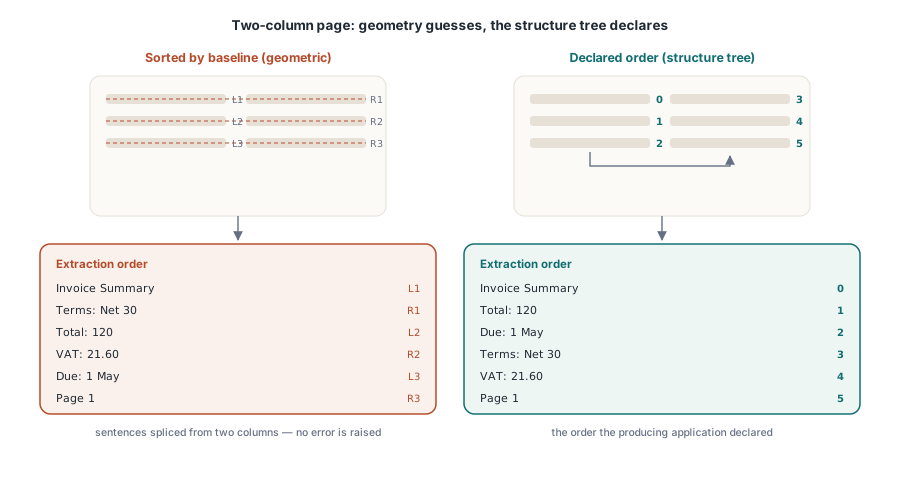
The failure mode is a quiet one. A geometric extractor never reports an error, it simply hands back prose whose sentences have been spliced together out of two columns. Anything consuming that text, a search index, an e-invoice field mapper, a retrieval pipeline feeding a language model, inherits the damage without a warning. HotPDF also ships the geometric extractors for loaded documents, and they remain the right tool for untagged files; the point of the structure-order path is to stop guessing once the document already carries the answer
What the structure tree actually stores
A tagged PDF holds a second, parallel description of the page. The catalog points at a /StructTreeRoot, whose /K children form a tree of structure elements: /Document, /Sect, /P, /Table, /TR, /TD and so on. The leaves of that tree are marked-content references, integers that name a span of the page content stream. On the content side, those spans are opened by a BDC operator carrying an /MCID and closed by EMC. Each structure element also carries a /Pg entry naming the page it belongs to, which is what makes per-page traversal feasible in a document whose structure tree spans hundreds of pages
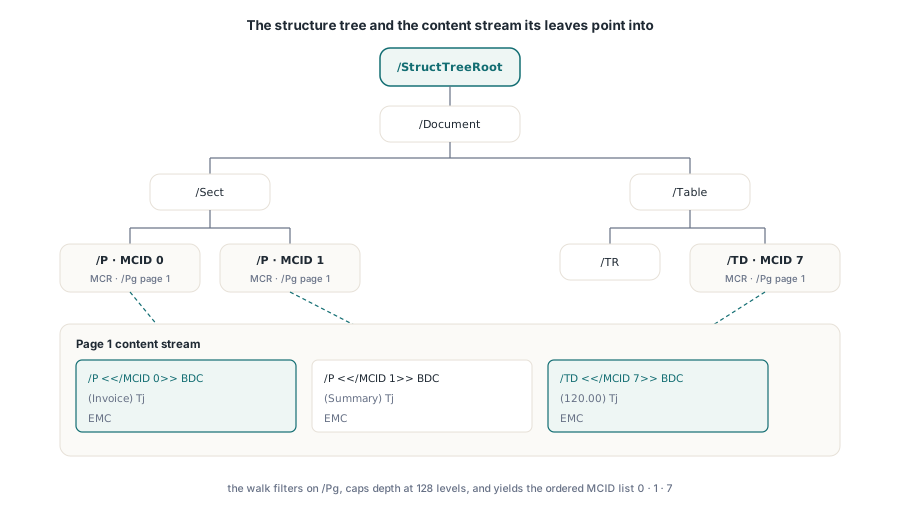
HotPDF traverses that tree with a depth cap of 128 levels and filters on /Pg so that only the current page contributes. The output of the traversal is not text but an ordered list of MCID values: the authoring order of the marked-content spans on this page. Reassembling the text is then simply a matter of replaying the glyphs in that order
The MCID is recorded during glyph extraction, not looked up afterwards
This is the implementation detail that makes the feature so cheap. HotPDF already records the active marked-content identifier on every glyph it extracts, in the MCID field of THPDFGlyphRecord, because the content-stream interpreter knows which BDC scope is open at the moment it processes each Tj or TJ operator. Structure-order extraction therefore needs no second pass over the content stream at all. It gathers the MCID sequence from the structure tree, then buckets the already-extracted glyphs by MCID and emits them in that order
var
  Pdf: THotPDF;
  PageCount, I, Untagged: Integer;
  PageText, AllText: UnicodeString;
  Report: TStrings;   // caller-owned diagnostics sink
begin
  Pdf := THotPDF.Create(nil);
  try
    PageCount := Pdf.LoadFromFile('accessible-form.pdf');
    AllText := '';
    for I := 0 to PageCount - 1 do
    begin
      if Pdf.ExtractLoadedPageStructureText(I, PageText, Untagged) then
      begin
        // Authoring order straight from the structure tree
        if Untagged > 0 then
          Report.Add(Format('page %d: %d glyphs outside the structure tree',
            [I, Untagged]));
      end
      else
        // No usable structure tree on this page: geometric fallback
        Pdf.ExtractLoadedPageText(I, PageText);
      AllText := AllText + PageText + #13#10;
    end;
  finally
    Pdf.Free;
  end;
end;
Untagged glyphs are counted, never silently dropped
A page can be only partly tagged. Producers add a decorative rule, a page number or a late-stage watermark outside any BDC scope, and those glyphs belong to no MCID. Dropping them would be the tidy implementation and the wrong one, because the same gap appears when a producer tags the body but forgets the table, and you would lose the table without noticing
HotPDF appends unclaimed glyphs as a geometric tail after the structure-ordered text and reports their number through the UntaggedGlyphCount output parameter. That number is a quality signal you can act upon. A handful of glyphs on a page of two thousand is page furniture and can safely be ignored. Forty per cent of the page sitting outside the structure tree means the tagging is decorative, and the geometric extractor is the more honest answer for that file
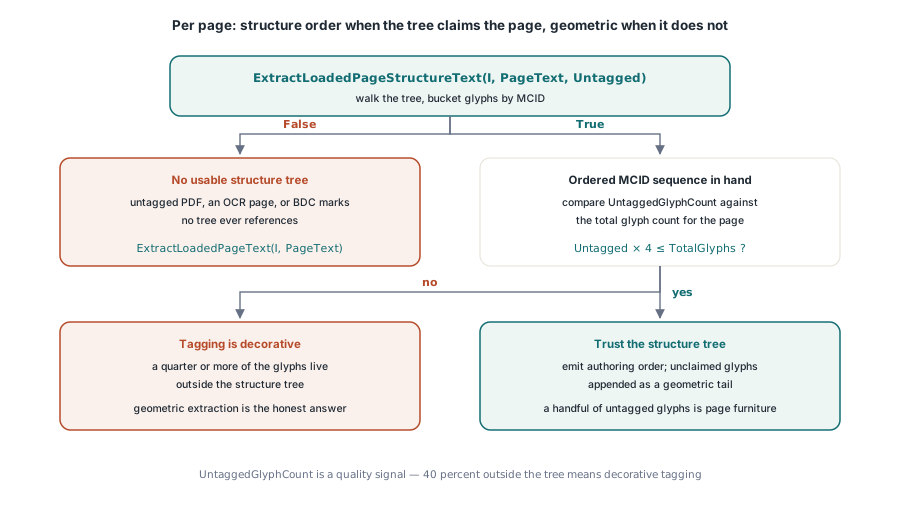
function ExtractPageBestEffort(Pdf: THotPDF; PageIndex: Integer;
  out AText: UnicodeString; out UsedStructure: Boolean): Boolean;
var
  Untagged, TotalGlyphs: Integer;
  Glyphs: THPDFGlyphArray;
begin
  UsedStructure := False;
  if Pdf.ExtractLoadedPageStructureText(PageIndex, AText, Untagged) then
  begin
    TotalGlyphs := 0;
    if Pdf.ExtractLoadedPageGlyphs(PageIndex, Glyphs) then
      TotalGlyphs := Length(Glyphs);
    // Trust the structure tree only when it claims most of the page
    if (TotalGlyphs = 0) or (Untagged * 4 <= TotalGlyphs) then
    begin
      UsedStructure := True;
      Result := True;
      Exit;
    end;
  end;
  Result := Pdf.ExtractLoadedPageText(PageIndex, AText);
end;
What makes the function return False
Three cases, and they are worth distinguishing because only one of them is a defect in the document. The first is an ordinary untagged PDF: no /StructTreeRoot, nothing to walk, and False is simply the truth. The second is a scanned page whose text comes from an OCR layer that was never tagged. The third is the interesting one: content that carries BDC operators with /MCID values whilst its page has no /StructParents entry and the structure tree never references those identifiers. The marked content exists, the structure side does not, and there is no order to recover. HotPDF reports False rather than inventing one
That last case turns up in hand-edited files and in output from tools that emit marked content for optional-content or artefact purposes without ever building a structure tree. If you are producing tagged PDFs yourself, the same asymmetry is what PDF/UA validation checks for, and the writer-side counterpart is covered in the layout DOM that emits tagged, paginated output
Where structure order pays for itself
Accessibility auditing is the obvious one: if you are certifying a document against PDF/UA, the reading order a screen reader will announce is precisely the structure order, so extracting it is how you review it without a screen reader. Data capture is the larger commercial case. Tagged government forms, regulated disclosures and e-invoice attachments carry field labels and values in declared order, and reading them in that order removes an entire class of mapping bugs that geometric extraction introduces on multi-column layouts
The newest consumer is retrieval for language models. Chunking a document for embedding is only ever as good as the text order, and a chunk that splices two columns produces sentences that never existed. Structure-order extraction is the cheapest fix available, because for a tagged document the correct order is already in the file and merely needs reading
HotPDF is a native VCL component for Delphi and C++Builder, so the structure-tree traversal and the glyph replay both run in-process against a loaded document, with no external renderer involved. Full API details for the loaded-document extraction family are on the HotPDF Delphi PDF component product page