HotPDF can build a paginated document from a declarative tree instead of from coordinates. You assemble a THPDFDOMDocument out of sections, stacks, text, lists and tables, hand it to THPDFDOMRenderer, and the renderer measures, paginates, draws page furniture, and, when asked, emits the PDF/UA structure tree that makes the result accessible. The layout code never computes a y coordinate
Anyone who has maintained a coordinate-driven report generator knows why this matters. The first version works. Then a customer address grows to three lines, a table gains rows, a localised heading wraps, and every downstream y position is wrong. The fixes accumulate as manual page-break checks scattered through business logic, and the tagged-PDF requirement that arrives two years later cannot be retrofitted onto code that has no idea what a paragraph is
What the tree owns, and why ownership is strict
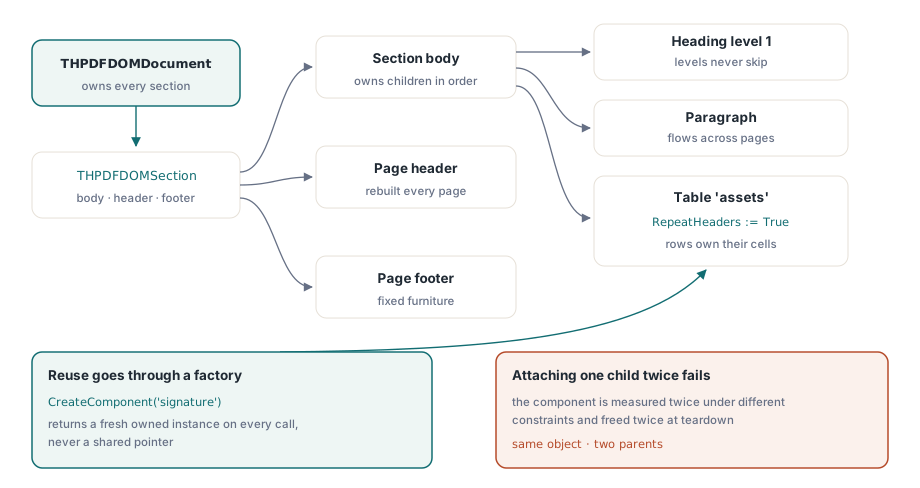
The DOM enforces single ownership at every level: the document owns its sections, a section owns its body, header and footer, and stacks, containers and tables own their children. Reuse happens through Clone or through a registered factory, never by attaching the same object to two parents. That rule is not ceremony. A component that appears twice in the tree would be measured twice with different constraints and freed twice at teardown
The practical consequence for calling code is that helpers return new instances. Registering a factory with RegisterComponent and calling CreateComponent gives you a named recipe that produces a fresh component each time, which is how repeated furniture such as a signature block or a legal footer belongs in the tree
uses
  HPDFDoc, HPDFLayoutDOM;

var
  Doc: THPDFDOMDocument;
  Section: THPDFDOMSection;
  Table: THPDFDOMTable;
  Row: THPDFDOMTableRow;
  I: Integer;
begin
  Doc := THPDFDOMDocument.Create;
  Doc.GenerateStructure := True;        // emit the PDF/UA structure tree
  Doc.Language := 'en-US';

  Section := Doc.AddSection;
  Section.PageWidth := 595;           // A4 in points
  Section.PageHeight := 842;
  Section.MarginLeft := 56;
  Section.MarginTop := 56;
  Section.MarginRight := 56;
  Section.MarginBottom := 56;
  Section.Style.FontName := 'Helvetica';
  Section.Style.FontSize := 10;

  Section.Body.AddHeading('Annual maintenance report', 1);
  Section.Body.AddText('Every asset inspected during the reporting ' +
    'period is listed below, grouped by site.');
  Section.Body.AddSpacer(12);

  Table := THPDFDOMTable.Create('assets');
  Table.AddColumn(3);                 // weights, not absolute widths
  Table.AddColumn(1);
  Table.AddColumn(1);
  Table.RepeatHeaders := True;
  Row := Table.AddRow(18, True);      // header row
  Row[0].Text := 'Asset';
  Row[1].Text := 'Last service';
  Row[2].Text := 'Status';
  for I := 0 to High(Assets) do
  begin
    Row := Table.AddRow(16);
    Row[0].Text := Assets[I].Name;
    Row[1].Text := Assets[I].ServiceDate;
    Row[2].Text := Assets[I].Status;
  end;
  Section.Body.Add(Table);
end;
How does pagination avoid quadratic cost?
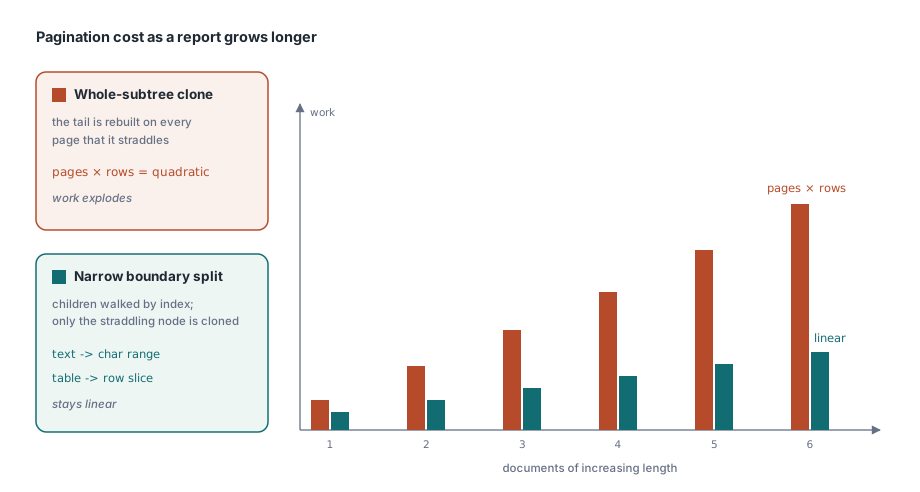
The naive way to paginate a tree is to clone whatever did not fit and carry it to the next page. On a table with ten thousand rows, that clones the remaining rows once per page and turns a linear document into a quadratic one
HotPDF splits narrowly instead. The top-level renderer walks body children by index and never clones a whole section or body. Only nested stacks and containers that genuinely straddle a page boundary get their affected subtree cloned, and the two heavy leaf types carry a cursor rather than a copy: a text continuation stores the source character range it still owes, and a table continuation stores the row slice it has yet to place. Long documents stay linear, and long paragraphs cost the same whether they break once or five times
Measurement stays honest about side effects. THPDFLayoutElement.Measure is required to be free of drawing side effects, and actual placement always runs through THotPDF.PlaceLayoutElement, the same central routine that re-measures the placed fragment, sets up overflow ownership and records diagnostics. The DOM renderer decides only fresh-page policy, page furniture, spacing and the lifetime of continuations
The table header rules that prevent an infinite document
Repeating table headers across pages sounds simple and hides two failure modes. HotPDF requires that header rows appear only in the first run of consecutive rows, and that the first split fit all header rows plus at least one body row. Without the second rule, a header taller than the remaining space produces a page containing nothing but the header, followed by another identical page, forever
Continuation pages redraw the header, and that redrawn copy is marked as an artifact rather than as content, which is the correct answer for both accessibility and text extraction. The original header row remains in the logical table structure exactly once. Skip this and a screen reader announces the column titles again in the middle of the data, and a text extractor inserts a duplicate header row between body rows
There is also a defensive ceiling on continuation depth, because a custom component is free to implement Split in a way that always returns an equivalent tail. The renderer checks the limit after detaching the tail and before starting the next page, and the current iteration frees the tail in its own finally block, so a misbehaving third-party component fails with a diagnosable error instead of filling a disk
One logical element, many page fragments
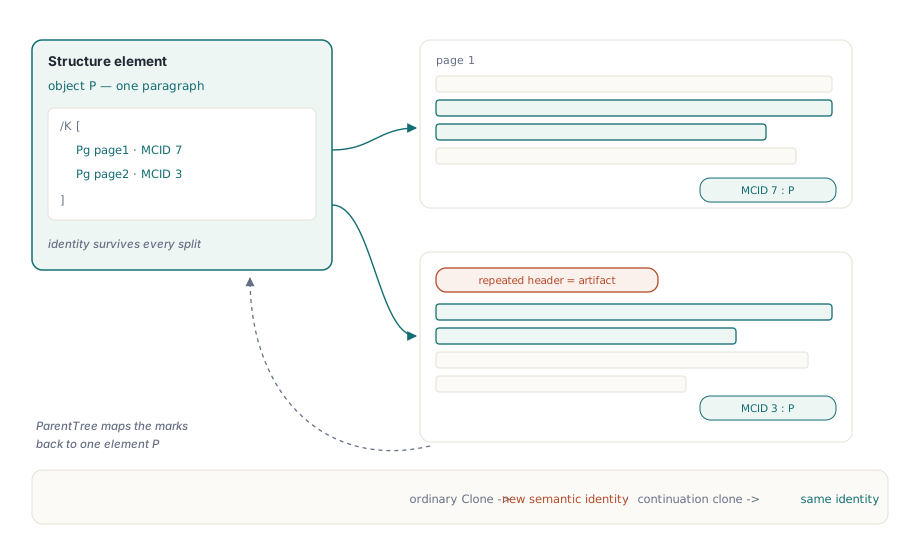
Automatic tagging is where the pagination model and the structure model have to agree. A paragraph split across two pages is one logical paragraph, so it must remain one structure element. But marked content identifiers are per page, so each visible fragment needs its own MCID on the page it appears on
HotPDF resolves this by keeping a single structure element and appending a marked-content reference to its /K array for each fragment, with the /Pg and /MCID pair identifying the page and the identifier. The ParentTree slot for that MCID points back at the same element. This is exactly what ISO 14289 expects, and it is the reason continuation clones are distinct from ordinary clones: an ordinary Clone means new logical content and gets a new semantic identity, while the internal continuation clone inherits the identity of the component it continues
Element reuse is looked up through an index of semantic identities sorted by component pointer and searched by binary comparison, which keeps lookup logarithmic on large trees. The index holds non-owning references only; the lifetime of the structure objects themselves stays with the PDF object graph
Structure rules the renderer enforces up front
With GenerateStructure enabled, several PDF/UA rules are checked while the tree is being rendered rather than after the file exists. Headings start at level 1 and may not skip levels. LI may appear only inside L, and Lbl and LBody only inside LI. TR belongs to a table, and TH and TD to a row. A figure without alternative text is rejected in PDF/UA mode
Rejecting early is the deliberate choice here. A validator that reports a missing alternative text after the document is written tells you that a batch of ten thousand statements needs regenerating; a renderer that refuses the component tells you which component, while the data that produced it is still in scope. Conformance verification still belongs in the pipeline as a separate step, and the mechanics of that are covered in PDF/A, PDF/X and PDF/UA validation
var
  Pdf: THotPDF;
  Renderer: THPDFDOMRenderer;
  Stats: THPDFDOMRenderStatistics;
begin
  Pdf := THotPDF.Create(nil);
  Renderer := THPDFDOMRenderer.Create;
  try
    Pdf.FileName := 'maintenance-report.pdf';
    Pdf.BeginDoc;
    Stats := Renderer.Render(Doc, Pdf);
    Pdf.EndDoc;

    Writeln(Format('%d page(s), %d placement(s), %d split(s)',
      [Stats.PageCount, Stats.PlacementCount, Stats.SplitCount]));
    Writeln(Format('structure elements=%d marked content=%d artifacts=%d',
      [Stats.StructureElementCount, Stats.MarkedContentCount,
       Stats.ArtifactCount]));
    Writeln(Format('deepest continuation chain: %d',
      [Stats.MaximumContinuationDepth]));
  finally
    Renderer.Free;
    Doc.Free;
    Pdf.Free;
  end;
end;
The statistics record is more useful than it first looks. SplitCount rising sharply after a template change usually means a component started measuring taller than its container. MaximumContinuationDepth creeping upward is the early warning for a component whose Split makes too little progress per page. And comparing ArtifactCount against the number of continuation pages confirms that repeated headers really were tagged as artifacts
Where the DOM fits alongside the direct API
The DOM does not replace direct drawing; it sits on top of the same page objects. Anything the renderer places can be interleaved with direct calls on THotPDF, which matters when a report needs one hand-positioned element such as a signature image at an exact location. Page closing remains under the control of AddPage and EndDoc, so the immediate flush mode holds no completed pages in memory and resident memory stays governed by the current continuations, font resources and the ordinary document object graph
Choose the DOM when the content is data-driven and the layout is rule-driven, and keep direct drawing for fixed artwork. If your current pain is specifically table pagination, the narrower approach in generating tables in PDF is worth reading first, and text-level behaviour such as justification is described in text justification
Declarative layout, automatic tagging and the direct drawing API ship in the same component for Delphi and C++Builder; the complete feature list is on the HotPDF Delphi PDF component page