HotPDF can decode the three riskiest PDF image filters, DCTDecode, JPXDecode and JBIG2Decode, inside a separate short-lived worker process instead of inside your application. The property that turns this on is CodecIsolationMode, and the practical effect is that a malformed JPEG 2000 codestream which would have crashed your VCL application now kills a disposable child process whilst the host reports a status code and carries on
That difference matters most in the places PDFs actually arrive from: an upload form, a mail gateway, a scanning appliance, a partner FTP drop. You do not control those bytes, and the image codecs are where the historical damage lives
Why does one bad image take the whole application down?
Because an image codec is the one part of a PDF reader that runs a complex state machine over attacker-controlled data with almost no structural checks left to fall back on. By the time bytes reach the JPEG 2000 or JBIG2 decoder, the cross-reference table has been parsed, the object has been resolved, the filter chain has been unwound, and what remains is a raw codestream that says how many tiles, how many components, how many bits per sample. A wrong number there is not a parse error. It is a bad allocation size or an out-of-range index inside a tight decode loop
Budget limits help, and you should already have them. HotPDF bounds expansion with DecodeBudgetBytes and DocumentDecodeBudgetBytes, and bounds filter chains with DecodeFilterLimit and DecodePipelineDepthLimit; the reasoning behind those caps is covered in bounded decoding for nested filters and PDF bombs. But a byte budget answers only one question, how much output is allowed. It cannot answer what happens when the decoder faults before it produces any output at all. An access violation inside a decode loop is not a policy violation you can decline; it is a process-level event, and the only reliable containment for a process-level event is a different process
What HotPDF isolates, and what it does not
HotPDF isolates exactly three codec kinds, enumerated as hckDCT, hckJPX and hckJBIG2 in the HPDFCodecIsolation unit. Everything else, Flate, LZW, RunLength, ASCII85, CCITT, stays in-process, because those decoders are simple enough to bound with budgets and are not where the interesting failures come from
The transport is deliberately narrow. The host allocates one bounded shared-memory mapping, writes a fixed THPDFCodecSharedHeader plus the compressed input and any JBIG2 global segments, launches the worker, and waits. The worker writes decoded pixels back into the same mapping and sets a status word. There is no pipe protocol to get out of sync, no serialisation format to fuzz, and the header carries a magic value and a version so a mismatched worker binary is rejected rather than misread
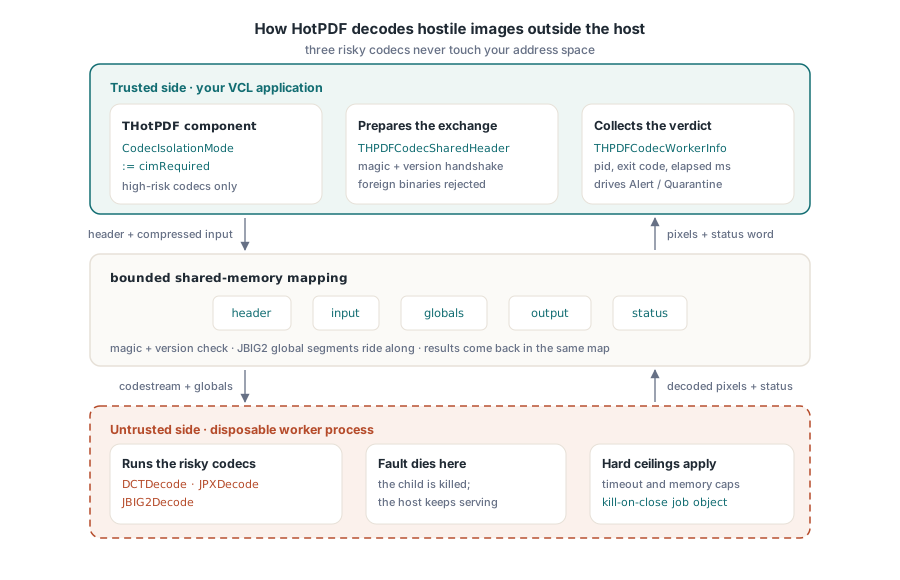
uses
  HPDFDoc, HPDFCodecIsolation;

var
  Pdf: THotPDF;
  Info: THPDFCodecWorkerInfo;
  Bmp: TBitmap;
begin
  Pdf := THotPDF.Create(nil);
  try
    // Fail closed: never decode these codecs in-process
    Pdf.CodecIsolationMode := cimRequired;
    Pdf.CodecWorkerExecutable := 'HotPDFCodecWorker.exe';
    Pdf.CodecWorkerTimeoutMilliseconds := 5000;       // 1..600000
    Pdf.CodecWorkerMemoryLimitBytes := 268435456;     // 0 or >= 64 MiB
    Pdf.DecodeBudgetBytes := 134217728;

    if Pdf.LoadFromFile('untrusted-upload.pdf') = 1 then
      if Pdf.GetLoadedImageCount > 0 then
      begin
        Bmp := Pdf.ExtractLoadedImage(0);
        try
          if Pdf.GetLastCodecWorkerInfo(Info) then
            LogCodecOutcome(Info);
        finally
          Bmp.Free;
        end;
      end;
  finally
    Pdf.Free;
  end;
end;
Leave CodecWorkerExecutable empty and HotPDF resolves the worker next to your own executable, as HotPDFCodecWorker.exe in the directory of ParamStr(0). Set it explicitly when your deployment puts the worker somewhere else; the value is expanded through ExpandFileName, so a relative path resolves against the current directory rather than the application directory, which is rarely what you want on a service
Automatic or required: which failure do you prefer?
The three values of THPDFCodecIsolationMode encode three different answers to one question, what should happen when the worker cannot run at all. cimDisabled skips isolation entirely and decodes in-process, the pre-3.x behaviour. cimAutomatic, the default, tries the worker and silently falls back to in-process decoding when the worker executable is missing or will not launch, which is reported as status cwsUnavailable. cimRequired refuses that fallback: an unavailable worker marks the decode as handled and failed, so no untrusted codestream ever reaches your address space
Pick by threat model, not by convenience. A desktop viewer opening documents the user already has on disk is fine on cimAutomatic, where a missing worker degrades to the classic behaviour instead of breaking the product. An ingestion service parsing files from the internet should run cimRequired, because a deployment mistake that quietly drops the isolation layer is exactly the kind of regression nobody notices until it matters. Note the asymmetry: only cwsUnavailable triggers fallback. A worker that launched and then crashed, timed out, or hit a limit is a decode failure in both modes, never a silent retry in-process
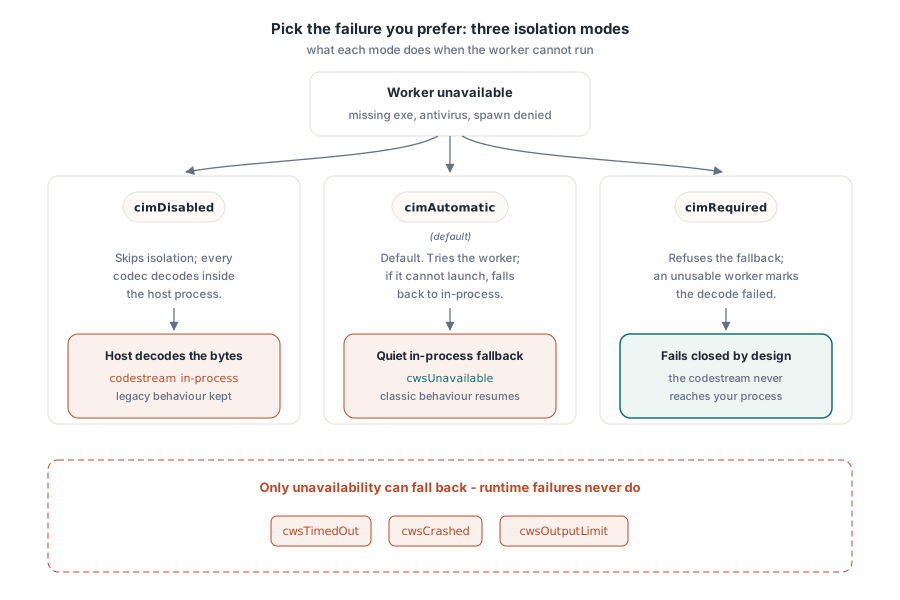
Reading the verdict from THPDFCodecWorkerStatus
GetLastCodecWorkerInfo returns the outcome of the most recent isolated decode, and the status enumeration is specific enough to drive real operational decisions rather than a generic "image failed" log line. The values are cwsNotRun, cwsSucceeded, cwsUnavailable, cwsLaunchFailed, cwsTimedOut, cwsCrashed, cwsDecodeFailed, cwsProtocolError and cwsOutputLimit
Treat them as three groups. Deployment problems are cwsUnavailable and cwsLaunchFailed: someone shipped without the worker, or an antivirus product is blocking process creation. Document problems are cwsDecodeFailed and cwsOutputLimit: the file is malformed or larger than your policy allows, and rejecting it is the correct answer. The interesting group is cwsTimedOut and cwsCrashed, because those are the events that would previously have hung or killed the host process. When that happens, the accompanying ProcessId, ExitCode and ElapsedMilliseconds fields give you enough to correlate with a Windows Error Reporting entry and decide whether one customer file is pathological or someone is probing you
procedure LogCodecOutcome(const Info: THPDFCodecWorkerInfo);
begin
  case Info.Status of
    cwsSucceeded:
      ; // nothing to report
    cwsUnavailable, cwsLaunchFailed:
      Alert('Codec worker not deployed: ' + Info.ErrorMessage);
    cwsTimedOut, cwsCrashed:
      Quarantine(Format('pid %d exit %d after %d ms',
        [Info.ProcessId, Info.ExitCode, Info.ElapsedMilliseconds]));
  else
    RejectDocument(Info.ErrorMessage);
  end;
end;
The limits that actually bind
Three separate ceilings apply to every isolated decode, and knowing which one fired saves an afternoon of guessing. CodecWorkerTimeoutMilliseconds defaults to 10,000 and is validated into the range 1 to 600,000; a value outside it raises rather than clamping silently. CodecWorkerMemoryLimitBytes defaults to 536,870,912 bytes and must be either zero, meaning no limit, or at least 67,108,864 bytes, because a smaller cap cannot hold a realistic decoder working set and would fail every document. The memory cap is enforced by a Windows Job Object with kill-on-close semantics, so the worker dies with the job even if the host is terminated abruptly
The third ceiling is the output limit, and it is derived rather than configured. HotPDF computes the required bytes from the requested region, or from the expected image geometry, as width times height times three for 24-bit output, then clamps that value down to DecodeBudgetBytes when a budget is set. A decoder that reports a plausible header and then tries to emit far more pixels than the geometry allows is stopped by the mapping itself, and the host sees cwsOutputLimit. This is why the isolation layer and the decode budget are complements: the budget defines how big an image is allowed to be, and the isolation boundary makes sure a lie about that size cannot become an out-of-bounds write in your process
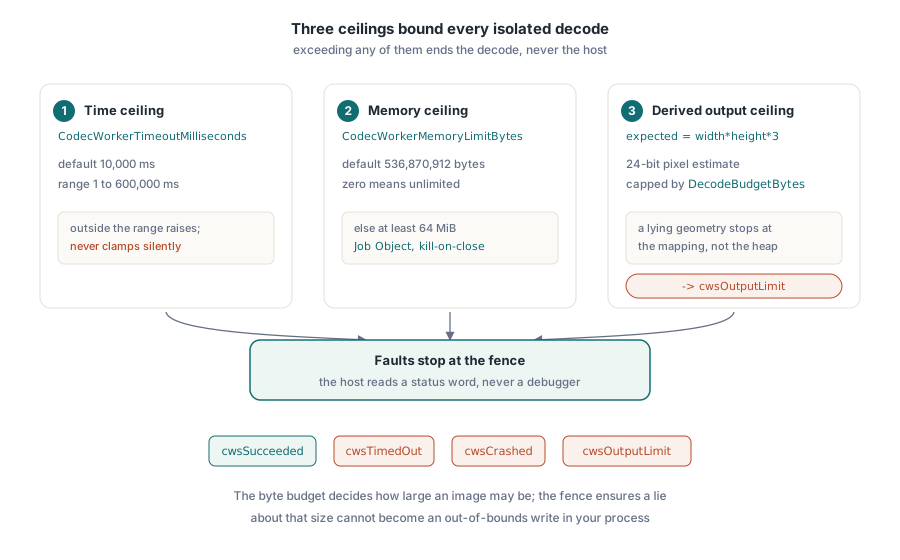
Where this fits in a hardened intake path
Process isolation is the outermost layer of a defence chain that starts much earlier. Structural limits reject implausible documents at parse time. Filter budgets bound expansion. Isolation contains what survives both. For documents that reach the image layer, it is worth knowing which codec you are actually exercising, since JPXDecode handling and JBIG2 symbol dictionaries have very different failure profiles, and JBIG2 in particular carries cross-page global segments that a naive per-image sandbox would break
The cost is honest and worth stating: launching a process per isolated image adds milliseconds, and a document with hundreds of scanned pages will feel it. Measure it against what it buys. On a batch converter that runs unattended overnight, the throughput loss is invisible and the crash containment is the whole point. On an interactive viewer opening documents the user already trusts, cimDisabled or cimAutomatic is the reasonable default. The mode is a plain property, so nothing stops you from choosing per document class at run time
HotPDF ships the isolation layer, the decode budgets and the structural parser limits as one native VCL component for Delphi and C++Builder, with no external runtime to deploy beyond the worker executable itself. Full API documentation and a trial build are available on the HotPDF Delphi PDF component page