A scanned medical slide, an aerial survey tile, a film frame archived at full dynamic range. These are the pictures that arrive as JPEG 2000, and they arrive that way for a reason. The format keeps 12 or 16 bits per channel, compresses with a wavelet transform instead of the block DCT that JPEG uses, and can encode the same picture either lossless or lossy from one codestream. When a document built from those sources has to become a PDF, the image has to travel through a filter the PDF specification reserves for exactly this codec
HotPDF v2.228.0 restored a working JPEG 2000 decode engine for that path. An earlier build had shipped the unit with stub functions that returned nil, so the API existed but decoded nothing. The current engine binds OpenJPEG 2.5.4 statically and turns a JP2 or J2K source into pixels HotPDF can place on a page
The JPXDecode filter in PDF
ISO 32000-1 defines the JPXDecode filter in §7.4.9. A PDF image XObject names its compression in the stream dictionary's /Filter entry, and JPXDecode is the value that says the stream data is a JPEG 2000 codestream rather than the baseline JPEG that /DCTDecode carries. The filter is what lets a PDF hold wavelet-compressed image data with high bit depth, and it admits both the lossless and the lossy modes of the codec, because the mode is a property of the codestream itself and not of the wrapper around it
That last point is the one worth holding onto. JPEG 2000 is a single algorithm with a lossless special case, not two separate formats. The reversible 5/3 wavelet reconstructs the original samples exactly; the irreversible 9/7 wavelet trades that exactness for a smaller file. A decoder treats both the same way at read time, which is why HotPDF needs only one decode path to accept whatever a JPXDecode stream throws at it
What the decoder does to the pixels
PDF image XObjects in the common case expect 8 bits per component in DeviceGray or DeviceRGB. JPEG 2000 routinely exceeds that, and its component model is more general than a packed raster, so the decoder has three jobs to do before the data is usable as a normal image
First, high bit-depth components are resampled to 8 bits. A 12-bit or 16-bit sample is scaled down to the 0 to 255 range so that the result is an ordinary 8-bit raster. Signed components are shifted into unsigned range first. The detail matters because it is lossy in itself: a 16-bit grayscale scan loses its deep tonal range the moment it becomes an 8-bit PDF image, which is the right trade for on-screen and print output but not for re-archiving
Second, a YCbCr (the codec calls it SYCC) colour space is converted to RGB. JPEG 2000 often stores colour in a luma-chroma space for compression efficiency, the same idea baseline JPEG uses, and the decoder applies the standard inverse transform so the page receives true RGB
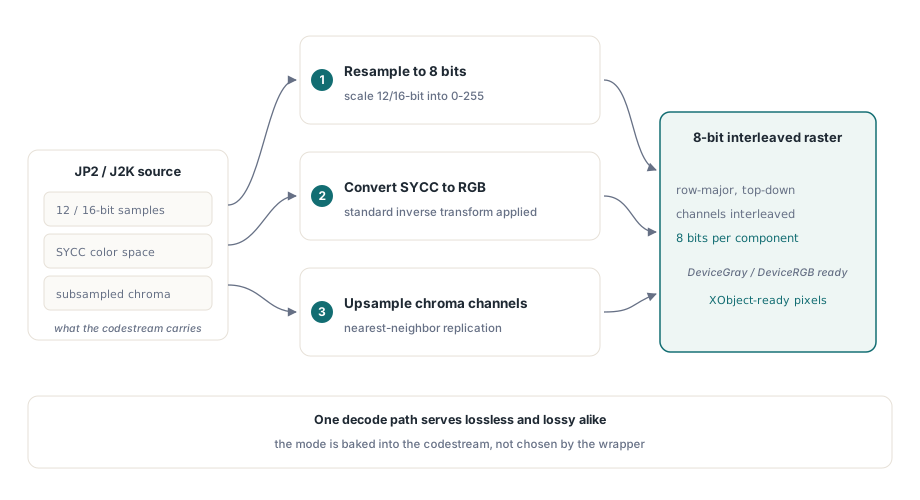
Third, subsampled components are upsampled by nearest-neighbor replication. Chroma channels are frequently stored at half resolution, so the decoder reads each component at its own dimensions and its own sampling factor, then replicates samples to bring every channel up to the full image size before interleaving. Nearest-neighbor keeps the step cheap; the chroma it is filling was low-frequency to begin with, so the visible cost is small
JP2 boxes versus a raw J2K codestream
A JPEG 2000 file comes in two shapes, and HotPDF detects which one it is reading from the first bytes rather than from the file extension. A JP2 file is a box-structured container: it opens with the twelve-byte signature box 00 00 00 0C 6A 50 20 20 and wraps the codestream alongside boxes that describe colour space, resolution, and metadata. A raw J2K codestream carries no container at all and begins with the SOC marker FF 4F FF 51. The decoder reads those leading bytes, recognizes the signature, and selects the matching OpenJPEG codec for each case
Both shapes are handled because both occur in the wild. Capture devices and archives that need the side metadata emit JP2; tools that want the smallest possible payload emit the bare codestream. The format type is modelled as an enum, TJpeg2000FileType, with the members jtInvalid, jtJP2, jtJ2K, and jtJPT. The JPT member names the JPIP streaming variant; the byte-signature detector resolves the two shapes it can decode, JP2 and J2K, and reports anything else as jtInvalid so an unsupported input fails cleanly instead of producing garbage

uses
  HPDFJpeg2000;

var
  Decoder: THPDFJpeg2000Decoder;
  Pixels: TJpeg2000ByteArray;
begin
  Decoder := THPDFJpeg2000Decoder.Create;
  try
    if Decoder.LoadFromStream(Input) then          // JP2 or J2K, auto-detected
      if Decoder.GetImageData(Pixels) then
        // Pixels is 8-bit interleaved, ColorComponents channels wide,
        // row-major top to bottom: ready for a DeviceGray/DeviceRGB XObject.
        ProcessRaster(Decoder.Width, Decoder.Height,
                      Decoder.ColorComponents, Pixels);
  finally
    Decoder.Free;
  end;
end;
Lossless and lossy on the encode side
The decoder reads both modes without being told which it is. The choice only becomes a parameter when you go the other way and produce a JPEG 2000 file, which HotPDF can also do through the TJpeg2000Bitmap class, a TBitmap descendant that loads and saves raster data as JP2. Two properties govern the output. LosslessCompression is a boolean that selects the reversible wavelet when true; CompressionQuality is a TJpeg2000QualityRange, an integer from 1 to 100 where 1 is small and ugly and 100 is large and faithful. The defaults live in named constants: Jpeg2000DefaultLosslessCompression is False and Jpeg2000DefaultLossyQuality is 80
The decision is a content decision. Lossless fits a master copy, a medical or legal scan, anything that may be re-encoded later and must not accumulate generational loss. Lossy at quality 80 fits a picture headed for screen or print, where the wavelet's graceful degradation gives a noticeably smaller file with no artefact a reader would catch. There is one CMYK caveat to flag: the bitmap exposes SetCMYK to mark four-channel data as CMYK rather than RGBA, which matters for print pipelines that keep separations intact
uses
  HPDFJpeg2000;

var
  Bmp: TJpeg2000Bitmap;
begin
  Bmp := TJpeg2000Bitmap.Create;
  try
    Bmp.LoadFromStream(Source);              // decode an existing JP2/J2K
    Bmp.LosslessCompression := True;         // reversible 5/3 wavelet
    // or, for a smaller lossy file:
    // Bmp.LosslessCompression := False;
    // Bmp.CompressionQuality := 80;         // matches the default
    Bmp.SaveToStream(Output);                // always writes a JP2 file
  finally
    Bmp.Free;
  end;
end;
Why there is no decode-on-load filter pipeline
One architectural fact shapes how you use any of this, and it is easy to assume the opposite. HotPDF has no general decode-on-load image filter. When you open a PDF that already contains a JPXDecode image, the engine does not decode that stream. It keeps the JPEG 2000 bytes exactly as they are, so a page copy or a document merge carries the image through untouched, byte for byte. The decoder has a single entry point, and it is on the creation side: the file-based AddImage, dispatched by file extension to handle .jp2, .j2k, .jpt, and .jpc sources
That split is the correct design rather than a limitation. Decoding an embedded JPX stream on load, only to re-encode it on save, would convert a lossless archived image into a lossy one and inflate every merge, all for a picture you only meant to move from one PDF to another. Passing the stream through verbatim is a lossless operation and a fast one. Decoding is deferred to the only moment it is genuinely required: when you hand the engine a JPEG 2000 file from disk and ask it to rasterize that picture for placement on a new page. At that point the file has to become pixels, and the decoder runs

Registering support and placing an image
JPEG 2000 picture registration is opt-in behind the HPDF_REGISTER_JPEG2000_PICTURE compile switch, which is off by default. The reason is a real conflict, not caution: registering the jp2, j2k, and jpc file formats globally with TPicture can interfere with the BLOB format detection that ReportBuilder's TppDBImage relies on. Define the switch when that integration is not in play, and the file formats register so TPicture recognizes them; leave it undefined and the AddImage extension dispatch still decodes JPEG 2000 files directly, because that path does not go through TPicture at all
With that understood, placing a JPEG 2000 picture is the same three-call rhythm as any other HotPDF image. Hand AddImage a .jp2 path and a compression type for how the picture should be stored in the output, then position the returned image index on the page with ShowImage
var
  Pdf: THotPDF;
  ImgIndex: Integer;
begin
  Pdf := THotPDF.Create(nil);
  try
    Pdf.BeginDoc;
    Pdf.AddPage;
    // The .jp2 source is decoded through the OpenJPEG backend, then
    // re-embedded with the compression you request here.
    ImgIndex := Pdf.AddImage('Scan_16bit.jp2', icJpeg);
    // x, y, width, height in points; final 0 is the rotation angle.
    Pdf.CurrentPage.ShowImage(ImgIndex, 72, 72, 400, 300, 0);
    Pdf.EndDoc;
  finally
    Pdf.Free;
  end;
end;
The compression you pass to AddImage controls how the decoded picture is re-stored, not how it was read. A JPEG 2000 file decoded to a bitmap can go back out as a DCTDecode JPEG, a Flate raster, or another supported filter, whichever suits the document. The decode from JP2 or J2K happens first regardless, so the same call accepts a wavelet-compressed source and embeds it in whatever form the rest of your pipeline expects
For the broader picture of how images and fonts land in generated output, see our notes on report output with fonts and images. When the document you are assembling reuses content from existing PDFs, the passthrough behaviour described here pairs with the merge and revision mechanics in object streams and incremental updates. The JPEG 2000 decode engine ships as part of the HotPDF Delphi Component for Delphi and C++Builder, alongside the image, font, and document APIs covered elsewhere on this blog