HotPDF fills AcroForm comb fields with Arabic, Hebrew, combining marks and mixed-direction text through THPDFHeadlessDocument.SetTextFieldValueWithFamilies. The comb grid is counted in Unicode scalars, a ligature or a base letter with its marks is centred as one cluster across the k cells its scalars own, and the whole line runs through the Unicode Bidirectional Algorithm before any cell is assigned
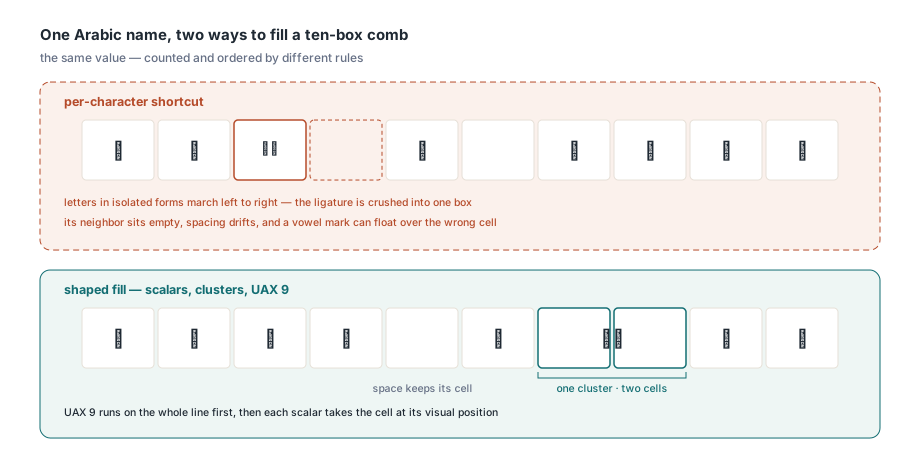
Each of those three rules replaces a shortcut that looks fine in a Latin demo and falls apart on the first real form. Picture a government application with a ten-box comb field for a name written in Arabic. Fill it with per-character logic and you get letters in isolated forms marching left to right, a lam-alef ligature squeezed into one box while its neighbour sits empty, and a fatha floating over the wrong cell. Every one of those defects comes from counting the wrong unit or ordering the text at the wrong moment
What does the Comb flag actually ask a PDF writer to do?
The Comb flag asks the writer to split the field into exactly MaxLen equally spaced positions and put one character in each. ISO 32000-1 §12.7.4.3 defines Comb as bit position 25 in Table 228, the field flags specific to text fields, and makes it meaningful only when the MaxLen entry from Table 229 is present and the Multiline, Password and FileSelect flags are clear. The bit itself is $1000000 in the 32-bit /Ff value; if you have ever seen comb fields misbehave after a round trip through a floating-point variable, the article on 32-bit AcroForm field flags explains why that bit is the first one to go
The specification says "character" and stops there. It was written with fixed-pitch Latin boxes in mind and does not say what a character is when one Arabic letter pair becomes one glyph, or when a vowel mark has no width of its own. HotPDF has to pick a unit, and it enforces the structural rules strictly while doing so: a comb field that is also multiline, or that carries no positive MaxLen, is rejected with a diagnostic, and password fields cannot be comb fields at all
Why count Unicode scalars instead of UTF-16 units, glyphs or graphemes?
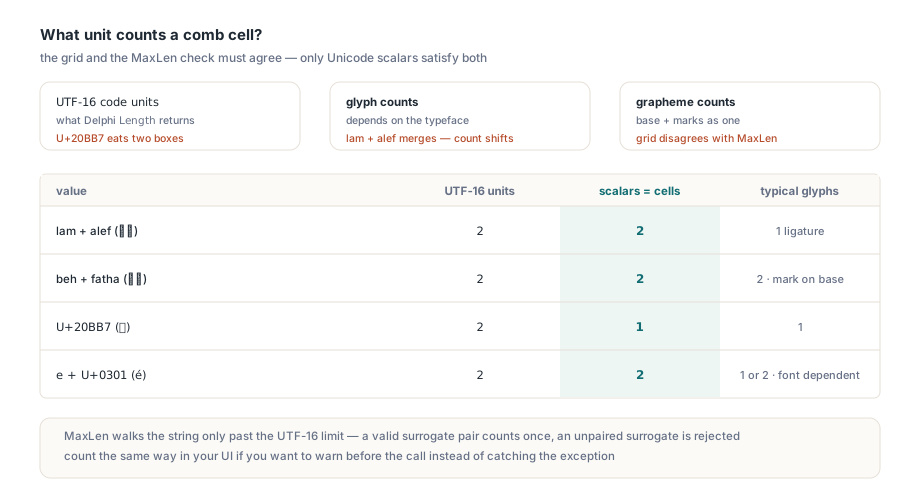
HotPDF counts comb cells in Unicode scalars because that is the same unit it uses to enforce MaxLen, and the grid and the length check must agree or a value that passes validation will not fit its boxes. The three tempting alternatives each break that agreement in a different way
- UTF-16 code units are what Delphi's
Lengthreturns, so a supplementary character such as U+20BB7 would eat two boxes and two slots of the field budget - Glyph counts depend on the font: most Arabic fonts turn lam plus alef into one glyph, so the cell count would change the moment you switch typefaces
- Grapheme counts merge a base letter with its marks, which means the grid would disagree with a
MaxLencheck that counts every scalar the user typed
The MaxLen validation in THPDFHeadlessDocument only walks the string when its UTF-16 length exceeds the limit, and when it does, it counts a valid surrogate pair once and rejects an unpaired surrogate outright. If your UI wants to warn before the call instead of catching an exception after it, count the same way
// Counts Unicode scalars the way the comb grid does:
// a valid surrogate pair is one scalar
function CountScalars(const S: UnicodeString): Integer;
var
  I: Integer;
begin
  Result := 0;
  I := 1;
  while I <= Length(S) do
  begin
    if (Ord(S[I]) >= $D800) and (Ord(S[I]) <= $DBFF) and
       (I < Length(S)) and
       (Ord(S[I + 1]) >= $DC00) and (Ord(S[I + 1]) <= $DFFF) then
      Inc(I, 2)
    else
      Inc(I);
    Inc(Result);
  end;
end;
A few values show how far the units drift apart, and why only the scalar column matches what a comb field budgets for
| Value | UTF-16 units | Scalars (cells) | Typical glyphs |
|---|---|---|---|
| Lam + alef (لا) | 2 | 2 | 1 ligature |
| Beh + fatha (بَ) | 2 | 2 | 2, mark attached to base |
| U+20BB7 (𠮷) | 2 | 1 | 1 |
| Decomposed e + U+0301 | 2 | 2 | 1 or 2, font dependent |
How do ligatures and combining marks share their cells?
A shaped cluster that covers k scalars occupies k contiguous cells and is centred as a single unit across them. After shaping, every cluster is mapped back to the exact span of source text it came from, so HotPDF knows which scalars, and therefore which cells, it owns. The lam-alef ligature above gets two boxes and sits centred across both. A beh carrying a shadda and a fatha is three scalars, so it gets three boxes, with the marks still attached to the letter
Centring is where the obvious implementation goes wrong. Centring each glyph in its own box pulls a mark away from its base, because the mark's position only means something relative to the letter it decorates. HotPDF keeps every glyph inside a cluster at its shaped advance and its X and Y offsets, then centres the cluster using the combined horizontal extent of the natural advance, the positioned glyph origins and the actual glyph ink. The cluster moves as a block; nothing inside it is rearranged
One consequence is easy to miss. Directional controls such as U+200F RIGHT-TO-LEFT MARK, U+061C ARABIC LETTER MARK, and the embedding and isolate controls are Unicode scalars with no glyph. They count against MaxLen and hold a cell that stays blank. If your source data comes from a system that sprinkles these marks into names, strip them before filling, or the field will show a gap and reject values one character earlier than the user expects
Why must bidi reordering happen before cells are assigned?
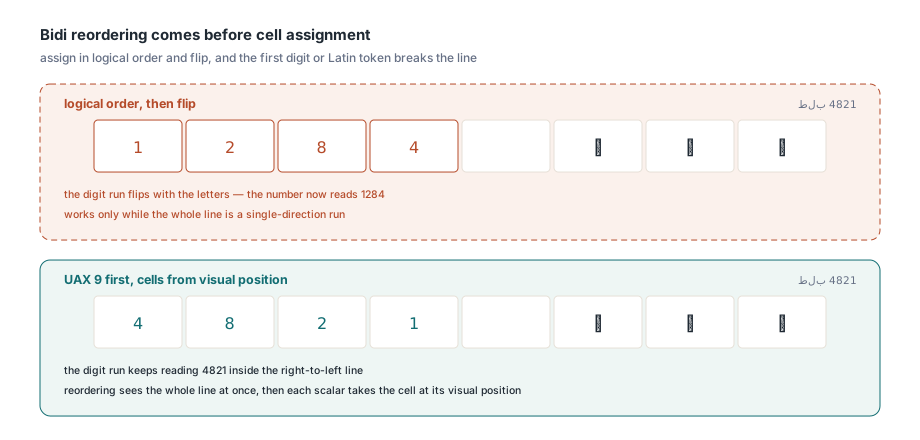
HotPDF runs the complete line through the Unicode Bidirectional Algorithm (UAX #9) first, and only then gives each scalar its cell from its visual position. Assigning cells in logical order and flipping the result afterwards works for a pure Arabic string and fails as soon as the line contains digits or a Latin token, because those runs must keep reading left to right inside the right-to-left line. A value like a reference code with an Arabic prefix and a number keeps its digits in the right order only if reordering sees the whole line at once. The complex-script text shaping overview covers the logical-versus-visual order problem in more depth
Alignment then positions the whole grid of used cells inside the field. The field's inherited /Q entry wins when present; Options.Alignment applies only when the form has none. That matters for right-to-left forms: a short Arabic value in a left-aligned comb field fills the leftmost boxes, which is spec-correct and almost never what the form designer intended. Fix the form's /Q, or set htaRight when the field has no quadding of its own. Widget rotation comes from the /MK /R entry, and at 90 or 270 degrees the logical text viewport swaps width and height while the cell logic stays the same
Filling a mixed-font comb field from Delphi
Mixed-font comb text uses one cell grid, one font size and one baseline for every supplied font. With FallbackFontFamilies set to True, HotPDF picks a font for each complete grapheme from the supplied families in their configured order, so an Arabic face can carry the letters while a Latin face carries embedded ASCII. Each font span is shaped with the whole line as context, a mark is never split from its base across fonts, and no ligature is invented across a font boundary. Laying out each span with its own local grid or scaling it to its own bounding box would be simpler, and it would break both cell positions and rotated fields the moment fallback switched fonts mid-line
uses
  System.SysUtils, System.IOUtils,
  HPDFHeadlessDocument, HPDFHeadlessAppearance;

procedure FillArabicComb(const SourceFile, TargetFile, Value: string);
var
  Doc: THPDFHeadlessDocument;
  Field: THPDFHeadlessFormField;
  Families: THPDFHeadlessRichTextFontFamilies;
  Options: THPDFHeadlessTextAppearanceOptions;
  FieldIndex: Integer;
begin
  Doc := THPDFHeadlessDocument.Create;
  try
    Doc.LoadFromFile(SourceFile);
    FieldIndex := Doc.FindFormField('applicant.name_ar');
    if FieldIndex < 0 then
      raise Exception.Create('Field not found');
    Field := Doc.GetFormField(FieldIndex);
    if (Field.Flags and $1000000) = 0 then   // bit 25: Comb
      raise Exception.Create('Not a comb field');

    SetLength(Families, 2);                  // one through sixteen families
    Families[0].FamilyName := 'Noto Naskh Arabic';
    Families[0].Fonts[hrfsRegular] :=
      TFile.ReadAllBytes('NotoNaskhArabic-Regular.ttf');
    Families[1].FamilyName := 'Noto Sans';
    Families[1].Fonts[hrfsRegular] :=
      TFile.ReadAllBytes('NotoSans-Regular.ttf');

    Options := THPDFHeadlessTextAppearanceOptions.Default;
    Options.ShapeComplexText := True;        // already the default
    Options.FallbackFontFamilies := True;    // default is False
    Options.FontSize := 0;                   // auto-fit, capped at 12
    Options.Alignment := htaRight;           // used only when /Q is absent

    Doc.SetTextFieldValueWithFamilies(FieldIndex, Value, Families, Options);
    Doc.SaveToFile(TargetFile);              // must differ from SourceFile
  finally
    Doc.Free;
  end;
end;
Notice what the example does not set. During document filling, Width, Height, Rotation and CombCells are derived from each widget rectangle, its /MK entry and the field's MaxLen, so values you put in those members are overwritten. A zero FontSize asks for automatic sizing, which checks every cluster's extent against the width of its k cells and the shared metric and ink height of all participating fonts; a fixed size is simply clipped to the widget. CharacterSpacing and WordSpacing never move comb positions, since the grid alone decides where a cluster lands. HotPDF loads its HarfBuzz and FriBidi runtimes only when a value actually requires shaping, and values that need no shaping keep the existing direct comb layout unchanged. For the general loaded-PDF fill workflow, including permissions and saving, see setting form field values in a loaded PDF
What does a shaped comb appearance not guarantee?
A shaped comb appearance guarantees correct cell assignment, intact clusters and a preserved logical value; it does not guarantee seamless cursive joins or perfect text extraction in every tool. Both limits follow from what a comb field is, and you should know them before promising anything to a customer
Cursive joins across cells are the first. Arabic letters are still shaped with full-line context, so each one gets its correct initial, medial or final form, but the fixed cell pitch puts space between separate clusters and the connecting strokes will not meet the way they do in running text. That is inherent in drawing a joining script into boxes, and no amount of centring hides it
Text extraction is the second. The field's /V keeps the plain logical value, and the parent Form XObject of the appearance carries one /ActualText span (ISO 32000-1 §14.9.4) with the complete input; the child Forms carry none. Extractors that honour ActualText recover the original string. Extractors that ignore it rebuild text from glyph positions and may return a different order or duplicate cluster text, because a multi-glyph cluster has no single obvious Unicode value per glyph. If a downstream system needs the value, read the field, not the page text
The remaining boundaries are mechanical. Comb text must be a single line without tabs, and a value with more scalars than cells fails rather than being truncated. Failures are transactional: a missing glyph, an invalid font, a budget overrun or a cancellation leaves the previous value and appearances untouched, so a rejected fill never leaves a half-drawn field behind
try
  Doc.SetTextFieldValueWithFamilies(FieldIndex, Value, Families, Options);
except
  on E: EHPDFHeadlessDocumentError do
    if E.Code = hdLimitExceeded then
      ShowFieldError('The value has more characters than the field allows')
    else
      raise;
  on E: EHPDFHeadlessAppearanceError do
    if E.Failure = haMissingGlyph then
      ShowFieldError('None of the supplied fonts covers this text')
    else
      raise;
end;
// On either error the field keeps its previous value and appearance
Where shaped comb fields fit in a form pipeline
Shaped comb support matters most for forms that already exist: tax returns, visa applications, bank onboarding packs and ID registrations designed with boxed fields and now filled in Arabic, Hebrew, Persian or Urdu. Count in scalars, keep the original value in /V, let one grid govern every font, and test with a value that mixes right-to-left letters, digits and a combining mark, since that single string exercises every rule in this article. The headless document API, comb shaping and font fallback described here are part of the HotPDF Delphi PDF component