In the field list of almost any PDF viewer, the street field on a German-language claim form reads Straße. The bytes behind its /T entry tell a different story: <FEFF005300740072006100DF0065>, a hexadecimal UTF-16BE string with a byte order mark in front. Code that matches field names against those raw bytes reports the field as missing, even though a user can click straight into it. The same form may store a checkbox's on state as 2 instead of Yes and its country list as [export display] pairs, which gives you three separate ways for the value you write and the value a viewer paints to disagree
All three variations come from the same place: a form built years ago in whatever authoring tool the customer had, one your Delphi application now has to fill from a database and hand back as a file that renders the same in every reader. You cannot re-author the form, so the filling code has to follow the rules the form was written under. ISO 32000-1 has a rule for each of the three cases: §7.9.2.2 for text strings, §12.7.4.2.3 for button appearance states, Table 231 in §12.7.4.4 for choice selections. Creating fields that do not exist yet is a different job, covered in adding AcroForm fields to a loaded PDF in Delphi
Finding the field: HotPDF decodes /T before it matches names
THotPDF.SetFormFieldValue has two overloads, one taking a zero-based field index and one taking a fully qualified name, and both resolve against a name table the component builds from the AcroForm tree on first use. While that table is built, every partial name passes through a decoder. A hexadecimal /T string is turned back into bytes; if those bytes start with FE FF and have even length, the rest is read as UTF-16BE and re-encoded as UTF-8. Each decoded partial name is then joined to its parent with a period, exactly as §12.7.3.1 describes, so a kid field named City under a parent named Address is registered as Address.City. Only the lookup key is decoded. The /T object in the file keeps its hex spelling, and saving the document does not touch the identity of a field you merely filled
Keys are lower-cased before they go into the table, so 'address.city' finds Address.City. That goes beyond the standard, which treats field names as case-sensitive, and it means two fields differing only in case would collide in the lookup. For code that reads field names out of a config file someone typed by hand, a missed capital letter is a far more common failure than two fields in one form that differ only by case
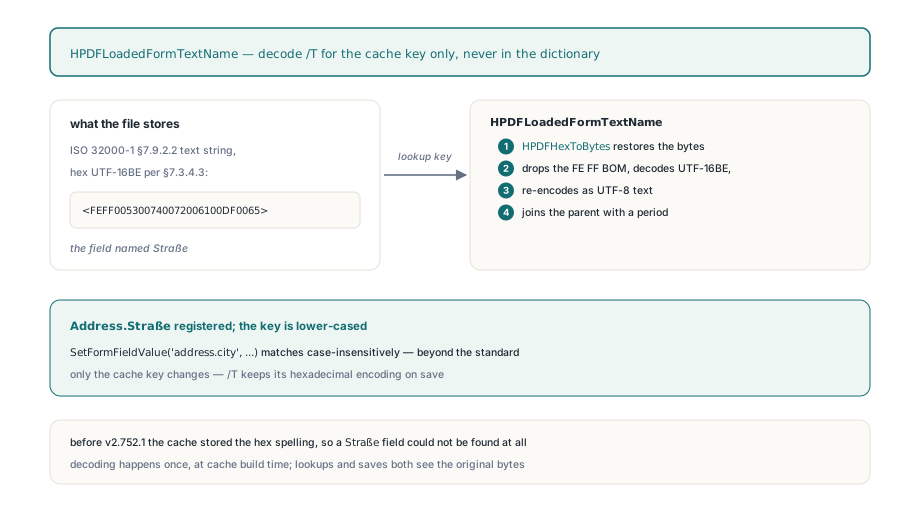
The decoded names are UTF-8 bytes carried in an AnsiString, and that is where Delphi's own string conversions get in the way. A literal such as 'Applicant.Straße' passed to an AnsiString parameter is converted through the system ANSI code page, so ß arrives as the single byte DF rather than the UTF-8 pair C3 9F, and the lookup misses. ASCII names are unaffected. For anything else, enumerate the fields once, decode each name with UTF8ToString, and write through the index overload:
// FindFieldIndex is a helper you add yourself: it compares the
// decoded UTF-8 names against a Unicode string, so no ANSI code
// page sits between your literal and the lookup
function FindFieldIndex(Pdf: THotPDF; const Name: string): Integer;
var
  I: Integer;
begin
  for I := 0 to Pdf.GetFormFieldCount - 1 do
    if SameText(UTF8ToString(Pdf.GetFormFieldName(I)), Name) then
      Exit(I);
  Result := -1;
end;

var
  Pdf: THotPDF;
  Street: Integer;
begin
  Pdf := THotPDF.Create(nil);
  try
    if Pdf.LoadFromFile('claim-form.pdf') <= 0 then Exit;

    // ASCII names can go straight to the by-name overload
    Pdf.SetFormFieldValue('Applicant.FullName', 'Maria Schneider');

    Street := FindFieldIndex(Pdf, 'Applicant.Straße');
    // The value is an AnsiString too, so a literal 'ß' would depend on
    // the system code page; FEFF hex (Hauptstraße 12) avoids that
    if Street >= 0 then
      Pdf.SetFormFieldValue(Street,
        'FEFF00480061007500700074007300740072006100DF0065002000310032');

    // The same FEFF-prefixed UTF-16BE hex works with the by-name
    // overload (this one is München); it is written as a hex string
    Pdf.SetFormFieldValue('Applicant.City', 'FEFF004D00FC006E006300680065006E');

    Pdf.SaveLoadedDocument('claim-form-filled.pdf');
  finally
    Pdf.Free;
  end;
end;
What SetFormFieldValue writes, step by step
Both overloads run the same sequence after the field is found: write /V, rebuild the choice selection index, mark the field changed, switch button appearance states, regenerate the text or choice appearance, and record the field in a dirty set. That last step feeds the parameterless RecalculateLoadedFormFieldsIncremental, which re-runs only the calculation scripts that read a changed field, directly or through a chain such as line item, subtotal, total
The object type of the new /V depends on the field. For a checkbox or radio button, SetFormFieldValue always writes a name object, because §12.7.4.2.3 stores the selected state as a name and PDF names are plain bytes with no text-string encoding. Every other field gets a string object, and the value you pass is inspected first. A string that starts with FEFF, has even length and contains only hex digits is taken to be the UTF-16BE form from §7.9.2.2 and serialized as <FEFF...>. That is what the City line above relies on. Anything else is stored as a literal string with exactly the bytes you supplied, so plain Latin text goes in as plain text
Why does a checkbox keep its old tick after the value changes?
For a button field the value does not decide what gets drawn. A checkbox widget carries an /AS entry that names which stream in /AP /N is currently showing, and viewers paint from /AS, not from /V. Change /V to Yes while /AS still says Off and the file contradicts itself; a flattener will bake the unchecked box into the page while the form data claims it is checked. SetFormFieldValue therefore visits the button field and every entry in its /Kids array, reads the on-state name from each widget's /AP /N, and sets /AS to that name when it matches the field value or to Off when it does not
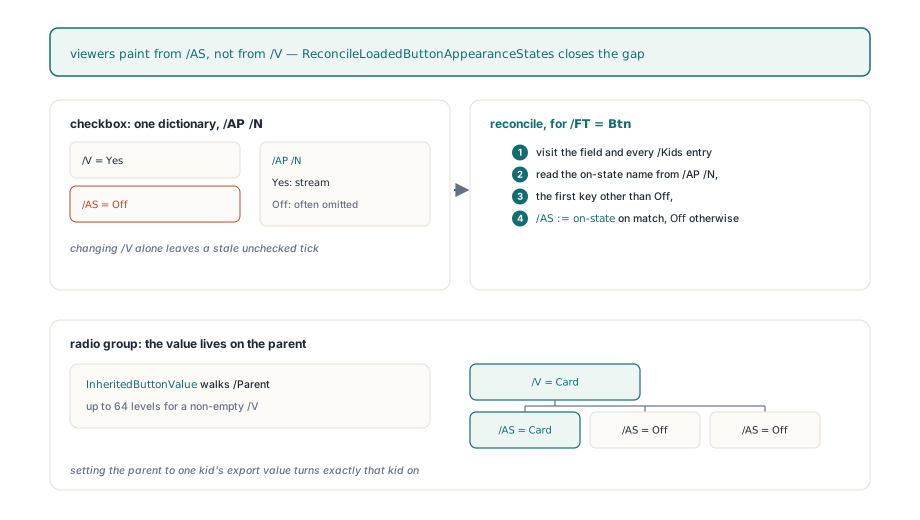
Real forms bend that rule in two ways. The off appearance is named Off in the standard, yet authoring tools often leave its stream out entirely and let the viewer draw nothing, so a normal appearance dictionary with a single entry is perfectly legal. The on-state name is whatever the author picked: Yes, On, 2, a word in the form's own language. So the on state is taken as the first key in /AP /N that is not Off, and the comparison with your value ignores case. Radio buttons add the arrangement from §12.7.4.2.4: the selected value lives in /V on the parent field, while each kid widget usually has no /V of its own. Each kid is compared against the value inherited through its /Parent chain
// Checkbox: the export value must match the on-state key in /AP /N
// (often 'Yes', but real forms use '2', 'On', or anything else)
Pdf.SetFormFieldValue('Consent', 'Yes');

// Radio group: /V is written on the parent; every kid widget gets
// /AS set to its own export name or to Off
Pdf.SetFormFieldValue('PaymentMethod', 'Card');

// Clearing a checkbox: any value that matches no on state yields /AS Off
Pdf.SetFormFieldValue('Newsletter', 'Off');
The flip side is that a typo produces no exception. 'yes ' with a trailing space matches nothing, so the box ends up Off and the file is still perfectly valid. If your values come from a database column, trim them before the call
Choice fields: keeping /I in step with /V
A combo box or list box records its selection in two places. Next to /V, Table 231 defines /I as an array of zero-based indices into /Opt, and a viewer that finds /I pointing at option 0 while /V names option 3 may highlight the wrong row. SetFormFieldValue rebuilds /I on every call to a choice field. It deletes the field's own /I entry before anything else and never edits the old array in place: an indirect array can be shared with another field, and mutating it would change that field's selection too. It then resolves /Opt through the /Parent chain, since options may be inherited, and walks the entries. A bare string option is compared directly, an [export display] pair on its export element, and a pair with fewer than two elements is skipped
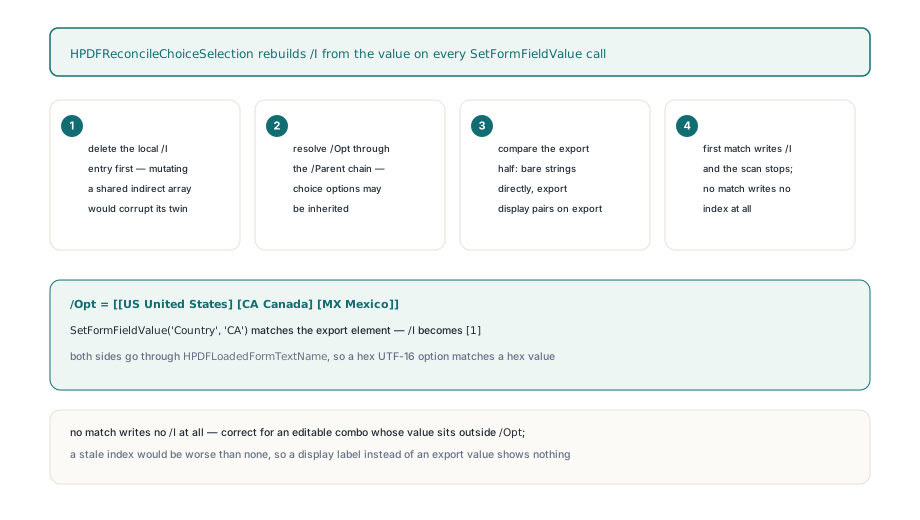
The comparison runs on decoded text, so an option stored in PDFDocEncoding matches a value written as UTF-16BE hex and vice versa. A scalar value produces at most one index; whatever multi-selection the field held before is replaced. When nothing matches, no /I is written at all. For an editable combo box that is the correct outcome, because §12.7.4.4 lets the user type a value outside the list and such a value has no index to point at
The same rule is behind the most common complaint about combo boxes: the call succeeds, /V holds the new text, and the viewer shows nothing selected. Usually the caller passed the display label (Canada) to a list built from [CA Canada] pairs. The component cannot treat that as an error without breaking editable combos, so the check belongs in your code. GetFormFieldOptionValue returns the export element of each option, which makes a guard short:
// SetChoiceByExport is your own guard, not part of the component:
// it refuses values that match no export element in /Opt
procedure SetChoiceByExport(Pdf: THotPDF; const FieldName,
  ExportValue: AnsiString);
var
  I: Integer;
begin
  for I := 0 to Pdf.GetFormFieldOptionCount(FieldName) - 1 do
    if Pdf.GetFormFieldOptionValue(FieldName, I) = ExportValue then
    begin
      // /Opt is [[US United States] [CA Canada] [MX Mexico]]:
      // 'CA' matches the export element and /I becomes [1]
      Pdf.SetFormFieldValue(FieldName, ExportValue);
      Exit;
    end;
  raise Exception.CreateFmt('%s is not an export value of %s',
    [string(ExportValue), string(FieldName)]);
end;

// Editable combo with free text: write it directly. /V is set,
// /I is removed, and no index is invented
Pdf.SetFormFieldValue('Title', 'Principal Engineer');
Does the new value show up without /NeedAppearances?
Yes, for text and choice fields. A viewer draws the stored /AP stream and does not look at /V, so a new value with an old appearance leaves the old text on screen and in print unless the AcroForm dictionary carries /NeedAppearances true (§12.7.3.3) and the viewer chooses to honour it. Flatteners and thumbnail generators frequently ignore that flag. SetFormFieldValue regenerates the appearance stream for text and choice fields as part of the call, using the same builder as the public EnsureLoadedFieldAppearanceStream. The stream is built from the inherited /DA string, /Q alignment, /MaxLen for comb fields and the value itself. The font named in /DA is resolved through the AcroForm /DR resources, so a Type0 font keeps its own glyphs instead of falling back to Helvetica. Buttons keep the state appearances their designer drew; for them only /AS moves
SetFormFieldValue is a procedure and does not tell you whether anything was painted. A widget without a usable /Rect gets no stream, and broken forms with orphaned or rectangle-less widgets do exist. When the rendered result matters, call EnsureLoadedFieldAppearanceStream yourself after setting the value. It returns True when at least one widget received a stream. GetFormField hands you a THPDFLoadedFormField whose Index property is what the call expects; you own that object and must free it
var
  Field: THPDFLoadedFormField;
begin
  Pdf.SetFormFieldValue('Applicant.FullName', 'Maria Schneider');
  Field := Pdf.GetFormField('Applicant.FullName');
  try
    // Paint the new value into /AP so viewers that ignore
    // /NeedAppearances still show it
    if not Pdf.EnsureLoadedFieldAppearanceStream(Field.Index) then
      raise Exception.Create('No widget rectangle to paint into');
  finally
    Field.Free;
  end;
  Pdf.SaveLoadedDocument('claim-form-filled.pdf');
end;
Checking that /V changed proves very little about what a user will see. A test that means something renders the page before and after and confirms that pixels inside the widget rectangle changed while pixels outside it did not. We keep that check because appearance bytes alone have misled us before: a stream held every right byte while a viewer honouring /NeedAppearances true rebuilt the display from /V and showed none of it
Reading values back, and what usually comes next
GetFormFieldValue returns the inherited /V of the field. A value stored as FEFF-prefixed hex comes back decoded to UTF-8, so the City field above reads back as the UTF-8 bytes of München and UTF8ToString turns it into a Delphi string. A literal string comes back with the bytes it was stored with. For round-trip checks, compare decoded text on both sides rather than the spelling you passed in
Moving field data in bulk between the form and an external system, instead of one call per field, is the subject of XFDF import and export in Delphi. Locking a finished form so nobody can edit it is flattening AcroForm and XFA fields in Delphi, which turns exactly the /AS states and appearance streams described here into static page content. Whatever is inconsistent at that point stays inconsistent for good, so fill, check, then flatten
SetFormFieldValue, EnsureLoadedFieldAppearanceStream and the incremental recalculation API are part of the HotPDF Delphi Component, next to the calls that rename, remove and flatten fields in a document you loaded from Delphi or C++Builder