HotPDF Delphi Component stores every PDF number in THPDFNumericObject.Value, which is declared as Single, and a Single cannot hold every 32-bit integer. AcroForm field flags (/Ff) are a 32-bit mask, so any mask with a high bit set was rounded on load: $8000FFFF came back as $80010000. Since v2.989.5, field flag reads parse the original integer token exactly and copy its bits into the existing Integer API
The bug is worth a close look even if you never touch PDF forms. Nothing crashed, no exception was raised, and most test files passed, because most real masks are small. The failure only appeared when a high bit and the low common flags were present together, and then it did not lose one bit, it rewrote several of them at once. Storing a bit mask in a floating-point type is a classic Delphi trap, and this is what it looks like in production code
Why does a Single lose AcroForm field flag bits?
A Delphi Single has a 24-bit significand, so it represents every integer up to 2^24 (16777216) exactly and nothing beyond that without gaps. Between 2^31 and 2^32 consecutive Single values are 256 apart. A field flag mask with bit 32 set lives exactly in that range, so its low eight bits, and often more, are rounded to the nearest multiple of 256
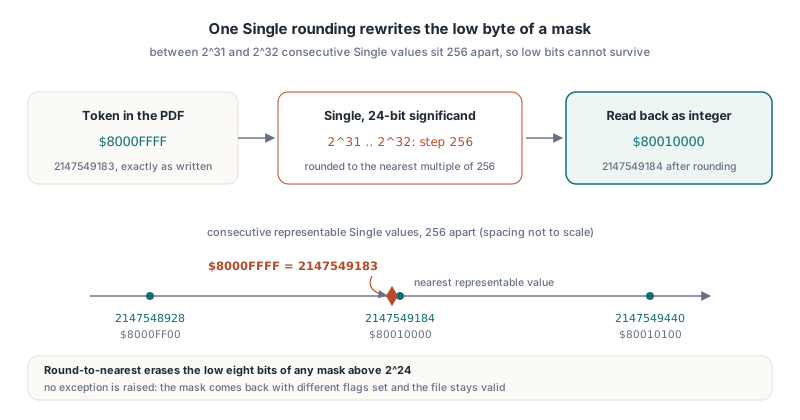
ISO 32000-1 §7.3.3 defines integer and real objects as separate kinds of number, and Annex C lists different implementation limits for each, so a PDF integer has no obligation to fit a 32-bit float. The field flags entry is defined in Table 221 as an integer, and it is read bit by bit, not as a quantity. Rounding a quantity by a tiny fraction is harmless; rounding a mask carries into neighbouring bits. You can reproduce the whole effect in a few lines of plain Delphi:
var
  S: Single;
  Mask: Int64;
begin
  S := $8000FFFF;              // 2147549183, not representable as Single
  Mask := Round(S);            // 2147549184
  Writeln(IntToHex(Mask, 8));  // 80010000: bits 1-16 cleared, bit 17 set

  S := $80003FFF;
  Mask := Round(S);
  Writeln(IntToHex(Mask, 8));  // 80004000: bits 1-14 cleared, bit 15 set
end;
The lesson generalises beyond PDF. A Single, a Double, a Variant holding a float, or a JSON number decoded into a float is the wrong container for a bit field, even when the values you happen to test with are small. Double pushes the exact range out to 2^53, which hides the problem for 32-bit masks but still leaves the type expressing the wrong intent. Use Cardinal, Integer, or Int64 and convert from the source text, not from a float that has already been rounded
Which field flags flip: Radio, Pushbutton, Password and Multiline
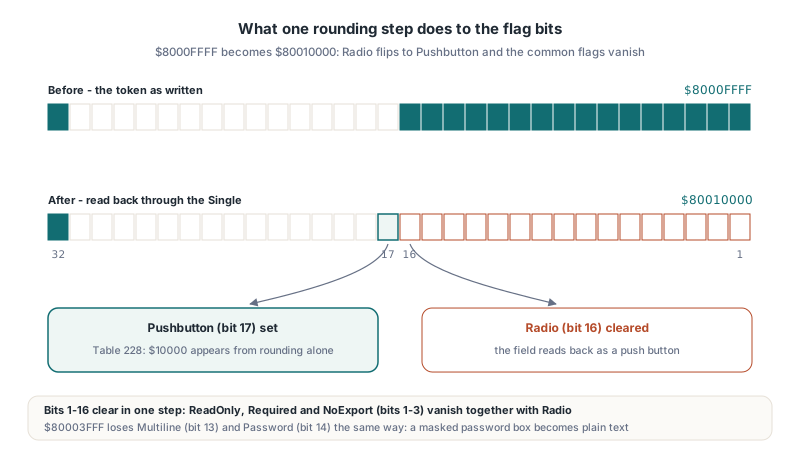
The two masks above are not arbitrary; they show how a single rounding step changes the field type a reader sees. PDF numbers flag bits from 1, so bit n has the value 2^(n-1). ISO 32000-1 §12.7.3.1 Table 226 defines bits 1 to 3 for every field, Table 228 defines the button flags, and Table 230 defines the text field flags
$8000FFFFto$80010000: bit 16 (Radio,$8000, Table 228) is cleared and bit 17 (Pushbutton,$10000) is set, so a radio button turns into a push button- The same rounding clears bits 1 to 3, so ReadOnly, Required and NoExport from Table 226 disappear along with Radio
$80003FFFto$80004000: bit 13 (Multiline,$1000) and bit 14 (Password,$2000) from Table 230 are both cleared, so a masked password box becomes a single-line plain text field- Below bit 32 the damage starts at 2^24:
16777219(Comb plus ReadOnly and Required) rounds to16777220, which drops ReadOnly and Required and adds NoExport
The last case mattered for HotPDF beyond forms editing. ExportLoadedPagesStructured builds its JSON and XML form model from the effective mask and uses NoExport in its value-suppression decision, so a rounded mask could hide an ordinary value or report the wrong readOnly and required members. The structured export path received the same exact read in v2.989.8
How HotPDF reads the exact 32-bit integer token
HotPDF Delphi Component fixes the read side without changing the numeric object model. The parser already remembers the original token text next to the Single value, so the field flag reader parses that token as an integer, accumulates it in a bounded Int64, and copies the resulting 32 bits into the Integer the public API returns. Generic numeric APIs and the old non-integer fallback stay as they were, and only field flag consumers take the exact path
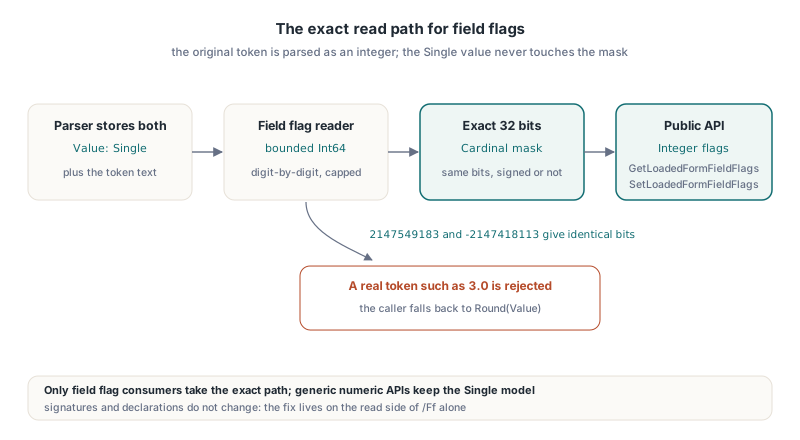
The parser has to accept both ways real files spell a high-bit mask. Some writers emit the unsigned value 2147549183, which is above the Annex C integer limit of 2^31 - 1 but common in practice; others emit the signed value -2147418113. Both describe the same bits. A version of the bounded parser looks like this:
function TryParseFlagMask(const Token: AnsiString; out Mask: Cardinal): Boolean;
var
  P, Digit: Integer;
  Negative: Boolean;
  Number, Limit: Int64;
begin
  Result := False;
  Mask := 0;
  if Token = '' then Exit;
  P := 1;
  Negative := Token[1] = '-';
  if Token[1] in ['+', '-'] then Inc(P);
  if P > Length(Token) then Exit;
  // Signed tokens down to -2^31, unsigned tokens up to 2^32 - 1
  if Negative then Limit := 2147483648 else Limit := 4294967295;
  Number := 0;
  while P <= Length(Token) do
  begin
    if not (Token[P] in ['0'..'9']) then Exit;  // reals take the old fallback
    Digit := Ord(Token[P]) - Ord('0');
    if Number > (Limit - Digit) div 10 then Exit;  // bounded, no overflow
    Number := Number * 10 + Digit;
    Inc(P);
  end;
  if Negative and (Number <> 0) then Number := 4294967296 - Number;
  Mask := Cardinal(Number);
  Result := True;
end;
Two details are deliberate. The bound is checked before each multiplication, so a 400-digit token fails cleanly instead of overflowing Int64. And a token such as 3.0 is rejected, which sends the caller back to Round(Value); the exact path improves integer masks without inventing new semantics for malformed ones
From application code nothing changes in the signatures. THotPDF.GetLoadedFormFieldFlags(FieldIndex: Integer): Integer returns the effective mask, walking the /Parent chain the same way described in how HotPDF resolves inherited AcroForm field values and resets, and THotPDF.SetLoadedFormFieldFlags(FieldIndex, AFlags: Integer) writes a complete local mask. A mask with bit 32 set is simply a negative Integer, so move the bits rather than converting the value:
const
  FF_RADIO      = $00008000;  // bit 16, ISO 32000-1 Table 228
  FF_PUSHBUTTON = $00010000;  // bit 17, Table 228
var
  Pdf: THotPDF;
  I, Native: Integer;
  Bits: Cardinal;
begin
  Pdf := THotPDF.Create(nil);
  try
    if Pdf.LoadFromFile('survey.pdf') <= 0 then Exit;
    for I := 0 to Pdf.GetFormFieldCount - 1 do
    begin
      Native := Pdf.GetLoadedFormFieldFlags(I);
      Move(Native, Bits, SizeOf(Bits));   // same 32 bits, no conversion
      if (Bits and FF_RADIO) <> 0 then
        Writeln(Pdf.GetFormFieldName(I), ': radio, mask $', IntToHex(Bits, 8));
    end;

    Bits := $80000002;                    // high bit plus Required
    Move(Bits, Native, SizeOf(Native));   // Native = -2147483646
    Pdf.SetLoadedFormFieldFlags(0, Native);
    Pdf.SaveLoadedDocument('survey-out.pdf');
  finally
    Pdf.Free;
  end;
end;
Reading an inherited mask leaves the child dictionary untouched; writing replaces the whole mask with a local entry on the selected field. The SetLoadedFormFieldReadOnly and SetLoadedFormFieldRequired shortcuts start from the effective inherited mask, toggle one bit, and keep every other bit exact. For filling values rather than flags, see setting form field values in a loaded PDF with HotPDF
Why does the order of Value and RememberSourceToken matter?
The order matters because THPDFNumericObject only trusts its remembered token whilst the Single value is unchanged. RememberSourceToken stores the token together with a snapshot of the current Value, and the SourceToken getter returns an empty string as soon as Value differs from that snapshot. That invalidation rule is what keeps an edited number from being saved with its stale original text
The rule turns into a trap on the write side. Remember the token first and assign the value second, and the snapshot holds the old value, the getter reports no token, and the serialiser falls back to formatting the rounded Single. Every flag writer inside the library, including the shortcuts and the native field constructors, follows the same sequence:
// Correct: the snapshot matches Value, so the exact token survives saving
Item := THPDFNumericObject.Create(nil);
Item.Value := AFlags;
Item.RememberSourceToken(AnsiString(IntToStr(AFlags)));

// Wrong: the snapshot is taken before Value changes, so SourceToken
// is invalidated and the rounded Single is written instead
Item := THPDFNumericObject.Create(nil);
Item.RememberSourceToken(AnsiString(IntToStr(AFlags)));
Item.Value := AFlags;
Because SaveNumericObject writes the remembered token whenever one is valid, getting the order right is what makes a saved and reopened file carry the original integer, not a rounded approximation of it
The null token that made two fields share one name
The same release fixed a second parser defect found whilst testing these masks: a null value in a dictionary read from the stream was never consumed. HotPDF peeks at the next token to classify it, and that check leaves the stream position at the start of the token. The otNull branch of the streaming dictionary reader created the null object but did not advance past the four bytes of null
The consequence was not a hang but a silent misread. The next key lookup scanned forward from the wrong place, ran past the end of the current dictionary, and read keys from the following indirect object, which then overwrote the current field. In the field list the symptom was two different fields reporting the same name and the same value. Array and span parsers already consumed null correctly, so the fix advances the stream by four bytes in that one branch instead of rewriting the general parser. A cursor that does not move is the same family of bug as the one in the PDF parser cursor stalls that hung HotPDF on malformed input, with a different symptom
The fix also clarified inheritance. A local /Ff null, or a reference that resolves to null, is treated as absent and the lookup continues to the parent, while an explicit 0 is a real mask that overrides the parent
What a {$R-} directive does and does not prove
The first hypothesis for the flag bug was a range-check error when a large mask was assigned to Integer. It was wrong, and the reason is a Delphi detail worth knowing: a local {$R-} directive placed before ParseSimpleDictionary in HPDFDoc.pas had no matching restore, so every function after it in the unit compiled with range checks off. Delphi does not reset a switch directive at the end of a function, and an include file inherits the directive state at the point where it is included
So a command-line -$R+ or -Cr only proves the initial setting of the unit. It says nothing about a particular function further down. To know whether range checking is active for a given routine, find the nearest directive above it, then confirm the behaviour with a real boundary value. The two older local flag consumers never raised the range exception the hypothesis predicted, so that missing exception could not be cited as evidence of a fix. The real defect was the Single rounding across known flag bits
The exact-token read is honest about its scope too. It does not change the unit-wide directive state, does not assign meaning to reserved bits, and does not claim that every bit combination is a valid field. It guarantees that the 32 bits in the file are the 32 bits your code sees
FAQ
Why not change THPDFNumericObject.Value to Double or Int64?
Changing the type of a public field would break every caller that reads or assigns it, and PDF numbers are real as often as they are integer. Keeping Single and reading field flags from the original token fixes the bug for bit masks without changing any existing declaration or calling convention
Does SetLoadedFormFieldFlags accept masks with bit 32 set?
Yes. Pass the mask as a signed Integer; $80000002 and -2147483646 are the same 32 bits. GetLoadedFormFieldFlags returns the same value after saving and reloading, including Required
Which HotPDF version reads exact AcroForm field flags?
Exact field flag reads and the null token fix shipped in HotPDF v2.989.5, and structured JSON and XML export adopted the exact mask in v2.989.8. Earlier versions round any mask above 2^24 through Single
Exact AcroForm field flags, inherited field lookup, and loaded-form editing are part of the HotPDF Component for Delphi and C++Builder, a native PDF library for creating, loading, and editing PDF documents