A PDF that opens instantly from a local disk can take several seconds to show its first page when the same bytes come from an HTTP server answering range requests, even though the file is only a few megabytes and the link is fast. Bandwidth is not the problem. The request count is, and the cure is to turn hundreds of tiny scattered reads into a few dozen cached blocks, then read ahead only while the access pattern stays sequential
Why does the same PDF load instantly from disk and crawl over HTTP?
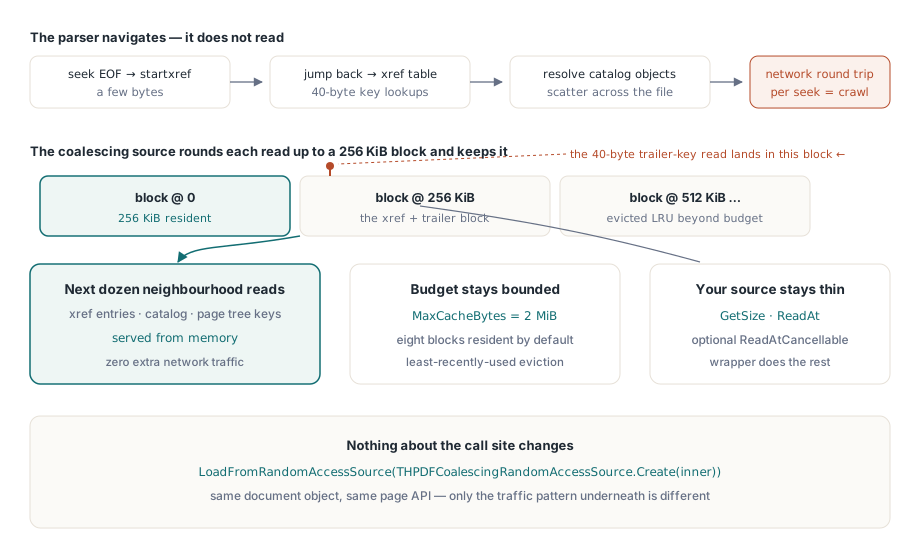
A PDF parser does not read a file front to back. It navigates one. The structure in ISO 32000-1 §7.5 puts the entry point at the end: the parser seeks to the last kilobyte for startxref, jumps back to the cross-reference table, resolves the trailer dictionary, follows a reference to the Catalog, then to the page tree root, then to a page node, then to that page's resource dictionary. Each hop reads tens of bytes from a different offset, and an incrementally updated file repeats the walk once per revision through the /Prev chain
On a local file this pattern is nearly free, because the operating system already holds the surrounding 4 KiB page in its file cache and the second read costs a memory copy. A network transport has no such locality. Every read becomes a request with its own latency, and the arithmetic is brutal: at 40 ms per round trip, 300 small reads add up to twelve seconds of waiting while the wire sits mostly idle. Reading less is not an option, since the parser needs exactly the bytes it asks for. What can change is how much each physical request brings back
Wrapping your transport in THPDFCoalescingRandomAccessSource
HotPDF loads documents from any class that descends from THPDFRandomAccessSource, and THPDFCoalescingRandomAccessSource sits between that class and the parser. Every read is rounded out to an aligned block and the block is kept in memory. BlockSize defaults to 262,144 bytes and MaxCacheBytes to 2,097,152, so eight blocks stay resident and the least recently used one goes when the budget is full. The parser's 40-byte lookup of a trailer key pulls in the 256 KiB around it, and the next dozen reads in that neighbourhood (cross-reference entries, the Catalog, page tree keys) come out of memory
Your own class stays thin. Two methods are mandatory: GetSize and ReadAt. Override ReadAtCancellable when your HTTP client can abort a request in flight, and override IsRangeAvailable when the source is a download still in progress. The wrapper asks that question before every fetch: if a whole block is not there yet it retries with just the bytes requested, and if those are missing too the read comes back short instead of blocking
type
  // TMyHttpClient stands for your own HTTP client class
  THttpRangeSource = class(THPDFRandomAccessSource)
  private
    FClient: TMyHttpClient;
    FUrl: string;
    FSize: Int64;
  public
    constructor Create(const AUrl: string);
    function GetSize: Int64; override;
    function ReadAt(Offset: Int64; var Buffer; Count: Longint): Longint; override;
    function ReadAtCancellable(Offset: Int64; var Buffer; Count: Longint;
      CancellationToken: THPDFCancellationToken): Longint; override;
  end;

var
  Raw: THttpRangeSource;
  Cached: THPDFCoalescingRandomAccessSource;
  Pdf: THotPDF;
begin
  Raw := THttpRangeSource.Create('https://files.example.com/contract.pdf');
  // OwnsSource=True: the wrapper frees Raw; 256 KiB blocks, 8 MiB budget
  Cached := THPDFCoalescingRandomAccessSource.Create(Raw, True, 262144, 8388608);
  Cached.MaxReadAheadBlocks := 8;   // valid range 1..32
  Pdf := THotPDF.Create(nil);
  try
    // OwnsSource=True again: Pdf frees Cached, which frees Raw
    if Pdf.LoadFromRandomAccessSource(Cached, True) > 0 then
      RenderFirstPage(Pdf);   // your own code
  finally
    Pdf.Free;
  end;
end;
Asynchronous prefetch and adaptive read-ahead are both on as soon as the wrapper is constructed, so the sample only touches the window ceiling. The constructor validates its arguments up front: BlockSize must lie between 4,096 and 16,777,216 bytes and MaxCacheBytes must hold at least one block, otherwise you get an ERangeError before a single byte moves
You do not strictly need the explicit wrapper. Hand LoadFromRandomAccessSource a plain source and HotPDF wraps it for you, using the raw-cache policy you can read and change through GetCacheAdmissionPolicy and SetCacheAdmissionPolicy with the clkRawCompressed layer: eight entries, 2 MiB in total, 256 KiB per entry. Pass your own THPDFCoalescingRandomAccessSource and it is used exactly as configured. For anything that crosses a network, build the wrapper yourself; you get the read-ahead knobs and the full statistics record, while the automatic path reports only hit, miss, admission and eviction counts through GetCacheAdmissionStatistics
How far ahead should it read?
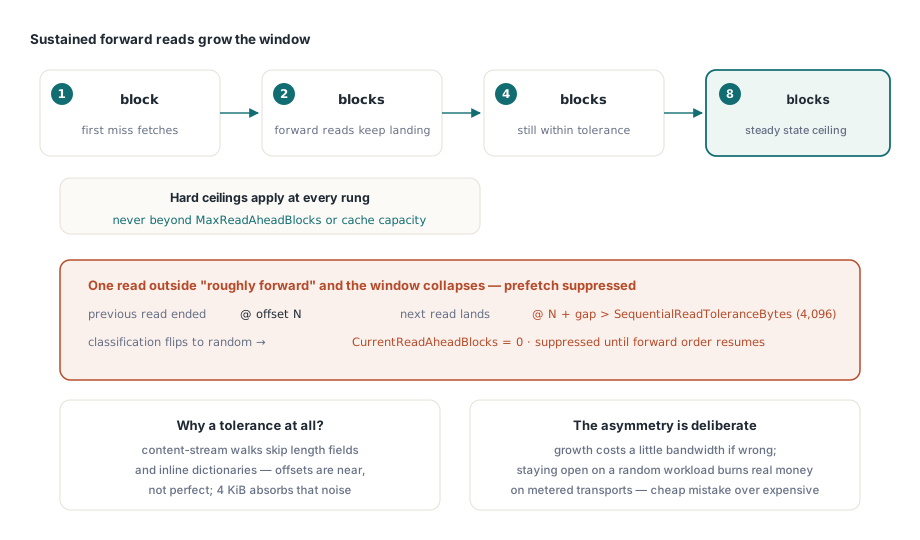
Adaptive read-ahead decides per document. With AdaptiveReadAheadEnabled set, every read the parser makes through the loaded document is classified as sequential or random, and the prefetch window follows a score. Two consecutive forward reads open the window to two blocks, four open it to four, six open it to eight. The window never exceeds MaxReadAheadBlocks, and it never exceeds the number of blocks that fit in MaxCacheBytes, so a small cache cannot be flooded by its own prefetch
A read that jumps backward, or lands too far past the previous read's end, drops the score below zero. The window closes, any prefetch heading somewhere else is cancelled, and SuppressedPrefetchCount goes up. Two forward reads later the window reopens at a single block. That lag is the point: one lucky contiguous read in the middle of a cross-reference chase does not restart speculation
SequentialReadToleranceBytes, 4,096 by default, defines "too far". A parser walking a content stream does not produce perfectly contiguous offsets; it skips a length field here, an inline image dictionary there. Reads landing within the tolerance of the previous end still count as forward. Set it too low and a normal forward scan is classified as random, so read-ahead never engages. Set it too high and genuine random access looks sequential, and you fetch megabytes nobody reads. The setter accepts any value from zero up to BlockSize and resets the score when it changes
Growth is gradual, collapse is immediate, and that asymmetry is deliberate. Over-fetching on a random workload burns real bandwidth, and on a metered transport real money; under-fetching on a sequential one costs a few extra round trips. Leave AdaptiveReadAheadEnabled on. Switched off, the wrapper prefetches one block after every read regardless of pattern, which is exactly the wrong behaviour while the parser is hopping between cross-reference sections
Classification is driven by the stream HotPDF reads from during a load. If your own code also pulls bytes through the wrapper, for example to hash a file or extract an attachment, call ObserveReadPattern with the offset and length after each read so the window reacts to that traffic too. When you already know which bytes will be wanted next, PrefetchRange starts a background fetch directly; IsPrefetchActive reports whether one is still running
Keeping hot blocks when the cache is full
Plain least-recently-used eviction has a known weakness. One long forward pass, say through a large embedded image, pushes out every block the parser keeps coming back to, including the cross-reference and Catalog blocks it will need again on the next page. THPDFCoalescingRandomAccessSource counts how often each block has been asked for, and once the budget is full a new block only enters the cache if it has been requested at least as often as the block it would replace. Otherwise the read goes straight to your source for exactly the bytes requested, and RejectionCount and FrequencyRejectionCount record it
That rule is on by default (the AdaptiveAdmission constructor argument). ConfigureCacheAdmission changes the byte budget, the per-entry ceiling, an optional entry count limit and the admission rule on a live wrapper; it cancels any running prefetch and trims the cache to the new limits on the spot
Cancellation that actually stops the transfer
Prefetch runs on a single background thread, and the wrapper cancels it as soon as it stops being worth finishing. A foreground read for bytes outside the range being prefetched cancels it, so the page the user asked for never waits behind speculative traffic. A random read cancels it. Destroying the wrapper, or calling CancelPrefetch or ClearCache, cancels it and waits for the thread to exit. Each of these sets the THPDFCancellationToken the prefetch thread passes into your ReadAtCancellable
Whether bytes actually stop flowing depends on your override. The default ReadAtCancellable on THPDFRandomAccessSource checks the token before and after a plain ReadAt, which is enough for a file share but lets a half-finished 256 KiB HTTP response run to completion. A client that reads the response body in chunks can check the token between chunks and abort:
function THttpRangeSource.ReadAt(Offset: Int64; var Buffer;
  Count: Longint): Longint;
begin
  Result := ReadAtCancellable(Offset, Buffer, Count, nil);
end;

function THttpRangeSource.ReadAtCancellable(Offset: Int64; var Buffer;
  Count: Longint; CancellationToken: THPDFCancellationToken): Longint;
var
  Status: Integer;
begin
  if CancellationToken <> nil then
    CancellationToken.ThrowIfCancellationRequested('http range read');
  // GetRange and its callback are your client's API: it sends
  // "Range: bytes=Offset-(Offset+Count-1)" and calls the callback between body chunks
  Result := FClient.GetRange(FUrl, Offset, Count, Buffer, Status,
    function: Boolean
    begin
      Result := (CancellationToken <> nil) and
        CancellationToken.IsCancellationRequested;
    end);
  // 200 instead of 206 means the server ignored Range and sent the whole file
  if Status <> 206 then
    raise EStreamError.CreateFmt('Range request not honored (HTTP %d)', [Status]);
  if CancellationToken <> nil then
    CancellationToken.ThrowIfCancellationRequested('http range read');
end;
The status check covers the trap most HTTP sources hit first. RFC 9110 §14 lets a server ignore a Range header and answer 200 with the full representation, and some CDN and proxy configurations do exactly that for certain files. A source that copies the first Count bytes of a 200 response hands the parser bytes from offset zero no matter which offset it asked for. Return values matter as well: the wrapper raises EStreamError if ReadAt reports a negative count or more bytes than requested, and it treats zero as end of data
The only non-nil token your source receives belongs to the prefetch thread. Parser reads during a load reach your ReadAtCancellable with a nil token, so stopping the load itself is a separate switch: assign a token to THotPDF.OperationCancellationToken, and the document load checks it as it goes. The same token model drives the queue described in background rendering with a request queue, so a viewer can cancel a load, its renders and its speculative network traffic from one close handler
Reading the range cache statistics
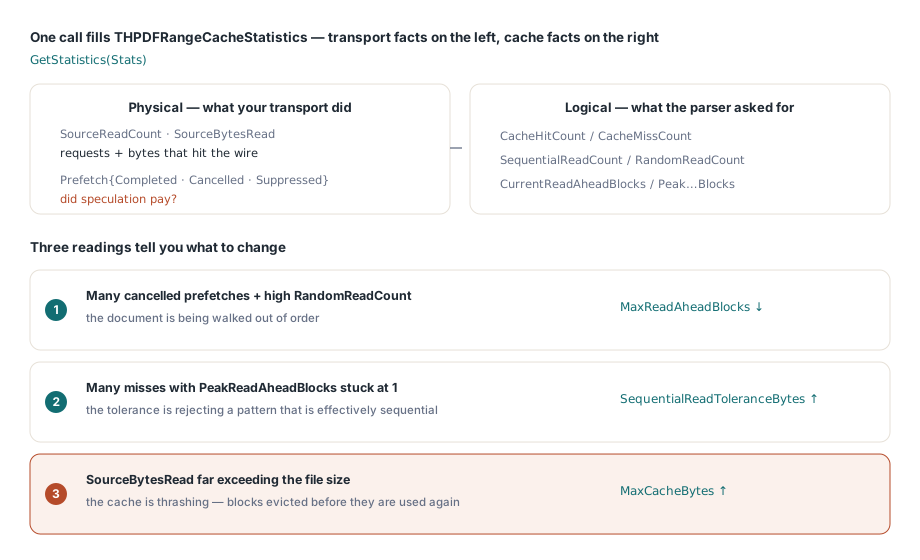
GetStatistics fills a THPDFRangeCacheStatistics record that keeps what your transport did apart from what the cache did. SourceReadCount and SourceBytesRead are physical traffic. CacheHitCount and CacheMissCount are logical traffic. SequentialReadCount and RandomReadCount show how the access pattern was classified, CurrentReadAheadBlocks and PeakReadAheadBlocks show how far the window opened, and the four prefetch counters show whether speculation paid off. CachedRangeCount, CachedBytes, EvictionCount and RejectionCount describe the cache itself
var
  S: THPDFRangeCacheStatistics;
begin
  Cached.GetStatistics(S);
  Log(Format('physical %d reads / %d bytes, hits %d, misses %d',
    [S.SourceReadCount, S.SourceBytesRead, S.CacheHitCount, S.CacheMissCount]));
  Log(Format('pattern: %d sequential, %d random, peak window %d blocks',
    [S.SequentialReadCount, S.RandomReadCount, S.PeakReadAheadBlocks]));
  Log(Format('prefetch: %d issued, %d completed, %d canceled, %d suppressed',
    [S.PrefetchRequestCount, S.PrefetchCompletedCount,
     S.PrefetchCancelledCount, S.SuppressedPrefetchCount]));
  Log(Format('cache: %d blocks / %d bytes, %d evicted, %d rejected',
    [S.CachedRangeCount, S.CachedBytes, S.EvictionCount, S.RejectionCount]));

  // Rejections piling up on a mostly sequential document: give it more room
  if S.RejectionCount > S.CacheHitCount then
    Cached.ConfigureCacheAdmission(16 * 1024 * 1024, Cached.BlockSize, 0);
end;
Three readings tell you what to change. Many cancelled prefetches next to a high random-read count mean the document is being walked out of order, so lower MaxReadAheadBlocks and stop paying for bandwidth you throw away. Many misses with the peak window stuck at 1 mean the tolerance is rejecting a pattern that is effectively sequential, so raise SequentialReadToleranceBytes. SourceBytesRead far above the file size means blocks are evicted before they are used again; raise MaxCacheBytes before touching anything else. The rejection threshold in the sample is our own starting heuristic, so tune it against your traffic
Linearised files change the arithmetic
If you control the producer, linearising the document changes the problem instead of tuning it. ISO 32000-1 Annex F places the first page's objects and a hint table at the front of the file, so a viewer can render page one from the opening bytes without touching the rest. HotPDF exposes that path through GetProgressiveLinearizedLoadInfo and ReadProgressiveLinearizedFirstPageSection, both of which take the same THPDFRandomAccessSource you would wrap for coalescing; the writing side is covered in generating linearised PDFs with hint tables
The two techniques compose. Coalescing makes any document tolerable over a slow link, including files from third parties you cannot re-save; linearisation makes the first page arrive fast on documents you produce yourself. Files on a local disk that are too large to hold in memory are a different problem with no round-trip latency to amortize, and the mapped-file and lazy-stream paths in the direct file API workflow fit them better
The random-access source classes, the coalescing wrapper, the cache admission policies and the progressive linearised loading calls all ship with HotPDF, a native Delphi and C++Builder PDF component with full source. Licensing and the complete API reference are on the HotPDF Delphi PDF component page