HotPDF writes linearised PDF files, the layout Acrobat labels Fast Web View, through the LinearizeOutput property on THotPDF. Setting it before BeginDoc makes HotPDF reorder the finished object graph so a byte-range-aware reader can display page one after fetching only the leading part of the file, instead of downloading the whole document first. The mechanism is ISO 32000-1 Annex F
The reason this matters is unglamorous. A normal PDF puts its cross-reference table at the end, so a viewer must reach the last byte before it knows where anything is. Hand a browser a 200-page scanned report and the user stares at a spinner for the full transfer, even though the only thing they wanted was page 1. Linearisation fixes that by paying a cost at write time. This article is about that write path specifically, the partitioning, the measurement loop and the hard limits; for the conceptual background on what Fast Web View buys you, the earlier explanation of PDF linearisation and Fast Web View covers the ground
What the linearised layout actually guarantees
A linearised file is an ordinary PDF with an extremely specific physical ordering, and every guarantee it offers comes from that ordering rather than from any new object type. HotPDF emits the parts in the sequence Annex F prescribes: the linearisation parameter dictionary inside the first 1024 bytes, an early cross-reference table, the document-level objects, the primary hint stream, the first page and its private objects, then the remaining pages, then the shared objects, then everything else, and finally the main cross-reference table
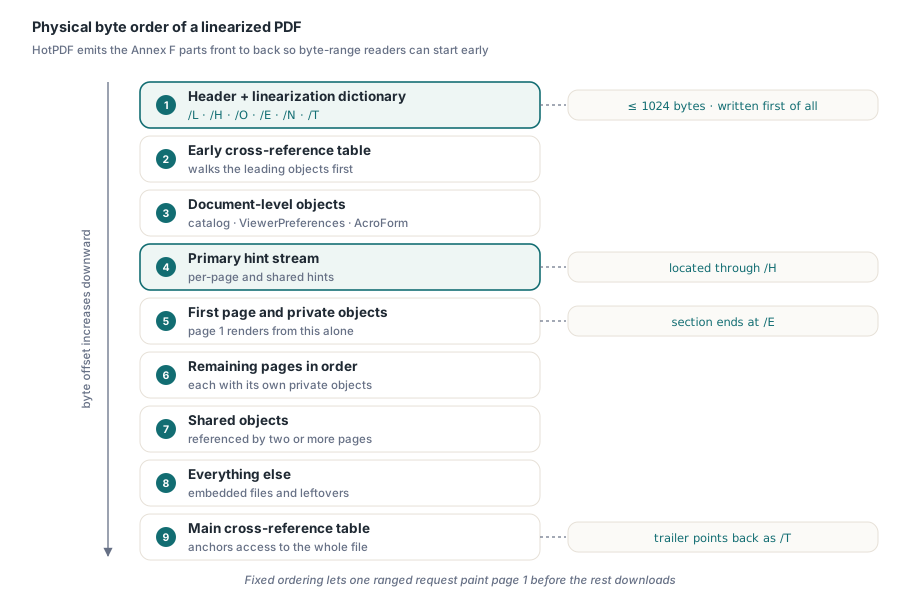
The partitioning is derived, not declared. HotPDF walks the reference graph from each page object and records, for every indirect object, how many pages reach it and which page reached it first. An object used by exactly one page becomes private to that page. An object reached by more than one becomes shared. The catalogue, plus whatever it references under /ViewerPreferences, /OpenAction, /Threads and /AcroForm, plus the encryption dictionary when protection is active, form the document-level group that must precede everything. Page tree nodes are held back deliberately so they do not pollute the first-page section
The parameter dictionary carries the numbers a reader needs before it has read anything else: /L for the total file length, /H for the offset and length of the hint stream, /O for the object number of the first page, /E for the byte where the first page section ends, /N for the page count and /T for the offset of the main cross-reference table entry. Every one of those is a byte offset into a file that does not exist yet at the moment you need to write them
Why must the hint table offsets converge?
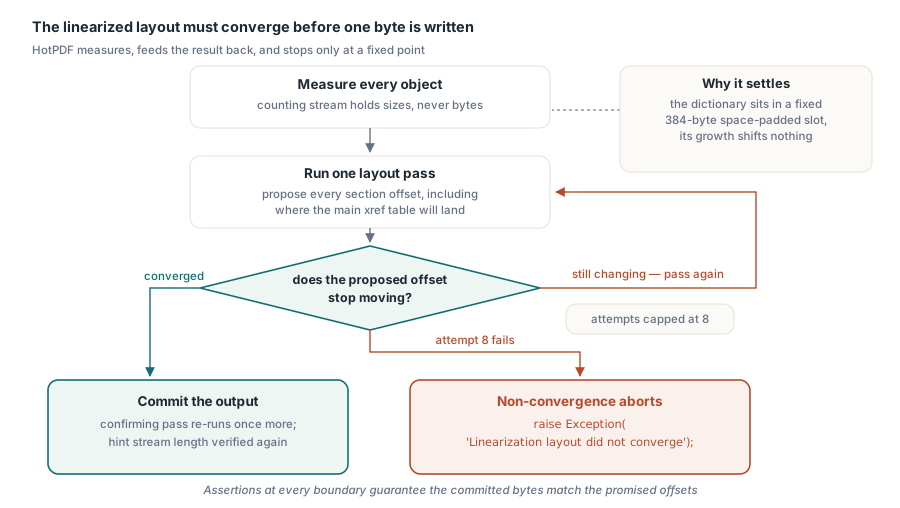
Because the numbers in the parameter dictionary describe the file that contains them, and changing any of them changes the file. That is the central difficulty of a linearised writer, and it is why HotPDF measures repeatedly instead of writing once. Widen /T from 6 digits to 7 and the parameter dictionary grows by a byte; the header grows; every object shifts; the main cross-reference table moves; /T now needs a different value. The layout has to reach a fixed point before a single byte of real output is committed
HotPDF handles this with a bounded iteration. It first serialises every object into a counting stream that records length without keeping bytes, so each object has a known serialised size. It then runs a layout pass that assigns offsets to the document-level group, the hint stream, the first-page group, the later page groups, the shared group and the remainder, and reports where the main cross-reference table would land. That result is fed back in as the input to the next pass. The loop is capped at eight attempts, and non-convergence raises an exception rather than producing a file with plausible-looking wrong offsets
CandidateMainOffset := 0;
for Attempt := 0 to 7 do
begin
  CalculateLayout(CandidateMainOffset, FirstXRefData,
    HintOffset, EndFirstPage, NewMainOffset);
  if NewMainOffset = CandidateMainOffset then
    Break;
  CandidateMainOffset := NewMainOffset;
end;
if NewMainOffset <> CandidateMainOffset then
  raise Exception.Create('Linearization layout did not converge');
Two details keep the loop from thrashing. The parameter dictionary is written into a fixed 384-byte slot, padded with spaces, so its own growth can never destabilise the layout; if the dictionary text ever exceeded that reservation HotPDF raises instead of silently shifting everything. And after convergence HotPDF runs one more confirming layout pass and re-checks the hint stream length, because the hint stream itself encodes offsets that were only known once the layout settled. The payoff of all this measurement is that HotPDF never buffers a second copy of the document: once the offsets are fixed, objects are serialised straight into the destination stream, with an assertion at each section boundary that the bytes written match the offset that was promised
Turning it on from Delphi
The API surface is one Boolean, and its only requirement is that you set it before generation begins. LinearizeOutput defaults to False, and the layout pass runs when the document is written, so assigning it after EndDoc accomplishes nothing
var
  PDF: THotPDF;
begin
  PDF := THotPDF.Create(nil);
  try
    PDF.FileName := 'fast-view.pdf';
    PDF.Version := pdf17;
    PDF.LinearizeOutput := True;      // must precede BeginDoc
    PDF.BeginDoc;
    PDF.Canvas.TextOut(72, 72, 'First page');
    PDF.EndDoc;
  finally
    PDF.Free;
  end;
end;
One deployment caveat outranks everything on the code side. Linearisation only pays off when the transport supports HTTP range requests. Serve the same file from an endpoint that streams it whole, or from a CDN configuration that ignores Range, and you have bought yourself a slower write path and a larger file for no user-visible gain. Check the server before you check the code
Why does linearisation override UseXRefStream and UseObjectStreams?
Because the linearised writer needs every object to have its own directly addressable byte offset, and both of those features take that away. HotPDF therefore emits traditional text cross-reference tables and unpacked indirect objects whenever LinearizeOutput is enabled, even if the caller also set UseXRefStream or UseObjectStreams. This is a deliberate override, not a conflict you have to resolve yourself
The reasoning follows from the hint tables. A hint table describes where a page section starts and how long it is, so a reader can request exactly that range. An object packed into an /ObjStm container has no independent offset at all; it exists only as a slice inside another compressed stream that must be fetched and inflated as a unit. If you were counting on object streams for file size, understand that linearisation and compression are pulling in opposite directions here, and read the trade-off in the companion piece on object streams and incremental updates in HotPDF. The same tension shapes hybrid-reference files, which exist precisely to keep older readers working alongside stream-based tables, as covered in the article on hybrid cross-reference streams in Office-generated PDFs
There is also a version floor. Linearisation requires PDF 1.2 or later. If the selected version is older, HotPDF raises it automatically, unless StrictVersionLock is set, in which case writing raises an exception rather than quietly promoting a document you pinned on purpose
The 4 GiB wall, and why HotPDF refuses instead of truncating
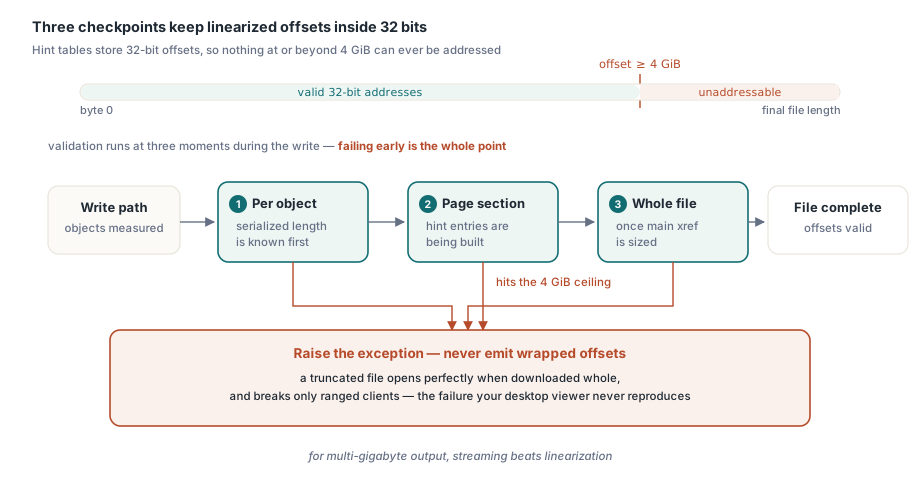
Linearisation hint tables store offsets as 32-bit values, so a linearised file cannot address anything at or beyond 4 GiB, and HotPDF rejects such output with an explicit exception rather than writing a file with wrapped offsets. The limit is not a HotPDF implementation choice; it is the width of the fields Annex F defines
The check is applied in three places, and all three matter. HotPDF validates each object once its serialised length is known, validates each page section length while building the hint entries, and validates the final file length after the main cross-reference table is sized. Failing early is the entire point: a hint table with a silently truncated offset produces a file that opens correctly in a viewer downloading it whole and fails only for the byte-range client that linearisation existed to serve, which is the worst possible failure mode because your test viewer never reproduces it. If you are producing multi-gigabyte output, linearisation is not the tool, and the streaming approach described in the notes on the Direct File API for large PDF workflows is the direction to look
Detecting linearisation on a file you loaded
THotPDF.IsLoadedLinearized reports whether the currently loaded document was already written in linearised form, and it answers from a snapshot taken before parsing, not from the live stream. HotPDF reads the first 1024 bytes from position zero of the source stream, scans them for the first obj keyword and then for a /Linearized entry with the value 1, and caches the boolean result
var
  PDF: THotPDF;
  PageCount: Integer;
begin
  PDF := THotPDF.Create(nil);
  try
    PageCount := PDF.LoadFromFile('incoming.pdf');
    if (PageCount > 0) and (not PDF.IsLoadedLinearized) then
      Writeln('Source is not Fast Web View ready');
  finally
    PDF.Free;
  end;
end;
Two constraints in that description are load-bearing. The detection cannot rely on the stream position, because by the time application code asks the question the parser has moved it, and it cannot re-read on demand because LoadFromFile releases the internal source stream once loading finishes. Hence the capture-before-parse-and-cache design. The scan is also deliberately literal about the value: only /Linearized 1 or a numerically equivalent form with an all-zero fraction is accepted, because a file whose parameter dictionary says something else is not making the Annex F promise
A Delphi record trap worth stealing
Local records containing dynamic arrays initialise their managed fields and nothing else, and if you keep a plain Count field beside the array you must clear it yourself. This bit the linearisation partitioning during development, and it is the kind of bug that costs a day precisely because one platform hides it
type
  THPDFLinearIndexList = record
    Values: THPDFIntegerArray;  // managed field: cleared for you
    Count: Integer;             // plain field: whatever was on the stack
  end;

// Required, not cosmetic:
Part4 := Default(THPDFLinearIndexList);
Part6 := Default(THPDFLinearIndexList);
Part8 := Default(THPDFLinearIndexList);
Part9 := Default(THPDFLinearIndexList);
The dynamic array field is reference-counted, so the compiler zeroes it. The Count beside it is an ordinary integer with no such guarantee, and an uninitialised Count sends the very first append to an arbitrary index. Under Win32 the stack slot happened to hold zero, the append landed at index 0, and every test passed. Under Win64 the same code wrote past the end of the array. The lesson generalises well beyond linearisation: when a record mixes managed and unmanaged fields, assign Default(TRecord) and stop reasoning about which fields the compiler covers, and never treat a green Win32 run as evidence that initialisation is correct
The LinearizeOutput and IsLoadedLinearized members described here ship with the standard HotPDF Delphi Component for Delphi and C++Builder; the product page carries the full property reference, including the interaction rules with cross-reference streams, object streams and version locking