HotPDF's THPDFBackgroundRenderer class is a TThread descendant that renders loaded PDF pages into bitmaps on a worker thread, so a Delphi viewer can keep scrolling and repainting while a page is still being rasterised in the background. THPDFBackgroundRenderer.RequestPage queues a page index for that worker thread, CancelAll drops whatever is still waiting, and GetCachedBitmap hands back a finished bitmap that the caller owns and must free. Scroll a two-hundred-page scanned contract at print resolution on the UI thread alone and every page turn pauses the window until GDI finishes drawing it, which is the exact stutter THPDFBackgroundRenderer exists to remove
Why render PDF pages on a background thread at all?
A background thread earns its complexity because HotPDF's page renderer is a genuine content-stream interpreter, not a cheap bitmap copy that returns before anyone notices: it walks PDF operators, keeps a graphics-state stack, and rasterises paths, images and glyphs through GDI, the same engine covered in rendering loaded PDF pages to a TBitmap. Run that work synchronously inside a scroll or paint handler and the message loop stops pumping until the call returns, which is what a frozen window actually is. Dropping Application.ProcessMessages inside the render call does not fix this: it lets the message queue drain, but the render itself still owns the calling thread, so the window repaints stale content faster while the real work has not moved anywhere. The only way to keep a viewer responsive during a genuinely slow render is to run that render somewhere else, which is why THPDFBackgroundRenderer exists as a TThread subclass instead of a callback or a timer
Setting up a request queue for a scrolling viewer
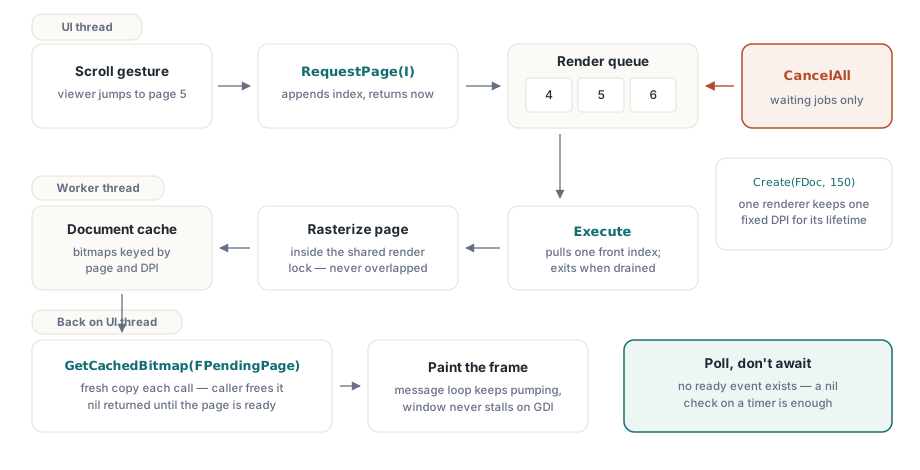
THPDFBackgroundRenderer.Create takes the loaded THotPDF instance and a DPI that stays fixed for that renderer's entire life, so every page queued through one instance renders at one resolution; a viewer that supports zoom needs a fresh renderer, not a fresh DPI property, whenever the zoom level changes. RequestPage appends a page index to an internal queue and returns immediately: it does no rendering itself and never touches the UI thread. Execute, the inherited TThread entry point HotPDF runs once you call Start, pulls one index off the front of that queue at a time, renders it through the document's page cache, and stores a copy indexed by page so GetCachedBitmap can hand it back later
type
  TViewerForm = class(TForm)
    RenderPollTimer: TTimer;
    procedure RenderPollTimerTimer(Sender: TObject);
  private
    FDoc: THotPDF;
    FRenderer: THPDFBackgroundRenderer;
    FPendingPage: Integer;
    procedure RequestPageWindow(CenterPage: Integer);
  end;

procedure TViewerForm.RequestPageWindow(CenterPage: Integer);
var
  I: Integer;
begin
  if FRenderer <> nil then
  begin
    FRenderer.CancelAll;
    FRenderer.Free;
  end;
  FRenderer := THPDFBackgroundRenderer.Create(FDoc, 150);
  for I := CenterPage - 1 to CenterPage + 1 do
    if (I >= 0) and (I < FDoc.LoadedPageCount) then
      FRenderer.RequestPage(I);
  FPendingPage := CenterPage;
  FRenderer.Start;
end;

procedure TViewerForm.RenderPollTimerTimer(Sender: TObject);
var
  Bmp: TBitmap;
begin
  if FRenderer = nil then Exit;
  Bmp := FRenderer.GetCachedBitmap(FPendingPage);
  if Bmp <> nil then
  begin
    PageImage.Picture.Bitmap.Assign(Bmp);
    Bmp.Free;
  end;
end;
GetCachedBitmap returns nil until that page's copy is ready, so a poll-on-a-timer pattern like the one above is enough; there is no separate ready event to wire up, HotPDF resolves this with a plain nil check instead of a bigger notification API. The next section covers what CancelAll and that Free call are actually doing, because both matter once pages start rendering out of order or a scroll happens faster than the queue can drain
The one-call shortcut for a single page
THotPDF.RenderLoadedPageToBitmapAsync exists for the common case of firing off exactly one page without touching THPDFBackgroundRenderer directly: it constructs the renderer internally, calls RequestPage once, starts the thread, and returns the TThread reference to the caller, who owns it and is responsible for freeing it. Retrieving the result goes through THotPDF.GetLoadedCachedRenderedBitmap rather than the renderer's own GetCachedBitmap, because GetLoadedCachedRenderedBitmap reads the document's shared cache keyed by page index and DPI, the same cache RenderLoadedPageToBitmapCached and the built-in prefetcher already populate — a page some other part of the viewer already rendered at that DPI can come back immediately, before the background thread just started has even been scheduled by the OS
// A simpler alternative to the queue above, for one page at a time.
procedure TViewerForm.RequestSinglePage(PageIndex: Integer);
begin
  if FAsyncWorker <> nil then
    FAsyncWorker.Free; // waits if a prior page is still rendering
  FAsyncWorker := Pdf.RenderLoadedPageToBitmapAsync(PageIndex, 150);
  FPendingPage := PageIndex;
end;

procedure TViewerForm.AsyncPollTimerTimer(Sender: TObject);
var
  Bmp: TBitmap;
begin
  Bmp := Pdf.GetLoadedCachedRenderedBitmap(FPendingPage, 150);
  if Bmp <> nil then
  begin
    PageImage.Picture.Bitmap.Assign(Bmp);
    Bmp.Free;
  end;
end;
Can you cancel a page that is already queued?
CancelAll only removes jobs still sitting in the queue; a page HotPDF has already pulled off the front and handed to its rendering call keeps going to completion, because THPDFBackgroundRenderer has no mechanism to interrupt work already in progress. That is a reasonable trade in practice — a single page render is rarely long enough to make pre-emption worth the added complexity — but a fast scroll that fires CancelAll on every scroll event still pays for whichever one page was mid-render at the moment of each cancel. The official reference is direct about this: already-running rendering may finish before the thread terminates
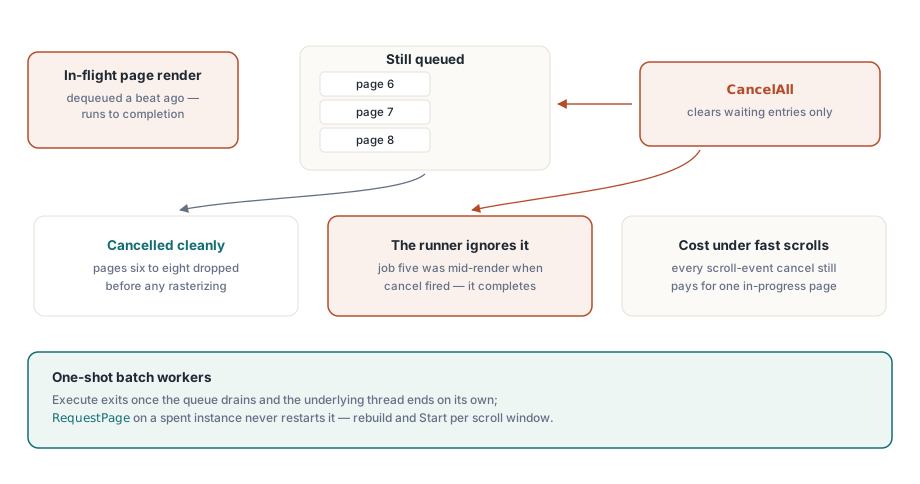
Execute has a second, easy-to-miss behaviour: the loop exits as soon as it finds the queue empty, it does not idle and wait for more work to arrive. A THPDFBackgroundRenderer instance is therefore a one-shot batch worker, not a persistent background service — queue a handful of pages, call Start, and once the last queued page has rendered the underlying OS thread ends on its own. Calling RequestPage again on that same instance after Execute has already drained the queue does not restart it, which is exactly why RequestPageWindow above replaces the renderer instance on every call instead of trying to keep feeding one long-lived object
Is it safe to touch a TBitmap from a background thread in Delphi?
Touching a TBitmap from a background thread is safe in HotPDF's design as long as only one thread ever operates on a given bitmap instance at a time, and THPDFBackgroundRenderer enforces that boundary instead of leaving it to the caller. Execute renders each page inside the document's own render lock, the same critical section every RenderLoadedPageToBitmapCached call and the built-in PrefetchLoadedPages prefetcher already share, so the actual GDI drawing for a given page happens on exactly one thread at a time and never overlaps another render of that document. The resulting bitmap is a worker-thread-owned object that THPDFBackgroundRenderer never publishes directly to a caller
GetCachedBitmap instead allocates a brand-new TBitmap and calls Assign on it under the renderer's own separate lock, so the copy always happens while Execute is blocked from replacing that cache slot underneath it — the calling thread gets pixel data, never the original handle. That separation is also the reason to resist rolling a custom rendering thread that calls HotPDF's rendering functions directly without going through THPDFBackgroundRenderer or PrefetchLoadedPages: two renders racing against the same loaded document's shared caches and object graph is precisely the scenario HotPDF's internal locking exists to prevent, and the background renderer class gets you that locking for free instead of reimplementing it
How does this differ from HotPDF's built-in page prefetch?
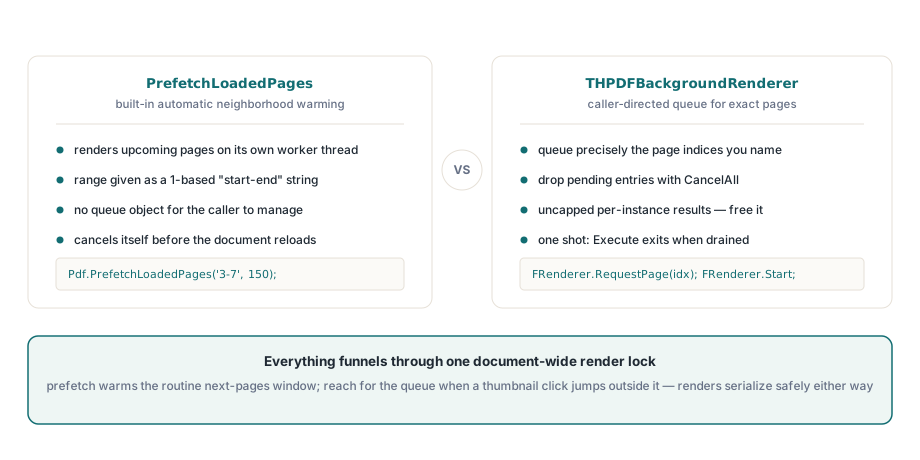
PrefetchLoadedPages and THPDFBackgroundRenderer solve related but different problems: PrefetchLoadedPages, given a page range, renders that whole neighbourhood into the shared document cache automatically on its own worker thread, with no queue object for the caller to create or manage. THPDFBackgroundRenderer trades that automation for control — the caller decides exactly which page indices matter and in what order, and can cancel the ones still queued without touching whatever range the built-in prefetcher is warming elsewhere. Both funnel through the same render lock, so a viewer can run PrefetchLoadedPages for the ordinary next-few-pages case and reach for THPDFBackgroundRenderer only when something outside that pattern comes up, such as a thumbnail strip jumping straight to a page the user just clicked
begin
  // PrefetchLoadedPages takes a 1-based "start-end" range string, while
  // RequestPage below stays 0-based like every other loaded-page index.
  Pdf.PrefetchLoadedPages(Format('%d-%d', [CenterPage + 1, CenterPage + 5]), 150);

  // Reach for THPDFBackgroundRenderer only for a page outside that
  // window, such as a thumbnail the user just clicked.
  FRenderer := THPDFBackgroundRenderer.Create(Pdf, 150);
  FRenderer.RequestPage(ClickedThumbnailPage);
  FRenderer.Start;
end;
Two lifecycle details are worth carrying into production code. The document-wide cache behind RenderLoadedPageToBitmapCached is bounded by RenderCacheCapacity, eight pages by default, and evicts the least-recently-used entry once full, but a THPDFBackgroundRenderer instance's own result list has no such limit — it keeps one bitmap per distinct page index ever requested through that instance until the instance itself is freed, so a renderer kept alive for an entire scrolling session at high DPI will happily accumulate one full-resolution bitmap per page scrolled past. HotPDF also does not cancel a caller-created renderer automatically the way it cancels its own prefetcher before a document loads or destroys itself, since a THPDFBackgroundRenderer instance is never registered on the THotPDF object it points at — so the calling code has to cancel and free every renderer built against a document before reloading or freeing that document, the same ordering discipline HotPDF applies to PrefetchLoadedPages internally
THPDFBackgroundRenderer is one piece of the loaded-document facade behind HotPDF's MVC viewer architecture, and it pairs naturally with the file-level workflows in the Direct File API for large PDFs when the document being scrolled is itself too large to load casually in the first place. Background rendering, request queues, and the render cache described here are all part of the standard HotPDF Delphi Component for Delphi and C++Builder