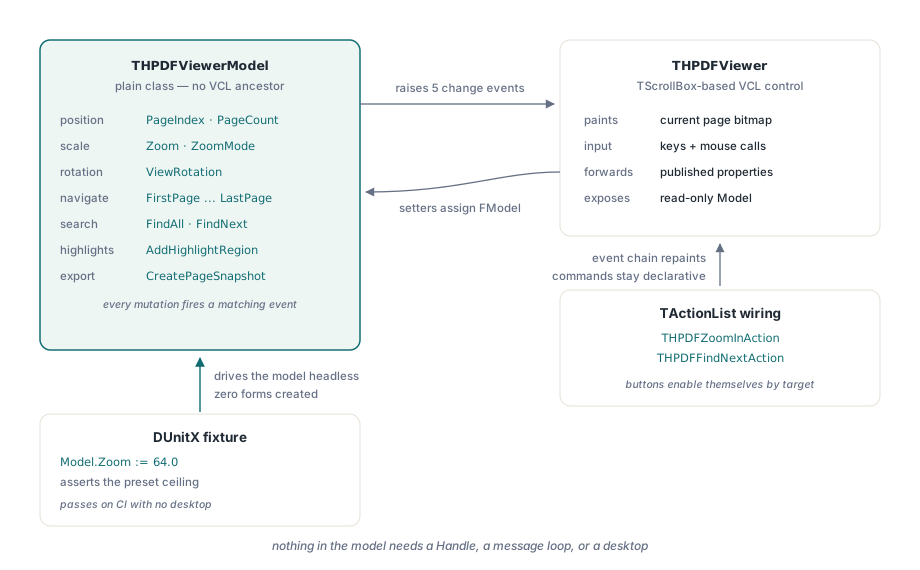
HotPDF separates its Delphi PDF viewer into two pieces: THPDFViewerModel, a plain class that owns zoom, rotation, search, highlight, and navigation state with no window-handle dependency, and THPDFViewer, a TScrollBox-based control that turns that state into pixels. The split is what lets viewer logic run, and get tested, without ever creating a form
Most custom viewer controls do not look like this. Zoom level lives in a private field on the control, page navigation clamps its bounds inside a button's OnClick handler, and the only way to know whether Ctrl+scroll respects a zoom ceiling is to run the app, click, and look. A control built that way works fine until it needs a regression suite, or a second host — a print-preview dialogue, a thumbnail rail, a batch reviewer with no visible window at all — and the state you need turns out to be welded to a TWinControl that insists on a real handle before it will do anything
Why does a PDF viewer control need an MVC split at all?
A PDF viewer needs this kind of split because its state and its presentation change for different reasons and at different rates. Page index, zoom, view rotation, search hits, and highlight regions are business state: they can be computed, validated, and serialised without a single pixel on screen. Painting a bitmap, capturing the mouse, and drawing a marquee-selection rectangle are presentation concerns that only make sense once a control exists. HotPDF keeps the first group in THPDFViewerModel, a class with no VCL windowing ancestor at all, and the second group in THPDFViewer, which owns a model instance and reacts to it — closer to a Model-View pair than a textbook three-tier MVC, since there is no separate Controller class and THPDFViewer itself turns raw keyboard and mouse events into model calls. What matters more than the label is the dependency direction: nothing about THPDFViewerModel requires a Handle, a message loop, or a visible desktop, which is precisely what lets HotPDF's own test suite drive paging, zoom clamping, keyboard commands, and coordinate round-trips through DUnitX without opening a window
uses
  DUnitX.TestFramework,
  HPDFDoc, HPDFViewerModel;

type
  [TestFixture]
  TViewerModelTests = class
  public
    [Test]
    procedure ZoomInStopsAtTheTopPresetLevel;
  end;

procedure TViewerModelTests.ZoomInStopsAtTheTopPresetLevel;
var
  Doc: THotPDF;
  Model: THPDFViewerModel;
begin
  Doc := THotPDF.Create(nil);
  Model := THPDFViewerModel.Create;
  try
    Doc.LoadFromFile('sample.pdf');
    Model.Document := Doc;
    Model.Zoom := 64.0;          // top of the preset table (6400%)
    Model.ZoomIn;                // already at the ceiling
    Assert.AreEqual(64.0, Model.Zoom, 0.0001);
  finally
    Model.Free;
    Doc.Free;
  end;
end;
What THPDFViewerModel actually owns
THPDFViewerModel owns everything a viewer needs to answer what should currently be on screen without owning how to draw it. PageIndex, PageNumber, and PageCount track position; Zoom and ZoomMode (vzmActualSize, vzmFitPage, vzmFitWidth, vzmCustom) track scale; ViewRotation tracks a non-destructive on-screen rotation that never touches the page's own /Rotate entry. Navigation methods — FirstPage, PriorPage, NextPage, LastPage — and zoom methods — ZoomIn, ZoomOut, walking a fixed table of nineteen preset levels from 5% to 6400% — live here too, alongside FindAll/FindNext/FindPrevious for text search and AddHighlightRegion/RemoveHighlightRegion/ClearHighlightRegions for persistent page annotations a caller wants to keep between renders. The model owns output as well as input: CreateCurrentPageSnapshot and CreateCurrentPageMetafile export exactly the page currently on screen, and PrintCurrentView sends that same current view — current page, current zoom-derived DPI, current rotation — to a TPrinter, a narrower, view-scoped job than the document-wide print pipeline covered in HotPDF's TPrinter printing walkthrough. Every mutation that matters raises a matching event too — OnPageChange, OnZoomChange, OnSearchChange, OnHighlightChange, OnViewRotationChange — so a subscriber finds out what changed without polling
How does THPDFViewer know when to repaint?
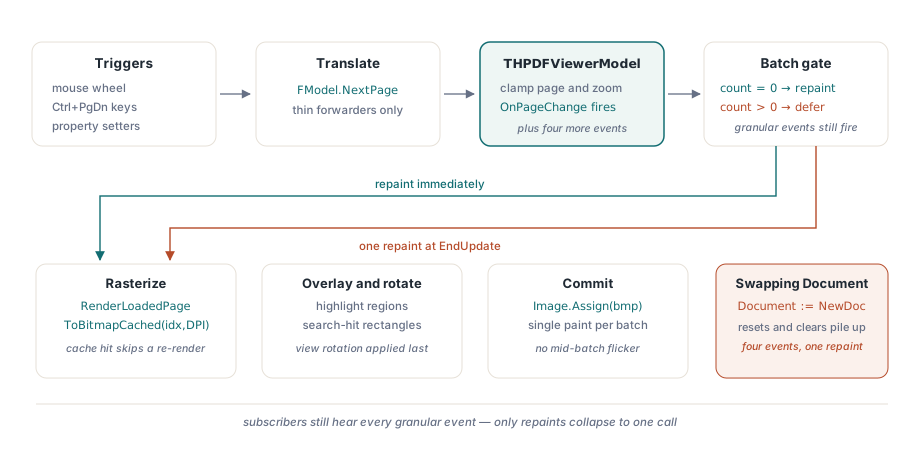
THPDFViewer knows when to repaint because it subscribes to the model instead of guessing. THPDFViewer's constructor creates a private THPDFViewerModel, then wires every one of its notification events — OnBeginUpdate, OnEndUpdate, OnHighlightChange, OnPageChange, OnSearchChange, OnViewRotationChange, OnZoomChange — to a matching private handler. Each handler's job is small: call RefreshDocument, the method that actually rasterises the current page through the same cached page renderer described in HotPDF's page-to-bitmap rendering internals, then composites highlight boxes and search hits on top and applies the current view rotation. Published properties like PageIndex, Zoom, ZoomMode, and ViewRotation are thin forwarders — the getter reads FModel.PageIndex, the setter writes FModel.PageIndex — so from the Object Inspector or from code, the control looks like it holds the state directly, even though THPDFViewerModel is the only place that state actually lives. Callers are not limited to the forwarded subset either: THPDFViewer exposes the model itself through a read-only Model: THPDFViewerModel property, so code that wants FindFormFieldAt or PrefetchCurrentPageSnapshots — neither of which the control re-exposes — can reach past the wrapper and call the model directly
procedure THPDFViewer.RefreshDocument;
var
  Bitmap: TBitmap;
  DPI: Integer;
begin
  // simplified: the real method also resolves fit-mode DPI
  // and composites highlight and search-hit rectangles first
  if (FModel.Document = nil) or (FModel.PageIndex < 0) then Exit;
  DPI := Round(96 * FModel.Zoom);
  Bitmap := FModel.Document.RenderLoadedPageToBitmapCached(FModel.PageIndex, DPI);
  try
    FModel.ApplyViewRotation(Bitmap);
    FImage.Picture.Bitmap.Assign(Bitmap);
  finally
    Bitmap.Free;
  end;
end;
BeginUpdate and EndUpdate: stopping redraw storms
BeginUpdate and EndUpdate exist because a single logical change often touches several pieces of state at once, and repainting after each piece would be wasteful and visually noisy. Swapping the loaded document is the clearest example: assigning THPDFViewerModel.Document resets view rotation, clears search hits, clears highlight regions, and jumps to page one, and each of those steps normally fires its own change event. THPDFViewerModel wraps that sequence in BeginUpdate/EndUpdate, a reference-counted pair where nested calls only fire OnBeginUpdate on the transition into the outermost call and OnEndUpdate on the transition back out. THPDFViewer tracks that same depth on its side and skips RefreshDocument for every granular event while the count is above zero, then repaints exactly once when the batch closes. The granular events still fire during the batch, so a subscriber that only cares about OnSearchChange still hears about it; it is only the control's own repaint that gets collapsed to one call instead of four
How does marquee highlighting map a mouse drag back to PDF coordinates?
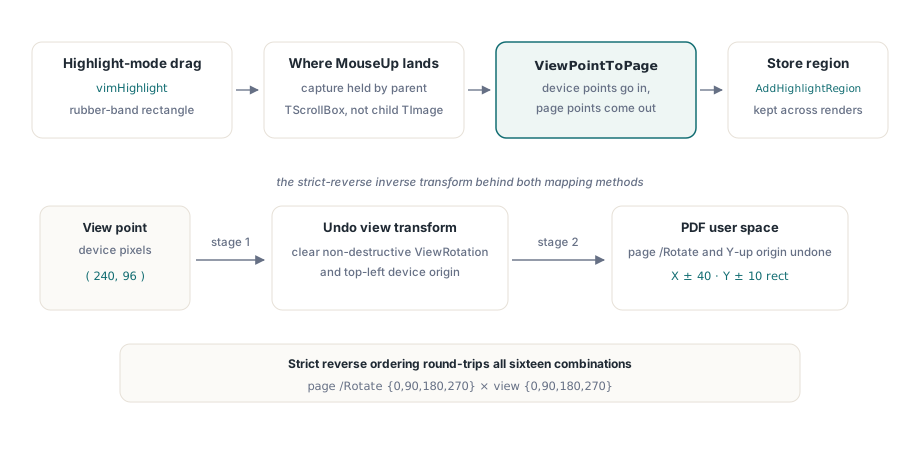
Marquee highlighting maps a mouse drag back to PDF coordinates through a pair of model methods built for exactly that round trip: PagePointToView and ViewPointToPage. Both take a page index, a DPI, and a point, and both resolve the transform in two stages — first the page's own /Rotate entry and its bottom-left PDF origin, then the view's separate, non-destructive ViewRotation and the viewer's top-left device origin — specifically so the inverse direction can undo the two stages in strict reverse order and round-trip correctly across all sixteen combinations of page rotation and view rotation. THPDFViewer calls ViewPointToPage when the user releases the mouse after dragging a rectangle in vimHighlight interaction mode, turns the two device points into a THPDFRectangle in page space, and hands it to Model.AddHighlightRegion. One detail worth knowing if you build something similar: mouse capture belongs to the TScrollBox-descended viewer, not to the child TImage the bitmap is painted into, because TControl.MouseCapture is protected and only the parent control can claim it — so a drag that leaves the image's bounds before the button comes up still resolves through the viewer's own overridden MouseMove/MouseUp instead of getting silently dropped by the child control
var
  ViewPt, PagePt: THPDFViewerPoint;
  Rect: THPDFRectangle;
begin
  ViewPt.X := 240;   // device pixels inside the rendered image
  ViewPt.Y := 96;
  if Model.ViewPointToPage(Model.PageIndex, ViewPt, PagePt,
     RenderedDPI) then                 // DPI you last rendered at
  begin
    Rect.Left := PagePt.X - 40;  Rect.Bottom := PagePt.Y - 10;
    Rect.Right := PagePt.X + 40; Rect.Top := PagePt.Y + 10;
    Model.AddHighlightRegion(Model.PageIndex, Rect);
  end;
end;
What the split buys you beyond a green test suite
The payoff is not limited to tests passing in a CI job with no desktop session. Because THPDFViewer forwards to THPDFViewerModel rather than duplicating its logic, HotPDF was able to add a third consumer — THPDFViewerAction and concrete subclasses like THPDFZoomInAction and THPDFFindNextAction — that plug navigation, zoom, search, and rotation into a standard Delphi TActionList, so a toolbar button or a menu item can drive the viewer declaratively, enabling itself automatically based on whether a viewer is currently resolved as the action's target. None of that layer had to know anything about bitmaps or GDI; it calls Viewer.NextPage or Viewer.Model.FindNext, and the existing event chain takes care of the repaint. And because nothing in THPDFViewerModel references TScrollBox, TImage, or a window handle, the state machine underneath is not welded to that one control either — the same model could sit behind a different rendering surface without touching a line of navigation, zoom, or search logic
Where the render cache helps, and where it does not
THPDFViewerModel's render cache helps within a loaded document, but it does not change what loading that document costs in the first place. CreatePageSnapshot, CreateCurrentPageSnapshot, and the prefetch methods PrefetchPageSnapshots/PrefetchCurrentPageSnapshots all route through the same cached renderer keyed by page and DPI, so paging back to a page you already viewed at the same zoom level is a cache hit rather than a re-render, and prefetching a small radius of neighbouring pages smooths the common case of a reader paging forward one page at a time. None of that touches the cost of the initial LoadFromFile call, though, and a viewer built to open whatever a user drags onto it eventually meets a file large enough to make that call the actual bottleneck. For the tiered, handle-based alternative to a full load — worth knowing about before that day arrives — see the companion article on the Direct File API for large PDFs
The Model and View classes described here are two more pieces of the same loaded-document surface used throughout the HotPDF Delphi Component for Delphi and C++Builder, built to be driven from a form, from a TActionList, or from neither at all