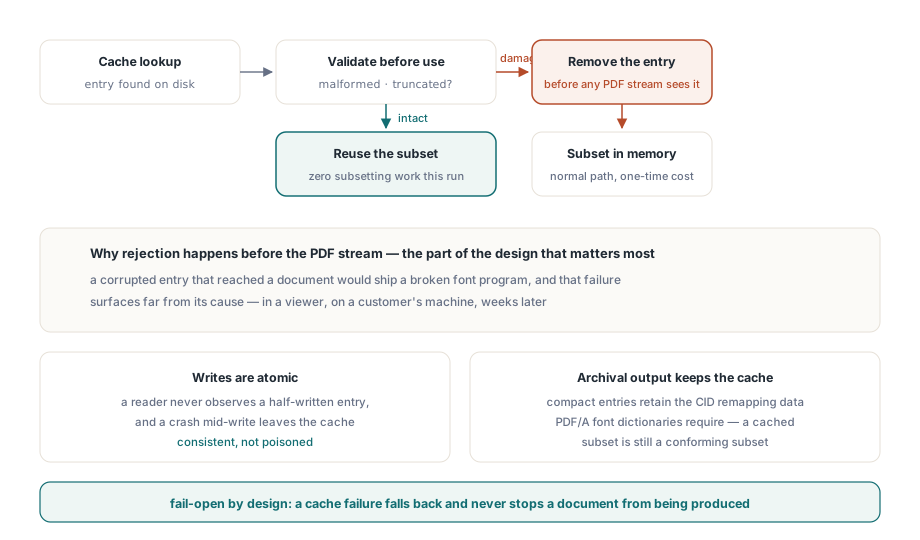
HotPDF can retain TrueType and OpenType font subsets on disk and reuse them across documents and process runs. A batch that renders ten thousand statements with the same three fonts therefore subsets each font once rather than ten thousand times. The cache is configured through two properties, inspected through one record, and safe to leave enabled: if it fails, ordinary in-memory subsetting takes over and document generation continues
Subsetting is expensive for a reason. Building a subset means walking the glyph closure, rewriting loca and glyf, rebuilding cmap and hmtx, and emitting a CID mapping the PDF can address. For one document that cost disappears into the noise. For a report server producing documents in a loop, it is often the largest single block of CPU time in the run
What makes a cache hit possible
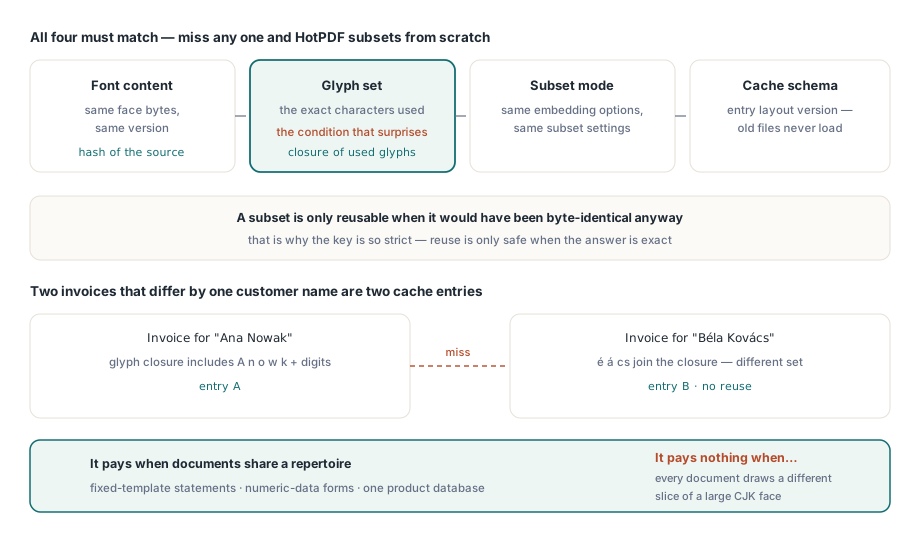
Four things must match: the font content, the set of used glyphs, the subset mode, and the cache schema. Miss any one and HotPDF subsets from scratch, because a subset is only reusable when it would have been byte-identical anyway
The glyph set is the condition that surprises people. Two invoices that differ by a single customer name use different glyph sets, and therefore produce different subsets and different cache entries. The cache pays off when documents share a glyph repertoire — statements from a fixed template, forms whose variable data is numeric, catalogues drawn from one product database — and pays nothing when every document draws a different slice of a large CJK face. Measure before assuming which case you are in
var
  Pdf: THotPDF;
  Info: THPDFFontSubsetCacheInfo;
begin
  Pdf := THotPDF.Create(nil);
  try
    Pdf.EnableFontSubsetting := True;
    Pdf.FontSubsetCacheFolder := 'C:\ProgramData\Reports\fontcache';
    Pdf.FontSubsetCacheMaxBytes := 64 * 1024 * 1024;   // 64 MiB, default is 256
    // ... generate the batch ...
    Info := Pdf.GetFontSubsetCacheInfo;
    LogFmt('subset cache: %d hits, %d misses, %d bytes in %d files',
      [Info.HitCount, Info.MissCount, Info.CurrentBytes, Info.FileCount]);
  finally
    Pdf.Free;
  end;
end;
How do you know the cache is doing anything?
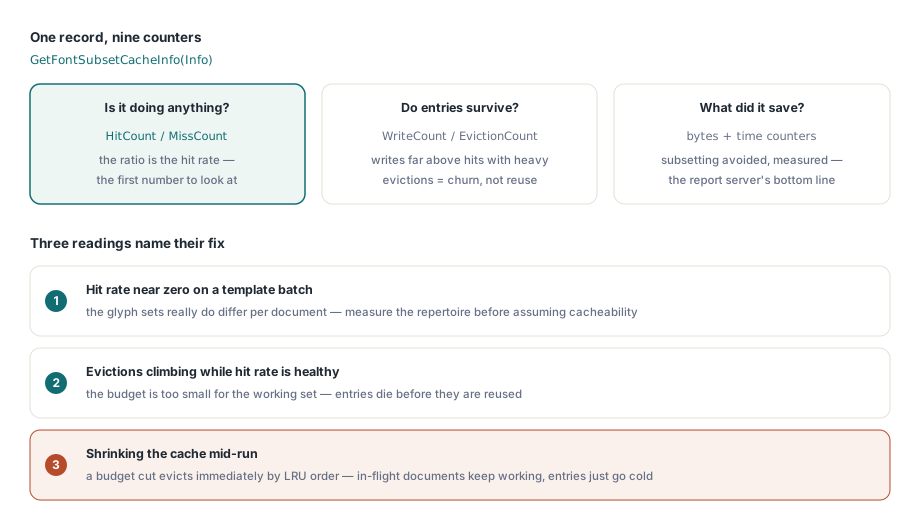
GetFontSubsetCacheInfo returns nine counters, and the ratio between the first two answers the question directly. HitCount and MissCount give the hit rate. WriteCount and EvictionCount show whether entries survive long enough to be reused or are being pushed out by a budget that is too small. CurrentBytes and FileCount report what is on disk right now
The remaining three are the ones worth alerting on. CorruptCount counts entries that failed validation and were removed — a few after an unclean shutdown are normal, a steady stream means the storage is unreliable. RejectedCount counts entries refused before use. WriteFailureCount counts entries that could not be written at all, which usually means a permissions problem on the folder rather than anything about fonts. None of these three stop document generation, which is exactly why you have to look at them: a cache that silently never writes looks the same from the outside as a cache that works, except for the CPU bill
Eviction, budgets and the moment you shrink one
FontSubsetCacheMaxBytes defaults to 268435456 bytes, that is 256 MiB, and it can be lowered at runtime. Lowering it triggers immediate least-recently-used eviction rather than waiting for the next write, so a service that reacts to disk pressure can free space at the moment it decides to, not at some later point it does not control
Setting FontSubsetCacheFolder to an empty string disables the disk tier without clearing anything already stored, and without changing a single byte of font output. That is the property to reach for when you want to isolate the cache during troubleshooting: turn it off, run the same batch, and compare the produced PDFs. They should be identical, because the cache stores a result, not a policy
What the cache does when an entry is damaged
It removes it and subsets normally. Malformed or truncated entries are rejected before the subset can reach a PDF stream, which is the part of the design that matters most: a corrupted cache entry that made it into a document would produce a PDF with a broken font program, and that failure would surface far from its cause — in a viewer, on a customer's machine, weeks later
Writes are atomic, so a reader never observes a half-written entry, and a crash mid-write leaves the cache consistent rather than poisoned. Compact subset entries retain the CID remapping data that PDF/A font dictionaries require, so a cached subset is still a conforming subset — archival output does not have to bypass the cache to stay valid
// Reset the disk tier after a font upgrade or a schema change
Pdf.ClearFontSubsetCache;

// Or move it somewhere writable and let the budget apply immediately
Pdf.SetFontSubsetCacheFolder('D:\cache\fonts');
Where to put the folder in a real deployment
Three properties decide this: the folder must be writable by the account the service runs as, it should sit on local storage rather than a network share, and it should not be inside a directory that a deployment step wipes. A cache on a share turns every miss into a round trip and every hit into two; a cache under an application folder that the installer recreates is a cache that starts cold after every update
For multi-instance services, give each instance its own folder unless you have confirmed the storage handles concurrent atomic replacement the way you expect. The cost of a duplicated entry is one extra subsetting pass; the cost of debugging a shared-cache race is an afternoon
When to reach for something else
The cache reduces repeated work. It does not reduce the work of the first document, and it does not help a workload whose glyph sets never repeat. If your output is dominated by one enormous CJK face used across unpredictable text, the more effective lever is the subsetting closure itself — which glyphs get pulled in, and why — covered in the notes on font subset closure and shaping glyphs. If your batch is slow for reasons that turn out not to be fonts at all, the walkthrough of report output with fonts and images shows where the other time usually goes, and the case study on the EndDoc font subset ordering bug is a reminder that subsetting correctness and subsetting speed are separate problems
HotPDF is a native VCL PDF component for Delphi and C++Builder, and the subset cache is part of the library rather than an add-on service, so a report server gets it by setting one folder path — see the HotPDF Delphi component page for the full font and performance feature list