Generate a report, embed a TrueType font, and the output opens correctly in every viewer you try. The glyphs are right, the text is selectable, the file is valid. The only thing wrong is the size. A document that used a few dozen Latin characters carries the whole 350 KB font. A document that printed a paragraph of Chinese carries a 14 MB CJK font instead of the half-megabyte slice it should need. No exception was raised, no warning was logged, and the file passed validation. This is what a misordered finalization step looks like from the outside: nothing fails, and the only evidence is a number that is too large
The bug that produced it lived in HotPDF for one release line and has since been fixed. It is worth writing up not as a defect notice but as a lesson, because the shape of the mistake is general. Any document engine has a finalization stage that mutates objects just before it writes them, and the correctness of that stage depends entirely on the order of its steps relative to serialisation. Get one step on the wrong side of the write and it does nothing, quietly
What font subsetting is supposed to do
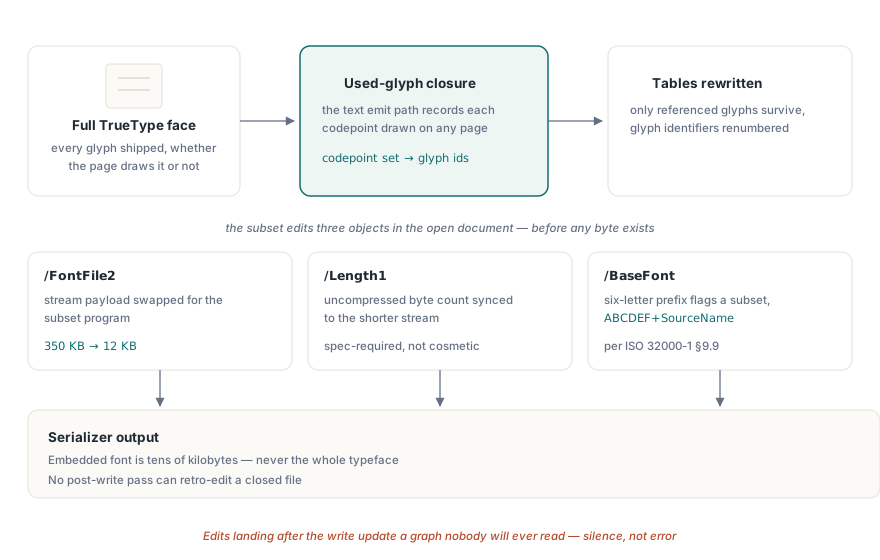
A subset font is the part of a TrueType file that a document actually uses. ISO 32000-1 §9.9 describes how an embedded font program rides in a stream referenced by the font descriptor, and for a TrueType program that stream is /FontFile2 with a /Length1 giving the uncompressed byte count. Subsetting rewrites the glyf and loca tables so they contain only the glyphs the document references, renumbers the glyph identifiers, and prefixes the /BaseFont name with a six-letter tag such as ABCDEF+ to mark the font as a subset, exactly as the spec requires. A Latin face that subsets to ten or fifteen kilobytes is the difference between a lean PDF and one that ships an entire typeface for the sake of one heading
The point at which this happens matters. Subsetting is not a transform you apply to bytes already on disk. It edits the in-memory object graph: it shrinks the /FontFile2 stream content, fixes up /Length1, and rewrites the /BaseFont string. All of that has to be in place when the serializer walks the graph and emits bytes. If the edits land after the bytes are written, they update objects nobody will ever read
The symptom, and why nothing complained
The reported behaviour was full fonts in the output with no diagnostic. A user who registered a Unicode TrueType font and produced a normal document found that the embedded font object was the same length as the source .ttf file, and that the /BaseFont name carried no six-letter subset prefix. The output never shrank between runs that used ten glyphs and runs that used ten thousand
The absence of any error is the part that makes this class of bug expensive. A subsetting routine that runs at the wrong time still runs. It walks the accumulated codepoint usage, builds a perfectly correct subset, and applies it to the object graph in memory. Internally the work is done and the call returns cleanly. The only thing wrong is that the object graph it edited is no longer the thing being written, because the writer already finished. From the caller's point of view the document was produced and saved without incident, which is precisely the impression a silent failure gives
The root cause was finalization order
In HotPDF the closing work happens inside EndDoc. The subsetting step is an internal routine named BuildAndApplyUnicodeFontSubset. It reads the per-document set of used codepoints, kept in a bitmap that the text emit path fills as glyphs are shown, maps each used codepoint through the cached codepoint-to-glyph table to a real glyph identifier, and rewrites the font program around that closure. When a Unicode TrueType font is registered, the emit path sets a bit in the used-codepoints set for every character it draws, so by the time the document closes the engine knows exactly which glyphs the subset must keep
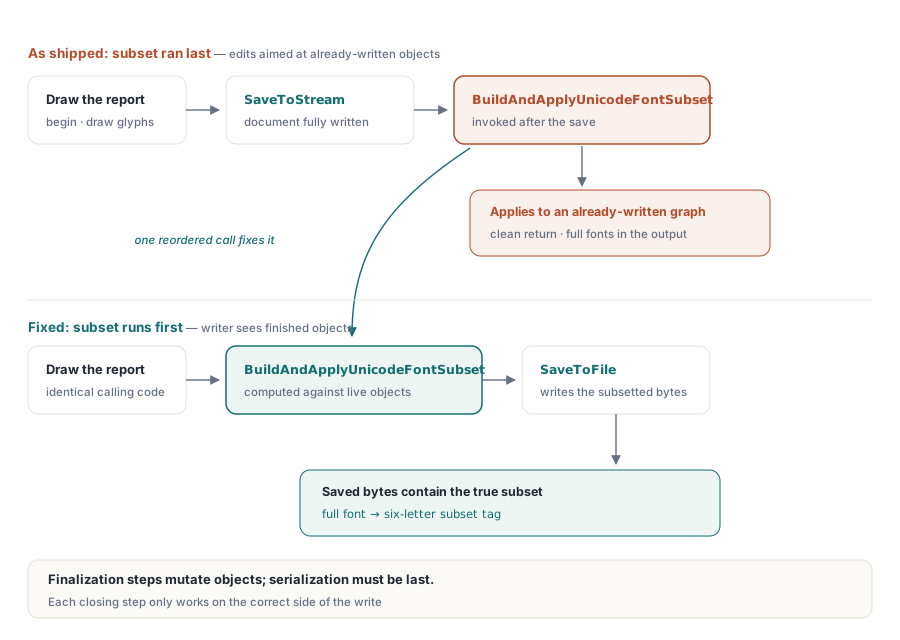
The defect was that BuildAndApplyUnicodeFontSubset was being invoked after SaveToStream or SaveToFile had already serialised the document. The subsetter's edits to /FontFile2, its corrected /Length1, and the six-letter /BaseFont prefix were all computed against an object graph that had already been turned into bytes. The fix was a one-line reordering: move the subset call ahead of serialisation, so the writer emits the subsetted font rather than the original. The corrected sequence runs the subsetter first and serializes afterward
var
  Pdf: THotPDF;
begin
  Pdf := THotPDF.Create(nil);
  try
    Pdf.RegisterUnicodeTTF('C:\Fonts\NotoSansSC-Regular.ttf');
    Pdf.BeginDoc;
    Pdf.CurrentPage.SetFont('Noto Sans SC', [], 12);
    Pdf.CurrentPage.TextOut(72, 760, 0, '报表标题 Report Heading');
    Pdf.EndDoc;                 // subsetting runs here, before the write
    Pdf.SaveToFile('Report.pdf');
  finally
    Pdf.Free;
  end;
end;
With the order corrected, nothing about the calling code changes. Subsetting is on by default once a Unicode TrueType font has been registered. You register the font, begin the document, draw, and end it, and the subset is built from the glyphs you used before the bytes leave memory
Why one misplaced step is a whole category
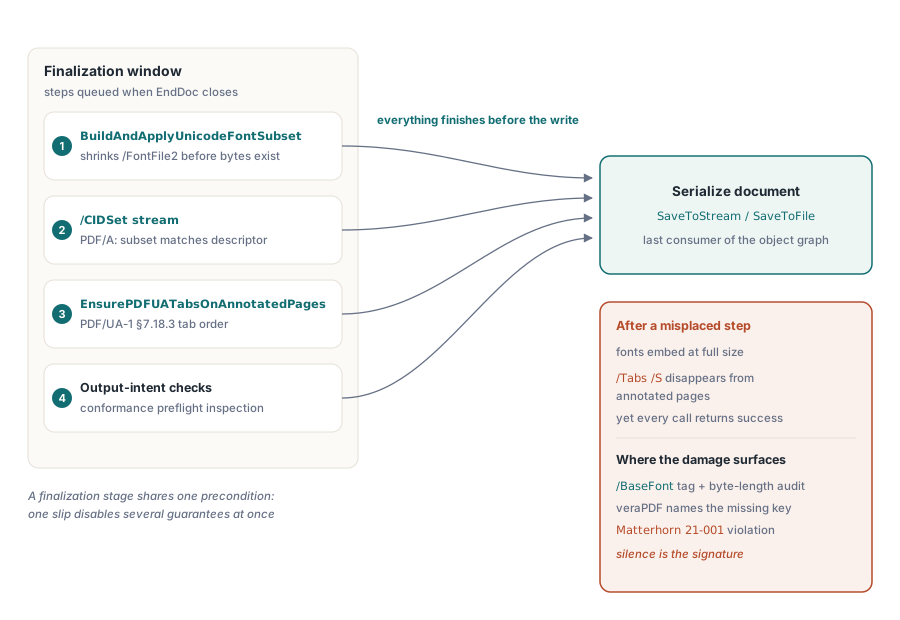
The reason this is worth a lesson rather than a footnote is that EndDoc emits a list of closing steps, and every one of them is sensitive to its position relative to the write. Font subsetting is one. PDF/A output requires a /CIDSet stream that enumerates exactly the glyph identifiers present in the subset, a constraint ISO 19005 imposes so a validator can confirm the embedded program matches what the font descriptor claims; that stream is emitted in the same finalization window and depends on the subset having been built first. PDF/UA-1 requires, by ISO 14289-1 §7.18.3, that every page carrying an annotation declare /Tabs with the value /S, and an internal routine named EnsurePDFUATabsOnAnnotatedPages stamps that key during the same stage. Output-intent checks run there too
The same ordering fault that disabled subsetting also dropped the PDF/UA tab-order key on annotated pages, because that step sat on the same wrong side of the write. veraPDF and PAC report a missing /Tabs /S as a violation of Matterhorn protocol checkpoint 21-001. So a single misplaced call did not merely inflate file size; it silently broke an accessibility conformance requirement at the same time, with the same lack of any error. That is the hazard of a finalization stage: its steps share a precondition, and a single ordering mistake can take several of them out at once while every call still returns success
How a silent emit failure is actually caught
A bug that raises no exception is not caught by running the program. It is caught by inspecting the output and comparing it against what the input should have produced. For font subsetting the checks are concrete. Compare the output file size against a rough expectation: a document that touched a handful of glyphs should not be the size of a full typeface. Open the embedded font object and read its byte length; a subsetted /FontFile2 for a Latin face is a small fraction of the source file. Read the /BaseFont name and confirm the six-letter prefix is present, because its absence is a direct signal that no subset was applied
var
  Pdf: THotPDF;
  Output: TMemoryStream;
begin
  Output := TMemoryStream.Create;
  try
    Pdf := THotPDF.Create(nil);
    try
      Pdf.RegisterUnicodeTTF('C:\Fonts\DejaVuSans.ttf');
      Pdf.BeginDoc;
      Pdf.CurrentPage.SetFont('DejaVu Sans', [], 11);
      Pdf.CurrentPage.TextOut(72, 760, 0, 'Subset me');
      Pdf.EndDoc;
      Pdf.SaveToStream(Output);
    finally
      Pdf.Free;
    end;
    // A few glyphs from a ~700 KB face must not yield a multi-hundred-KB stream.
    if Output.Size > 100 * 1024 then
      raise Exception.Create('Font subset did not shrink the output');
  finally
    Output.Free;
  end;
end;
For PDF/A output the check is sharper still, because a validator does the work for you. Set the conformance level and run the result through veraPDF: a missing /CIDSet, or a subset that does not match the descriptor, is reported as a failed clause rather than left for you to notice by eye. The conformance switches that drive this finalization work are properties on the document. PDFACompliance takes a string such as '2B' for PDF/A-2 Level B, and PDFUACompliance is a boolean that turns on the tagged-PDF and tab-order requirements
Pdf := THotPDF.Create(nil);
try
  Pdf.PDFACompliance := '2B';     // PDF/A-2 Level B, drives /CIDSet emission
  Pdf.PDFUACompliance := True;    // stamps /Tabs /S on annotated pages
  Pdf.RegisterUnicodeTTF('C:\Fonts\NotoSansSC-Regular.ttf');
  Pdf.BeginDoc;
  Pdf.CurrentPage.SetFont('Noto Sans SC', [], 12);
  Pdf.CurrentPage.TextOut(72, 760, 0, '合规报告');
  Pdf.EndDoc;
  Pdf.SaveToFile('Report_PDFA.pdf');
finally
  Pdf.Free;
end;
The engineering lesson
Two rules fall out of this. The first is that any finalization step which mutates objects has to run before those objects are serialised, and the closing stage of a document engine should be read as an ordered pipeline where serialisation is the last action, not one action among several. The second is the one that cost the most time here: for an emit step, the absence of an error is not evidence of success. A routine that builds the right subset and applies it to the wrong, already-written graph reports nothing wrong, because from its own perspective nothing was. Verification has to look at the artifact, not the return code. Check the output size, read the embedded font's byte length and its /BaseFont prefix, and let veraPDF judge the PDF/A output where a missing /CIDSet turns a silent shortfall into a named failure
The producer side of font handling, how faces are registered and embedded for report output, is covered in our article on fonts and images in report output. The validation side, where these finalization steps are checked against the standards, is covered in the walkthrough on PDF/A and PDF/UA validation. Both pair with the subsetting and conformance work described here, which ships as part of the HotPDF Delphi Component for Delphi and C++Builder alongside the loading, editing, encryption, and signing APIs covered elsewhere on this blog