HotPDF THotPDF.CompressDocument is a single switch that makes BeginDoc produce the smallest lossless PDF the component can write: FlateDecode at the maximum level, a cross-reference stream with object streams, font subsetting and compact font subsets that renumber the kept glyphs behind an explicit /CIDToGIDMap. EndDoc then puts your own settings back. A three-page Arial and SimSun test document dropped from 10.2 MB to 20 KB with identical rendering
What does CompressDocument actually switch on?
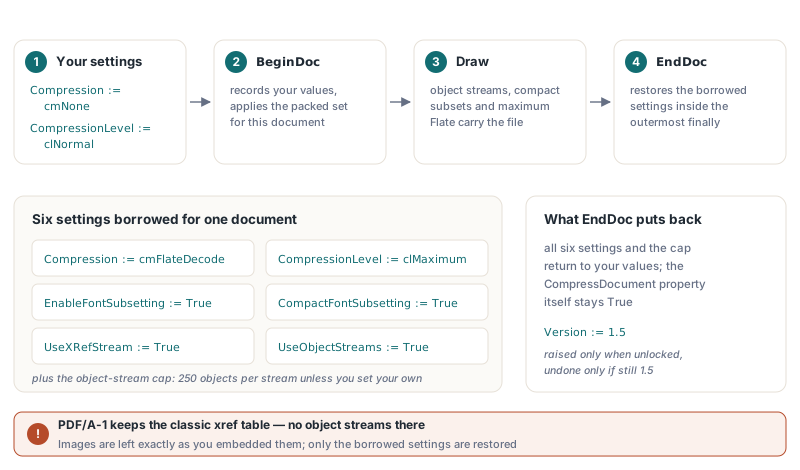
CompressDocument overrides six writer settings, plus the object-stream cap, for one document and restores all of them afterwards. At BeginDoc, before the PDF version settles, HotPDF records your values and sets Compression to cmFlateDecode, CompressionLevel to clMaximum, turns on EnableFontSubsetting and CompactFontSubsetting, and enables UseXRefStream plus UseObjectStreams (ISO 32000-1 §7.5.7 and §7.5.8). Object streams need PDF 1.5, so an older Version is raised to 1.5 when it is not locked. PDF/A-1 forbids both structures, so a PDF/A-1 document keeps its classic cross-reference table and only gets the Flate and font work. Images are left exactly as you embedded them
var
  Pdf: THotPDF;
begin
  Pdf := THotPDF.Create(nil);
  try
    Pdf.AutoLaunch := False;
    Pdf.FileName := 'invoice-2026-1042.pdf';
    Pdf.CompressDocument := True;    // applied by BeginDoc, undone by EndDoc
    Pdf.BeginDoc;
    Pdf.CurrentPage.SetFont('Arial', [], 12);
    Pdf.CurrentPage.TextOut(40, 40, 0, 'Invoice 2026-1042');
    Pdf.EndDoc;
  finally
    Pdf.Free;
  end;
end;
The restore happens in the outermost finally of EndDoc, so an exception halfway through a report does not leave a long-lived component stuck on maximum compression for the next job. The CompressDocument property itself stays True; only the six settings it borrowed go back. The version is handled with more care. HotPDF undoes its own raise to 1.5 only if the document still ends at 1.5, so when another feature pushed the file to 1.6 during the run (an embedded OpenType font, say), the higher version stays, exactly as it would have without compression
Why are font subsets still large without compaction?
A classic TrueType subset drops the outlines you never draw but keeps every glyph ID where it was, and that numbering is what keeps it heavy. The content stream shows CIDs that equal the original GIDs, so the subset has to keep a loca offset and an hmtx entry for every slot up to the highest glyph it retains, empty or not. For a Latin face that overhead is noise. For a CJK face such as SimSun, whose ideographs sit deep in a very large glyph table, two Chinese characters drag along tables sized for the whole font. The font subset closure rules for shaped glyphs decide which glyphs survive; compaction is about how much the survivors cost
CompactFontSubsetting renumbers the kept glyphs into a dense range starting at zero and writes a /CIDToGIDMap stream on the CIDFont, which ISO 32000-1 §9.7.4.2 defines as a table of two-byte GIDs indexed by CID. That table is the whole trick. Content streams, the /W widths array and the ToUnicode CMap all keep the original CIDs, so nothing already written has to change; only the lookup from CID to glyph moves into the map. In the test that motivated the feature, SimSun with two characters went from 24.8 KB of font data to 3.1 KB
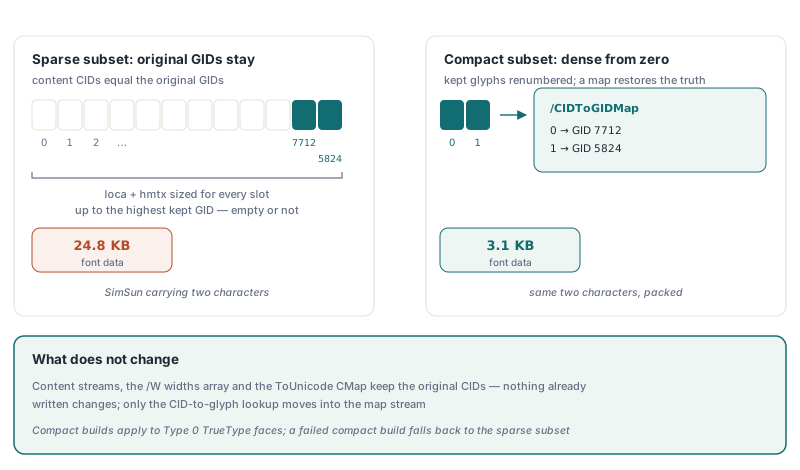
Compaction has firm limits, and it degrades quietly rather than failing. HotPDF builds compact subsets only for Type 0 TrueType faces, both those set through SetFont with subsetting on and the face registered through RegisterUnicodeTTF. A simple TrueType font finds its glyphs through the cmap inside the font program, which renumbering would break, so it keeps the sparse subset. OpenType-CFF faces have no compact path either. A compact build that fails falls back to the sparse subset instead of raising. The property is off by default, so existing output stays byte-identical, while under PDF/A the registered Unicode face always gets a compact subset
Pdf.EnableFontSubsetting := True;
Pdf.CompactFontSubsetting := True;   // usable without CompressDocument
Pdf.BeginDoc;
Pdf.CurrentPage.SetFont('SimSun', [], 12);
Pdf.CurrentPage.TextOut(40, 40, 0, WideString('Total: '#$4E2D#$6587));
Pdf.EndDoc;
How does the packed writer squeeze the file structure?
Once fonts and streams are small, the dictionaries and the cross-reference data become the largest remaining cost, so the object-stream writer behind CompressDocument trims those as well. The object streams and incremental updates guide covers the container format itself; the compression path adds four refinements on top:
- Compact syntax per ISO 32000-1 §7.2.2: a space is written only between two tokens that would otherwise run together as regular characters, so
/Type /Pagebecomes/Type/Page - Cross-reference stream fields take any width §7.5.8.2 allows, so a file under 16 MB stores each offset in 3 bytes instead of 4
- Up to 250 objects go into each object stream instead of the usual 100, unless you set your own cap through
ConfigureAdaptiveObjectStreamPacking - When the file is not encrypted, the Catalog and the Info dictionary are packed into object streams too; encrypted output keeps them at the top level
The compact syntax came with a trap worth knowing if you extend the writer. Signing fills in the signature after the file is written by searching the bytes for the literal placeholders /ByteRange ( and /Contents <, and compact spelling would turn those into /ByteRange( and /Contents<, which the search never finds. Signature dictionaries (Type Sig or DocTimeStamp, FT Sig) and the encryption dictionary therefore keep the spaced layout. A related defect affected builds before v2.766.41: every object-stream save, CompressDocument included, began with two %PDF- header lines, so upgrade if a strict validator flags your output
Can you compress a PDF that is already loaded?
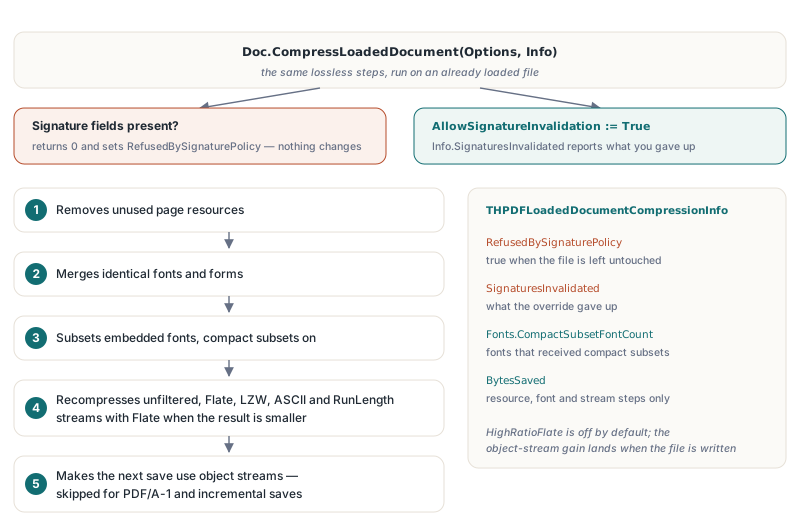
Yes, through the options overload CompressLoadedDocument(Options, Info), which runs the same lossless steps on an existing file. With THPDFLoadedDocumentCompressionOptions.Default it removes unused page resources, merges identical fonts and forms, subsets embedded fonts with compact subsets on, recompresses unfiltered, Flate, LZW, ASCII and RunLength streams with Flate when the result is smaller, and makes the next save use object streams. HighRatioFlate is off by default, and object streams are skipped for PDF/A-1 and incremental saves. The parameterless CompressLoadedDocument overload is the older, narrower call that only Flate-compresses uncompressed streams
var
  Doc: THotPDF;
  Options: THPDFLoadedDocumentCompressionOptions;
  Info: THPDFLoadedDocumentCompressionInfo;
begin
  Doc := THotPDF.Create(nil);
  try
    Doc.AutoLaunch := False;
    Doc.LoadFromFile('quarterly-report.pdf');
    Options := THPDFLoadedDocumentCompressionOptions.Default;
    Doc.CompressLoadedDocument(Options, Info);
    if Info.RefusedBySignaturePolicy then
      Writeln(Format('Left untouched: %d signature fields', [Info.SignatureCount]))
    else
    begin
      Writeln(Format('Compact fonts: %d, stream bytes saved: %d',
        [Info.Fonts.CompactSubsetFontCount, Info.BytesSaved]));
      Doc.SaveLoadedDocument('quarterly-report-compact.pdf');
    end;
  finally
    Doc.Free;
  end;
end;
Two boundaries matter on the loaded path. Every step rewrites bytes a signature covers, so a document with signature fields is refused as a whole: the call returns 0, sets RefusedBySignaturePolicy and changes nothing, unless you set AllowSignatureInvalidation, after which Info.SignaturesInvalidated tells you what you gave up. Compaction is also more conservative here than on the creation path. HotPDF compacts only font programs used solely by CIDFontType2 fonts with an Identity /CIDToGIDMap, where CID equals GID, and skips programs with an existing map stream, a /CIDSet, or colour glyph tables such as COLR, sbix, CBDT or SVG, because the compact rebuild would drop the colour layers. Note also that Info.BytesSaved sums the resource, font and stream steps only; the object-stream gain shows up when the file is written
What results should you expect in practice?
The gains track how much of a file is uncompressed structure and oversized font data, not how many pages it has. The three-page Arial and SimSun sample shrank from 10.2 MB to 20 KB when generated with CompressDocument, and from 10.2 MB to 19.8 KB when the uncompressed original was loaded and run through CompressLoadedDocument, with identical rendering both ways. A PDF that is already compact barely moves: in the regression set, such files saved within -0.07% to +0.06% of their original size. Photo-heavy files gain little, because neither path touches image data
If you generate the same CJK reports every night, pair compact subsets with the persistent font subset cache on disk so the subsetting work is not repeated per run, and diff compressed outputs by object content rather than bytes, since one changed field re-Flates a whole object stream. Full property and record references are on the HotPDF Delphi PDF component product page