A shared stylesheet sets td { padding: 6pt !important }, and further down a template adds td.compact { padding: 2pt }. A browser prints the compact cells with 6 points of padding, because the CSS cascade sorts by importance before it ever compares specificity. A converter that lets the most specific rule win prints 2 points instead, and the invoice that looked right on screen comes out of the PDF pipeline with cramped tables. Getting HTML onto pages in Delphi means reproducing that ordering, plus deciding where content may break and what the converter is allowed to load
RenderHTML5 and the lightweight RenderHTML
HotPDF converts HTML to PDF pages through THPDFHTMLImporter.RenderHTML5, which parses the markup into a DOM, runs a CSS cascade over it and lays the result out as paged media, with tables, page breaks and optional AcroForm fields generated from HTML form controls. Everything happens in-process. There is no browser engine, no Chromium and no external converter, and the importer itself opens no files and no sockets
RenderHTML stays on the same class as a compact block renderer. Invoices and letters that applications already lay out against it keep producing the same output, because a full DOM and cascade would move things around in templates written for the simpler model. New work belongs on RenderHTML5. Its profile is versioned: the class function HTML5ProfileVersion returns the profile number (currently 1), and HTML5ProfileMilestones returns a set that names the four supported areas, himParserCascade, himPagedLayout, himTablesForms and himBoundedResources. Log the version next to each rendered document and you can tell later which profile produced a given PDF
The DOM matters more than it sounds. In HTML, html is the root element and body holds the content, yet a parser that hunts for text-bearing tags can easily treat both as text blocks, collapse the whole document into one paragraph and leave every selector, table and page-break rule with nothing to match. RenderHTML5 builds html and body as containers, so body > table or .invoice td match the structure the author actually wrote
Cascade order, spelt out
HotPDF resolves each property in four passes. Normal declarations from matching rules go first, ordered by specificity and then by source order. Inline normal declarations from the style attribute come next, then !important declarations from matching rules in the same specificity order, and finally inline !important. A later pass overrides an earlier one, which is exactly why the 6-point padding in the opening example survives
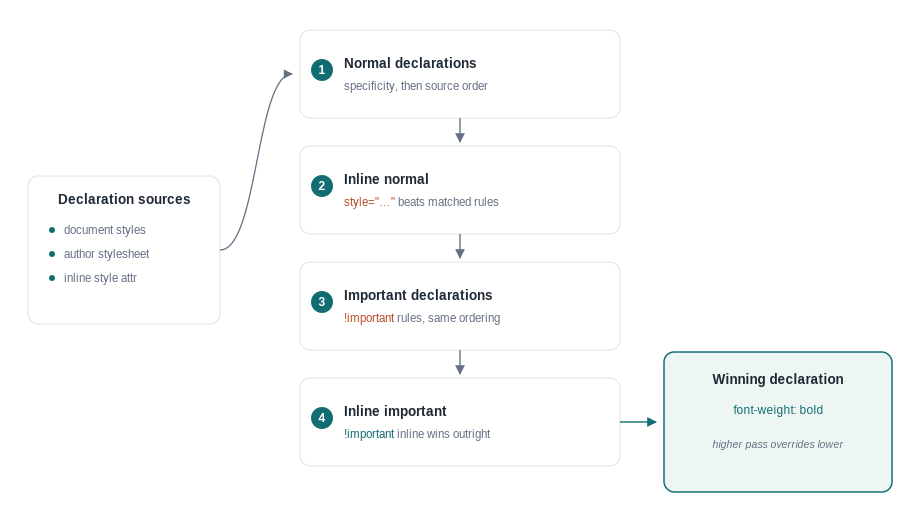
Specificity is counted the classic way: an ID selector adds 100, a class or attribute selector adds 10, an element name adds 1. The stylesheet you pass as the second argument of RenderHTML5 is parsed before any <style> block or linked stylesheet in the document, so it holds the lowest source order. A template rule with the same specificity therefore beats your house rule. That is the right default for presentation choices the template owns. For rules that must hold no matter what the template says, such as cell padding on a regulated statement, mark them !important, and keep them few
Shorthands hide a second trap. Store margin as one property, expand it at the end and let margin-left override it, and an earlier margin-left will beat a later margin: 0, while a normal per-side value can even beat an !important shorthand. The importer expands margin, padding and the numeric border shorthand into physical sides while it reads declarations, so every side goes through the same source-order and importance comparison. A shorthand with one invalid token is dropped as a whole rather than half-applied
uses
  SysUtils, HPDFDoc, HPDFHTMLImport;

var
  Pdf: THotPDF;
  Importer: THPDFHTMLImporter;
  Html, HouseCss: WideString;
begin
  Pdf := THotPDF.Create(nil);
  Importer := THPDFHTMLImporter.Create(Pdf);
  try
    Pdf.FileName := 'statement.pdf';
    Pdf.BeginDoc;

    Importer.Margin := 56;              // points; an @page margin replaces it
    Importer.BaseFontName := 'Arial';
    Importer.BaseFontSize := 10;
    Importer.CreateAcroForms := False;  // draw controls, do not create fields

    // Parsed before the template's own styles: equal-specificity template
    // rules win unless the house rule is marked !important
    HouseCss := '@page { margin: 56pt } ' +
                'td { padding: 4pt !important } ' +
                'tr.total { page-break-inside: avoid; font-weight: bold }';
    Html := LoadTemplate('statement.html');   // your own loader

    if not Importer.RenderHTML5(Html, HouseCss) then
      raise Exception.Create('no layout operations: empty or hidden markup');

    Pdf.EndDoc;

    Writeln(Format('profile=%d nodes=%d rules=%d ops=%d breaks=%d tables=%d',
      [Importer.Statistics.ProfileVersion,
       Importer.Statistics.ParsedNodeCount,
       Importer.Statistics.CSSRuleCount,
       Importer.Statistics.LayoutOperationCount,
       Importer.Statistics.PageBreakCount,
       Importer.Statistics.TableCount]));
  finally
    Importer.Free;
    Pdf.Free;
  end;
end;
RenderHTML5 returns False when nothing was laid out: no current page, a content width of zero after margins, or markup whose every element ended up hidden. Treat that as an error in a batch job, since an empty page in a customer statement is worse than a failed run
Which CSS reaches the page, and how do you find out what was dropped?
The profile is a print stylesheet profile, and it tells you what it skipped. Selectors cover element names, classes, IDs, equality attribute selectors such as [data-kind="total"], and descendant and child combinators. A selector with a pseudo-class, a sibling combinator or a prefix, suffix or substring attribute match is reported and left out. Rules inside @media print or @media all apply, and so does any media query that lists print or all among its types, such as @media screen, print; other media blocks are skipped. @page sets the four page margins, while the page size comes from the HotPDF document you created. @font-face is read, and its font bytes go through the same resource gate as images
Pagination uses the CSS names readers already know. break-before and break-after (and their page-break-* spellings) accept auto, always and page; break-inside accepts auto, avoid and avoid-page; widows and orphans take positive integers and default to 2. A bare <page-break> element forces a new page unless the cursor already sits at the top of one. Long tables repeat their header block on every page, where the header is the thead rows plus any leading rows made only of th cells; repetition switches off when a spanning cell reaches out of the header or the header alone would fill a page
Anything outside the profile lands in Diagnostics, an array of THPDFHTMLDiagnostic records with a Kind, the offending Subject and Value, and a message. An unknown property such as border-collapse produces hdkUnsupportedProperty; a known property with a value outside its grammar produces hdkUnsupportedValue. Each distinct problem is recorded once even if the cascade hits it on a thousand cells, up to MaxDiagnostics entries (256 by default), and Statistics.DiagnosticCount keeps counting past that limit. Setting StrictCSS to True turns the first diagnostic into an EHPDFHTMLUnsupportedCSS exception
const
  KindNames: array[THPDFHTMLDiagnosticKind] of string =
    ('property', 'value', 'selector', 'at-rule',
     'layout fallback', 'pagination');

// Importer must be attached to a THotPDF document after BeginDoc
function CheckTemplate(Importer: THPDFHTMLImporter;
  const Html, HouseCss: WideString): Boolean;
var
  I: Integer;
  D: THPDFHTMLDiagnostic;
begin
  Importer.StrictCSS := False;   // collect every problem in one run
  Result := False;
  try
    Importer.RenderHTML5(Html, HouseCss);
  except
    // order matters: the budget class derives from ERangeError and the
    // strict-CSS class from EConvertError
    on E: EHPDFHTMLImportBudget do
      Writeln('budget: ', E.Message);
    on E: EHPDFHTMLUnsupportedCSS do
      Writeln('strict CSS: ', E.Message);
    on E: EConvertError do
      Writeln('stylesheet syntax: ', E.Message);  // e.g. unterminated rule
  end;
  for I := 0 to High(Importer.Diagnostics) do
  begin
    D := Importer.Diagnostics[I];
    Writeln(KindNames[D.Kind], ': ', D.Subject, ' ', D.Value,
      ' - ', D.MessageText);
  end;
  Result := Importer.Statistics.DiagnosticCount = 0;
end;
Run template checks like this one with StrictCSS off and fail the check when the count is above zero: the template author gets the whole list in one pass, where strict mode would stop at the first border-collapse. In production the choice flips for documents that must render exactly as designed or not at all, and StrictCSS := True is the safer setting there. A stylesheet with an unbalanced brace raises a plain EConvertError in either mode, so catch the strict-CSS class before the general one
Why does the importer never fetch anything?
An HTML-to-PDF converter that resolves external references is a server-side request forgery engine in a document-generation costume. Feed it user-supplied markup and it will happily request http://169.254.169.254/ or read a file: URL on your application server, then embed whatever came back in a PDF someone downloads
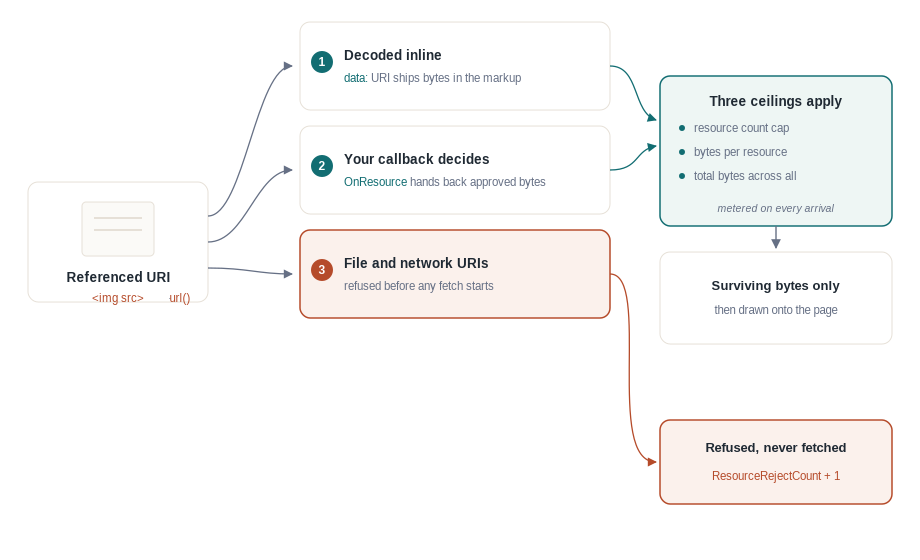
HotPDF resolves every URI in exactly two ways. A data: URI is decoded inline, base64 or percent-encoded. Anything else goes to the OnResource event, which receives the URI and a THPDFHTMLResourceKind: hrkStyleSheet for <link rel="stylesheet">, hrkImage for images and hrkFont for @font-face sources. Leave the event unassigned, or return with Handled still False, and the reference is refused and Statistics.ResourceRejectCount goes up by one
procedure TReportForm.SupplyResource(Sender: TObject;
  const URI: WideString; ResourceKind: THPDFHTMLResourceKind;
  var Data: TBytes; var ContentType: string; var Handled: boolean);
var
  Name: string;
begin
  Handled := False;
  // data: URIs are decoded before this event runs and never arrive here.
  // Never hand the URI to an HTTP client or join it onto a path unchecked
  if not StartsText('asset:', URI) then
    Exit;                               // http:, file: and the rest: refused
  Name := Copy(URI, 7, MaxInt);
  if not IsAllowedAssetName(Name) then  // your own allow-list check
    Exit;
  case ResourceKind of
    hrkImage:      ContentType := 'image/png';
    hrkStyleSheet: ContentType := 'text/css';
    hrkFont:       ContentType := 'font/ttf';
  end;
  Data := LoadAssetBytes(Name);         // your own asset store
  Handled := Length(Data) > 0;
end;

// wiring, before RenderHTML5
Importer.OnResource := SupplyResource;
Importer.MaxResources := 32;                      // default 64
Importer.MaxResourceBytes := 4 * 1024 * 1024;     // default 8 MB
Importer.MaxTotalResourceBytes := 16 * 1024 * 1024; // default 32 MB
Every request, inline data: URIs included, counts against three ceilings: MaxResources for the number of requests, MaxResourceBytes for each payload and MaxTotalResourceBytes for the sum. A request over any of them is rejected and counted, and the render carries on without that resource. Take a template that references the same 50 MB image two hundred times. With the defaults, the first 64 requests each exceed the 8 MB per-resource cap and their bytes are dropped as soon as the callback returns; the remaining 136 are refused before the callback is even called. The document renders without the picture and ResourceRejectCount ends at 200
Budgets that throw, and budgets that count
Four other limits stop the import with EHPDFHTMLImportBudget: MaxDOMNodes (100,000 by default), MaxCSSRules (10,000), MaxLayoutOperations (100,000) and MaxDecodedImageBytes (128 MB of decoded pixel data). They are metered independently because hostile or careless input fails independently. One document is small but pathologically expensive to lay out; another is shallow and carries a stylesheet with tens of thousands of rules. Setting a limit to 0 disables it, which is fine for trusted in-house templates and a bad idea anywhere markup comes from users
The split is deliberate. A missing image degrades one picture, so resource ceilings reject and continue; a layout that runs past its operation budget has no sensible partial result, so it throws. Statistics and Diagnostics reset at the start of every RenderHTML5 call, which makes the numbers per document. In a service that renders untrusted templates, log ParsedNodeCount, LayoutOperationCount and ResourceRejectCount for each job: a climbing reject count usually means template authors reference assets your callback does not know, and an operation count near MaxLayoutOperations means the next slightly longer statement will throw
Choosing between HTML import and the layout API
HTML import fits when people who are not Delphi developers author the content, when templates change more often than code, or when the same content also goes out as email. The declarative layout tree described in declarative PDF layout with tagged output fits when your own code generates the document from data, when PDF/UA structure should come out automatically, or when exact pagination control matters more than authoring convenience
Mixing them is common. A typical report imports its body from HTML and draws the header, footer and signature block directly, since those are fixed geometry that no template should own. Complex financial tables are worth trying both ways: some paginate better through the dedicated table path described in generating tables in PDF, and a quick render of your longest real statement through each settles it
Set CreateAcroForms on purpose. Off, which is the default, form controls are drawn as static artwork, which is what a printed statement wants. On, checkboxes and radio buttons become AcroForm check boxes and radio buttons, <select> becomes a combo box, buttons become push buttons, and text inputs become text fields that keep their maxlength, with <textarea> mapped to a multiline field. Each field takes its name from the control's name attribute, and unnamed controls get generated names of the form html_field_N, so give every control a name if code will fill the form later. What you can do with those fields afterward is covered in adding form fields to a loaded PDF
HTML import, declarative layout and direct drawing all write into the same document object in Delphi and C++Builder, so one PDF can combine all three. Editions, platforms and the rest of the API are listed on the HotPDF Delphi PDF component page