HotPDF RenderCacheFolder turns the in-memory rendered-page cache of the HotPDF Delphi component into a persistent disk page cache: rendered pages are written as PNG files under a folder you choose, and the next time the same PDF source is opened, RenderLoadedPageToBitmapCached reads them back instead of rasterising again. The lookup order is memory, then disk, then the renderer
The disk tier has been in the API since v2.416.0, but until v2.770.140 it never actually served a page for a normal LoadFromFile or LoadFromStream call. The fix forced a question every persistent cache has to answer: how do you know that the file you opened today is the document you rendered yesterday, and what happens to the cached pages when it is not? Below are the answers HotPDF settled on, including where it deliberately refuses to cache
How does the HotPDF disk render cache work?
The HotPDF disk render cache is a second tier behind the in-memory raster cache, and it only participates when RenderCacheFolder is a non-empty path. A call to RenderLoadedPageToBitmapCached(PageIndex, DPI) first scans the in-memory entries, keyed by page index, DPI and a render-settings variant. On a miss it asks the disk tier; a disk hit decodes the PNG, promotes it back into memory and returns a caller-owned copy. Only when both tiers miss does the page go through the content-stream interpreter described in rendering a loaded PDF page to a TBitmap, and the fresh bitmap is then written to disk as well
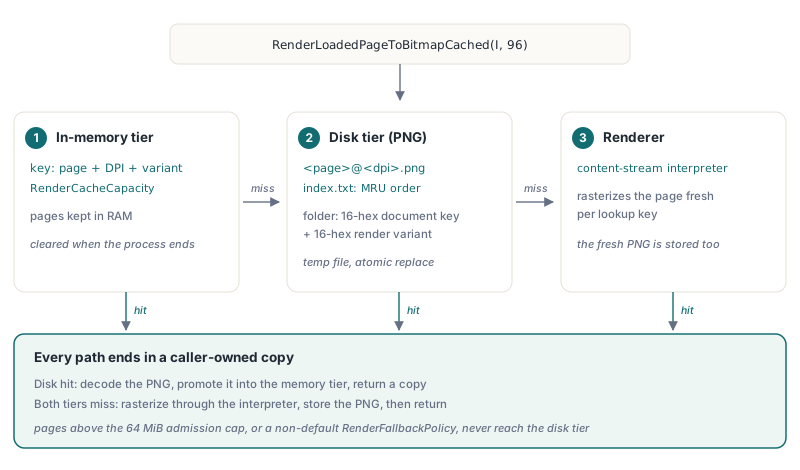
On disk the layout is deliberately boring. Each document gets a subfolder named from a 16-hex-character document key plus a 16-hex-character render variant, each page is stored as <page>@<dpi>.png, and an index.txt at the root keeps documents in most-recently-used order behind a schema tag. A schema mismatch clears the folder on first use. Writes go to a temporary file first and are swapped into place with an atomic replace, so a crash mid-write leaves either the old page or nothing, never half a PNG. A PNG that fails to decode is deleted and counted as a miss
Three limits bound the folder:
RenderCacheMaxDocuments(default 20) caps the number of document subfolders; the least recently used folder is evicted firstRenderCacheMaxBytes(default 524288000, which is 500 MB) caps the total size of all PNG files under the root- Each document folder keeps at most 200 page images; that per-document cap is fixed by THotPDF and is not a published property
RenderCacheCapacity (default 8) is a separate knob: it sets how many rendered pages the in-memory tier keeps, and it has nothing to do with the disk footprint
uses
  SysUtils, Graphics, HPDFDoc;

procedure WarmThumbnails(const FileName: string);
var
  Pdf: THotPDF;
  Bmp: TBitmap;
  I: Integer;
begin
  Pdf := THotPDF.Create(nil);
  try
    // Configure the disk tier before the first cached render:
    // the folder and both limits are read when the tier is first used
    Pdf.RenderCacheFolder := IncludeTrailingPathDelimiter(
      GetEnvironmentVariable('LOCALAPPDATA')) + 'MyViewer\PageCache';
    Pdf.RenderCacheMaxDocuments := 50;
    Pdf.RenderCacheMaxBytes := Int64(1024) * 1024 * 1024; // 1 GiB
    Pdf.RenderCacheCapacity := 16;                        // pages in memory

    if Pdf.LoadFromFile(FileName) > 0 then
      for I := 0 to Pdf.LoadedPageCount - 1 do
      begin
        Bmp := Pdf.RenderLoadedPageToBitmapCached(I, 96);
        if Bmp <> nil then
        try
          // Hand the copy to the thumbnail strip here
        finally
          Bmp.Free; // the cached call always returns a caller-owned copy
        end;
      end;
  finally
    Pdf.Free; // since v2.770.140 this no longer deletes the disk entries
  end;
end;
Run the same procedure twice and the second run never rasterises a page that fit the cache. The disk cache object is created lazily on the first cached render and lives until the THotPDF instance is freed, so changing RenderCacheFolder, RenderCacheMaxDocuments or RenderCacheMaxBytes after that point does not move or resize an already-open cache. Pages too large for the in-memory admission policy (by default a single entry may not exceed 64 MiB of 32-bit pixels) are not persisted either, and the disk tier is only consulted while RenderFallbackPolicy keeps its default rfpIgnore, because fallback diagnostics are not stored alongside the PNG
Why did RenderCacheFolder never work before v2.770.140?
RenderCacheFolder had no effect before v2.770.140 because the disk tier keyed documents on a hash of source bytes that ordinary loads never kept. The document key came from a SHA-256 over an internal copy of the raw PDF bytes, but LoadFromFile and LoadFromStream parse the source in place and do not retain such a copy; the field was only filled temporarily on an encrypted-recovery path and cleared again right after. With no bytes, the key was always empty, and an empty key means the disk tier is bypassed. No error, no warning, just a folder that stayed empty
Making the key non-empty exposed a second bug that had been hiding behind the first. The old InvalidateRenderedPageCache deleted the document's disk folder, and InvalidateRenderedPageCache runs at the start of every load, on every edit and inside Free. So the moment the key worked, every viewer session would have destroyed its own cache on exit, and the next session would have started cold anyway. Worse, the key was recomputed from the same source after an edit, so renders of the edited document would have been stored under the key of the original file and served to the next session that opened the unmodified PDF. v2.770.140 fixes the identity and the invalidation together; fixing only one of them would have shipped either a dead cache or a lying one
How HotPDF identifies a PDF without reading the whole file
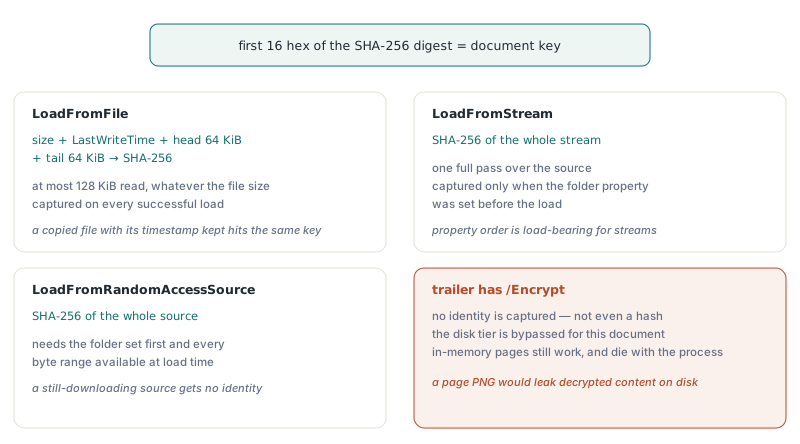
HotPDF identifies a PDF loaded from a local file by a fingerprint of its size, its last-write time and its first and last 64 KiB, and identifies a stream or random-access source by a SHA-256 of its entire content. Both are captured once, when a load succeeds, and the first 16 hex characters of the SHA-256 digest (64 bits) become the document key
| Source | Identity | Cost | Captured when |
|---|---|---|---|
LoadFromFile | Size + LastWriteTime + leading and trailing 64 KiB, hashed with SHA-256 | At most 128 KiB read, independent of file size | Every successful load, even if RenderCacheFolder is set later |
LoadFromStream | SHA-256 of the whole stream | One full pass over the source | Only if RenderCacheFolder was set before the load |
LoadFromRandomAccessSource | SHA-256 of the whole source | One full pass over the source | Only if the folder was set first and the whole range is available |
Any source with an /Encrypt entry | None | None | Never; the disk tier is bypassed |
The file fingerprint is a deliberate trade-off. Hashing a 400 MB scanned archive in full on every open can cost more than rendering the two pages a user actually looks at. The sampled regions are not arbitrary: the header sits at the start of the file, and the trailer and the last cross-reference section sit at the end (ISO 32000-1 §7.5). An incremental update appends a new body, cross-reference section and trailer (§7.5.6), so it changes the size and the tail at once. A full rewrite by any normal tool changes the last-write time. For files up to 128 KiB the two samples cover every byte, so small documents are effectively hashed in full
The residual risk is a same-size, in-place change to the middle of a large file whose writer then restores the original timestamp. That needs a tool that deliberately preserves modification times while editing content, which is rare but not impossible, and in that case the cache serves stale pages. The flip side is benign: copying a file on Windows normally preserves its last-write time, so a copy of a document already in the cache hits the same entries, which is correct because the bytes are identical
Streams have no modification time at all, so the only honest identity is the content. HotPDF only pays for that full SHA-256 pass when you have asked for a disk cache before loading; every other caller of LoadFromStream sees no extra cost. That makes the property assignment order load-bearing:
procedure OpenDownloadedPdf(Pdf: THotPDF; Data: TStream;
  const CacheRoot: string);
begin
  // Wrong order for streams: the content hash is only computed when the
  // folder is already set, so this document would bypass the disk tier
  //   Pdf.LoadFromStream(Data);
  //   Pdf.RenderCacheFolder := CacheRoot;

  Pdf.RenderCacheFolder := CacheRoot; // set first
  Data.Position := 0;
  if Pdf.LoadFromStream(Data) <= 0 then
    raise Exception.Create('The stream is not a loadable PDF');
end;
A random-access source that is still downloading (some ranges not yet available) gets no identity rather than a hash of partial content, and if computing the identity fails for any reason the load still succeeds; the document simply renders without the disk tier
What invalidates a HotPDF disk cache entry?
A HotPDF disk cache entry is never invalidated by deleting it on edit; instead, editing the loaded document drops the document identity, so the disk tier is bypassed for the rest of that load and the stored pages remain valid for the unmodified source. Entries leave the disk only through the LRU and byte limits, a corrupt PNG, or a schema change
The key describes a source on disk, not the object graph in memory. Once you stamp a page or change an annotation, the document no longer matches that source, so neither reading nor writing under its key would be correct. Since v2.770.140, both document-level and page-level invalidation clear the identity instead of touching the folder, and there is a second guard for edits that did not call InvalidateRenderedPageCache: before using the disk tier, THotPDF checks whether any loaded object is dirty and treats a dirty document as having no identity
Render settings work the other way round. Switching PageRenderBackend (or calling UseNativeGDIRenderBackend), and calling ConfigureRenderICCWorkflow or ClearRenderICCWorkflow, flush the in-memory pages but keep the identity, because the document still matches its source. Those settings change the pixels without being part of the in-memory variant, so the disk key folds in the backend name, the black-point compensation flag and SHA-256 digests of the ICC proof and output profiles. The variant itself already covers the colour intent, output dithering, overprint preview, luminosity mask mode, fallback policy and the visibility of every optional content group, so toggling a layer renders into a different folder instead of overwriting the default view
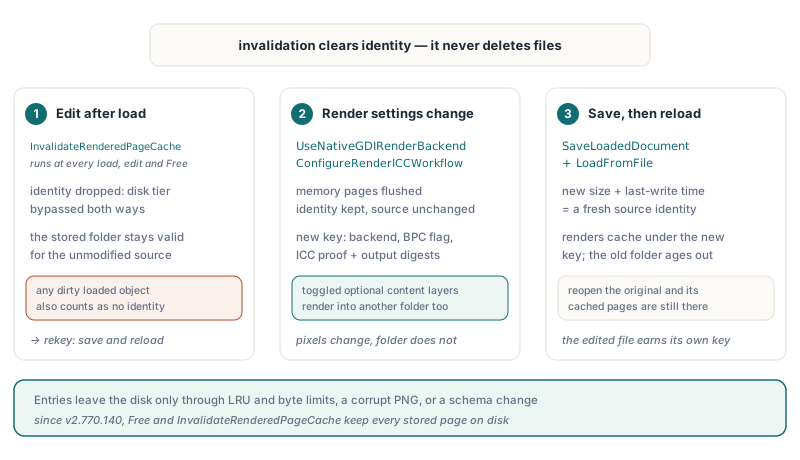
To get an edited document back onto the disk tier, give it a new source identity by saving it and loading the result:
procedure CommitEditsAndRekey(Pdf: THotPDF; const EditedFile: string);
begin
  // After editing the loaded document: refresh the in-memory pages.
  // The source identity is already gone, so nothing is read from or
  // written to the original document's disk folder
  Pdf.InvalidateRenderedPageCache;

  // A saved file has a new size and last-write time, hence a new
  // identity; renders after this load are cached under the new key
  Pdf.SaveLoadedDocument(EditedFile);
  if Pdf.LoadFromFile(EditedFile) <= 0 then
    raise Exception.Create('Could not reload the edited document');
end;
The original document's folder is left alone and ages out through RenderCacheMaxDocuments and RenderCacheMaxBytes like any other entry. If the user reopens the unedited original, its pages are still there
Security boundaries: encrypted sources and linked folders
The HotPDF disk render cache refuses two kinds of input on purpose: it never writes pages of an encrypted PDF to disk, and it never follows a document subfolder that is a junction or other reparse point. Both rules trade cache hits for not leaking data or deleting the wrong files
Encrypted PDFs are never cached on disk
A rendered page is decrypted content. Writing it as a plain PNG into a cache folder would leave a readable copy of a password-protected document on disk, outside the protection the author chose (ISO 32000-1 §7.6). HotPDF therefore captures no identity for any source whose trailer carries an /Encrypt entry, including files opened with a password or with an empty user password. Those documents still use the in-memory tier, which dies with the process
Junction subfolders are rejected since v2.770.173
The cache root is your choice, and pointing it at a junction is allowed. The document subfolders under it are a different matter: the cache creates, reads, touches and deletes them on its own, during startup recovery (which removes leftover temporary files), lookup (which updates timestamps), store, invalidation and the three eviction limits. If someone with write access to the cache root replaces a document folder with a junction to another directory, every one of those paths would follow it, and eviction would delete files somewhere the cache never owned. Since v2.770.173 each of those entry points checks the reparse-point attribute and skips a linked document folder: a lookup counts a miss, a store counts a write failure, and eviction leaves it alone
Unicode paths and shared roots
Two related fixes matter if you deploy to user profiles. Before v2.770.135, RenderCacheFolder was an AnsiString, so a folder outside the system code page (a Chinese user name on an English Windows installation, for example) was converted lossily before the cache saw it; the property is now a Unicode string, and the atomic replace uses the wide Windows API. Since v2.770.52, several THotPDF instances in one process that point at the same root (after path expansion, compared case-insensitively) share a single reference-counted index and lock. Earlier, each instance overwrote index.txt with its own copy and enforced the limits against its partial view, so the folder could grow several times past its budget
That sharing stops at the process boundary. Two separate processes on the same root still hold separate in-memory indexes, so give each concurrently running application its own cache root. Viewers that render on worker threads are fine within one process: PrefetchLoadedPages and the queue covered in background rendering with a request queue both go through the same cached path and the same lock
Quick reference: RenderCacheFolder checklist
- Set
RenderCacheFolder,RenderCacheMaxDocumentsandRenderCacheMaxBytesbefore the first call toRenderLoadedPageToBitmapCached; for stream and random-access loads, set the folder before loading - Upgrade to v2.770.140 or later if you rely on the disk tier; earlier versions accept the property but never serve a page from disk for normal loads
- Expect no disk caching for encrypted PDFs, for documents edited after the load, or while
RenderFallbackPolicyis notrfpIgnore - Free the THotPDF instance normally; since v2.770.140 neither
FreenorInvalidateRenderedPageCachedeletes disk entries - Changing
PageRenderBackendor the ICC workflow keeps the document on the disk tier under a different key - Use one cache root per running application; instances inside one process share the index since v2.770.52
- Keep the cache root in a per-user location; document subfolders that are junctions are skipped since v2.770.173
A persistent page cache pays off most in a viewer that reopens the same documents all day, which is exactly the shape of the custom PDF viewer architecture in Delphi described elsewhere on this blog. RenderCacheFolder, the in-memory raster cache and the page renderer ship with the HotPDF Delphi PDF component for Delphi and C++Builder