Two complaints follow every embedded PDF viewer around: large documents re-render from scratch on every launch, and text turns blurry the moment the window is dragged onto a high-DPI monitor. losLab PDF Library answers both in its TPDFlibViewer control: the DiskCacheFolder property enables a cross-session disk page cache keyed by document fingerprint, and the ScreenDPI property, backed by GetDpiForWindow and a WM_DPICHANGED handler, gives the control true per-monitor DPI awareness
Both problems are worth taking seriously because users notice them immediately. A 400-page scanned contract that took eight seconds to become scrollable yesterday takes eight seconds again today, even though nothing in the file changed. And on a mixed-DPI desktop, a viewer that renders at the primary monitor's 96 DPI looks fine there and visibly soft on the 4K panel next to it. This article walks through how TPDFlibViewer solves each one and, more usefully, why the design landed where it did. If you are new to the control itself, start with the interactive PDF viewer control overview and come back for the performance layer
How do you cache rendered PDF pages across sessions in Delphi?
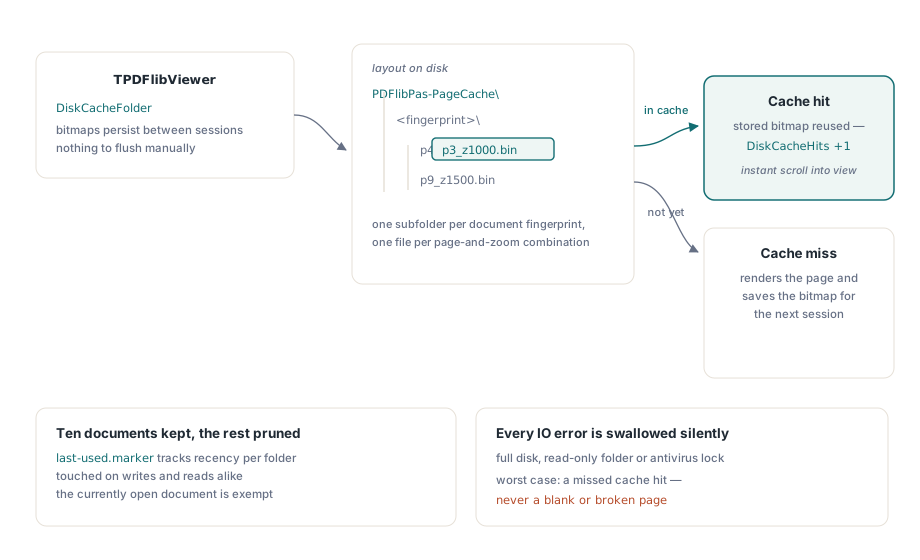
Assign a folder to TPDFlibViewer.DiskCacheFolder and the control persists rendered page bitmaps to disk, so a recently viewed document reopens instantly instead of re-rendering. On disk the layout is <Folder>\PDFlibPas-PageCache\<document fingerprint>\p<page>_z<zoomkey>.bin: one subfolder per document, one file per page-and-zoom combination. Everything else is automatic; there is no cache API to call and nothing to flush
uses
  PDFlibViewer;

procedure TMainForm.FormCreate(Sender: TObject);
begin
  FViewer := TPDFlibViewer.Create(Self);
  FViewer.Parent := Self;
  FViewer.Align := alClient;
  // One line turns on the cross-session page cache
  FViewer.DiskCacheFolder := 'C:\ProgramData\MyApp\PageCache';
  FViewer.LoadFromFile('C:\Contracts\master-agreement.pdf', '');
end;
The DiskCacheHits counter reports how many page renderings the disk cache saved in the current session, which makes the win measurable rather than anecdotal. On a document you closed and reopened, every page that scrolls into view without a render pass increments it
Why the cache key is a fingerprint, not a version number
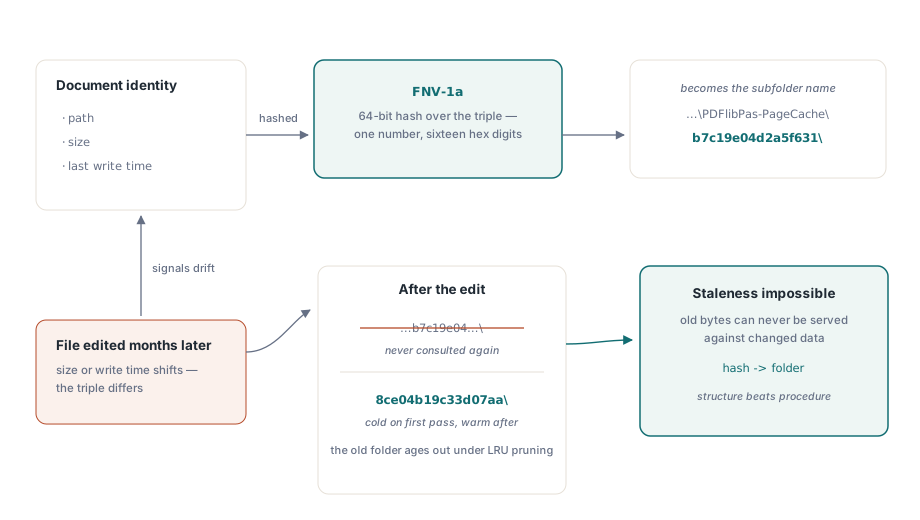
The document fingerprint is a 64-bit FNV-1a hash over the string path|size|last write time, formatted as sixteen hex digits. That triple is the entire invalidation strategy: when the file is edited, its size or write time changes, the hash changes, and the viewer simply opens a different cache subfolder. The stale folder is never consulted again and eventually falls to LRU pruning. There is no version-tag protocol to maintain, no timestamp comparison logic that can drift, and no way for an old bitmap to be served against a modified document
This is the same "content identity as cache key" idea that build systems use, and it earns its keep in the failure modes it removes. A cache that stores files under the document's plain name has to detect edits explicitly, and every explicit check is a bug waiting for an edge case: a file restored from backup with an old timestamp, a save that preserves size, a path compared case-sensitively on one machine and not another. Hashing all three signals into the folder name makes staleness structurally impossible rather than procedurally checked
Why rotation is deliberately left out of the disk key
The cache file name encodes page number and zoom, and nothing else — the view rotation angle is intentionally absent. The disk cache always stores the unrotated rendering bytes; when a cached page is loaded while the view is rotated, the pixels are re-oriented in memory after decoding. If rotation were part of the on-disk key, a user cycling through the four view angles would write the same page to disk four times, quadrupling cache growth for zero extra information, since rotation is a cheap pixel shuffle compared to a full render pass
The in-memory bitmap cache does use a composite key, Round(Zoom * 1000) * 4 + Rotation div 90, because there the rotated bitmap is exactly what the paint handler needs. The background prefetch thread follows the same discipline: it always renders unrotated pages and reports plain zoom keys, and the main thread applies rotation when draining results — the same main-thread-owns-the-cache rule discussed in parallel page rendering and thread safety. Keeping rotation out of everything below the memory layer means one canonical rendering per page and zoom, everywhere it is expensive to store
How does LRU pruning keep the cache folder bounded?
The cache retains up to ten document folders and prunes the least recently used ones when new documents arrive. Recency is tracked by a last-used.marker file in each document folder whose timestamp is touched on both cache writes and cache reads, so a document you merely re-read stays warm without being re-written. The folder belonging to the currently open document is exempt from deletion, so pruning can never pull pages out from under the active view
Every disk operation in the cache — fingerprinting, folder creation, marker touches, page reads and writes, pruning — swallows its own exceptions. That is a deliberate posture, not sloppiness: the cache is a best-effort accelerator, and a full disk, a read-only folder or an antivirus lock must degrade the viewer to "renders like before", never to "fails to display the page". The worst outcome a cache IO error can produce is a missed hit
procedure TMainForm.FormClose(Sender: TObject; var Action: TCloseAction);
begin
  // How many render passes did the disk cache save this session?
  Log(Format('Disk cache hits: %d', [FViewer.DiskCacheHits]));
end;
How do you make a PDF viewer DPI-aware in Delphi?
TPDFlibViewer routes every DPI-dependent calculation through a single field, and that single-change-point design is what makes per-monitor support tractable. Layout, prefetch and render code all read one FScreenDPI value; at 100% zoom, one PDF point maps to ScreenDPI / 72 pixels. The public ScreenDPI property setter clears the bitmap cache, rebuilds the layout, updates the scroll ranges and invalidates the window, so changing DPI is one assignment with every consumer following automatically. The same pixel math matters when you render for a printer instead of a monitor, a topic covered in print preview and device context rendering
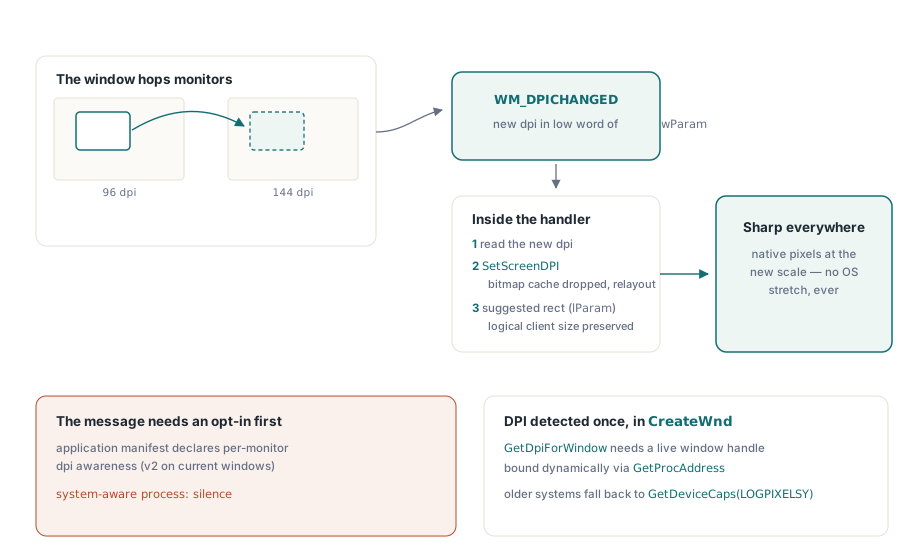
Detection happens in a CreateWnd override rather than the constructor, because GetDpiForWindow needs a valid window handle and the constructor runs long before one exists. Until CreateWnd fires, the control holds the legacy default of 96 so layout math stays sane. GetDpiForWindow itself is a Windows 10 1607+ API, so the control binds it dynamically with GetProcAddress and falls back to GetDeviceCaps(LOGPIXELSY) on older systems — the unit still loads everywhere, and older Windows simply reports the system DPI
What happens when the window moves to a 4K monitor?
Windows sends WM_DPICHANGED when a per-monitor-aware window crosses onto a monitor with a different scale factor, and TPDFlibViewer handles it directly. The handler reads the new DPI from the low word of wParam, assigns it through SetScreenDPI — which drops the now-wrong bitmap cache and relays out the pages — and then accepts the suggested window rectangle that Windows passes in lParam via SetWindowPos, which keeps the logical client size stable across the move. The user sees the document re-render crisply at the new scale instead of a bitmap stretched by the OS
// Normally you never touch ScreenDPI: CreateWnd detects the host monitor
// and WM_DPICHANGED tracks moves. Override it only for special targets,
// e.g. rendering the layout as if for a 150% display:
FViewer.ScreenDPI := 144;  // clears the bitmap cache and rebuilds layout
Boundaries worth knowing before you ship
Three practical limits deserve a place in your design review. First, WM_DPICHANGED only arrives if the process opts in: your application manifest must declare per-monitor DPI awareness (per-monitor v2 on current Windows), which in the Delphi IDE is the DPI awareness setting under Application options. A system-DPI-aware process never receives the message, and the control then renders at the DPI it detected at window creation. Second, the disk cache trades disk space for speed — ten documents worth of page bitmaps across several zoom levels is real storage, so point DiskCacheFolder at a location you are comfortable growing, not a roaming profile. Third, the cache folder needs write permission for the running user; without it the viewer still works, silently, with zero hits — check DiskCacheHits in testing if you suspect the cache is not engaging
Together the two features change the perceived quality of a document-heavy application more than most rendering optimisations: documents your users revisit open instantly, and the view stays sharp on whichever monitor it lands on. Both ship as ordinary properties on TPDFlibViewer in losLab PDF Library, so adopting them is an afternoon of wiring rather than a rendering-engine project