Rendering PDF pages in parallel from Delphi comes down to one rule: give every worker thread its own renderer. losLab PDF Library exposes RenderPagesToFilesParallel for exactly that job, fanning a page range across a TTask pool with one TPDFlib instance per worker, so a multi-core machine turns a batch raster job into throughput that scales close to the core count. Share a single instance across threads instead, and the run does not slow down gracefully, it corrupts memory and crashes
This is the article you reach for when a nightly job has to turn a 500-page PDF into 500 PNGs, the box has 16 cores sitting idle, and your first honest attempt at threading it fell over inside GDI+. The short version is that thread safety here is a structural property, not a flag you set, and the rest of this walks through why the safe shape looks the way it does and where the real speedup ceiling actually sits
Is TPDFlib thread-safe for parallel rendering?
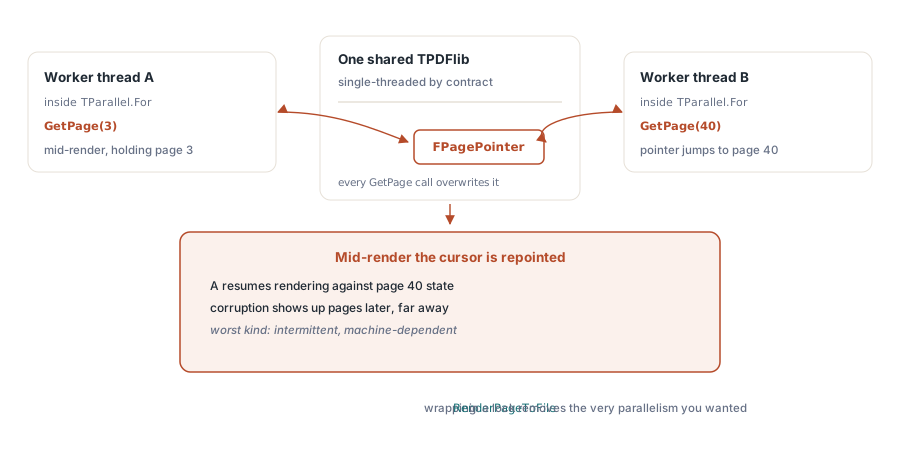
No, and the reason is worth understanding before you design around it. A single TPDFlib instance is declared for single-threaded use, and the sharp edge is TPDFPageTree.GetPage: it writes a shared FPagePointer field on the instance as a side effect of selecting a page. Two threads calling into the same instance race on that field, so worker A can be halfway through page 3 when worker B repoints the page tree at page 40. Nothing about the API stops you from writing the code below, and it will even run for a few pages before it faults, which is the worst way for a bug like this to behave
// DO NOT do this: one shared instance, many threads
var
  Pdf: TPDFlib;
begin
  Pdf := TPDFlib.Create;
  Pdf.LoadFromFile('report.pdf', '');
  TParallel.For(1, Pdf.PageCount,
    procedure(Page: Integer)
    begin
      // every thread reenters the same instance -> data race on FPagePointer
      Pdf.RenderPageToFile(150, Page, 0, 'page' + IntToStr(Page) + '.png');
    end);
  Pdf.Free;
end;
The failure is not deterministic, which is exactly why it survives a quick smoke test and then surfaces on a customer machine with a different core count and a heavier document. There is no lock you can wrap around RenderPageToFile to fix this cheaply either, because holding a mutex across the whole render call serialises the work and throws away the parallelism you came for
Why does each render worker need its own TPDFlib instance?
Because the instance is the unit of isolation. Once every worker owns a private TPDFlib that loaded the file independently, each has its own page tree, its own FPagePointer, and its own render state, so there is nothing shared to race on. That safety has a price you should size up front: every worker parses the whole document into memory, so peak footprint is roughly N times the single-instance cost. Eight workers on a 300 MB PDF is eight full parses resident at once, and on very large inputs that is the constraint that decides your worker count, not the CPU. When the document is huge and you are memory-bound rather than CPU-bound, the direct-access route in processing large PDFs without full-document parsing is often the better lever than more render threads
The one-call API: RenderPagesToFilesParallel
losLab PDF Library packages the whole safe pattern behind a single method, so for the common case you do not hand-roll any of it. RenderPagesToFilesParallel takes the file name and password, a DPI, an inclusive start and end page, an Options value passed straight through to the per-page raster path, an output pattern where %p is replaced by the page number, and a worker cap where any value at or below zero means auto. It returns the count of pages successfully rendered, and it is a Windows-only path because it leans on CoInitialize and GDI+
var
  Pdf: TPDFlib;
  Rendered: Integer;
begin
  Pdf := TPDFlib.Create;
  try
    // FileName, Password, DPI, StartPage, EndPage, Options, Pattern, MaxWorkers
    Rendered := Pdf.RenderPagesToFilesParallel(
      'report.pdf', '', 150.0, 1, 500, 0, 'out\page_%p.png', 0);
    // MaxWorkers = 0 -> auto: min(page count, CPU cores)
    WriteLn(Format('%d pages rendered', [Rendered]));
  finally
    Pdf.Free;
  end;
end;
Why CoInitialize on every worker thread?
GDI+ is the rasteriser underneath page rendering, and GDI+ is apartment-threaded: it expects COM to be initialised on whatever thread calls into it. The main thread of a VCL app usually has that set up already, but a freshly spawned TTask worker does not, and calling the render path from an uninitialised thread is a reliable way to crash. So each worker pairs a CoInitialize(nil) at entry with a CoUninitialize on exit, bracketing its whole lifetime. This is the same discipline any GDI+ or COM work needs off the main thread, and it is the second half of what makes per-worker isolation actually hold, the first half being the private instance. The same GDI+ raster path drives the single-threaded engines covered in choosing a rendering engine for PDF output
Static sharding versus dynamic page claiming
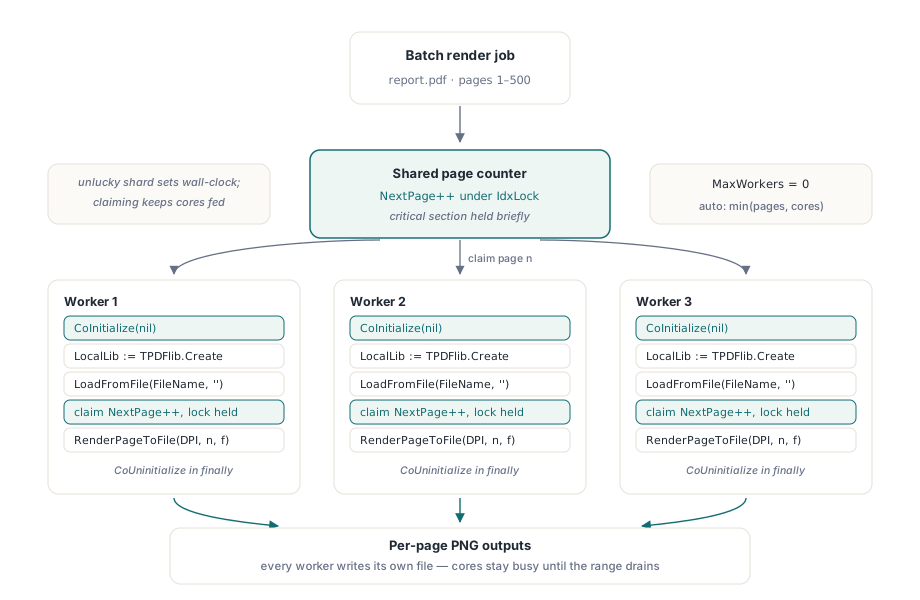
The obvious way to split 500 pages across 8 workers is to hand each a fixed slice of about 62 pages. losLab PDF Library does not do that, and the reason is load balance. Page cost varies wildly: a page of body text renders in milliseconds, a page of dense vector maps or a full-bleed scanned image can take fifty times longer. Cut the work into fixed shards and the worker that happens to draw the heavy slice runs long after the others have gone idle, so your wall-clock time is set by the unluckiest shard, not the average. Instead each worker claims the next page from a shared counter under a short critical section, renders it, and comes back for another, which keeps every core busy until the whole range is drained
// What each worker does inside the pool (simplified)
NextPage := StartPage;
IdxLock := TCriticalSection.Create;
WorkerProc :=
  procedure
  var
    LocalLib: TPDFlib;
    PageNum: Integer;
  begin
    CoInitialize(nil);              // GDI+ is apartment-threaded
    try
      LocalLib := TPDFlib.Create;   // one private instance per worker
      try
        LocalLib.LoadFromFile(FileName, '');
        while True do
        begin
          IdxLock.Enter;            // claim the next page atomically
          try
            PageNum := NextPage;
            Inc(NextPage);
          finally
            IdxLock.Leave;
          end;
          if PageNum > EndPage then Break;
          LocalLib.RenderPageToFile(DPI, PageNum, 0,
            Format('page_%d.png', [PageNum]));
        end;
      finally
        LocalLib.Free;
      end;
    finally
      CoUninitialize;
    end;
  end;
Structured logging across worker threads
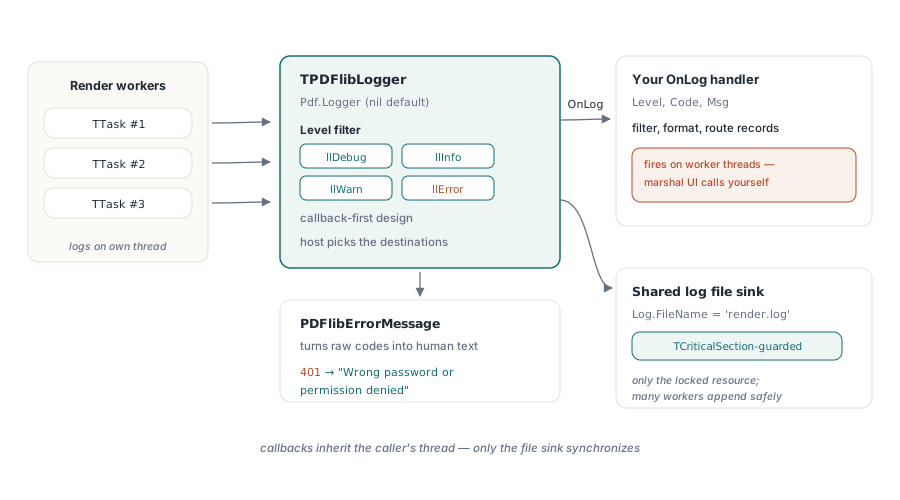
Debugging a batch that dies on page 213 of 500 is miserable without a log, and a naive log is its own concurrency bug. losLab PDF Library ships TPDFlibLogger, attached through the TPDFlib.Logger property and nil by default so the no-logger path stays zero-cost. It is callback-first: you set OnLog and route records wherever the host wants, filtered by an llDebug / llInfo / llWarn / llError level, and PDFlibErrorMessage turns the raw numeric codes into human text so an Error record reads as more than a bare integer. The optional file sink is the one shared resource, and it is guarded by a TCriticalSection precisely so several workers can append to one log file safely. Note the honest boundary: only that file sink is synchronised, so if you share one logger across a hand-rolled pool and your OnLog touches the UI, you still have to marshal that back to the main thread yourself
var
  Pdf: TPDFlib;
  Log: TPDFlibLogger;
begin
  Log := TPDFlibLogger.Create;
  Log.Level := llInfo;                   // llDebug, llInfo, llWarn, llError
  Log.FileName := 'render.log';          // optional shared sink (lock-guarded)
  Log.OnLog :=
    procedure(Level: TPDFlibLogLevel; Code: Integer; const Msg: WideString)
    begin
      if Level = llError then
        // marshal to the UI thread yourself; OnLog fires on worker threads
        WriteLn(Format('[%d] %s', [Code, PDFlibErrorMessage(Code)]));
    end;
  Pdf := TPDFlib.Create;
  Pdf.Logger := Log;                     // nil by default; zero-cost when unset
  try
    Pdf.RenderPagesToFilesParallel('report.pdf', '', 150.0, 1, 500, 0,
      'out\page_%p.png', 0);
    // an Error now carries text, e.g. 401 -> "Wrong password or permission denied"
  finally
    Pdf.Free;
    Log.Free;
  end;
end;
How much speedup should you actually expect?
Be honest with yourself about where the time goes, because parallel rendering only pays where the work is genuinely CPU-bound. High-DPI output and complex vector or shaded pages are compute-heavy, and those scale close to linearly with core count until you saturate the CPU. Trivial pages are a different story: there the per-worker LoadFromFile overhead, plus the disk cost of writing the output files, can swamp the render itself, and eight workers thrashing one slow disk can finish slower than a clean serial loop. Set MaxWorkers to your physical core count rather than something aspirational, watch memory when the source PDF is large, and if a batch turns out to be IO-bound the fix is faster storage or fewer workers, not more threads. Used on the jobs it was built for, the batch render path shown here is part of the standard losLab PDF Library for Delphi and C++Builder, and it turns idle cores into finished pages with none of the thread-safety traps you would otherwise have to solve yourself