Print shops rarely bounce a file because a page looks wrong. The preflight report that comes back says an RGB logo turned up in a PDF/X-1a job, a font was referenced instead of embedded, page 3 has no trim size, or the output intent carries no ICC profile at all. Each line describes something the exporting code decided, and each one can be caught in that code: pick the PDF/X part before the first page exists, treat every refused drawing call as an error, load the press profile the shop names, and audit the saved file before anyone uploads it
PDF/X-1a, X-3 or X-4: which part a Delphi exporter should target
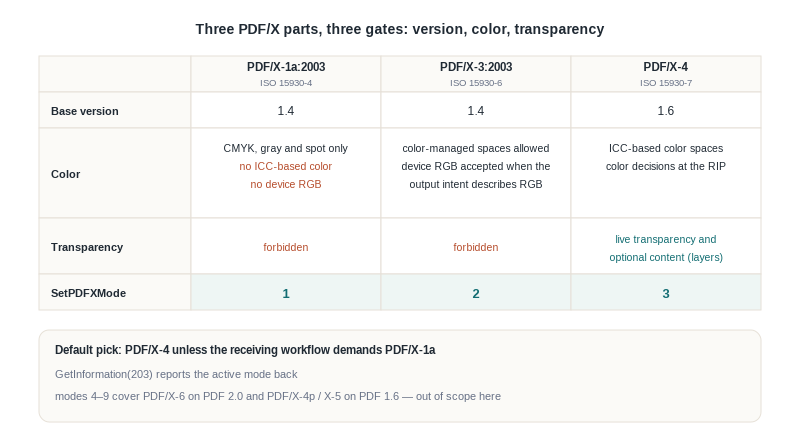
Target PDF/X-4 by default and switch to PDF/X-1a when the receiving workflow insists on it. That is our recommendation, and the reasoning is short. The three parts differ on exactly three things, the base PDF version, the colour model and transparency, and in PDFlibPas each of those becomes a gate that TPDFlib.SetPDFXMode switches on:
- PDF/X-1a:2003 (ISO 15930-4), mode 1: PDF 1.4 syntax, CMYK, grey and spot colour only, no ICC-based spaces and no transparency. The file arrives already separated into press colours, so the RIP performs no colour conversion
- PDF/X-3:2003 (ISO 15930-6), mode 2: still PDF 1.4 and still opaque, but colour-managed spaces are allowed, and device RGB is accepted when the output intent itself describes an RGB printing condition
- PDF/X-4 (ISO 15930-7), mode 3: PDF 1.6 syntax with live transparency and optional content (layers)
X-1a survives in ad delivery and in older workflows that want a file they can image without thinking about it. The price is paid at export time. Every drop shadow and every soft-edged logo has to be flattened before it reaches the PDF, and every colour decision is made in your code instead of at the RIP with the actual press profile. With X-4 the transparency arrives intact and the shop's RIP does the separation, which is what modern RIPs are built for. If the print buyer says nothing, send X-4
GetInformation(203) reports the active mode back as a string, '1' to '3' for the parts covered here and an empty string when PDF/X is off. Modes 4 to 9 select the PDF/X-6 variants on PDF 2.0 and the PDF/X-4p, X-5g and X-5pg variants on PDF 1.6; their version and output intent rules differ and they are left out of this article
What SetPDFXMode writes into the document
TPDFlib.SetPDFXMode writes the identification a PDF/X consumer checks first, so the application only supplies the press profile and the content. A call that returns 1 has done four things:
- Put the edition string into XMP as
pdfxid:GTS_PDFXVersion:PDF/X-1a:2003,PDF/X-3:2003orPDF/X-4. The 2003 editions are identified completely by that string, so no separate conformance property is written - Added an output intent declaring
DeviceCMYKif the document had none, and set its subtype to/S /GTS_PDFX(ISO 32000-1 §14.11.5 defines the output intent dictionary) - Set
/Trapped /Falsein the information dictionary. The writer never traps, and PDF/X wants the trapping state stated outright - Moved the document to the part base version: 1.4 for X-1a and X-3, 1.6 for X-4
Mode 1 also switches the default text, fill and stroke colours to their CMYK equivalents, so text drawn before any colour call comes out as 0 0 0 1 k rather than RGB black. At save time two more repairs run. A page without a TrimBox receives one copied from its MediaBox, because PDF/X requires a declared finished size on every page (ISO 32000-1 §14.11.2 covers the page boundaries), and annotations receive the print flag. Treat that TrimBox copy as a safety net. A full-bleed job needs a real trim box inside a larger media box, and the guide to TrimBox, BleedBox and CropBox defaults in PDFlibPas shows how to set those boxes and where inheritance can trip you up
uses
  SysUtils, PDFlibrary;

procedure BuildX1aAd(const OutFile, PressProfile: string);
var
  Pdf: TPDFlib;
begin
  Pdf := TPDFlib.Create;
  try
    if Pdf.SetPDFXMode(1) <> 1 then          // 1 = PDF/X-1a:2003
      raise Exception.CreateFmt('PDF/X mode refused (error %d)',
        [Pdf.LastErrorCode]);

    // Must come after SetPDFXMode: it fills the intent SetPDFXMode created
    if Pdf.LoadOutputIntentProfile(PressProfile, 'DeviceCMYK') <> 1 then
      raise Exception.Create('Press profile missing or not a CMYK ICC file');

    // Embed = 1 embeds the whole font program; 2 would subset it
    if Pdf.AddTrueTypeFont('Arial {1252}', 1) = 0 then
      raise Exception.Create('Font could not be loaded for embedding');

    Pdf.SetTextSize(24);
    Pdf.SetFillColorCMYK(0, 1, 1, 0);           // process red
    Pdf.DrawText(72, 720, 'Spring catalog, page 1');

    Pdf.SaveToFile(OutFile);
  finally
    Pdf.Free;
  end;
end;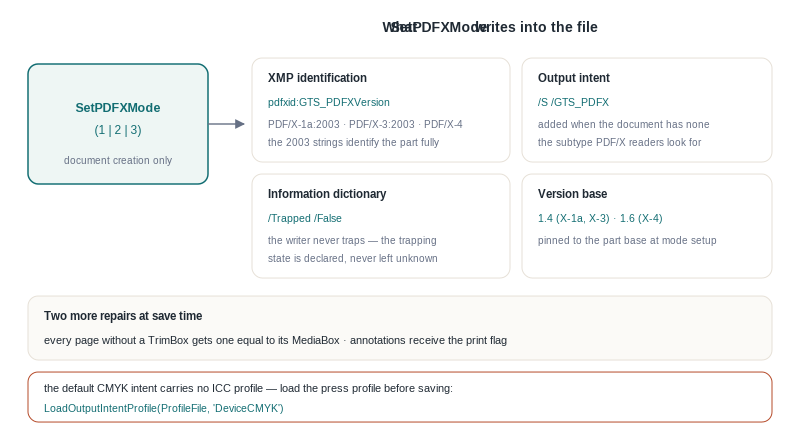
Why does the output intent need your press profile?
The intent that SetPDFXMode adds for modes 1 to 3 declares DeviceCMYK and carries no ICC profile. That is on purpose. The only profile bundled with the library is sRGB, and stuffing RGB bytes behind a CMYK label would produce a file that looks finished and describes no press anywhere. Skip LoadOutputIntentProfile and the audit later in this article reports PDFX- Document output intent carries no DestOutputProfile, which is the correct verdict: a PDF/X file without a printing condition has nothing to print against
TPDFlib.LoadOutputIntentProfile(FileName, 'DeviceCMYK') reads the ICC file, checks that bytes 16 to 19 of its header say CMYK, then replaces the DestOutputProfile stream and sets /N 4. Hand it an RGB profile by mistake and it returns 0, which is why the first sample raises on that result instead of carrying on. The call also returns 0 when the document has no output intent yet; it fills an existing intent and does not create one, so the order in the sample matters
One detail is worth a phone call to the shop. The profile swap leaves the rest of the intent dictionary alone, and the default intent's OutputConditionIdentifier is sRGB, with sRGB IEC61966-2.1 as its condition text. A RIP that reads the embedded profile will find your press profile. A workflow that matches on the identifier string instead (some registries key on names such as a FOGRA or GRACoL characterization) will find a value that has nothing to do with the job, so ask which of the two they check
The locked version that blocks PDF/X-1a
A new PDFlibPas document starts at PDF 1.5, the writer default, which sits above the 1.4 base of X-1a and X-3. SetPDFXMode handles the common case by lowering the version to the part base and carrying on. Refusing would be defensible on paper and pointless in practice, since every SetPDFXMode(1) on a fresh document would then fail
It still refuses in one case. If LockSaveVersion fixed the version above the part base, SetPDFXMode returns 0 with LastErrorCode 601, because somebody pinned that version deliberately and the library will not quietly overrule them. Shared setup code is where this bites: a "house defaults" helper that locks 1.7 for every export path breaks the print path, and switching to X-4 does not help, because 1.6 is also below the lock. Locking at the part base itself is fine, so LockSaveVersion('1.4') followed by SetPDFXMode(1) succeeds
procedure StartPrintDocument(Pdf: TPDFlib; PdfxPart: Integer);
var
  Err: Integer;
begin
  ApplyHouseDefaults(Pdf);   // your own helper; it calls LockSaveVersion('1.7')

  if Pdf.SetPDFXMode(PdfxPart) = 1 then
    Exit;

  Err := Pdf.LastErrorCode;  // read once: the getter clears the code
  if Err <> 601 then
    raise Exception.CreateFmt('SetPDFXMode(%d) failed, error %d',
      [PdfxPart, Err]);

  // Print output owns its version; drop the house lock and retry
  Pdf.UnlockSaveVersion;
  if Pdf.SetPDFXMode(PdfxPart) <> 1 then
    raise Exception.CreateFmt('SetPDFXMode(%d) refused after unlock',
      [PdfxPart]);
end;
The same method returns 0 on a document loaded from disk, because PDF/X mode is a creation-time switch: the library cannot vouch for content it did not draw. Existing files go through ConvertToPDFX(TargetMode, ProfileFileName) instead, with TargetMode 1 to 4. A loaded file often has no output intent, and LoadOutputIntentProfile needs one to exist, so the conversion takes the press profile path directly and builds the CMYK intent from it. For X-3 and X-4 targets it adds an sRGB DefaultRGB space to each page so device RGB becomes colour-managed. For an X-1a target, RGB artwork and transparency have to be separated and flattened in the layout tool that produced them; GetPDFXConversionReport lists what the conversion added and what still blocks conformance, and the call returns 1 only when the converted document passes the PDF/X check. The PDF/A conversion walkthrough follows the same report-driven pattern
Why do some refusals never set LastErrorCode?
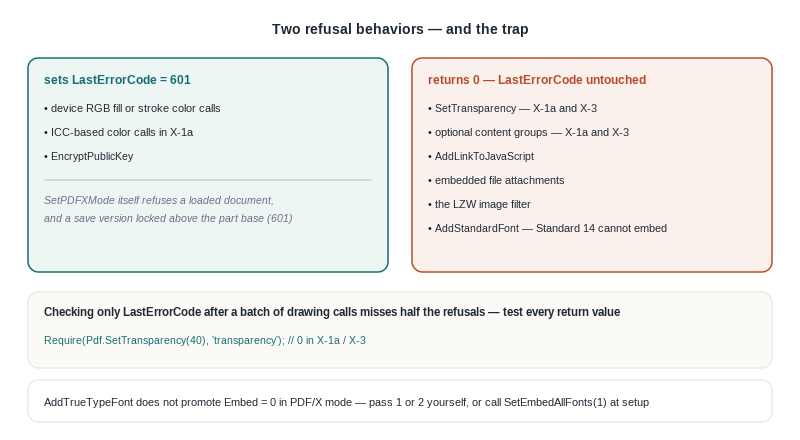
With a PDF/X mode active, PDFlibPas refuses each content call the chosen part forbids at the moment you make it, so the problem surfaces in your exporter and nowhere near the RIP. The list: device RGB fills and strokes (all of X-1a, and X-3 or X-4 unless the output intent is RGB), ICC-based, CalRGB and Lab colour in X-1a, transparency and blend modes in X-1a and X-3, optional content in X-1a and X-3, JavaScript links in all three parts, embedded file attachments, the LZW image filter, Standard 14 fonts and certificate encryption. Password encryption through Encrypt goes through at creation time, but the audit flags any encrypted file, so leave print jobs unencrypted
The refusals do not report the same way, and that is the trap. The colour-space gates in SetFillColor and SetLineColor, the ICC-based colour calls and EncryptPublicKey set LastErrorCode to 601, the conformance code the PDF/A gates also use. SetTransparency, SetBlendMode, AddLinkToJavaScript, the attachment and LZW gates and AddStandardFont just return 0. Add one more property of the getter: LastErrorCode resets to 0 every time you read it. Code that draws a whole page and then asks LastErrorCode once will miss half the refusals, and a second read of the same code returns nothing. Check each return value where it happens:
type
  EPrintConformance = class(Exception);

// Your own guard, not a library call
procedure Require(Ok: Integer; const What: string);
begin
  if Ok = 0 then
    raise EPrintConformance.CreateFmt('%s refused under PDF/X', [What]);
end;

Require(Pdf.SetFillColorCMYK(0, 0, 0, 1), 'CMYK fill');
Require(Pdf.SetTransparency(40), 'transparency');   // 0 in X-1a and X-3
Require(Pdf.AddLinkToJavaScript(72, 72, 120, 20,
  'app.alert(1)', 0), 'JavaScript link');           // 0 in modes 1 to 3
Fonts need their own rule. AddStandardFont returns 0 under PDF/X because the library does not ship the Standard 14 outlines and therefore cannot embed them. AddTrueTypeFont behaves differently: PDF/A mode promotes Embed = 0 to a full embed, PDF/X mode does not, and the referenced system font lands in the file for the audit to find. Pass 1 (full) or 2 (subset) yourself, or call SetEmbedAllFonts(1) once during setup so a stray 0 is promoted to 1 for every later font
How do you verify a PDF/X file before it goes to the printer?
Run CheckFileCompliance with ComplianceTest = 3 on the saved file. The audit ships with the Enterprise edition, so call it on a TPDFlibEnterprise instance. It returns 0 when it recorded no findings and otherwise a string-list handle whose items start with PDFX-. One catch follows from that return convention: on a plain TPDFlib the same call also returns 0, with LastErrorCode 900, and a pipeline that only tests for 0 will wave every file through. The audit reads the file with the same streaming reader as the PDF/A and PDF/UA preflight in PDFlibPas and covers the rules a print preflight looks at first:
- The file is not encrypted, XMP carries a known
GTS_PDFXVersion, and the PDF version does not exceed the part base - Exactly one output intent exists, with subtype
GTS_PDFX, an output condition identifier and an embedded destination profile whose header colour space matches its/N - The information dictionary declares
/Trappedas/Trueor/False - Every page has a TrimBox inside its MediaBox, never together with an ArtBox, and a BleedBox, when present, encloses the TrimBox
- Every font on a page has an embedded program, and in X-1a no page, image or form XObject uses RGB, ICC-based or Lab colour; X-1a and X-3 pages carry no transparency groups, soft masks, non-Normal blend modes or partial alpha
- No forbidden annotation types or actions, no JavaScript open action or document-level JavaScript, no embedded files and no
LZWDecodefilter anywhere in the object graph
uses
  Classes, SysUtils, PDFlibrary, PDFlibEnterprise;

function PreflightPDFX(Pdf: TPDFlibEnterprise; const FileName: string;
  Report: TStrings): Boolean;
var
  ListId, I: Integer;
begin
  ListId := Pdf.CheckFileCompliance(FileName, '', 3, 0);  // 3 = PDF/X
  if ListId = 0 then
  begin
    // 0 also comes back when the audit did not run at all
    if Pdf.LastErrorCode = PDFLIB_ERROR_ENTERPRISE_REQUIRED then
      raise Exception.Create('PDF/X audit unavailable on this instance');
    Result := True;
    Exit;
  end;
  Result := False;
  try
    for I := 1 to Pdf.GetStringListCount(ListId) do       // 1-based items
      Report.Add(Pdf.GetStringListItem(ListId, I));
  finally
    Pdf.ReleaseStringList(ListId);
  end;
end;
A clean result from this audit means the file is structurally PDF/X, and the structural rules are where exporter mistakes show up. Wire it in as the gate at the end of your export step. Total ink coverage, effective image resolution and whether the embedded profile matches the condition the press actually runs belong to the shop's own preflight profile, which they will run on your upload regardless of what your log says
PDFlibPas, the losLab native Object Pascal PDF library for Delphi, includes PDF/X output, conversion of existing files to PDF/X and, in the Enterprise edition, the PDF/X audit used above. Editions, supported platforms and the API reference are on the PDFlibPas Delphi PDF Library product page