Take a file whose information dictionary says /Title (Annual Maintenance Report) whilst its XMP packet has no dc:title at all. Viewers show the title without complaint, yet a PDF/A validator rejects the file because the two metadata copies disagree. A second file looks just as healthy but has no pdfaid:part entry in its XMP, and the validator responds with dozens of errors: it judges the file as an ordinary PDF and reports every rule of the claimed part as failed, all because of one missing line
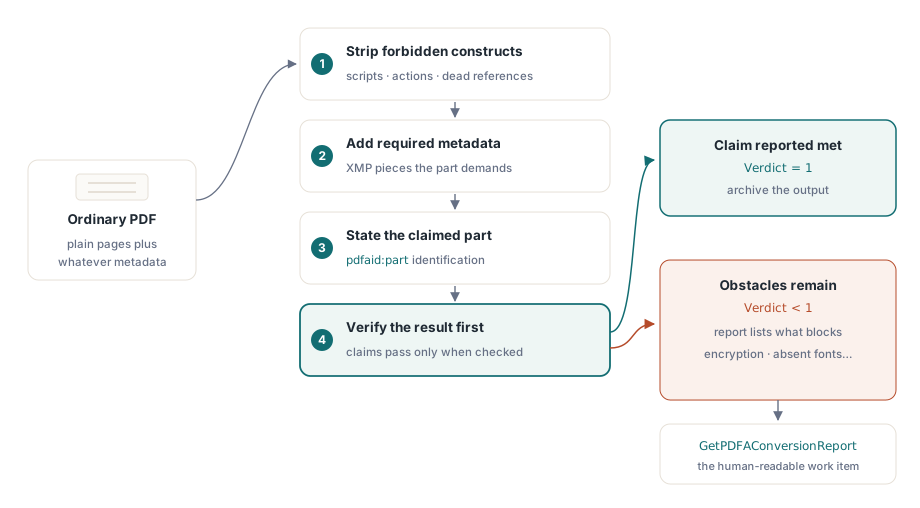
The two problems need very different amounts of work. Reconciling metadata is a narrow fix you can run on any file. Turning an arbitrary PDF into an archival one means stripping out what the target part forbids, adding what it requires, stating the claim, and then validating the bytes that actually came out. We built the conversion around that last step deliberately. ConvertToPDFA, which ships with the Enterprise edition (TPDFlibEnterprise) together with GetPDFAConversionReport, saves the converted document to memory, runs the PDF/A check on those bytes and returns 1 only when that check passes
Why does a PDF that opens fine fail a PDF/A check?
Both failures come from metadata rules. A PDF records its title, author, producer and dates in the document information dictionary, and PDF/A also requires the same facts in an XMP metadata packet; ISO 19005-1 §6.7.3 asks for the two to be equivalent, and PDF/A-2 and PDF/A-3 keep the rule. Amongst files that fail on this rule, the usual pattern is a producer that filled in the information dictionary and never wrote the XMP half, so the validator finds a title in one place and nothing in the other
The missing identification is a quieter affair. The pdfaid:part and pdfaid:conformance entries are what mark a file as PDF/A, and a file can be perfectly well formed without them. The case we see most often is an application that supplies its own XMP packet, replacing the one the PDF writer generated; the custom packet carries the application's own fields and no pdfaid entries, so the error list points nowhere near the real cause
RepairDocumentMetadata handles both cases and returns the number of entries it changed. It is available in every edition, as are SetPDFAMode and SanitizeDocument. The repair walks Title, Author, Subject, Keywords, Creator, Producer, CreationDate and ModDate. Where only the XMP carries a value, the information dictionary is filled from it, so nothing already recorded gets thrown away. Where both carry values and they differ, the information dictionary wins. We made that call because the information dictionary is the half producers most commonly set, which makes it the likelier record of what the author intended
If your XMP is the authoritative copy (say it was curated in a document management system), push the values you want into the information dictionary with SetInformation and only then run the repair. Doing it the other way round will overwrite your curated XMP title with whatever the original producer wrote
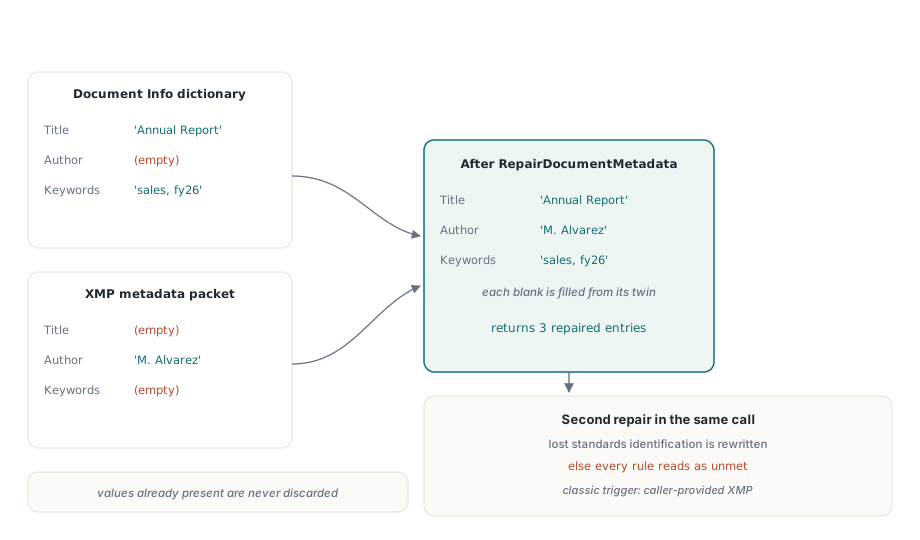
The identification repair needs one thing from you: the document has to know which part it is aiming for. A freshly loaded file has no PDF/A mode set, so call SetPDFAMode before the repair. With a mode in place, RepairDocumentMetadata writes the matching pdfaid entries, adds pdfaid:rev with the year 2020 for the part 4 modes, and sets dc:format to application/pdf, which validators also check
uses
  SysUtils, PDFlibrary;

procedure RepairIncoming(const InName, OutName: string);
var
  Lib: TPDFlib;
  Fixed: Integer;
begin
  Lib := TPDFlib.Create;
  try
    if Lib.LoadFromFile(InName, '') <> 1 then
      raise Exception.CreateFmt('Cannot open %s', [InName]);

    // The curated title goes into the information dictionary first,
    // because that copy wins when the two halves disagree
    Lib.SetInformation(2, 'Annual Maintenance Report 2025');

    Lib.SetPDFAMode(3);                  // 3 = PDF/A-2b, see the table below
    Fixed := Lib.RepairDocumentMetadata;
    Writeln(Format('%d metadata entries brought into agreement', [Fixed]));

    Lib.SaveToFile(OutName);
  finally
    Lib.Free;
  end;
end;
Choosing the target part and its mode number
Pick the part according to what the document has to carry, and only afterwards look up the number. SetPDFAMode and ConvertToPDFA share one numbering scheme, and it does not run in the order the part names suggest
| Mode | Part and level | Notes |
|---|---|---|
| 1 | PDF/A-1a | PDF 1.4, tagged |
| 2 | PDF/A-1b | PDF 1.4 |
| 3 | PDF/A-2b | PDF 1.7 |
| 4 | PDF/A-2a | PDF 1.7, tagged |
| 5, 6, 7 | PDF/A-3b, 3a, 3u | Embedded files of any type permitted |
| 8 | PDF/A-2u | PDF 1.7, Unicode text required |
| 9, 10, 11 | PDF/A-4, 4e, 4f | PDF 2.0; 4e adds 3D and rich media, 4f permits embedded files |
Mode 3 is PDF/A-2b and mode 4 is PDF/A-2a. That inversion catches out people who count up from 1a and assume the a-level always comes first. PDF/A-2u turns up at 8, after the part 3 modes
The choice with real consequences concerns attachments. Parts 1 and 2 forbid embedded files, so ConvertToPDFA removes them for modes 1 to 4 and mode 8. Convert a Factur-X or ZUGFeRD invoice to mode 3 and the structured XML invoice disappears from the output, along with the very reason the file existed. For anything that carries an attachment, target mode 5 (PDF/A-3b), which is also the part those invoice formats are defined on, or mode 11 if you need PDF 2.0. Every attachment in a part 3 or part 4 file must state how it relates to the document through /AFRelationship, and PDF Library for Delphi writes that entry for each embedded file it saves in those modes
Part 4 identifies itself differently. It has no conformance letter for plain PDF/A-4, uses E or F for the two extensions, and requires pdfaid:rev with the year its part was published. ConvertToPDFA raises the file to PDF 2.0 for modes 9 to 11, because ISO 19005-4 §6.1.2 builds the part on PDF 2.0, and the check judges such files against PDF 2.0 rather than 1.7
What ConvertToPDFA changes in the file
ConvertToPDFA makes a fixed sequence of repairs, notes each one in a plain-text report, saves the result to memory and validates those bytes. A failed check returns 0, and so does a mode outside 1 to 11, which returns before any report is written. The sequence is worth knowing, because each step is something the output will either lose or gain:
- An encrypted document whose password is unknown stops the conversion straight away with a
blocked:line; nothing inside it can be read, let alone repaired - Document-level JavaScript and the open action that runs it are removed, together with every additional-actions entry and the action types no part permits, amongst them Launch, Sound, Movie, ResetForm, ImportData, Hide, SetOCGState, Rendition and Trans. GoTo and URI links stay, so navigation keeps working
- Embedded files are removed for the parts that forbid them, as described earlier
- Annotations that are hidden or set never to display are deleted. PDF/A requires annotations to be visible and printable, and revealing them would change what the page looks like, so we opted for removal
- Form field appearances are regenerated before the
/NeedAppearancesflag is cleared, so filled-in values stay visible - Fonts that are used but not embedded are taken from the fonts installed on the machine and embedded
- Objects that nothing refers to any longer are dropped, and an sRGB output intent is added if the file has none
- Finally the part and level are recorded in the XMP, and the bytes are checked
On a server, the font step is the one most likely to stall a conversion. A document that uses a font which exists nowhere on the conversion host cannot be repaired from inside the file, and the report will say so. Install the fonts your documents actually use on the conversion machine; the walkthrough on embedding missing fonts in an existing PDF covers that step in its own right
How should a batch job handle a conversion that fails?
Treat the return value as a gate and the report as the work ticket. Archive the files that return 1, and route the rest to a person with the report attached. Do not save the output of a failed conversion into the archive just because it looks tidier than the input. That file now carries a PDF/A claim the check refused to confirm, which is precisely the situation the verification step exists to prevent
The report from GetPDFAConversionReport is one line per action, each starting with a verb: removed:, regenerated:, repaired:, embedded:, added:, stated:, plus blocked: if something stopped the run, and a closing result: line. The check behind the verdict stops at the first failure, so when a file fails, the conversion runs the check again in full and the report lists every issue in one go. Routing on the prefixes takes only a few lines
uses
  Classes, SysUtils, PDFlibrary, PDFlibEnterprise;

function ArchiveOne(const InName, ArchiveDir, ReviewDir: string): Boolean;
var
  Lib: TPDFlibEnterprise;
  Report: TStringList;
  I: Integer;
  Blocked: Boolean;
begin
  Result := False;
  Lib := TPDFlibEnterprise.Create;
  Report := TStringList.Create;
  try
    if Lib.LoadFromFile(InName, '') <> 1 then
      Exit;
    Result := Lib.ConvertToPDFA(5) = 1;      // 5 = PDF/A-3b, keeps attachments
    Report.Text := Lib.GetPDFAConversionReport;
    if Result then
      Lib.SaveToFile(IncludeTrailingPathDelimiter(ArchiveDir) + ExtractFileName(InName))
    else
    begin
      Blocked := False;
      for I := 0 to Report.Count - 1 do
        if Pos('blocked:', Report[I]) = 1 then
          Blocked := True;
      // Keep the original untouched; only the report travels with it
      Report.SaveToFile(IncludeTrailingPathDelimiter(ReviewDir) +
        ChangeFileExt(ExtractFileName(InName), '.pdfa-report.txt'));
      if Blocked then
        Writeln(InName, ': needs a password or a rebuilt source file');
    end;
  finally
    Report.Free;
    Lib.Free;
  end;
end;
A blocked: line usually means the fix lies outside the PDF: a password, a different source file, or a rerun of whatever produced the document. Plain validation issues after a full conversion are more often content that carries meaning and cannot simply be deleted, and those are the cases where a person has to make the call
Reading the PDF/A mark a file already carries
Before converting, check what the document already claims about itself. Files arriving from scanners, office suites and other PDF tools often carry a PDF/A mark already, and reconverting a valid PDF/A-3 file to part 2 would strip its attachments for no gain whatsoever
The trap is that XMP allows the same property to be written in two ways. Some producers write the part as a child element, <pdfaid:part>2</pdfaid:part>; others write it as an attribute on rdf:Description, pdfaid:part="2". Both are ordinary, valid XMP. A detector that searches for only one form decides that files from the other family of producers carry no mark, and a checker built that way ends up judging a valid PDF/A-2 file against part 1 and reporting it as unmarked and of too high a PDF version, the exact opposite of the truth. The validator in PDF Library for Delphi reads both forms. If you sniff the mark yourself, do likewise:
function DeclaredPDFAPart(Lib: TPDFlib): string;
const
  ElemTag = '<pdfaid:part>';
  AttrDQ  = 'pdfaid:part="';
  AttrSQ  = 'pdfaid:part=''';
var
  Packet: string;
  P: Integer;
begin
  Result := '';
  Packet := Lib.GetDocumentMetadata;
  P := Pos(ElemTag, Packet);                   // element form
  if P > 0 then
    Exit(Copy(Packet, P + Length(ElemTag), 1));
  P := Pos(AttrDQ, Packet);                    // attribute form, double quotes
  if P = 0 then
    P := Pos(AttrSQ, Packet);                  // attribute form, single quotes
  if P > 0 then
    Result := Copy(Packet, P + Length(AttrDQ), 1);
end;
An empty result means no mark in either form. A digit tells you which part the producer meant, and that number is what to compare against your target before deciding whether to convert at all
Sanitising scripts before the file goes into the archive
Archival conversion and security sanitising usually run together, since the content a security policy wants removed overlaps heavily with what PDF/A forbids. SanitizeDocument takes a bitmask of SANITIZE_* flags and returns how many removals it applied. ConvertToPDFA itself calls it with SANITIZE_JAVASCRIPT or SANITIZE_OPEN_ACTION as its first step
One detail matters to validators. Document-level scripts live in a /JavaScript name tree under the catalogue's /Names dictionary, and when the last script is removed the now-empty tree goes with it. An empty tree still announces that the document has scripts, and some checkers react to the key itself without counting what sits beneath it
Whichever tool did the sanitising, verify the saved file with a fresh load rather than trusting the in-memory state. Reopening it is cheap:
var
  Lib, Check: TPDFlib;
begin
  Lib := TPDFlib.Create;
  Check := TPDFlib.Create;
  try
    Lib.LoadFromFile('upload.pdf', '');
    Lib.SanitizeDocument(SANITIZE_JAVASCRIPT or SANITIZE_OPEN_ACTION);
    Lib.SaveToFile('upload-clean.pdf');

    Check.LoadFromFile('upload-clean.pdf', '');
    if Check.GlobalJavaScriptCount > 0 then
      raise Exception.Create('Document-level scripts survived the save');
  finally
    Check.Free;
    Lib.Free;
  end;
end;
For the neighbouring steps in an archival pipeline, see the guides to PDF/A and PDF/UA preflight, true redaction and content removal, and PDF/A-3 XMP extension schemas for Factur-X, which takes up the metadata side once an archived document also carries structured invoice data
All of the conversion, metadata repair and validation shown here runs inside your own Delphi, C++Builder or Lazarus process, with no external converter or command-line validator anywhere in the chain. The PDF Library for Delphi product page lists the PDF/A parts, editions and target platforms