Type a name into the Applicant box on page 1 of a freshly merged application pack, tab away, and in many viewers the Applicant box on page 6 fills in with the same text. Nobody wired those two controls together. Part 1 and part 3 of the pack were authored by different people, both called a top-level field Applicant, and a PDF form identifies a field by its fully qualified name. Two fields with one name are, as far as the file format is concerned, one field drawn twice
The fix is to decide what a shared name should mean before the merge happens: refuse it, keep it on purpose, or rename the newcomer. Deciding afterwards is much harder than it sounds
What ISO 32000 means by a field name
A field name is identity, and the specification says so. ISO 32000-1 §12.7.3.2 builds the fully qualified name from the partial name (the T entry) of a field and of each of its ancestors, joined with periods. The same section allows several field dictionaries to share a fully qualified name and describes them as different representations of the same underlying field, which should differ only in how they look. Concatenating the Fields arrays of two independently authored forms produces exactly that arrangement by accident
The damage depends on what the colliding fields held. A Date that meant date of birth on one form and date signed on another now has a single value slot, and whichever value a viewer settles on lands in both places. A Total on an expense sheet and a Total on a deposit form will disagree the moment either is calculated. Signature fields are the worst case: two signature widgets on different pages, one name, and no clean answer to which widget the signer actually approved
Case matters too. Partial names are text strings and nothing in the specification folds them, so Total and total are two different fields. A collision check that lowercases names before comparing reports conflicts that do not exist, and under a rename policy it renames fields nobody needed to touch
Checking names before anything moves
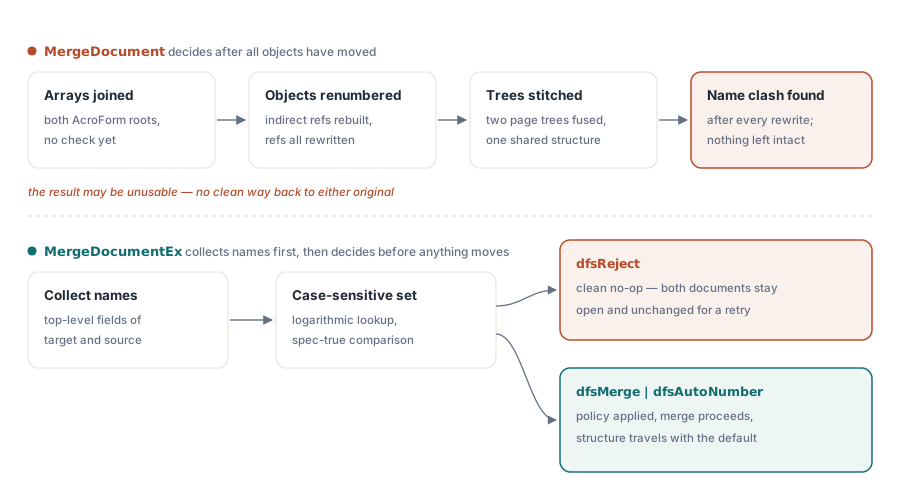
PDF Library for Delphi handles the collision in MergeDocumentEx(DocumentID, DuplicateFieldStrategy), which merges the document identified by DocumentID into the currently selected document and settles every name conflict before a single object is renumbered. The strategy is a TPDFlibDuplicateFieldStrategy value: dfsReject, dfsMerge or dfsAutoNumber. Plain MergeDocument still concatenates the two root field arrays unchanged, which is the right call when you own both forms and know their names are disjoint
Order is the whole design. A merge has to shift the object numbers of the incoming document so they do not clash with the target's, stitch its pages into the target's page tree and append its fields to the form. If a collision only surfaces after those steps, refusing is no longer free — the target has already absorbed pages, the source's objects carry numbers neither file started with, and the caller has no state to fall back to except reloading both files from disk. MergeDocumentEx collects the top-level field names of both documents into an ordered, case-sensitive set first and applies the strategy against that set. Under dfsReject a collision makes the call return 0 with LastErrorCode set to 705, and both documents remain exactly as loaded: you can read a field value out of the source document straight after the refusal and get the original text back
The scan itself is cheap. With n names in the target and m in the source, sorting them into one set costs on the order of (n + m) log(n + m) comparisons, so a pack of a few hundred fields adds nothing you would notice next to parsing the files
Three properties of the scan show up in real form packs:
- Only top-level fields are compared. In a hierarchical form that means the parent's partial name, so two forms that each have a parent called
applicantcollide even if their children differ, and auto-numbering renames the parent: the incoming children then read asapplicant_2.nameandapplicant_2.address - Incoming names join the set as they are checked. A source document that already carries two top-level fields with the same name trips the strategy on the second one, even when the target has no field of that name at all
- Fields with an empty partial name are skipped, and when either document has no AcroForm there is nothing to compare, so the merge goes ahead under any strategy
The loading side has one trap of its own. LoadFromFile adds a new document to the library and selects it, so the identifier to keep is the one SelectedDocument returns after each load. Grab it before the load and you are holding a different document than the one you think you are merging into
uses
  SysUtils, PDFlibrary;

procedure BuildPack(const Part1, Part2, OutFile: WideString);
var
  Lib: TPDFlib;
  TargetDoc, SourceDoc: Integer;
begin
  Lib := TPDFlib.Create;
  try
    if Lib.LoadFromFile(Part1, '') = 0 then
      raise Exception.CreateFmt('Cannot load %s', [Part1]);
    TargetDoc := Lib.SelectedDocument;   // read after the load, not before

    if Lib.LoadFromFile(Part2, '') = 0 then
      raise Exception.CreateFmt('Cannot load %s', [Part2]);
    SourceDoc := Lib.SelectedDocument;

    Lib.SelectDocument(TargetDoc);       // the selected document receives the merge
    if Lib.MergeDocumentEx(SourceDoc, dfsReject) = 0 then
    begin
      if Lib.LastErrorCode <> 705 then
        raise Exception.CreateFmt('Merge failed, error %d', [Lib.LastErrorCode]);

      // Duplicate top-level names: both documents are untouched,
      // so SourceDoc can go straight back into a second attempt
      WriteLn('Duplicate field names in ', Part2, ', retrying with auto-numbering');
      if Lib.MergeDocumentEx(SourceDoc, dfsAutoNumber) = 0 then
        raise Exception.CreateFmt('Merge failed, error %d', [Lib.LastErrorCode]);
    end;

    Lib.SaveToFile(OutFile);
  finally
    Lib.Free;
  end;
end;
Strict first, lenient second. That two-step shape only works because the refusal leaves SourceDoc loaded and intact; with a merge that fails halfway, the fallback branch would have to start by reloading both files. Checking for 705 specifically also matters, because an invalid document identifier or an out-of-range strategy value fails the call with a different code, and retrying with another strategy will not fix either of those
Picking a strategy: reject, share or renumber
For unattended pipelines, make dfsReject the default and treat 705 as a ticket for whoever owns the source forms. Renaming a field upstream once is cheaper than discovering months later that an export mapping silently stopped matching because a merge invented Total_2. The automatic strategies earn their place when a human has looked at the forms and decided what the shared names mean
dfsMerge keeps the shared name deliberately. Before anything is appended, the target field's value and default value are copied into the incoming field, so the merged file starts out consistent and a viewer that groups widgets by name sees one logical field with one value. The two field dictionaries stay separate objects, each keeping its own page, appearance and actions. Folding them into one dictionary would throw away formatting and behaviour that belong to the incoming form, and that trade is not worth making for a cosmetic simplification
dfsAutoNumber renames incoming duplicates by appending a numeric suffix, starting at _2 and taking the first free one. If the target already has Shared and Shared_2, the newcomer becomes Shared_3. The result depends only on the names present, never on object numbers, so merging the same pair of files twice yields the same names both times — a property that downstream FDF imports and database mappings rely on
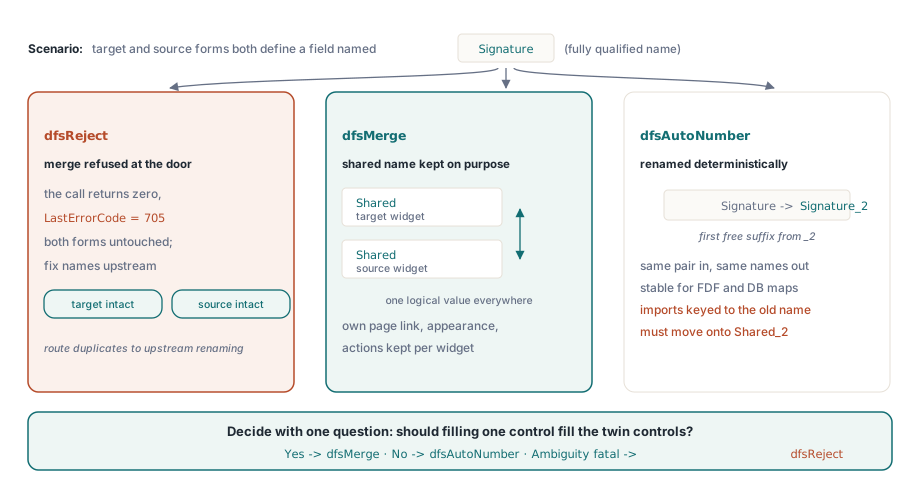
Choosing between the two automatic strategies comes down to one question: should filling one control fill the other? For the signer's name repeated on every part of a pack, yes, and dfsMerge fits. For a total that is computed differently on each form, no. Pick dfsAutoNumber there, or better, rename the field in the source form so the suffix never appears
What does the merged form contain afterwards?
Take a target with a top-level text field Shared holding "Target value" and a source with its own Shared. After dfsMerge, FormFieldCount counts two fields, both titled Shared, both reporting "Target value". After dfsAutoNumber, the same input gives Shared and Shared_2, and the incoming field keeps whatever value it had in the source file
The dfsMerge result has a sharp edge, and it sits in your own fill code. FindFormFieldByTitle returns the first index whose title matches, and SetFormFieldValue writes to exactly one field. A routine that looks up Shared once and sets it updates the target's copy and leaves the incoming copy holding the value it received at merge time. The saved file now contains two fields with one name and two different values, and which one a viewer shows is up to the viewer. Write every match instead:
// Sets every field that carries Title; returns how many were written.
// After a dfsMerge merge one logical field can appear at several indexes
function SetAllFieldsNamed(Lib: TPDFlib; const Title, Value: WideString): Integer;
var
  I: Integer;
begin
  Result := 0;
  for I := 1 to Lib.FormFieldCount do
    if Lib.GetFormFieldTitle(I) = Title then
    begin
      if Lib.SetFormFieldValue(I, Value) = 1 then
        Inc(Result)
      else
        WriteLn(Format('Field %d (%s) not written, error %d',
          [I, Title, Lib.LastErrorCode]));   // read-only fields end up here
    end;
end;
Before wiring a merged pack into a data feed, dump what the merge actually produced. A two-line loop is enough, and it catches the renamed parents and _2 suffixes before an import job does:
for I := 1 to Lib.FormFieldCount do
  WriteLn(Format('%3d  %-30s  %s',
    [I, Lib.GetFormFieldTitle(I), Lib.GetFormFieldValue(I)]));
Assembling a form pack in practice
A successful merge consumes the source document. It is removed from the library's document list, so DocumentCount drops by one, and the old SourceDoc identifier must not be used again. The merged document takes the higher of the two PDF versions: merging a PDF 2.0 form into a 1.7 document yields a 2.0 file, which matters if a downstream archiving step expects a particular version
Merge order decides whose names survive. The selected document keeps every one of its names, and renames or value copies only ever apply to the incoming fields, so merging A into B and merging B into A give different auto-numbered results. When a pack has a primary form — the one whose field names your back office already knows — make it the target and merge the supplements into it
Sign last. A signature covers the bytes of the revision it signed, and merging rewrites the file, so a part that was signed before assembly no longer carries a signature that matches the document. Assemble the pack, check the field list, then apply signatures to the finished file. If the job is only about stitching pages together and the forms do not matter, fast PDF merge with byte reference shifting is the quicker route
Plan the data side alongside the merge. If field values arrive from an external system that addresses fields by name, settle the naming before choosing dfsAutoNumber, since Shared_2 will not match a mapping that expects Shared. Value import and export formats are covered in FDF, XFDF and XFA form data interchange. Calculation scripts and actions that reference fields by name are affected by renaming in the same way, and interactive form actions and JavaScript shows where those references live
Duplicate-aware form merging, field filling and digital signing are all part of the same library for Delphi, C++Builder and Free Pascal projects. The PDF Library for Delphi product page lists the rest of the form and document assembly API